
KEENSTAR ST-265TC
KEENSTAR ST-265TC Touch Screen 2-Slice Toaster
Model: ST-265TC
1. Tärkeitä suojatoimia
Sähkölaitteita käytettäessä on aina noudatettava perusturvallisuusohjeita, mukaan lukien seuraavat:
- Lue kaikki ohjeet ennen leivänpaahtimen käyttöä.
- Älä koske kuumia pintoja. Käytä kahvoja tai nuppeja.
- Suojautuaksesi sähköiskulta, älä upota johtoa, pistoketta tai leivänpaahdin veteen tai muuhun nesteeseen.
- Tarkka valvonta on tarpeen, kun mitä tahansa laitetta käyttävät lapset tai lapset ovat niiden lähellä.
- Irrota pistoke pistorasiasta, kun et käytä ja ennen puhdistusta. Anna jäähtyä ennen osien pukemista tai irrottamista.
- Älä käytä laitetta, jonka johto tai pistoke on vaurioitunut, tai sen jälkeen, kun laitteessa on toimintahäiriö tai se on vaurioitunut millään tavalla.
- Älä anna johdon roikkua pöydän tai tason reunan yli tai koskettaa kuumia pintoja.
- Älä aseta kuumalle kaasu- tai sähköpolttimelle tai sen lähelle tai kuumennettuun uuniin.
- Älä käytä leivänpaahdinta muuhun kuin aiottuun käyttöön.
- Ylisuuria ruokia, metallifoliopakkauksia tai ruokailuvälineitä ei saa laittaa leivänpaahtimeen, koska ne voivat aiheuttaa tulipalon tai sähköiskun vaaran.
- Tulipalo voi syttyä, jos leivänpaahdin on peitetty tai se koskettaa syttyvää materiaalia, kuten verhoja, verhoja, seiniä ja vastaavia käytön aikana.
- Älä yritä irrottaa ruokaa, kun leivänpaahdin on kytketty pistorasiaan.
- Tämä laite on tarkoitettu vain kotitalouskäyttöön.
2. Tuote ohiview
The KEENSTAR ST-265TC is a modern 2-slice toaster featuring a touch screen interface for precise control over your toasting preferences. It includes wide slots to accommodate various bread types and a removable crumb tray for easy cleaning.
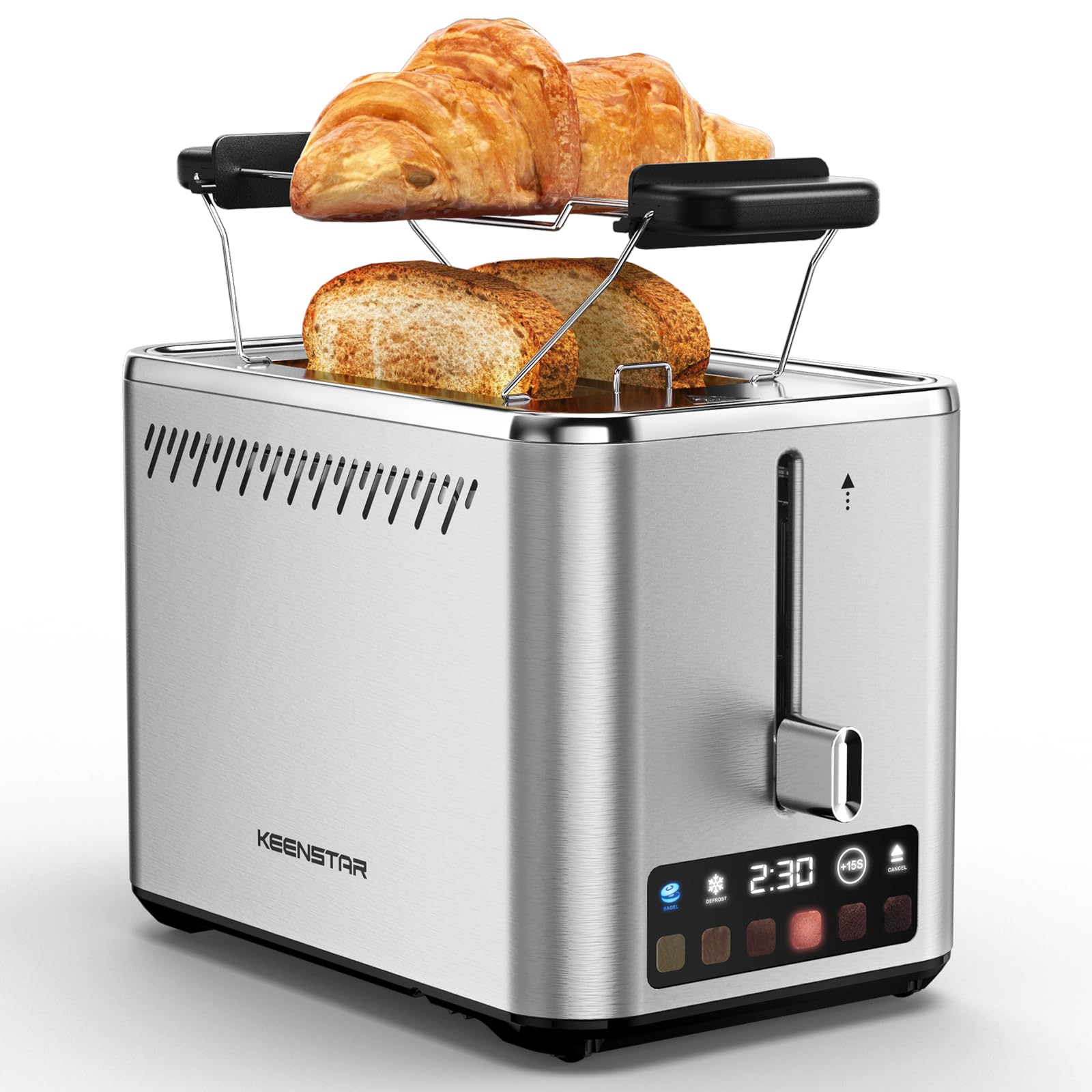
Image: KEENSTAR ST-265TC 2-Slice Toaster in silver stainless steel.
3. Asennus
Purkaminen
Carefully remove the toaster and all packaging materials from the box. Ensure all accessories, including the warming rack, are present.
Sijoitus
Aseta leivänpaahdin vakaalle, tasaiselle ja kuumuutta kestävälle alustalle, kauas syttyvistä materiaaleista, kuten verhoista tai seinistä. Varmista riittävä ilmanvaihto laitteen ympärillä.
Ensimmäinen käyttökerta
Before toasting food for the first time, operate the toaster without bread on the highest browning setting (level 6) to burn off any manufacturing residues. A slight odor or smoke may be present; this is normal and will dissipate.
4. Käyttöohjeet
Ohjauspaneeli ohiview

Image: The toaster's smart touch control display showing 6 browning levels and extra functions like Bagel, Defrost, +15S, and Cancel.
Peruspaahtoleipä
- Insert up to two slices of bread into the wide 1.5-inch slots.
- Select your desired browning level (1-6) by touching the corresponding icon on the display. Level 1 is the lightest, and Level 6 is the darkest.
- Press the lever down until it locks into place. The digital display will show a countdown timer.
- The toast will automatically pop up when the cycle is complete.

Image: Visual guide showing the steps for easy toaster operation: 1. Put bread in slots, 2. Select browning level and function, 3. Press the lever down, 4. Enjoy delicious bread.
Bagel -toiminto
This function is designed to toast the cut side of bagels while gently warming the outer side.
- Insert bagel halves into the slots with the cut side facing outwards.
- Valitse haluamasi ruskistusaste.
- Kosketa BAGELI button on the display. It will illuminate.
- Press the lever down until it locks.

Image: The toaster's display showing the illuminated BAGEL mode. BAGEL mode toasts one side only; place the cut side facing outward.
Sulatustoiminto
Use this function to toast frozen bread without pre-thawing.
- Laita pakastettu leipä rakoihin.
- Valitse haluamasi ruskistusaste.
- Kosketa SULATUS button on the display. It will illuminate.
- Press the lever down until it locks.

Image: The toaster's display showing the illuminated DEFROST mode. This mode allows you to cook frozen breads easily without guesswork.
+15S Function
If your toast is not quite browned enough after a cycle, you can add an additional 15 seconds of toasting time.
- After a toasting cycle, if more browning is desired, touch the +15S -painiketta.
- The toaster will initiate a 15-second toasting cycle.
Peruuta toiminto
To stop the toasting cycle at any time, simply touch the PERUUTTAA button. The lever will automatically raise, and the heating elements will turn off.

Image: The toaster's display highlighting the +15S button to increase baking time by 15 seconds, and the Cancel button to stop heating.
Lämmitettävä teline
The included warming rack can be used to warm pastries, croissants, or other items that cannot be placed directly into the toaster slots.
- Place the warming rack securely on top of the toaster, aligning it over the slots.
- Place the item to be warmed on the rack.
- Start a toasting cycle (without bread in the slots) to generate heat. The heat rising from the toaster will warm the item on the rack.
- Monitor the item closely to prevent over-warming or burning.

Image: The removable warming rack attached to the toaster, with a croissant placed on it for warming.
Tuotevideot
Video: Demonstrates the touchscreen and warming tray features of the KEENSTAR toaster.
Video: Yksityiskohtainen uudelleentarkasteluview of the KEENSTAR Smart 2-Slice Toaster, highlighting its touch screen and various functions.
Video: Explores the key features and functionalities of the KEENSTAR toaster.
5. Huolto ja puhdistus
Yleissiivous
Always unplug the toaster from the power outlet and allow it to cool completely before cleaning. Wipe the exterior with a soft, damp cloth. Do not use abrasive cleaners or metal scouring pads, as these can scratch the stainless steel finish.
Mutterikasetti
The removable crumb tray collects crumbs during toasting and should be emptied regularly to prevent fire hazards.
- Varmista, että leivänpaahdin on irrotettu pistorasiasta ja että se on täysin jäähtynyt.
- Pull out the crumb tray located at the bottom rear of the toaster.
- Hävitä muruset ja pyyhi tarjotin puhtaaksi mainosliinalla.amp kangas.
- Slide the crumb tray back into place until it clicks securely.

Image: The toaster's convenient design showing the removable crumb tray being pulled out and the cord storage area on the bottom.
Johdon säilytys
For neat storage, the power cord can be wrapped around the designated area on the underside of the toaster.
6. Vianmääritys
- Leivänpaahdin ei käynnisty: Ensure the power cord is securely plugged into a working electrical outlet. Make sure the toast lever is fully pressed down.
- Epätasainen paahtaminen: Ensure bread slices are centered in the slots. Try adjusting the browning level. Different types of bread may require different settings.
- Bread stuck in slots: Unplug the toaster immediately and allow it to cool. Gently remove the bread using non-metallic tongs. Never use metal utensils.
- Leivänpaahtimesta tulee savua: Unplug the toaster immediately. Remove any food particles or crumbs that may be lodged inside the slots or on the heating elements. Ensure the crumb tray is clean.
7. Tekniset tiedot
| Merkki | KEENSTAR |
| Malli | ST-265TC |
| Tehoa | 900 wattia |
| Voitage | 120 volttia (AC) |
| Viipaleiden määrä | 2 |
| Materiaali | Ruostumaton teräs |
| Tuotteen mitat (S x L x K) | 10.39 cm x 7.1 cm x 6.1 cm |
| Slot Leveys | 1.5 tuumaa |
| Erikoisominaisuudet | Cancel Function, LED Indicator, Removable Crumb Tray, Touchscreen, Warming Rack |

Image: Diagram showing the dimensions of the KEENSTAR ST-265TC toaster: 9.4 inches (24cm) length, 6.1 inches (15.6cm) width, 7 inches (18cm) height, and 1.5 inch (3.8cm) wide slots.
8. Takuu ja tuki
Takuu
This KEENSTAR toaster comes with a 2-year warranty. Please refer to the warranty card included in the product packaging for detailed terms and conditions.
Asiakastuki
For any questions, technical assistance, or warranty claims, please contact KEENSTAR customer support. Contact information can typically be found on the warranty card or the official KEENSTAR websivusto.
Ask a question about this manual
Ask about setup, troubleshooting, compatibility, parts, safety, or missing instructions. Manuals+ will review the question and use this page’s manual context to help answer it.