
1. Johdanto
The DALY Smart Active Balance BMS (Battery Management System) is designed to protect and optimize the performance of Li-ion, LiFePO4, and LTO battery packs. This model, R24TS-300A, supports 8-24 series cells with a 300A charge/discharge current and features 1A active balancing. It includes built-in Bluetooth, RS485, and CAN communication interfaces for comprehensive monitoring and control.
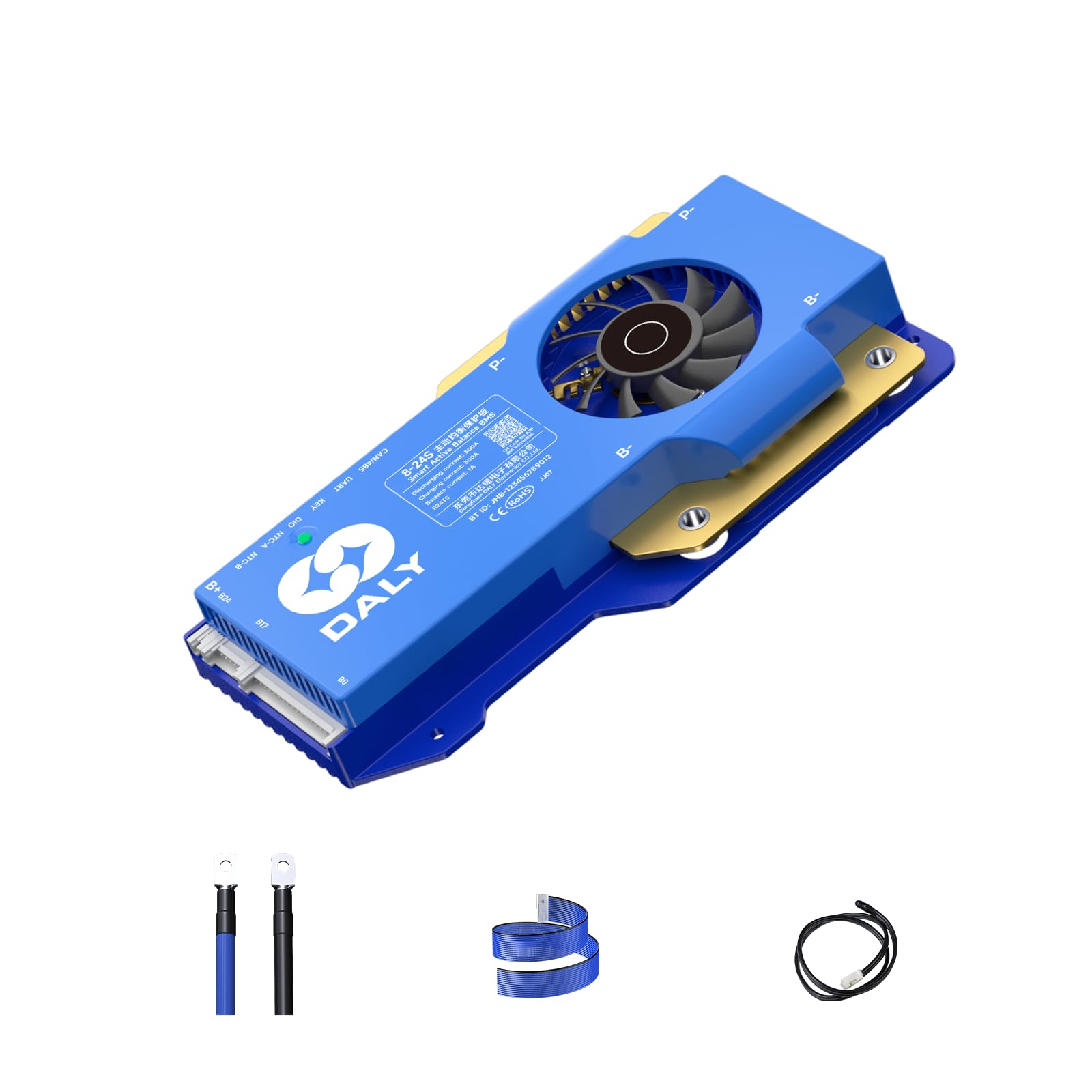
Image 1.1: DALY Smart Active Balance BMS (Model R24TS-300A).
Tärkeimmät ominaisuudet:
- Aktiivinen tasapainotus: 1A active balance current helps equalize cell voltages, extending battery life and improving performance.
- Laaja yhteensopivuus: Supports 8-24 series Li-ion, LiFePO4, and LTO battery packs.
- Korkean virran luokitus: Capable of handling 300A charge and discharge currents.
- Älykäs valvonta: Integrated Bluetooth for real-time monitoring of cell voltages, temperatures, and other parameters via a mobile application.
- Viestintärajapinnat: Equipped with RS485 and CAN for advanced system integration and control.
- Kattava suojaus: Protects batteries from overcharge, overdischarge, overcurrent, short circuits, and high/low temperature conditions.
2. Tuotteen ominaisuudet
The DALY Smart Active Balance BMS offers advanced features for robust battery management.

Kuva 2.1: ohiview of Smart Active Balance BMS specifications including battery strings, charge/discharge current, balance current, function, battery type, and communication.
Multi-Channel Communication
The BMS supports various communication methods, allowing for flexible integration into different systems and monitoring setups.
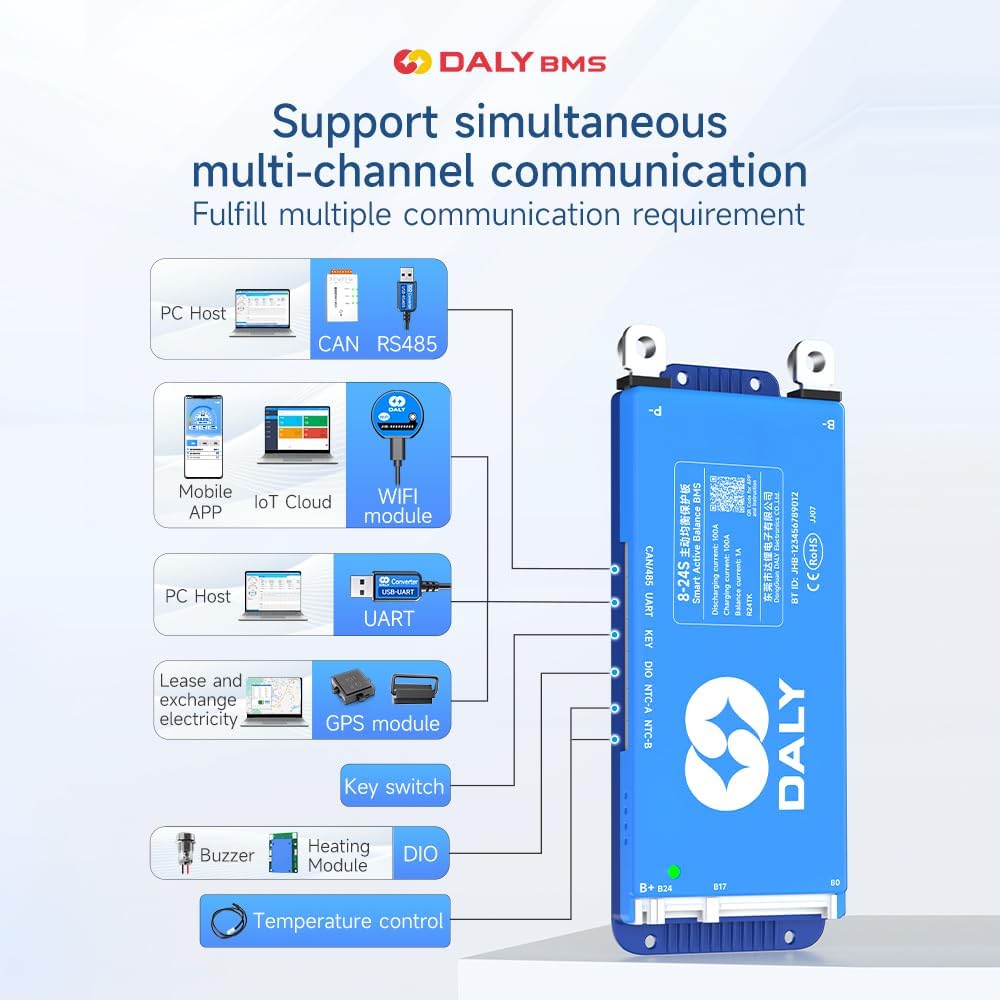
Image 2.2: Diagram illustrating multi-channel communication options including PC Host (CAN, RS485, UART), Mobile APP (Bluetooth, WiFi module), GPS module, Key switch, Buzzer, Heating Module, and Temperature control.
- Bluetooth: Connects to the "BalanceBMS" mobile application for real-time data and settings adjustment.
- RS485 & CAN: Industrial standard communication protocols for integration with other control systems.
- UART: Universal Asynchronous Receiver/Transmitter for direct PC connection and configuration.
- Valinnaiset moduulit: Supports WiFi, GPS, heating, and other modules for enhanced functionality.
3. Tekniset tiedot
Detailed technical specifications for the DALY Smart Active Balance BMS R24TS-300A.
| Parametri | Arvo |
|---|---|
| Merkki | PÄIVITTÄIN |
| Mallinumero | R24TS-300A |
| Paristonauhat | 8-24S (Series) |
| Lataus/purkausvirta | 300A |
| Tasapainovirta | 1 A (aktiivinen tasapaino) |
| Tuetut akkutyypit | Litiumioniakku, LiFePO4, LTO |
| Viestintä | Built-in Bluetooth, RS485, CAN |
| Mitat (P x L x K) | 7.72 x 4.29 x 1.02 tuumaa (noin 196 x 109 x 26 mm) |
| Paino | 660 grammaa |

Image 3.1: Table showing product dimensions and current ratings for different DALY BMS models (100A, 150A/200A, 250A-500A). Note: The specific model R24TS-300A falls under the 250-500A category.
4. Pakkausluettelo
Varmista, että pakkauksessa on kaikki tarvittavat osat purettaessa:

Image 4.1: Visual representation of the DALY BMS and its included accessories.
- Smart Active Balance BMS (1 unit)
- P-&B- cable (1 set)
- Ruuvit (2 kpl)
- Sampling cable (1 set)
- B+ cable (1 unit)
- NTC (Temperature Sensor) (1 standard, 2 optional)
- Käyttöopas (1 kopio)
- Packaging box (1 unit)
- RS485/CAN port cable (1 unit)
5. Asennus ja yhteys
Proper installation is crucial for the safe and efficient operation of your BMS. Always ensure the battery pack is disconnected from any power source before beginning installation.
5.1. Pre-Connection Checklist
- Verify the battery type (Li-ion, LiFePO4, LTO) and cell count (8-24S) match the BMS specifications.
- Ensure all battery cells are balanced to a similar voltagennen rakennusautomaatiojärjestelmän kytkemistä.
- Tarkista kaikki kaapelit vaurioiden varalta.
5.2. Kytkentäohjeet
- Connect B- to the Battery Negative: Connect the main negative terminal (B-) of the BMS to the negative terminal of your battery pack.
- Connect P- to Load/Charger Negative: Connect the P- terminal of the BMS to the negative terminal of your load and charger.
- Connect B+ to Battery Positive: Connect the main positive terminal (B+) of the BMS to the positive terminal of your battery pack.
- Kytke tasapainotusjohdot: Carefully connect the balance wires from the BMS to each cell of your battery pack, starting from B0 (negative of the first cell) and proceeding sequentially to the highest cell voltage. Ensure the correct order to prevent damage.
- Connect Temperature Sensors (NTC): Attach the NTC sensors to appropriate locations on your battery pack to monitor temperature.
- Viestintäportit: Connect the RS485, CAN, or UART cables if you plan to use these communication features.

Image 5.1: Diagram illustrating the pre-charge protection circuit, ensuring safe initial connection.

Image 5.2: Diagram showing misconnection protection, highlighting critical connection points to avoid errors.
5.3. Rinnakkaisliitäntä
The DALY Smart BMS supports parallel battery pack configurations. Ensure that each battery pack has its own BMS and that all packs are at a similar state of charge before connecting them in parallel.

Image 5.3: Illustration of connecting multiple battery packs with individual BMS units in parallel.
Tärkeää: Incorrect wiring can cause severe damage to the BMS, battery, and connected equipment. If you are unsure, seek professional assistance.
6. Operating the BMS
Once installed, the BMS operates automatically to protect your battery. For monitoring and advanced settings, use the dedicated mobile application or PC software.
6.1. Mobile Application (BalanceBMS)
- Download the "BalanceBMS" app from your device's app store (iOS & Android).
- Ota Bluetooth käyttöön mobiililaitteellasi.
- Open the app and search for your DALY BMS.
- Connect to the BMS to view real-time data such as:
- Yksittäinen solu voltages
- Akun kokonaistilavuustage
- Lataus/purkausvirta
- Akun lämpötila
- Maksutila (SOC)
- Protection status (overcharge, overdischarge, etc.)
- The app also allows for configuration of various parameters, such as voltage thresholds and current limits. Refer to the app's internal guide for detailed settings.
6.2. PC Software (via UART/RS485/CAN)
- For PC monitoring and advanced configuration, a UART, RS485, or CAN adapter is required (not always included).
- Install the DALY BMS PC software (available from the manufacturer's websivusto).
- Connect the BMS to your PC using the appropriate adapter and cable.
- The PC software provides a more comprehensive interface for data logging, parameter adjustment, and firmware updates.
7. Huolto
The DALY Smart Active Balance BMS is designed for minimal maintenance. However, periodic checks can ensure optimal performance and longevity.
- Silmämääräinen tarkastus: Periodically check all wiring and connections for signs of corrosion, damage, or loose contacts.
- Lämpötilan valvonta: Ensure the BMS and battery pack operate within their specified temperature ranges. The BMS will provide protection against extreme temperatures.
- Cell Voitage Valvonta: Use the mobile app or PC software to regularly monitor individual cell voltages. The active balancing feature will work to keep cells balanced, but significant deviations may indicate an issue with a cell or the balance wiring.
- Ohjelmistopäivitykset: Tarkista DALY website or app for any available firmware updates for the BMS to ensure you have the latest features and improvements.
- Puhdistus: Keep the BMS free from dust and debris. Use a dry, soft cloth for cleaning. Do not use liquids.
8. Vianmääritys
This section addresses common issues you might encounter with your DALY Smart Active Balance BMS.
8.1. Yleisiä kysymyksiä
- BMS ei käynnisty:
- Check all main power connections (B-, P+, B+).
- Verify the balance wires are correctly connected and in the right sequence.
- Varmista, että akun tilavuustage on rakennusautomaatiojärjestelmän toiminta-alueen sisällä.
- No Charge/Discharge:
- Check for active protection (e.g., overvoltage, aliarvioitage, overcurrent, temperature protection) via the mobile app or PC software.
- Inspect the main charge/discharge cables for secure connections.
- Cells Unbalanced:
- Confirm the active balancing feature is enabled in the app/software.
- Tarkista tasapainotusjohtimien liitäntöjen jatkuvuus ja oikea järjestys.
- If a single cell consistently deviates, it may indicate a faulty cell or the balance wiring.
8.2. Viestintäongelmat
- Bluetooth-yhteysvirhe:
- Varmista, että Bluetooth on käytössä mobiililaitteellasi.
- Varmista, että BMS-järjestelmään on kytketty virta.
- Käynnistä sovellus uudelleen ja yritä muodostaa yhteys uudelleen.
- Ensure no other device is currently connected to the BMS via Bluetooth.
- PC Software Not Connecting (UART/RS485/CAN):
- Verify the correct communication adapter is being used and its drivers are installed.
- Check the physical connection of the communication cable to the BMS and PC.
- Ensure the correct COM port is selected in the software.
8.3. Compatibility Note (from customer reviews)
It has been noted that some DALY BMS models, including this series, may have specific compatibility for 24S configurations. While the product description states compatibility with Li-ion, LiFePO4, and LTO, some users have reported that 24S configurations might specifically require LiFePO4 batteries for optimal operation, or that the BMS might be pre-configured for a specific chemistry. Always verify the exact battery chemistry and cell count settings in the BMS software after initial connection, especially for 24S Li-ion setups, to ensure it matches your battery pack. Incorrect settings can lead to improper balancing or protection.

Image 8.1: A guide to selecting the appropriate BMS based on battery cell type, series count, and current requirements. This emphasizes the importance of matching BMS to battery specifications.
9. Sovellusskenaariot
The DALY Smart Active Balance BMS is versatile and suitable for a wide range of applications requiring robust battery management:

Kuva 9.1: Visuaalinen esimerkkiamples of where the DALY BMS can be utilized, including electric two-wheelers, home energy storage, electric bicycles, electric tricycles, outdoor energy storage, electric wheelchairs, lead-acid to lithium upgrades, AGV, lease battery swapping, and RV energy storage.
- Electric Vehicles (e.g., electric bicycles, scooters, tricycles, wheelchairs)
- Kodin energian varastointijärjestelmät
- Outdoor Portable Power Stations
- Industrial AGVs (Automated Guided Vehicles)
- Meren energiajärjestelmät
- Asuntoautojen energian varastointi
- Upgrading Lead-Acid Battery Systems to Lithium
10. Takuu ja tuki
10.1. Takuutiedot
This DALY Smart Active Balance BMS comes with a 3 vuoden valmistajan takuu. This warranty covers defects in materials and workmanship under normal use. Please retain your proof of purchase for warranty claims. The warranty does not cover damage caused by improper installation, misuse, unauthorized modifications, or external factors.
10.2. Asiakastuki
For technical assistance, troubleshooting, or warranty inquiries, please contact DALY customer service. You can find contact information on the official DALY website or through your purchase platform. Additionally, the "BalanceBMS" mobile application often provides access to support resources and FAQs.