
KOFIRE UG-06
KOFIRE UG-06 Wireless Gaming Headset Instruction Manual
Malli: UG-06 | Tuotemerkki: KOFIRE
Johdanto
Thank you for choosing the KOFIRE UG-06 Wireless Gaming Headset. This manual provides detailed instructions for setup, operation, and maintenance to ensure you get the best experience from your new headset. The UG-06 is designed to deliver superior audio performance and comfort for gaming, work, and entertainment across multiple platforms.
Mitä laatikossa on
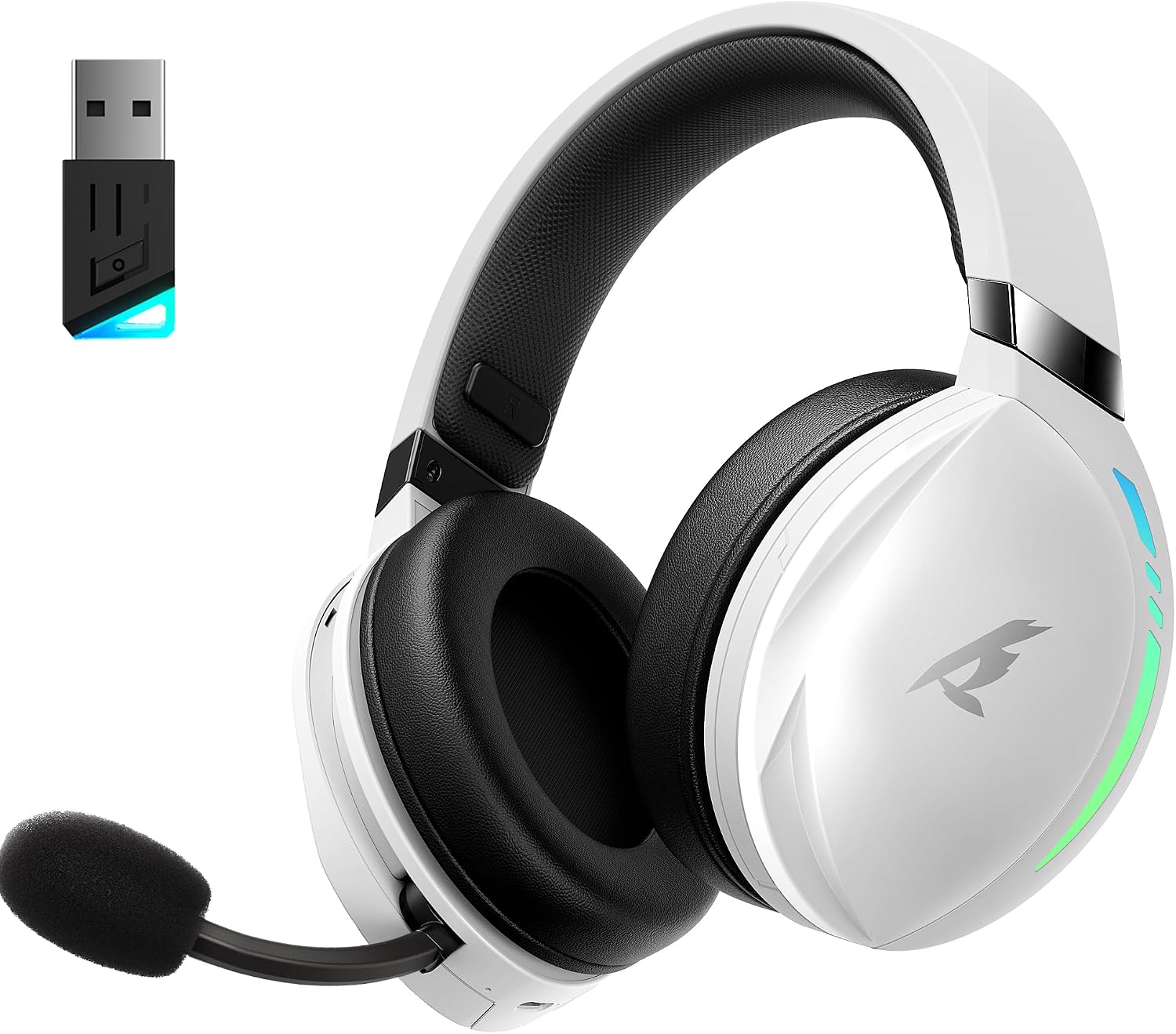
The KOFIRE UG-06 Wireless Gaming Headset in white and black, shown with its USB dongle.
- 1 x KOFIRE UG-06 Wireless Gaming Headset
- 1 x USB Dongle (2.4GHz Wireless Receiver)
- 1 x 0.8m TYPE-C Charging Cable
- 1 x vaahtomuovinen mikrofonisuojus
- 1 x 3.5 mm audiokaapeli
- 1 x Käyttöohje (tämä asiakirja)
Tuote loppuview ja tärkeimmät ominaisuudet

A user wearing the headset, illustrating the immersive 3D spatial audio experience.

Lähikuva view of the retractable, hidden noise-canceling microphone.
- 50MM Driver & 3D Stereo Sound: Equipped with powerful 50mm drivers for excellent 3D stereo effects and high-fidelity sound, ensuring you hear every detail for an immersive gaming experience.
- 2.4Ghz Wireless Connection & Bluetooth 5.4: Advanced 2.4Ghz wireless technology and Bluetooth 5.4 provide a seamless and stable connection with ultra-low latency (15ms). Easily switch between Bluetooth and 2.4G dongle mode by triple-clicking the power button.
- Unmatched Comfort & Telescopic Noise Cancelling Mic: Ergonomic design with oversized, soft protein leather earmuffs for pressure reduction and effective noise isolation. The adjustable headband ensures a personalized fit. The noise-canceling microphone with a sponge cap blocks 80% of background noise, and its retractable design offers convenience.
- Extended Playtime & Cool RGB Design: Enjoy up to 65 hours of continuous play in music/video modes (lights off) or 40 hours with 2.4Ghz gaming. Dynamic breathing RGB lights enhance the gaming atmosphere. Note: RGB lighting doubles power consumption.
- Monipuolinen yhteensopivuus: Supports three connection modes: lossless 2.4GHz USB dongle, Bluetooth 5.4, and 3.5mm wired connection. Compatible with PS4, PS5, PC, Switch, Mac, Phone, and tablet.

The headset demonstrating its compatibility with multiple gaming platforms and devices.
Asennusohjeet
1. Alkulataus
Before first use, fully charge your headset using the provided USB Type-C charging cable. Connect the Type-C end to the headset's charging port and the USB-A end to a compatible power source (e.g., computer USB port, USB wall adapter). The charging indicator light will show charging status.
2. Connecting via 2.4GHz USB Dongle (Recommended for Gaming)
- Insert the 2.4GHz USB dongle into an available USB port on your device (PS4, PS5, PC, Mac, Switch).
- Power on the headset by pressing and holding the Power button until you hear a confirmation tone or see the indicator light.
- The headset should automatically pair with the dongle. A solid indicator light on both the headset and dongle typically signifies a successful connection.
- Varmista, että kuulokkeet on valittu äänen lähtö- ja syöttölaitteeksi järjestelmän ääniasetuksissa.
3. Yhdistäminen Bluetoothin kautta 5.4
- With the headset powered on, triple-click the Power button to switch to Bluetooth mode. The indicator light will flash, indicating pairing mode.
- On your device (phone, tablet, PC), go to Bluetooth settings and search for "KOFIRE UG-06" (or similar).
- Valitse paritettavat kuulokkeet. Kun yhteys on muodostettu, merkkivalo palaa tasaisesti.
4. Connecting via 3.5mm Wired Connection
- Liitä 3.5 mm:n äänikaapelin toinen pää kuulokkeiden 3.5 mm:n porttiin.
- Liitä toinen pää laitteesi 3.5 mm:n ääniliitäntään.
- The headset will operate in passive mode, drawing no power from its internal battery.
Käyttöohjeet
Kuulokkeiden säätimet

Yksityiskohtainen view of the control buttons and volume wheel on the headset's earcup.

Kuulokkeiden esittelyasing its dynamic breathing RGB lighting feature.
- Virta päälle/pois: Paina virtapainiketta 3 sekunnin ajan.
- Äänenvoimakkuuden säätö: Use the scroll wheel on the earcup to adjust the volume up or down.
- Mikrofonin mykistys/poista mykistys: Press the dedicated Mute button on the earcup to toggle the microphone on or off.
- Tilan vaihto: Triple-click the Power button to switch between 2.4GHz wireless and Bluetooth modes.
- RGB-valaistus: Press the RGB button to cycle through lighting effects or turn them off. Note that turning off RGB lights extends battery life.
- Mikrofonin käyttö: Pull the telescopic microphone down when speaking. Ensure the foam mic cover is in place to reduce plosives and background noise. Push the microphone back into the earcup when not in use.
Huolto
- Puhdistus: Puhdista kuulokkeet pehmeällä, kuivalla liinalla. Vältä voimakkaita kemikaaleja tai hankaavia materiaaleja.
- Varastointi: Säilytä kuulokkeita viileässä, kuivassa paikassa, poissa suorasta auringonvalosta ja äärimmäisistä lämpötiloista.
- Akun hoito: Akun käyttöiän pidentämiseksi vältä kuulokkeiden jatkuvaa tyhjentämistä kokonaan. Lataa ne säännöllisesti, vaikka niitä ei käytettäisikään jatkuvasti.
- Mikrofonin hoito: Handle the retractable microphone gently to prevent damage.
Vianetsintä
| Antaa | Ratkaisu |
|---|---|
| No sound/microphone not working (2.4GHz) |
|
| Bluetooth-pariliitosongelmat |
|
| Lyhyt akunkesto |
|
| Sound quality issues (wired mode) |
|
Tekniset tiedot
| Ominaisuus | Yksityiskohta |
|---|---|
| Mallin nimi | UG-06 |
| Yhteystekniikka | 2.4 GHz:n langaton, Bluetooth 5.4, 3.5 mm:n langallinen |
| Ääniohjaimen koko | 50 millimetriä |
| Akun kesto | Up to 65 Hours (music/video, lights off), 40 Hours (2.4Ghz gaming) |
| Latausaika | 3 tuntia |
| Ääniviive | 15 millisekuntia |
| Melunhallinta | Sound Isolation, ENC Noise Canceling Mic |
| Yhteensopivat laitteet | PS4, PS5, PC, Switch, Mac, Phone, Tablet |
| Materiaali | Leather, Plastic, Polycarbonate (PC), Soft Memory Sponge Cushions |
| Tuotteen paino | 1.19 kiloa |
| Tuotteen mitat | 7.5 x 1 x 7.9 tuumaa |
Takuu ja tuki
KOFIRE provides a reliable 24-hour online service to ensure customer satisfaction. For any issues, questions, or support needs, please contact KOFIRE customer service through the retailer's platform or the official KOFIRE websivusto.
Please refer to your purchase documentation for specific warranty details and duration.
Ask a question about this manual
Ask about setup, troubleshooting, compatibility, parts, safety, or missing instructions. Manuals+ will review the question and use this page’s manual context to help answer it.