
1. Tuote ohiview
The Traxxas Slash 4X4 VXL HD is a high-performance remote control short course truck designed for durability and speed. This model includes a factory-installed Extreme Heavy Duty Upgrade Kit for enhanced resilience. It features a Velineon brushless power system, a modular chassis design, and an ultra-efficient shaft drive. The TQi radio system provides precise control for speeds exceeding 60 mph.

Kuva 1.1: Sivu view of the Traxxas Slash 4X4 VXL HD remote control truck.
Tärkeimmät ominaisuudet:
- Factory-installed Extreme HD components
- Clipless Body Mounting
- Velineon VXL-3S Brushless Power System
- Fully assembled and Ready-To-Race
Mukana tulevat komponentit:
- Kaukosäädin
- Tuoteopas
Huomautus: Akku ja laturi myydään erikseen ja niitä tarvitaan toimintaan.
2. Asennusopas
Follow these steps to prepare your Traxxas Slash 4X4 VXL HD for its first use:
- Carefully remove the Traxxas Slash 4X4 VXL HD from its packaging.
- Insert a compatible battery (not included) into the designated battery compartment. Ensure the battery is securely fastened.
- Connect the battery charger (not included) to the battery and a power source.
- Charge the battery fully according to the specific instructions provided with your charger.
- Once the battery is charged, re-insert it into the truck if it was removed for charging.
- Turn on the TQi radio system.
- Ensure the truck's power switch is in the 'ON' position.

Kuva 2.1: Etuosa view of the Traxxas Slash 4X4 VXL HD, showing the robust bumper and body design.
3. Käyttöohjeet
Before operating your RC truck, always ensure you are in a safe, open area away from people, pets, and obstacles. Familiarize yourself with the controls of the TQi radio system.
Perusohjaimet:
- Kaasulaukaisin: Vedä kiihdyttääksesi eteenpäin, työnnä jarruttaaksesi tai peruuttaaksesi.
- Ohjauspyörä: Käänny vasemmalle tai oikealle ohjataksesi kuorma-autoa.
- Virtakytkin: Located on the truck and remote. Always turn on the remote first, then the truck. Turn off the truck first, then the remote.
The Traxxas Slash 4X4 VXL HD is designed for off-road use and can handle various terrains. Its Extreme Heavy Duty Upgrade Kit provides enhanced durability for aggressive driving.

Figure 3.1: The Traxxas Slash 4X4 VXL HD performing a jump on a dirt track, showcasing its robust suspension and power.
Tuote toiminnassa:
Video 3.1: This video demonstrates the Traxxas Slash 4X4 VXL HD's durability and performance in various challenging environments, highlighting its ability to withstand impacts and navigate rough terrain.
4. Huolto
Regular maintenance ensures the longevity and optimal performance of your Traxxas Slash 4X4 VXL HD.
Yleisiä huoltovinkkejä:
- Puhdistus: After each use, especially in dirty or wet conditions, clean the truck to remove dirt, mud, and debris. Use a soft brush or compressed air.
- Tarkastus: Tarkista säännöllisesti kaikkien ruuvien, mutterien ja pulttien kireys. Tarkista mahdolliset vaurioituneet tai kuluneet osat, kuten jousituksen osat, renkaat ja korin kiinnikkeet.
- Akun hoito: Always store batteries in a cool, dry place. Follow manufacturer guidelines for charging and discharging to maximize battery life.
- Moottori ja ESC: Keep the motor and Electronic Speed Control (ESC) free from debris. Ensure proper ventilation to prevent overheating.
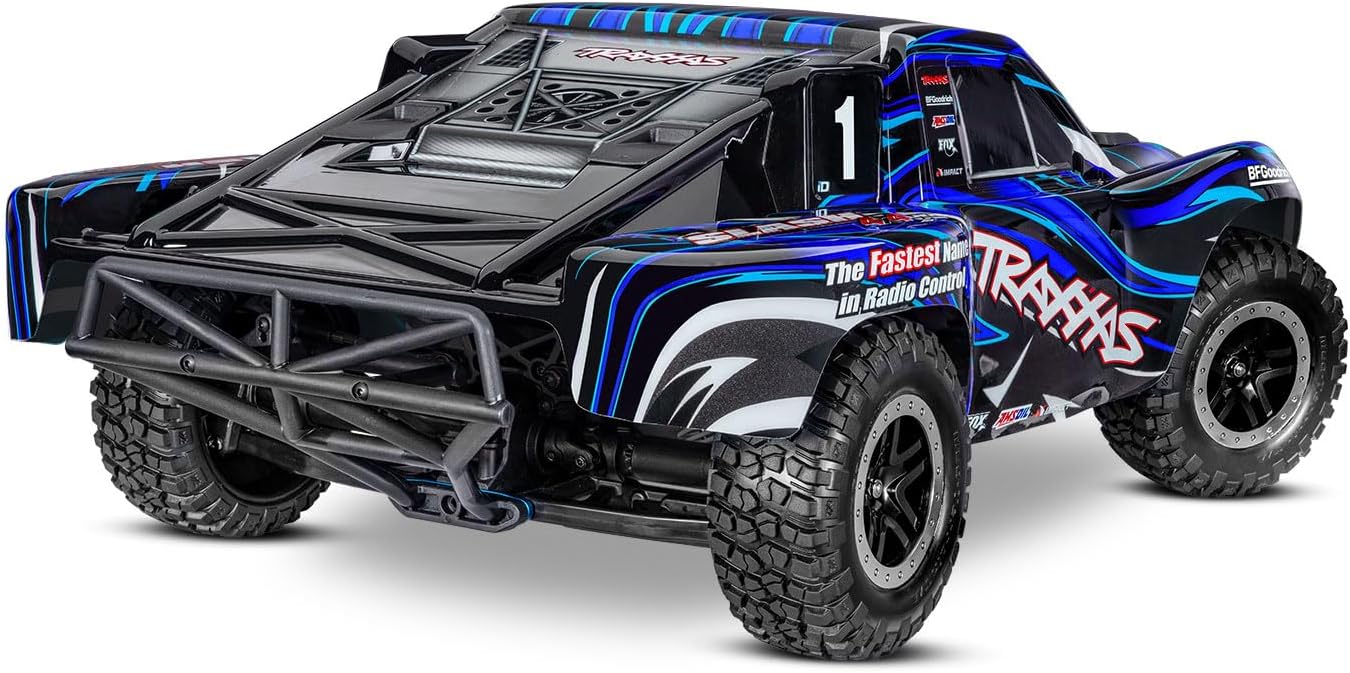
Kuva 4.1: Takaosa view of the Traxxas Slash 4X4 VXL HD, showing the rear bumper and tire tread, important areas for post-run inspection.
5. Vianmääritys
This section provides solutions to common issues you might encounter with your Traxxas Slash 4X4 VXL HD.
Yleisiä ongelmia ja ratkaisuja:
- Ei virtaa:
- Varmista, että akku on ladattu täyteen ja kytketty oikein.
- Check that both the truck and remote control are switched ON.
- Verify battery connections for corrosion or damage.
- Kontrollin menetys/epätasainen käyttäytyminen:
- Check for interference from other radio frequencies.
- Varmista, että kaukosäätimen paristot ovat tuoreita.
- Re-bind the remote control to the receiver if necessary (refer to TQi radio system manual).
- Heikentynyt suorituskyky/ylikuumeneminen:
- Check for debris in the motor or around moving parts.
- Ensure the motor and ESC have adequate ventilation.
- Verify that the correct gearing is used for the terrain and battery type.
- Ohjausongelmat:
- Tarkasta ohjaustehostimen vauriot tai löysiä liitoksia.
- Check steering linkages for obstructions or damage.
If you encounter an issue not listed here, or if the suggested solutions do not resolve the problem, please refer to the official Traxxas support resources.
6. Tekniset tiedot
Detailed technical specifications for the Traxxas Slash 4X4 VXL HD:
| Erittely | Arvo |
|---|---|
| Tuotemerkki | Traxxas |
| Mallin nimi | SLASH 4X4 VXL HD |
| Mallinumero | 68386-4-BLUE |
| UPC | 020334026958 |
| Materiaalityyppi | Muovi |
| Virtalähde | Paristokäyttöinen |
| Akun kuvaus | Lithium-Ion Polymer (Paristot eivät sisälly toimitukseen) |
| Toimintatila | Kaukosäädin |
| Sisä-/ulkokäyttö | Ulkona |
| Tuotteen paino | 8.07 puntaa |
| Tuotteen mitat (PxLxK) | 22.4 x 11.7 x 7.6 tuumaa |
| Ikärajan kuvaus | Adult (Manufacturer Minimum Age: 168 months) |
| Vaaditaan kokoonpano | Ei |
7. Takuu ja tuki
Traxxas products are known for their quality and durability. For specific warranty information, please refer to the documentation included with your product or visit the official Traxxas websivusto.
Asiakastuki:
For technical assistance, replacement parts, or any questions regarding your Traxxas Slash 4X4 VXL HD, please contact Traxxas customer support directly. Their official website often provides extensive FAQs, troubleshooting guides, and contact information.
You can typically find support resources and contact details on the manufacturer's websivusto: Traxxas tuki