
Andesfit A02-SEB
Andesfit Bluetooth Blood Pressure Monitor User Manual
Model: A02-SEB
1. Johdanto
The Andesfit Bluetooth Blood Pressure Monitor is designed for accurate and convenient blood pressure measurement at home. This device combines advanced technology with user-friendly features, allowing you to monitor your health effectively and share data with healthcare professionals. It is FDA Cleared and CE Certified, ensuring high quality and safety standards.

Figure 1: Andesfit Blood Pressure Monitor with included cuffs and companion app.
2. Sisältö
Your Andesfit Blood Pressure Monitor package includes the following components:
- Andesfit Blood Pressure Monitor Unit
- Large Blood Pressure Cuff (9-17 inches arm circumference)
- Extra Large Blood Pressure Cuff (13-21 inches arm circumference)
- 4 AA-paristoa (mukana)
- USB Type-C Cable (for power, not charging batteries)
- Säilytyspussi
- Käyttöopas (tämä asiakirja)

Figure 2: All components included in the Andesfit Blood Pressure Monitor package.
3. Asennus
3.1 Laitteen virran kytkeminen
The monitor can be powered using the included AA batteries or via the USB Type-C cable. USB power is prioritized if both are connected.
- Akun asennus: Open the battery compartment on the back of the monitor. Insert the 4 AA batteries, ensuring correct polarity (+/-). Close the compartment.
- USB-virtalähde: Connect the provided USB Type-C cable to the monitor's USB port and plug the other end into a compatible USB power source (e.g., wall adapter, power bank). Note: The USB port is for power supply only and does not charge the batteries.

Figure 3: Dual power mode options for the monitor.
3.2 Mansetin kiinnittäminen
Select the appropriate cuff size (Large or Extra Large) for your arm. Connect the cuff's air tube securely into the air jack on the side of the monitor unit.

Figure 4: The two included cuff sizes for optimal fit.
3.3 App Installation (Optional but Recommended)
For enhanced tracking and data management, download the "ANDESFITBP" app from your smartphone's app store (Apple App Store or Google Play Store). The app allows for unlimited data storage and easy sharing.
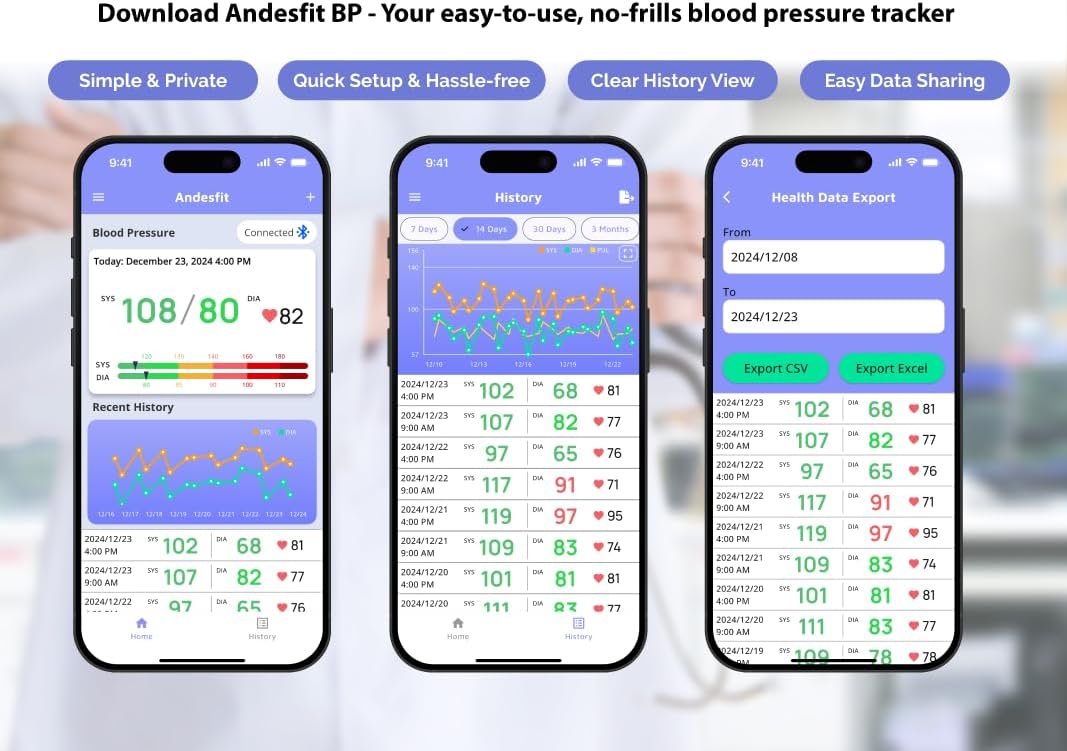
Kuva 5: Päättynytview of the Andesfit BP app features.
Huomautus: The app does not require personal data input or login, ensuring your privacy. Data is stored locally on your device and can be synced with Apple Health or Google Fit.
4. Käyttöohjeet
4.1 Mittauksen tekeminen
- Valmistaudu mittaukseen: Istu mukavasti selkä tuettuna ja jalat lattialla. Aseta käsivartesi pöydälle niin, että mansetti on sydämen tasolla. Vältä puhumista tai liikkumista mittauksen aikana.
- Kiinnitä mansetti: Wrap the cuff around your bare upper arm, ensuring the air tube is positioned correctly (usually aligned with your middle finger). The cuff should be snug but not too tight.
- Aloita mittaus: Press the "START/STOP" button on the monitor. The cuff will automatically inflate and then slowly deflate as it measures your blood pressure.
- Lue tulokset: Your Systolic (SYS), Diastolic (DIA), and Pulse (PUL) readings will be displayed on the large 6-inch color LED screen. The screen also features a WHO color-coded indicator for easy interpretation of your blood pressure level.
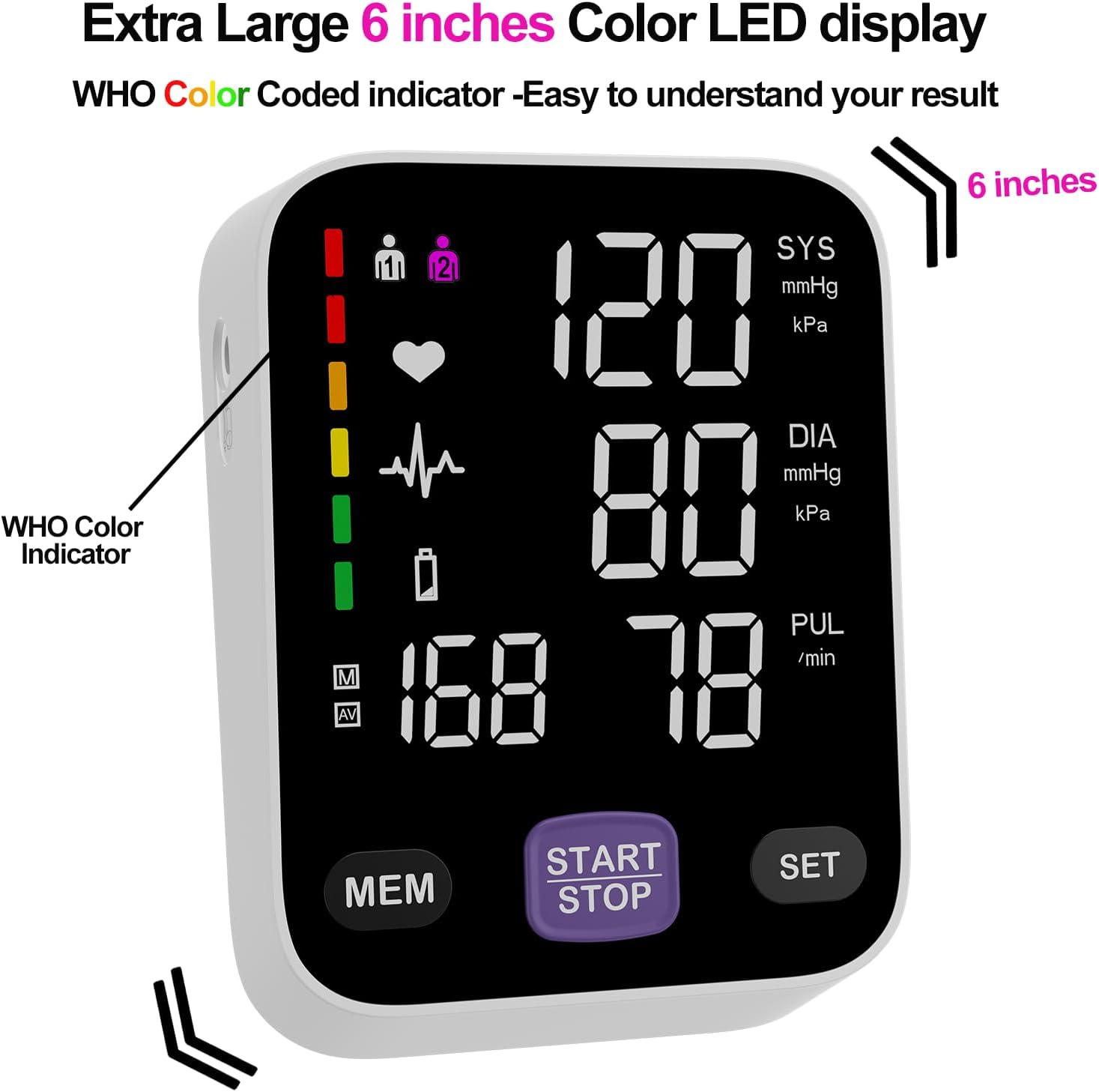
Figure 6: The monitor's large color LED display with WHO color indicator.
4.2 Using the App with the Monitor
Once the app is installed and Bluetooth is enabled on your smartphone, simply switch on your blood pressure monitor and open the app. The app will automatically connect to the device. Your measurement readings will be synced and stored in the app, providing a comprehensive history of your blood pressure trends.
You can export your data as CSV files to share with your doctor or for personal record-keeping.
Video 1: Official Andesfit video demonstrating the Bluetooth blood pressure monitor and app connectivity.
5. Huolto
- Puhdistus: Wipe the monitor and cuff with a soft, dry cloth. Do not use abrasive cleaners or immerse the device in water.
- Varastointi: Säilytä laitetta mukana toimitetussa säilytyspussissa viileässä, kuivassa paikassa, poissa suorasta auringonvalosta ja äärimmäisistä lämpötiloista.
- Akun vaihto: Vaihda kaikki 4 AA-paristoa, kun näytössä näkyy heikon pariston ilmaisin.
6. Vianmääritys
If you encounter issues with your Andesfit Blood Pressure Monitor, please refer to the following common solutions:
| Ongelma | Mahdollinen syy | Ratkaisu |
|---|---|---|
| Ei näyttöä/laite ei käynnisty | Batteries are low or incorrectly installed; USB cable not connected properly. | Replace batteries or ensure correct polarity. Check USB cable connection. |
| Epätarkkoja lukemia | Improper cuff placement; movement or talking during measurement; incorrect posture. | Ensure cuff is correctly applied and snug. Remain still and silent during measurement. Sit upright with feet flat. |
| Sovellus ei muodosta yhteyttä Bluetoothin kautta | Bluetooth is off on phone/monitor; app permissions not granted. | Ensure Bluetooth is enabled on both devices. Check app permissions in phone settings. Restart app/monitor. |
7. Tekniset tiedot
| Ominaisuus | Yksityiskohta |
|---|---|
| Tuotteen mitat | 4.5" P x 4.2" L x 1.9" Paksuus |
| Tuotteen mallinumero | A02-SEB |
| Paristot | 4 AA-paristoa (mukana) |
| Valmistaja | Shenzhen GoodlyMed Technology Co., Ltd. |
| Virtalähde | Akkukäyttöinen / USB Type-C |
| Näytön tyyppi | LED Color Display (6 inches) |
| Mansetin koot | 9-17 inches (Large), 13-21 inches (Extra Large) |
| Tietojen tallennus | 2 users * 199 readings (device), Unlimited (app) |
| Sertifikaatit | FDA Cleared & CE Certified |
8. Takuu ja tuki
Andesfit products are designed for reliability and performance. For information regarding warranty coverage and technical support, please contact Andesfit directly. You can find contact details on the official Andesfit websivustosi tai ostoalustasi kautta.
Palautuskäytäntö: Tällä tuotteella on tyypillisesti 30 päivän palautusoikeus hyvitystä tai vaihtoa varten vakiomyyntiehtojen mukaisesti.