
1. Johdanto
Kiitos ostoksestasiasing the Audizio Genua DAB Radio. This manual provides essential information for the safe and efficient operation of your device. Please read it thoroughly before use and retain it for future reference. The Audizio Genua is a versatile DAB+/FM stereo radio featuring Bluetooth connectivity, USB playback, and an alarm function, designed for both home and portable use.
2. Turvallisuustiedot
- Virtalähde: Käytä ainoastaan laitteen mukana toimitettua virtalähdettä. Varmista, että äänenvoimakkuus ontage vastaa alueesi vaatimuksia.
- Vesi ja kosteus: Älä altista laitetta sateelle, kosteudelle tai tippuville/roiskeille nesteille. Älä aseta laitteen päälle nesteillä täytettyjä esineitä, kuten maljakoita.
- Ilmanvaihto: Varmista riittävä ilmanvaihto. Älä tuki tuuletusaukkoja.
- Lämpö: Pidä laite poissa lämmönlähteistä, kuten pattereista, lämmittimistä, liesistä tai muista laitteista (mukaan lukien ampnostimet), jotka tuottavat lämpöä.
- Puhdistus: Puhdista vain kuivalla liinalla.
- Huolto: Älä yritä huoltaa tätä tuotetta itse. Anna kaikki huoltotoimenpiteet pätevän huoltohenkilöstön tehtäväksi.
- Antenni: Do not bend or force the antenna.
3. Pakkauksen sisältö
Tarkista pakkauksesta purkamisen yhteydessä, että kaikki osat ovat mukana ja hyvässä kunnossa:
- Audizio Genua DAB Radio
- Kaukosäädin
- Virtalähde
- Quick Start Guide (language not guaranteed)
4. Tuote ohiview
4.1 Etupaneelin säätimet ja näyttö

Kuva 4.1: Etuosa view of the Audizio Genua DAB Radio.
The front panel features a clear color TFT display, two speaker grilles, and an array of control buttons and a central rotary knob. The display shows station information, track details, time, and menu options. Buttons include Menu, Preset, Scan, Dimmer, Alarm, and playback controls (Play/Pause, Skip). The central knob is used for volume adjustment, tuning, and selection.
4.2 Takapaneelin liitännät
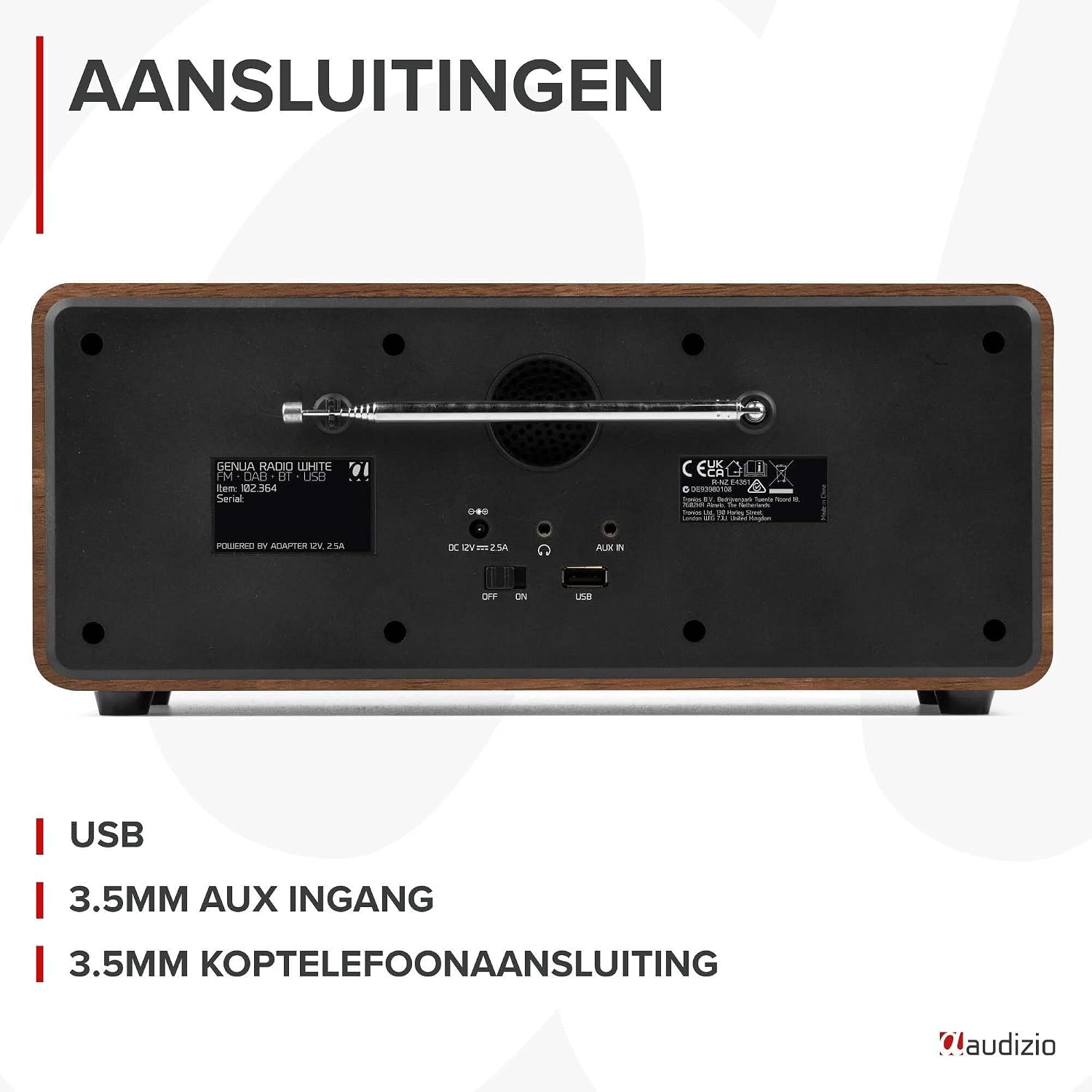
Kuva 4.2: Takaosa view of the Audizio Genua DAB Radio with connections.
The rear panel includes the telescopic antenna for radio reception, a USB port for media playback, a 3.5mm AUX input for external audio devices, a 3.5mm headphone output, a DC 12V power input, and a main power ON/OFF switch.
4.3 Kaukosäädin

Figure 4.3: Remote control for the Audizio Genua DAB Radio.
The included remote control provides full functionality, allowing you to power on/off, adjust volume, change modes, navigate menus, set alarms, and control playback from a distance.
5. Asennus
5.1 Virtaliitäntä
- Connect the power adapter to the DC 12V input on the rear of the radio.
- Kytke virtalähde sopivaan pistorasiaan.
- Flip the main power switch on the rear panel to the 'ON' position.
5.2 Antennin säätö
Vedä teleskooppiantenni kokonaan ulos optimaalisen DAB+- ja FM-radiovastaanoton saavuttamiseksi. Säädä sen asentoa parhaan signaalinlaadun saavuttamiseksi.
5.3 Alkuasetukset ja automaattinen skannaus
- Upon first power-on, the radio may prompt you to perform an auto-scan for DAB+ stations. Select 'Yes' or press the 'Scan' button.
- Radio etsii saatavilla olevia DAB+-asemia ja tallentaa ne. Tämä voi kestää muutaman minuutin.
- Kun haku on valmis, radio virittyy ensimmäiselle saatavilla olevalle asemalle.
6. Käyttöohjeet
6.1 Tilan valinta
Press the 'Mode' button on the remote control or the 'Menu' button on the unit to cycle through available modes: DAB+, FM, Bluetooth, USB, and AUX In.
6.2 DAB+-radion käyttö
- Valitse DAB+-tila.
- If no stations are found or you wish to rescan, press the 'Scan' button to perform a full scan.
- Use the 'Tune/Select' knob or the navigation buttons on the remote to browse through the list of available stations.
- Press the 'OK' button (on remote) or push the 'Tune/Select' knob to select a station.
- Esiasetusten tallentaminen: To store a favorite station, press and hold the 'Preset' button until the preset menu appears. Use the knob/navigation to select a preset number (1-30) and press 'OK' to confirm.
- Esiasetusten haku: Briefly press the 'Preset' button, then use the knob/navigation to select the desired preset and press 'OK'.
6.3 FM-radion käyttö
- Valitse FM -tila.
- Automaattinen skannaus: Press the 'Scan' button to automatically scan for and store available FM stations.
- Manuaalinen viritys: Use the 'Tune/Select' knob to manually tune to a specific frequency.
- Esiasetusten tallentaminen: Similar to DAB+ mode, press and hold 'Preset', select a number, and confirm.
- Esiasetusten haku: Briefly press 'Preset', select the desired preset, and confirm.
6.4 Bluetooth-yhteys
- Valitse Bluetooth-tila. Näytössä näkyy "Pariliitos" tai "Odotetaan yhteyttä".
- Ota Bluetooth käyttöön älypuhelimessasi tai muussa Bluetooth-yhteensopivassa laitteessasi ja hae käytettävissä olevia laitteita.
- Select "Audizio Genua" from the list of devices.
- Once paired, the radio will confirm the connection, and you can start playing audio from your device.
6.5 USB-toisto
- Aseta USB-muistitikku, jossa on MP3 files takapaneelin USB-porttiin.
- Select USB mode. The radio will automatically detect the USB drive and begin playing the first compatible audio file.
- Use the playback control buttons (Play/Pause, Skip Forward/Backward) on the unit or remote to manage your music.
6.6 AUX-tulo
- Connect an external audio device (e.g., MP3 player, smartphone) to the 3.5mm AUX IN port on the rear panel using an audio cable (not included).
- Valitse AUX-tila.
- Ohjaa toistoa ja äänenvoimakkuutta ulkoisesta laitteestasi.
6.7 Herätys ja uniajastin
- Hälytyksen asettaminen: Press the 'Alarm' button on the unit or remote. Follow the on-screen prompts to set Alarm 1 and Alarm 2, including time, source (DAB/FM/Buzzer), and volume.
- Torkkutoiminto: When the alarm sounds, press any button (except Power) to activate snooze. The alarm will sound again after a set interval.
- Uniajastin: Press the 'Sleep' button on the remote to set a sleep timer (e.g., 15, 30, 60 minutes). The radio will automatically turn off after the selected time.
6.8 Näytön himmennin
Press the 'Dimmer' button on the unit or remote to adjust the brightness of the display. This is useful for different lighting conditions or for use in a bedroom.
7. Huolto
- Puhdistus: Puhdista radion ulkopinta pehmeällä, kuivalla liinalla. Älä käytä hankaavia puhdistusaineita, vahoja tai liuottimia.
- Antenni: Käsittele teleskooppiantennia varovasti vaurioiden välttämiseksi.
- Varastointi: If storing the radio for an extended period, disconnect it from the power supply.
8. Vianmääritys
| Ongelma | Mahdollinen syy | Ratkaisu |
|---|---|---|
| Ei virtaa | Power adapter not connected; Main power switch off | Ensure power adapter is securely connected and plugged in; Turn main power switch to 'ON' |
| Huono radiovastaanotto (DAB+/FM) | Antenna not extended; Weak signal area; Interference | Fully extend and adjust the telescopic antenna; Try repositioning the radio; Move away from other electronic devices |
| Bluetooth ei muodosta pariliitosta | Radio not in Bluetooth mode; Device not discoverable; Already paired with another device | Select Bluetooth mode on the radio; Ensure Bluetooth is enabled on your device and it's in pairing mode; Disconnect from other Bluetooth devices |
| USB-toisto ei toimi | USB-asema ei ole asetettu oikein; Yhteensopimaton file alustus; USB-asema vioittunut | Ensure USB drive is fully inserted; Check if files are in MP3 format; Try a different USB drive |
| Ei ääntä | Äänenvoimakkuus liian alhainen; Mykistys aktivoitu; Väärä lähde valittu | Increase volume; Check if mute is active; Ensure correct input source (DAB/FM/BT/USB/AUX) is selected |
9. Tekniset tiedot

Figure 9.1: Audizio Genua DAB Radio dimensions.
- Merkki: Audizio
- Mallinumero: Genua
- Väri: Valkoinen
- Erikoisominaisuus: Bluetooth Connectivity, DAB+ Radio
- Yhteystekniikka: Aux, Bluetooth, USB
- Tuotteen mitat (P x L x K): 13.5 x 31 x 13.3 cm
- Viritintekniikka: DAB+
- Tyyli: Moderni
- Virtalähde: Johdollinen sähkö
- Tuetut radioyhtyeet: FM, DAB+
- Yhteensopivat laitteet: Smartphone, Tablet, Laptop, MP3 Player, Headphones, Speaker
- Voitage: 220 volttia
- Kaiuttimen maksimilähtöteho: 50 wattia
- Paristojen määrä: 1 Non-standard battery (Type of battery required)
- Näytön tyyppi: TFT
- Tuotteen paino: 2.25 kiloa
10. Takuu ja tuki
This product is covered by a standard manufacturer's warranty. For detailed warranty terms and conditions, please refer to the documentation provided at the time of purchase or contact your retailer. For technical support or service inquiries, please contact the Audizio customer support team through their official websivustollasi tai ostopaikassasi.


