
1. Johdanto
The Hello Kitty Sunrise Alarm Clock is designed to provide a gentle and natural waking experience with its sunrise simulation feature. This digital alarm clock includes multicolor lights, an LED display showing time, date, and temperature, a USB charging port, and a convenient snooze function. Its charming Cinnamoroll design adds a whimsical touch to any room.

Image 1: Hello Kitty Cinnamoroll Sunrise Alarm Clock with multicolor lighting.
2. Turvallisuustiedot
- Älä altista laitetta äärimmäisille lämpötiloille, suoralle auringonvalolle tai korkealle kosteudelle.
- Use only the provided USB power cable or a certified equivalent.
- Pidä laite poissa vedestä tai muista nesteistä.
- Älä yritä purkaa tai korjata laitetta itse. Ota yhteyttä pätevään huoltohenkilöstöön.
- Varmista, että laite on sijoitettu vakaalle, tasaiselle alustalle.
3. Pakkauksen sisältö
Tarkista pakkauksesta seuraavat tuotteet:
- Hello Kitty Sunrise Alarm Clock (Cinnamoroll design)
- USB-virtakaapeli
- Käyttöopas (tämä asiakirja)
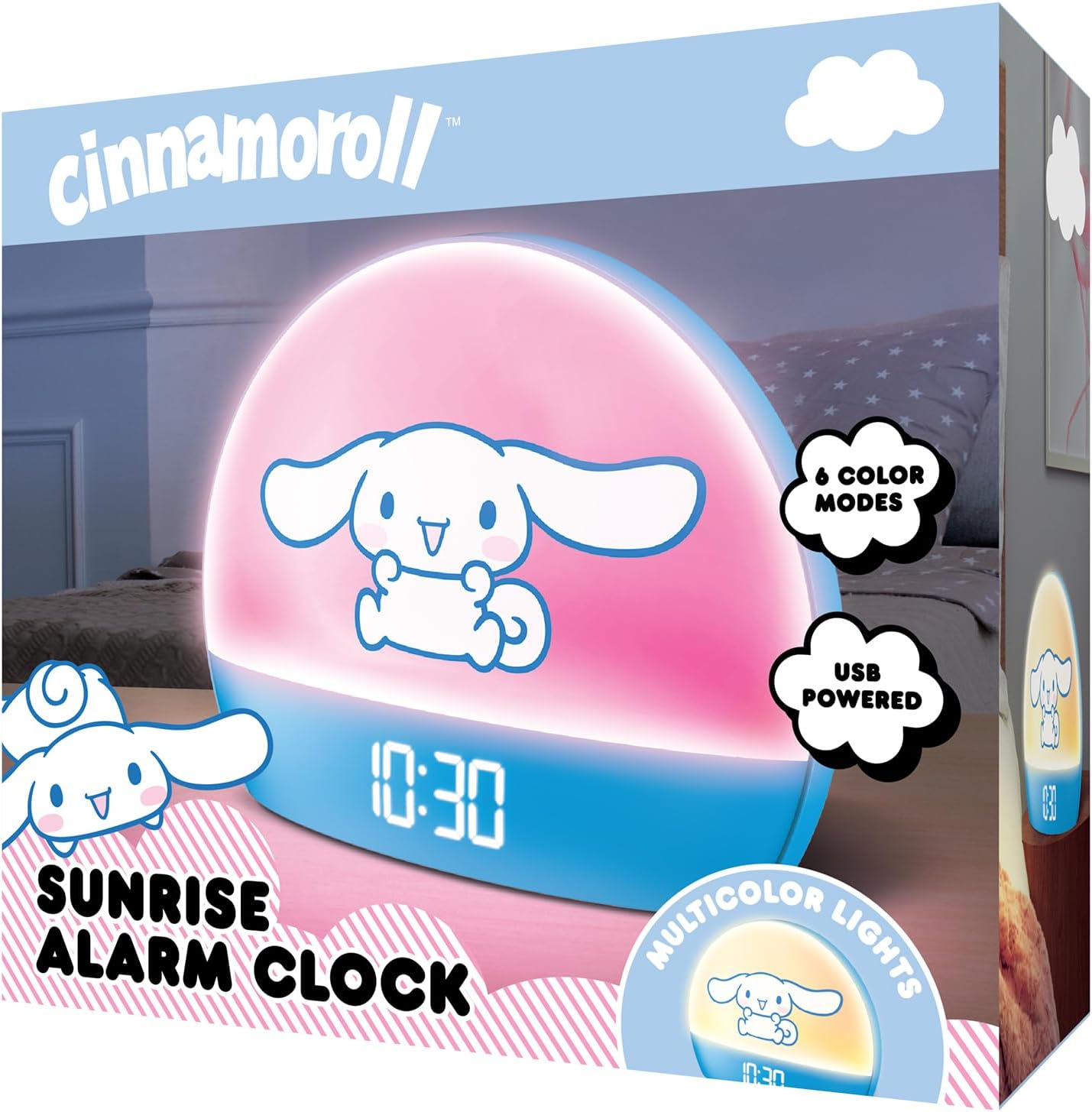
Image 2: Front packaging of the Hello Kitty Cinnamoroll Sunrise Alarm Clock.
4. Tuote ohiview
Tutustu herätyskellosi tärkeimpiin osiin.
- LED-näyttö: Näyttää ajan, päivämäärän ja lämpötilan.
- Valopaneeli: Emits multicolor and sunrise simulation lights.
- Ohjauspainikkeet: Located on the back or bottom for setting time, alarm, and light functions.
- USB-latausportti: For powering the device and charging external devices.
- Torkkupainike: Typically a prominent button on the top or front.

Image 3: Hello Kitty Cinnamoroll Sunrise Alarm Clock in a bedroom setting.
5. Asennus
5.1 Virtaliitäntä
- Liitä mukana toimitettu USB-virtajohto herätyskellon takana olevaan USB-porttiin.
- Kytke USB-kaapelin toinen pää yhteensopivaan USB-virtalähteeseen (ei sisälly toimitukseen) tai virtaa saavaan USB-porttiin.
- The LED display will light up, indicating the device is powered on.
5.2 Kellonajan ja päivämäärän asettaminen
Specific button names are not provided, so general instructions are given. Refer to the physical device for exact button labels.
- Press the "SET" or "TIME" button to enter time setting mode.
- Use the "UP" and "DOWN" buttons to adjust the hour. Press "SET" again to confirm.
- Adjust the minute using "UP" and "DOWN" buttons. Press "SET" to confirm.
- Continue this process to set the year, month, and day.
- The clock may offer 12-hour or 24-hour format selection. Follow on-screen prompts or consult the device's specific button functions.
6. Käyttöohjeet
6.1 Hälytyksen asettaminen
- Paina "ALARM"-painiketta siirtyäksesi hälytyksen asetustilaan.
- Use "UP" and "DOWN" buttons to set the desired alarm hour. Press "ALARM" to confirm.
- Adjust the alarm minute. Press "ALARM" to confirm.
- Some models may allow setting alarm volume or sound. Follow prompts if available.
- To activate/deactivate the alarm, look for an "ALARM ON/OFF" button or a toggle within the alarm setting menu.
6.2 Auringonnoususimulaatio
The sunrise simulation feature gradually increases light intensity before your set alarm time, mimicking a natural sunrise.
- This feature is typically linked to the alarm function. When the alarm is active, the light will begin to brighten a set period (e.g., 30 minutes) before the alarm sounds.
- Consult the device's specific controls for adjusting the duration or intensity of the sunrise simulation, if applicable.
6.3 moniväristä valoa
The clock offers various color modes for ambient lighting.
- Press the "LIGHT" or "COLOR" button to cycle through different color options or activate a color-changing mode.
- Press and hold the "LIGHT" button to turn off the ambient light.
- Brightness of the display and ambient light can often be adjusted using dedicated buttons or by holding the "LIGHT" button.
6.4 Torkku -toiminto
When the alarm sounds, press the large "SNOOZE" button (usually on top) to temporarily pause the alarm. The alarm will sound again after a short interval (e.g., 5-10 minutes).
6.5 USB-latausporttia
The integrated USB port can be used to charge small electronic devices like smartphones or tablets. Simply connect your device's charging cable to the USB port on the alarm clock.
6.6 Lämpötilan näyttö
The LED display shows the current room temperature. No specific action is usually required to view this, as it cycles with time and date or is displayed continuously.
7. Huolto
- Puhdista kello pehmeällä, kuivalla liinalla. Älä käytä hankaavia puhdistusaineita tai liuottimia.
- Varmista, että USB-portti on vapaa pölystä ja roskista.
- Store the clock in a cool, dry place when not in use for extended periods.
8. Vianmääritys
| Ongelma | Mahdollinen syy | Ratkaisu |
|---|---|---|
| Kello ei käynnisty. | USB cable not connected properly or power source issue. | Check USB cable connection. Try a different USB power adapter or port. Ensure the cable is securely inserted. |
| Time is incorrect or drifts. | Time not set correctly or internal clock issue. | Re-set the time following Section 5.2. If the issue persists, try disconnecting and reconnecting power. |
| Hälytys ei soi. | Hälytys ei ole aktivoitu tai asetettu väärin. | Verify the alarm is set and activated (check for an alarm icon on the display). Ensure the volume is not set to zero if adjustable. |
| Painikkeet eivät reagoi. | Tilapäinen ohjelmistohäiriö tai fyysisten painikkeiden ongelma. | Disconnect power for a few seconds and reconnect to reset the device. If buttons remain unresponsive, contact support. |
| USB-latausportti ei toimi. | Cable issue, device not fully powered, or port malfunction. | Ensure the clock is properly powered. Try a different USB charging cable. Check if the port is clean and free of debris. |
9. Tekniset tiedot
| Merkki | Hello Kitty |
| Mallinumero | HKCLK01CR-MFN |
| Väri | Cinnamoroll |
| Näytön tyyppi | Digitaalinen |
| Erikoisominaisuudet | Adjustable Brightness, Alarm, Charging Port, LED Display, Temperature Display, Sunrise Simulation, Multicolor Lights |
| Tuotteen mitat | 7 cm L x 6 cm K |
| Virtalähde | Johdollinen sähkö (USB) |
| Materiaali | Muovi |
| Tuotteen paino | 0.4 kiloa (14 unssia) |
| Yhteystekniikka | USB |
| Valmistaja | Southern Telecom |
10. Takuu ja tuki
For warranty information or technical support, please refer to the contact details provided on the product packaging or visit the official Hello Kitty product support websivusto. Säilytä ostokuitti takuuvaatimuksia varten.