
1. Johdanto
This instruction manual provides essential information for the safe and effective use of your GT POWER AC Adapter, model 602. This power supply is designed to be compatible with the Verizon WNC-CR200A Gateway Router. Please read this manual thoroughly before use and retain it for future reference.
2. Turvallisuustiedot
VAROITUS: Sähköiskun, tulipalon tai loukkaantumisen riskin vähentämiseksi noudata seuraavia turvaohjeita:
- Varmista, että virtalähdettä käytetään laitteiden kanssa, joiden äänenvoimakkuus vastaa sentage ja nykyiset tekniset tiedot.
- Älä altista sovitinta vedelle, sateelle tai liialliselle kosteudelle.
- Älä pura tai muuta sovitinta. Jätä kaikki huoltotyöt pätevän henkilöstön tehtäväksi.
- Avoid placing the adapter in areas with poor ventilation or near heat sources.
- Inspect the adapter and cable for damage before each use. Do not use if damaged.
- Pidä poissa lasten ulottuvilta.
- Irrota sovitin pistorasiasta, kun sitä ei käytetä pitkään aikaan.
Tässä sovittimessa on ylijännitesuojatage-suojaus (OVP), ylivirtasuojaus (OCP) ja oikosulkusuojaus (SCP) turvallisen käytön varmistamiseksi.
3. Pakkauksen sisältö
- 1 x GT POWER AC Adapter (Model 602)
4. Tuote ohiview
The GT POWER AC Adapter is a compact and reliable power supply designed for specific networking equipment. It converts standard AC wall power to the DC power required by your device.

Kuva 4.1: Edessä view of the GT POWER AC Adapter, showing the power prongs and the output cable.

Kuva 4.2: Sivu view of the GT POWER AC Adapter, highlighting the barrel connector at the end of the output cable.
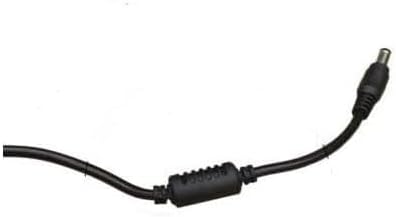
Kuva 4.3: Lähikuva view of the barrel connector, which plugs into the compatible device.
5. Asennus
Follow these steps to properly connect your GT POWER AC Adapter to your Verizon WNC-CR200A Gateway Router.
- Tarkista laitteen yhteensopivuus: Before connecting, ensure your device is a Verizon WNC-CR200A Gateway Router. The adapter is specifically designed for this model. You can often find the model number on a label at the bottom or back of your router.

Kuva 5.1: Example of a Verizon WNC-CR200A Gateway Router's bottom label, indicating the model number for compatibility verification.
- Yhdistä laitteeseen: Insert the barrel connector of the GT POWER AC Adapter firmly into the power input port of your Verizon WNC-CR200A Gateway Router.
- Liitä pistorasiaan: Kytke sovittimen virtapistokkeet tavalliseen 100–240 V:n pistorasiaan.
- Virta päälle: Once connected, your Verizon WNC-CR200A Gateway Router should power on automatically or can be turned on using its power button, if available.
6. Käyttö
The GT POWER AC Adapter operates automatically once connected. It provides a stable power supply to your compatible device. No user interaction is required for its operation beyond initial connection.
- Ensure the adapter is always connected to a functioning power outlet.
- Avoid disconnecting the adapter during critical operations of your router to prevent data loss or system instability.
7. Huolto
Asianmukainen huolto varmistaa verkkovirtalähteesi pitkän käyttöiän ja turvallisen toiminnan.
- Puhdistus: Irrota sovitin pistorasiasta ja laitteesta ennen puhdistamista. Pyyhi ulkopinta pehmeällä, kuivalla liinalla. Älä käytä nestemäisiä puhdistusaineita tai liuottimia.
- Varastointi: Kun et käytä sovitinta, säilytä sitä viileässä ja kuivassa paikassa, poissa suorasta auringonvalosta ja äärimmäisistä lämpötiloista. Vältä kaapelin tiukkaa kelaamista vaurioiden välttämiseksi.
- Kaapelihuolto: Älä taivuta, kierrä tai vedä kaapelia liikaa. Vältä painavien esineiden asettamista kaapelin päälle.
8. Vianmääritys
If you encounter issues with your GT POWER AC Adapter, refer to the following common problems and solutions:
| Ongelma | Mahdollinen syy | Ratkaisu |
|---|---|---|
| Laite ei käynnisty. |
|
|
| Adapteri tuntuu epätavallisen kuumalta. |
|
|
9. Tekniset tiedot
| Ominaisuus | Yksityiskohta |
|---|---|
| Mallinumero | 602 |
| Merkki | GT POWER |
| Tulo Voltage | AC 100-240V (50/60Hz) |
| Lähtö Voltage | DC 12V |
| Lähtövirta | 3A |
| Wattage | 36 wattia |
| Liittimen tyyppi | Tynnyri |
| Kaapelin pituus | 59 tuumaa (noin 1.5 metriä) |
| Suojausominaisuudet | OVP (Over Voltage-suojaus), OCP (ylivirtasuojaus), SCP (oikosulkusuojaus) |
| Yhteensopivat laitteet | Verizon WNC-CR200A Gateway Router CR200A WiFi6 NKR-LV65C-T3 |
10. Takuu ja tuki
This GT POWER AC Adapter comes with a Yhden vuoden takuu ostopäivästä lukien. Lisäksi 30 päivän rahat takaisin -takuu tarjotaan.
For technical support, warranty claims, or further assistance, please contact your retailer or the manufacturer directly. Please have your purchase information and product model number (602) available when contacting support.
For more information, you may refer to the seller's contact details provided at the point of purchase.