
1. Johdanto
Kiitos ostoksestasiasing the Philco Portable CD Player Boombox. This versatile audio system combines modern and classic audio playback options, including CD, cassette, FM radio, and Bluetooth connectivity. This manual provides essential information for safe and efficient use of your device.
2. Tärkeitä turvallisuusohjeita
- Lue kaikki ohjeet ennen laitteen käyttöä.
- Säilytä tämä käyttöopas myöhempää tarvetta varten.
- Älä altista laitetta sateelle tai kosteudelle tulipalon tai sähköiskun välttämiseksi.
- Varmista asianmukainen ilmanvaihto; älä tuki mitään tuuletusaukkoja.
- Käytä vain valmistajan määrittelemiä lisälaitteita/lisävarusteita.
- Irrota laite verkkovirrasta ukkosmyrskyjen aikana tai kun sitä ei käytetä pitkään aikaan.
- Anna kaikki huoltotoimenpiteet pätevän huoltohenkilöstön tehtäväksi.
- Älä avaa c:täasing; sisällä ei ole käyttäjän huollettavia osia.
- Vältä laitteen sijoittamista lämmönlähteiden, kuten pattereiden, lämmitysventtiilien, liesien tai muiden laitteiden (mukaan lukien ampnostimet), jotka tuottavat lämpöä.
3. Tuotteen osat ja hallintalaitteet
Familiarize yourself with the various parts and controls of your Philco Portable CD Player Boombox.
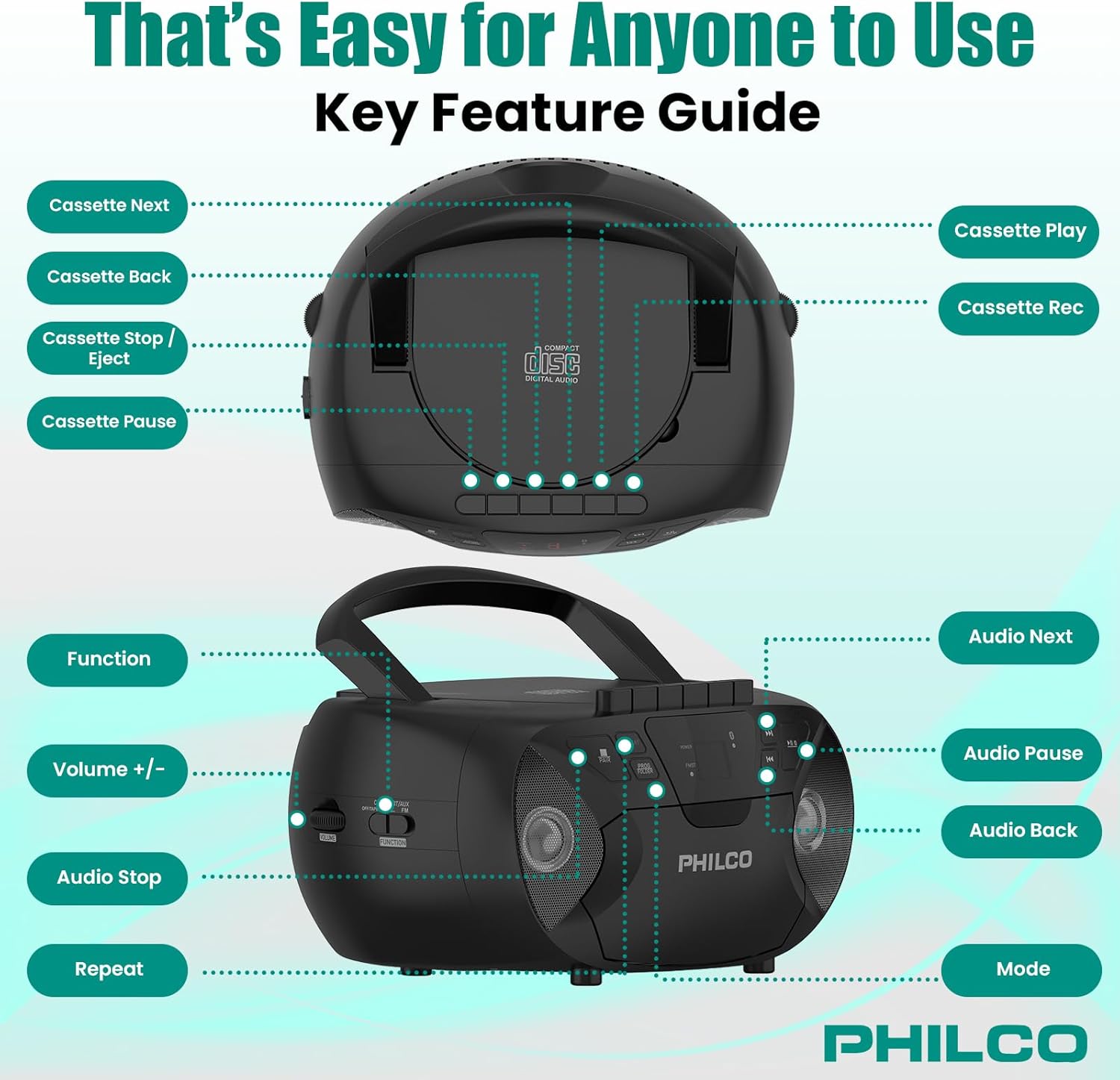
Kuva 3.1: Ylä ja sivu view of the Philco Boombox with key controls labeled. This image shows the layout of buttons for cassette functions (Next, Back, Stop/Eject, Pause, Play, Record) and audio controls (Next, Pause, Back, Mode, Volume, Function, Stop, Repeat).
Etupaneelin säätimet:
- Virtanappi: Kytkee laitteen päälle tai pois päältä.
- MODE-painike: Switches between CD, Cassette, FM Radio, Bluetooth, and AUX modes.
- PLAY/PAUSE Button (CD/Bluetooth): Aloittaa tai keskeyttää toiston.
- STOP Button (CD/Bluetooth): Pysäyttää toiston.
- OHITA/HAKU-painikkeet (<< / >>): Ohittaa kappaleita tai kelaa eteen-/taaksepäin.
- Äänenvoimakkuuden säädin: Säätää äänen ulostulon tasoa.
- FM TUNER Dial: Selects FM radio stations.
Kasettisoittimen säätimet:
- TOISTA-painike: Aloittaa kasetin toiston.
- RECORD-painike: Initiates cassette recording (from CD, FM, or AUX).
- REWIND/FAST FORWARD Buttons: Rewinds or fast forwards the tape.
- PYSÄYTÄ/POISTA-painike: Stops tape playback/recording and opens the cassette door.
- PAUSE-painike: Temporarily pauses cassette playback/recording.
Rear/Side Panel Connections:
- Verkkovirta: Liittää AC-virtajohdon.
- Akkulokero: Holds 6 x 'C' size batteries (not included) for portable use.
- AUX-tuloliitäntä (3.5 mm): Liittää ulkoiset äänilaitteet.
- KUULOKEJÄRJESTELMÄ (3.5 mm): Yksityiseen kuunteluun kuulokkeilla.
- FM-antenni: Ulosvedettävä antenni parantaa FM-vastaanottoa.
4. Asennus
4.1 Laitteen virran kytkeminen
Your Philco Boombox can be powered by either AC power or batteries.

Kuva 4.1: Illustration of AC power connection and battery installation for the Philco Boombox.
Vaihtovirta:
- Varmista, että laite on sammutettu.
- Connect the supplied AC power cord to the AC power input jack on the back of the unit.
- Kytke virtajohdon toinen pää tavalliseen pistorasiaan (AC 120V ~ 60Hz).
Akun teho:
- Varmista, että laite on sammutettu ja irrotettu verkkovirrasta.
- Open the battery compartment cover located on the bottom or rear of the unit.
- Insert 6 x 'C' size batteries (not included), observing the correct polarity (+/-) as indicated inside the compartment.
- Sulje paristolokeron kansi kunnolla.
Huomautus: When using AC power, batteries are automatically disconnected. Remove batteries if the unit will not be used for an extended period to prevent leakage.
4.2 Ensimmäinen käynnistys
Paina POWER button to turn on the unit. The unit will typically default to the last used mode or CD mode.
5. Käyttö
5.1 CD-soittimen käyttö
Kuva 5.1: Demonstrating the top-loading CD compartment for disc insertion.
- Paina MODE button until "CD" mode is selected.
- Avaa CD-lokeron luukku nostamalla sitä varovasti.
- Place a CD (CD-R, CD-RW, MP3, WMA compatible) onto the spindle with the label side facing up.
- Sulje CD-lokeron luukku tiiviisti.
- Paina TOISTA/TAUKO -painiketta toiston aloittamiseksi.
- Käytä OHITA / HAKU buttons (<< / >>) to navigate between tracks.
- Paina STOP -painiketta toiston lopettamiseksi.
- Paina TOISTAA -painiketta toistaaksesi nykyisen kappaleen tai kaikki kappaleet uudelleen.
5.2 Kasettisoittimen/nauhurin käyttö

Kuva 5.2: View of the cassette deck with a tape loaded, ready for playback or recording.
Kasetin soittaminen:
- Paina MODE button until "TAPE" or "CASSETTE" mode is selected.
- Paina PYSÄYTÄ/POISTA painiketta kasettipesän avaamiseksi.
- Aseta kasetti sisään avoin reuna ylöspäin ja toistettava puoli itseesi päin.
- Sulje kasetin luukku.
- Paina PELATA -painiketta toiston aloittamiseksi.
- Käyttää REWIND/FAST FORWARD painikkeita nauhan selaamiseen.
- Paina PYSÄYTÄ/POISTA -painiketta toiston pysäyttämiseksi ja nauhan poistamiseksi.
Tallennus kasetille:
- Aseta tyhjä kasetti kasettipesään.
- Select the desired source (CD, FM Radio, or AUX) using the MODE -painiketta.
- Start playback on the source (e.g., play a CD track, tune to an FM station).
- Paina TALLENTAA kasettisoittimen -painiketta. PELATA -painike kytkeytyy myös päälle.
- Voit keskeyttää tallennuksen painamalla TAUKO -painiketta. Jatka painamalla sitä uudelleen.
- Lopeta nauhoitus painamalla PYSÄYTÄ/POISTA -painiketta.
5.3 FM-radion käyttö
- Paina MODE -painiketta, kunnes "FM"-tila on valittuna.
- Extend the FM telescopic antenna for optimal reception.
- Kierrä FM -VIRITIN valitse haluamasi radioasema valitsimella.
- Säädä VOLUME kuuntelutasoa haluamallesi tasolle.
5.4 Bluetooth-äänen suoratoisto

Kuva 5.3: The Philco Boombox wirelessly connected to a smartphone via Bluetooth for audio streaming.
- Paina MODE button until "BT" or "BLUETOOTH" mode is selected. The unit will enter pairing mode, indicated by a flashing Bluetooth indicator.
- Ota Bluetooth käyttöön Bluetooth-laitteessasi (esim. älypuhelimessa tai tabletissa) ja hae käytettävissä olevia laitteita.
- Select "PHILCO BOOMBOX" (or similar name) from the list of devices to pair.
- Once paired, the Bluetooth indicator will stop flashing and remain solid.
- Start playing audio on your connected device. The sound will be streamed to the boombox.
- Adjust volume on both the boombox and your connected device.
Tärkeä huomautus: This boombox is designed to vastaanottaa audio via Bluetooth from other devices. It cannot lähettää audio to Bluetooth headphones, earbuds, or speakers.
5.5 AUX-tulon käyttö

Kuva 5.4: The AUX input jack on the Philco Boombox, used for connecting external audio sources.
- Liitä 3.5 mm:n äänikaapelin (ei sisälly toimitukseen) toinen pää boomboxin AUX IN -liitäntään.
- Liitä äänikaapelin toinen pää ulkoisen laitteen (esim. MP3-soittimen tai älypuhelimen) kuulokeliitäntään tai äänilähtöön.
- Paina MODE -painiketta, kunnes "AUX"-tila on valittuna.
- Start playing audio on your external device.
- Adjust the volume on both the boombox and your external device.
5.6 Kuulokkeiden käyttö
For private listening, plug any standard 3.5mm headphones into the KUULOKEET jack. The internal speakers will automatically mute.
6. Huolto
6.1 Laitteen puhdistaminen
- Pyyhi laitteen ulkopuoli pehmeällä, damp kangas. Älä käytä hankaavia puhdistusaineita tai liuottimia.
- For the CD lens, use a specialized CD lens cleaning kit.
- Puhdista kasettisoittimen nauhupäät ja puristusrullat säännöllisesti kevyesti kostutetulla vanupuikolla.ampisopropyylialkoholilla.
6.2 Akun hoito
- Remove batteries if the unit will not be used for an extended period to prevent battery leakage and corrosion.
- Älä sekoita vanhoja ja uusia paristoja tai erityyppisiä paristoja.
- Hävitä käytetyt paristot vastuullisesti paikallisten määräysten mukaisesti.
7. Vianmääritys
| Ongelma | Mahdollinen syy | Ratkaisu |
|---|---|---|
| Ei virtaa | Verkkojohtoa ei ole kytketty; Paristot ovat tyhjentyneet tai asetettu väärin. | Tarkista verkkojohdon liitäntä; Vaihda paristot tai varmista oikea napaisuus. |
| No sound from CD/Cassette/Radio/Bluetooth/AUX | Volume too low; Incorrect mode selected; Headphones connected; CD/Cassette inserted incorrectly or damaged; Bluetooth not paired. | Increase volume; Select correct mode; Disconnect headphones; Check/replace media; Re-pair Bluetooth device. |
| CD skips | CD dirty or scratched; Unit on an unstable surface. | Clean or replace CD; Place unit on a stable, flat surface. |
| Huono FM -vastaanotto | Antennia ei ole vedetty ulos; Heikko signaali. | Fully extend and adjust the FM antenna; Try moving the unit to a different location. |
| Bluetooth-laite ei muodosta pariliitosta | Boombox ei ole pariliitostilassa; Laite liian kaukana; Bluetooth on jo yhdistetty toiseen laitteeseen. | Ensure boombox is in BT pairing mode; Move device closer; Disconnect from other devices and try again. |
| Cassette tape not playing/recording correctly | Tape damaged; Tape heads dirty; Buttons stuck (as per review). | Try a different tape; Clean tape heads; If buttons are stuck, gently try to free them or contact support if persistent. |
8. Tekniset tiedot
- Merkki: Philco
- Malli: B0DHYKCWYN
- Yhteystekniikka: Bluetooth
- Väri: Musta
- Kaiuttimen tyyppi: Stereot
- Tuotteen mitat (P x L x K): 10.08 x 5.71 x 10.75 tuumaa
- Virtalähde: AC 120V ~ 60Hz or 6 x 'C' Batteries (not included)
- Yhteensopivat laitteet: MP3 Player (via AUX)
- Tuetut äänimuodot: CD, CD-R, CD-RW, MP3, WMA (from CD)
- Kaiuttimien määrä: 2
- Äänilähtötila: Stereot
- Bluetooth-tuki: Yes (receive only)
- Sisäänrakennettu media: CD, Cassette, FM Radio
9. Takuu ja tuki
9.1 Takuutiedot
For specific warranty details, please refer to the warranty card included with your product or visit the official Philco websivusto. Takuuehdot voivat vaihdella alueittain ja jälleenmyyjiltä riippuen.
9.2 Asiakastuki
If you encounter any issues or have questions not covered in this manual, please visit the official Philco website for support resources, FAQs, and contact information. You can typically find support links on the product page where you purchased the item or by searching for "Philco customer support" online.