
1. Johdanto
Thank you for choosing the Tesvor S8Pro Robot Vacuum Cleaner. This manual provides essential information for setting up, operating, and maintaining your robot vacuum to ensure optimal performance and longevity. Please read this manual thoroughly before using the product and keep it for future reference.
2. Turvallisuusohjeet
To reduce the risk of injury or damage, read these safety instructions carefully. This appliance is for indoor household use only.
- Älä käytä robottia märissä olosuhteissa tai pinnoilla, joilla on seisovaa vettä.
- Keep the robot away from open flames or fragile objects.
- Ensure the charging dock is placed against a wall on a level surface, with no obstacles within 1 meter (3 feet) in front and 0.5 meters (1.5 feet) on either side.
- Älä anna lasten käyttää robottia. Valvo lapsia ja lemmikkejä robotin ollessa käynnissä.
- Before cleaning, remove power cords, small objects, and any items that could entangle the brushes.
- Älä käytä robottia suurten roskien, nesteiden tai palavien esineiden keräämiseen.
- Only use the original power adapter and charging dock provided by Tesvor.
- Jos virtajohto on vaurioitunut, valmistajan tai valtuutetun huoltoliikkeen on vaihdettava se vaarojen välttämiseksi.
3. Pakkauksen sisältö
Varmista, että pakkauksessa on kaikki osat:
- Robottipölynimuri
- Virtalähde
- Mop-pad
- Latausasema
- 2-in-1 Water Tank and Dustbin
- Sivuharjat (2 paria)
- HEPA-suodatin (esiasennettu)
- Käyttöopas
- Puhdistustyökalut
- Kaukosäädin
- Rullaharja (esiasennettu)

Kuva 3.1: Pakkauksen sisältö. The package includes the robot vacuum, power adapter, mop pad, charging station, 2-in-1 water tank and dustbin, side brushes, HEPA filter, user manual, cleaning tools, remote control, and roller brush.
4. Tuote ohiview
The Tesvor S8Pro is a 2-in-1 robot vacuum cleaner featuring powerful suction and intelligent navigation for efficient home cleaning.
Tärkeimmät ominaisuudet:
- Tehokas imu: Up to 6000 Pa (adjustable up to 8000 Pa) for deep cleaning.
- 2-in-1-imuri ja moppi: Simultaneous vacuuming and mopping with a 350 ml electronic water tank and 250 ml dustbin.
- LiDAR-navigointi: Precise mapping and optimal route planning for comprehensive coverage.
- Pitkä akun käyttöikä: 5200 mAh lithium-ion battery, providing up to 180 minutes of runtime at low suction.
- Automatic Charging & Resume: Returns to the charging dock when battery is low and resumes cleaning.
- Sensor-Controlled Obstacle Avoidance: Detects and avoids obstacles to prevent collisions.
- Carpet Boost: Lisää automaattisesti imutehoa matoilla.
- Älykäs ohjaus: Control via smartphone app, compatible with Amazon Alexa and Google Home.

Image 4.1: 2-in-1 Water Tank and Dustbin. The Tesvor S8Pro features a versatile 2-in-1 design, allowing it to vacuum and mop simultaneously. It includes a 350 ml water tank and a 250 ml dustbin.

Image 4.2: Powerful Suction. The Tesvor S8Pro offers powerful suction, adjustable up to 8000Pa, to effectively clean various types of debris from hard floors and carpets. The image shows different suction levels from quiet to max.
5. Asennus
5.1 Latausaseman sijoittaminen
Place the charging dock against a wall on a hard, level surface. Ensure there are no obstacles within 1 meter (3 feet) in front and 0.5 meters (1.5 feet) on either side of the dock to allow the robot to return and charge successfully.
5.2 Ensimmäinen lataus
Connect the power adapter to the charging dock and plug it into a wall outlet. Place the robot on the charging dock. The robot will automatically begin charging. For first-time use, fully charge the robot (approximately 5-6 hours).

Image 5.1: Automatic Charging. The robot vacuum automatically returns to its charging dock when the battery is low (below 20%) and resumes cleaning from where it left off once charged (above 80%).
5.3 Sivuharjojen asentaminen
Napsauta sivuharjat robotin pohjassa oleviin vastaaviin tappeihin, kunnes ne napsahtavat paikoilleen.
5.4 Installing 2-in-1 Water Tank/Dustbin
Fill the water tank with clean water (for mopping) and ensure the dustbin is empty. Slide the 2-in-1 module into the back of the robot until it locks securely.
5.5 Yhdistäminen sovellukseen
Download the Tesvor app from your smartphone's app store. Follow the in-app instructions to connect your robot vacuum to your home Wi-Fi network. This enables advanced features like scheduling, cleaning mode selection, and real-time mapping.
6. Käyttö
6.1 Puhdistuksen aloittaminen/keskeyttäminen
- Aloita: Press the power button on the robot or the 'Clean' button in the app/remote control to start automatic cleaning.
- Tauko: Press the power button or 'Clean' button again to pause cleaning.
6.2 Puhdistustilaa
Select cleaning modes via the Tesvor app or remote control:
- Automaattinen puhdistus: The robot intelligently plans an S-shaped path for comprehensive coverage.
- Paikan puhdistus: Cleans a specific area intensively.
- Reunojen puhdistus: Puhdistaa seinien ja huonekalujen reunojen vierestä.
- Moppaustila: For wet cleaning, ensure the water tank is filled and the mop pad is attached.

Image 6.1: Smart Cleaning Features. This intelligent robot vacuum supports various cleaning modes including S-shaped path, specific area cleaning, and scheduled cleaning. It generates real-time room maps and can be controlled via Amazon Alexa or Google Home.
6.3 Mattotehostus
The robot automatically detects carpets and increases its suction power for a more thorough clean. It can also navigate over obstacles up to 20mm high.

Image 6.2: Carpet Boost. The robot vacuum automatically detects carpets and increases suction power for a deeper clean. It can climb obstacles up to 20mm.
6.4 Ääniohjaus
The Tesvor S8Pro is compatible with Amazon Alexa and Google Home. Follow the instructions in the Tesvor app to link your robot with your voice assistant for convenient control.

Image 6.3: LDS LiDAR Navigation. The robot vacuum uses advanced LDS LiDAR navigation to efficiently map its surroundings, ensuring comprehensive coverage and optimized cleaning paths.
7. Huolto
Regular maintenance ensures your Tesvor S8Pro operates efficiently. Always turn off the robot before performing any maintenance.
7.1 Emptying Dustbin & Cleaning Water Tank
- Press the release button to remove the 2-in-1 module.
- Avaa pölysäiliön lokero ja tyhjennä roskat.
- Rinse the dustbin and water tank with clean water. Allow them to air dry completely before reinserting.
- Remove and clean the mop pad after each use.
7.2 Pääharjan puhdistus
Open the main brush cover on the bottom of the robot. Remove the main brush and use the cleaning tool to cut and remove any hair or debris tangled around it. Reinstall the brush.
7.3 Sivuharjojen puhdistus
Periodically check the side brushes for tangled hair or debris. Pull them off their posts, clean them, and reattach. Replace worn brushes as needed.
7.4 Suodattimien puhdistus
Remove the HEPA filter from the dustbin. Tap it gently to remove dust. Do not wash the HEPA filter with water. Replace the HEPA filter every 3-6 months, depending on usage.
7.5 Antureiden ja latauskontaktien puhdistaminen
Pyyhi sekä robotin että lataustelakan pudotusanturit, seinäanturit ja latauskoskettimet puhtaalla ja kuivalla liinalla varmistaaksesi niiden oikean toiminnan.
8. Vianmääritys
Jos robotti-imurisi kanssa ilmenee ongelmia, katso seuraavat yleiset ongelmat ja ratkaisut:
| Ongelma | Mahdollinen syy | Ratkaisu |
|---|---|---|
| Robotti ei käynnisty | Akku vähissä; Virtapainiketta ei painettu | Lataa robotti; Paina virtapainiketta 3 sekuntia |
| Robotti ei voi latautua | Latauskoskettimet likaiset; Lataustelakka irrotettu pistorasiasta | Puhdista latauskontaktit; Varmista, että lataustelakka on kytketty pistorasiaan |
| Robotti juuttuu usein | Liikaa esteitä; jyrkänneanturit likaiset | Clear the cleaning area; Clean cliff sensors |
| Huono puhdistusteho | Pölysäiliö täynnä; Harjat sotkeutuneet; Suodatin tukossa | Empty dustbin; Clean main/side brushes; Clean/replace filter |
| Moppaustoiminto ei toimi | Water tank empty; Mop pad not attached | Fill water tank; Attach mop pad correctly |
Jos tarvitset lisätietoja, ota yhteyttä Tesvorin asiakastukeen.
9. Tekniset tiedot
| Ominaisuus | Yksityiskohta |
|---|---|
| Merkki | Tesvor |
| Mallin nimi | YC-S8 Pro |
| Mallinumero | M2-NLT |
| Imuteho | 6000 Pa (adjustable up to 8000 Pa) |
| Navigointityyppi | LiDAR-navigointi |
| Akun tyyppi | Litium-ioni |
| Akun kapasiteetti | 5200 mAh |
| Max Kesto | 180 minutes (at lowest suction) |
| Vesisäiliön kapasiteetti | 350 ml |
| Roskakorin kapasiteetti | 250 ml |
| Suodattimen tyyppi | HEPA |
| Valvontamenetelmä | Sovellus, Kaukosäädin |
| Yhteensopivat laitteet | Amazon Echo, Google Home, Smartphone, Tablet |
| Tuotteen mitat (robotti) | 33 L x 33 W x 10 H cm |
| Charging Dock Dimensions | 17.5 L x 9 W x 11.5 H cm |
| Väri | Valkoinen |
| Suositellut käyttötavat | Home cleaning, floors, carpets, pet hair removal |
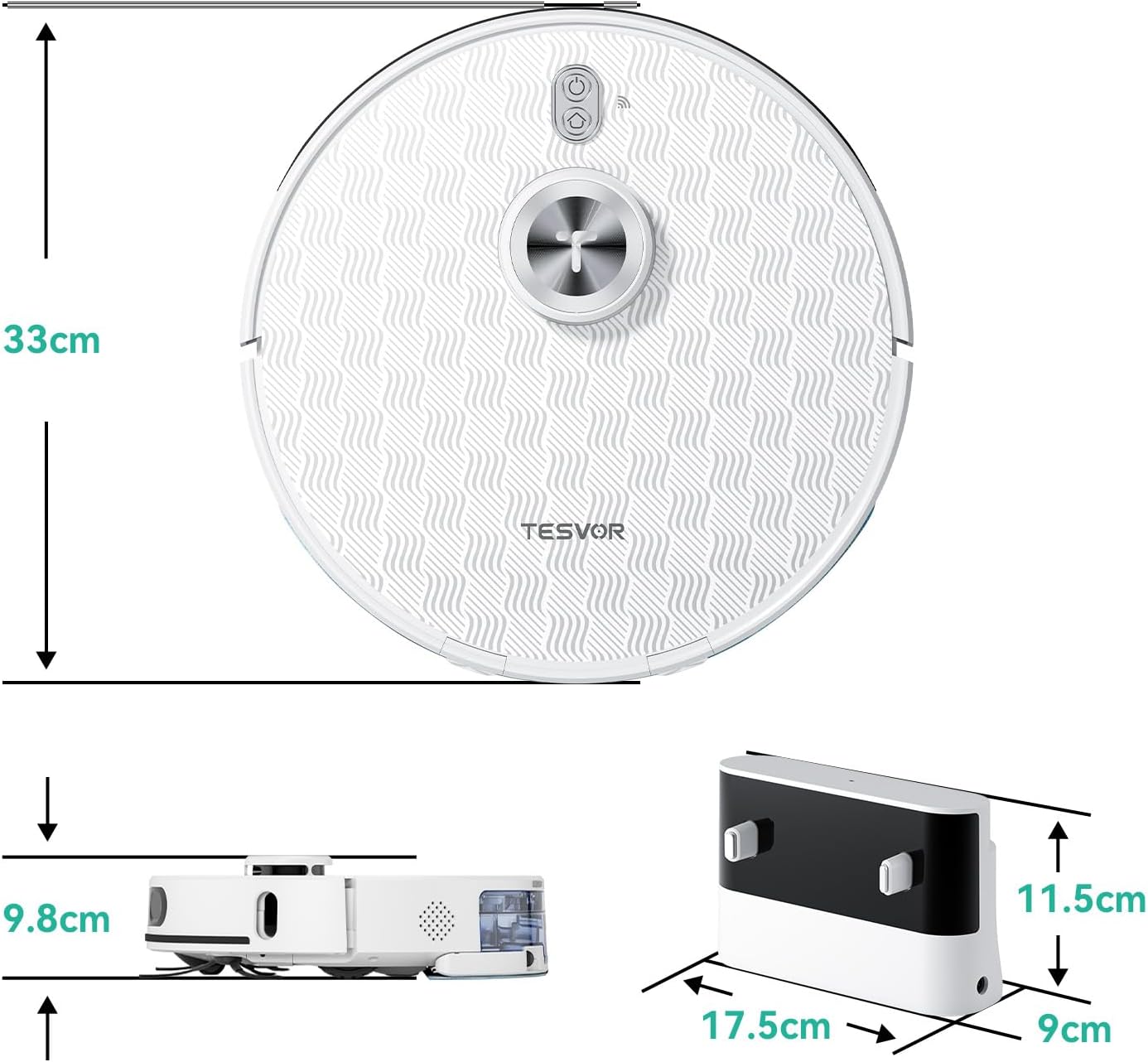
Kuva 9.1: Tuotteen mitat. The robot vacuum measures 33cm in diameter and 9.8cm in height. The charging dock measures 17.5cm in width, 9cm in depth, and 11.5cm in height.
10. Takuu ja tuki
The Tesvor S8Pro Robot Vacuum Cleaner comes with a 2 vuoden takuu. For warranty claims, technical support, or any questions regarding your product, please contact Tesvor customer service through the official website or your purchase platform. Please have your model number (M2-NLT) and proof of purchase ready.