
1. Johdanto
This manual provides detailed instructions for the HOU Keyboard Case designed for the iPad Pro 13-inch M5/M4 models. Please read this manual carefully before use to ensure proper operation and to maximize the product's lifespan.
1.1 Yhteensopivuus
This keyboard case is specifically designed for the iPad Pro 13-inch M5/M4 (2025 models). Compatible iPad models include: A2925, A2926, A3007.
Important: This case is NOT compatible with iPad Air 13 (M2) 2024 (models A2898, A2899, A2900) or iPad Pro 12.9-inch (2017-2022) (6th/5th/4th/3rd/2nd/1st generation).
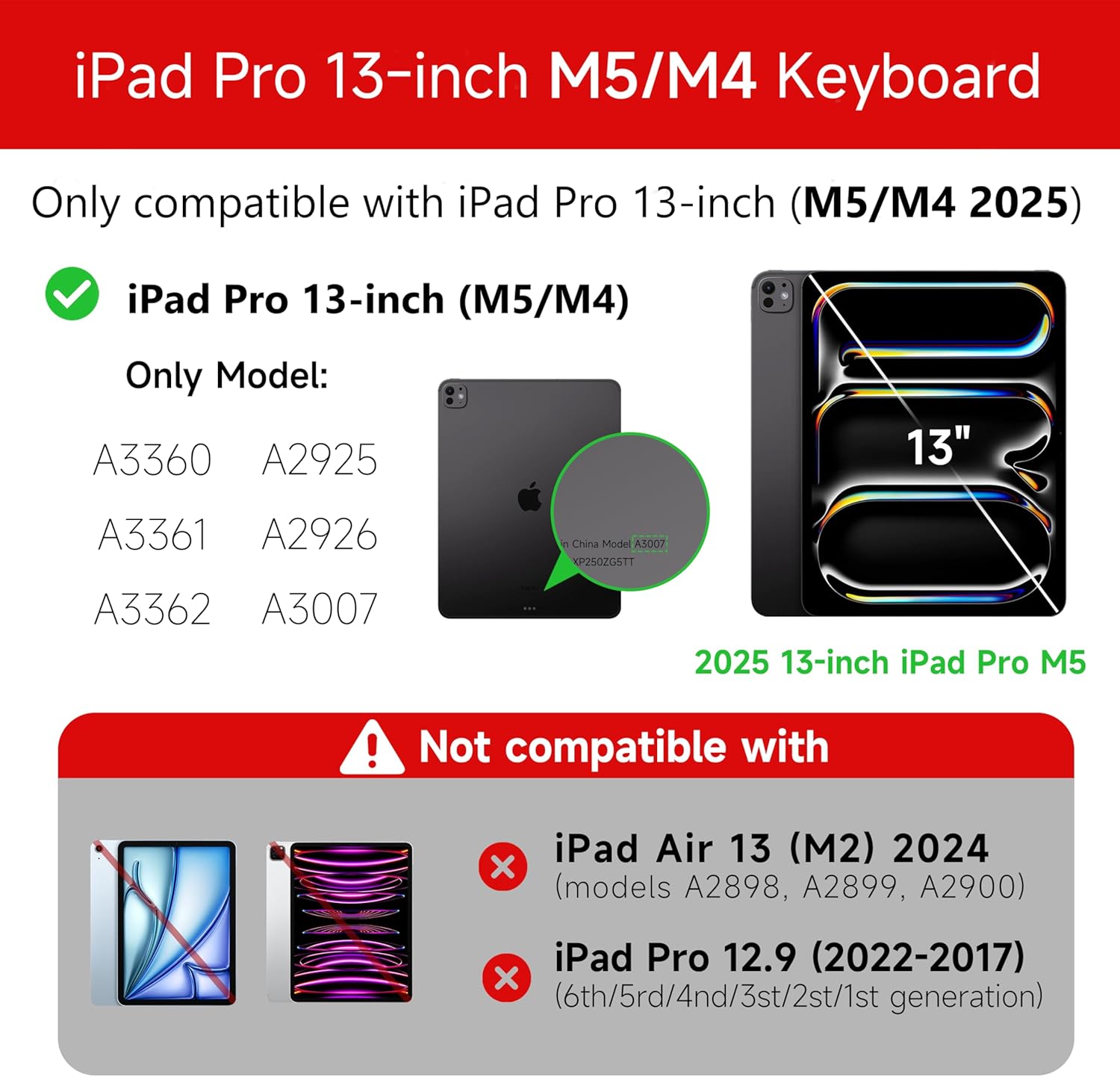
Figure 1: Compatibility details for the HOU iPad Pro 13-inch Keyboard Case.
2. Asennus
2.1 Näppäimistön lataaminen
Before initial use, fully charge the keyboard. Connect the provided USB-C cable to the charging port on the keyboard and to a power source. The charging indicator light will show the charging status.
- Latausportti: Tyyppi-C
- Latausaika: Approximately <2 hours
- Akun kapasiteetti: 500 mAh
2.2 iPad Pron liittäminen
The keyboard case features a magnetic design for secure attachment. Align your iPad Pro 13-inch with the magnetic back panel of the case. The strong magnets will securely hold your iPad in place, providing stability.

Figure 2: Magnetic attachment for secure iPad placement.
2.3 Bluetooth-yhteys
To connect the keyboard to your iPad Pro via Bluetooth:
- Varmista, että näppäimistö on ladattu ja päällä.
- Siirry iPadillasi osoitteeseen Asetukset > Bluetooth ja kytke Bluetooth päälle.
- Paina näppäimistöllä ja pidä pohjassa Fn + Control + R for 3 seconds until the indicator light flashes, indicating pairing mode.
- On your iPad, select the keyboard from the list of available devices (e.g., "HOU Keyboard").
- Kun yhteys on muodostettu, näppäimistön merkkivalo lakkaa vilkkumasta.
After the initial connection, the keyboard should automatically reconnect to your iPad when both devices are powered on and Bluetooth is enabled.
3. Käyttöohjeet
3.1 Säädettävä Viewkulmat
The keyboard case features a floating design that allows for angle adjustment up to 135 degrees. The keyboard base opens at a 45-degree angle, providing enhanced stability for various viewkirjoitus- ja kirjoitustaidot.
Kuva 3: Säädettävä viewing angle up to 135 degrees.
3.2 Taustavalotoiminto
The keyboard features an adaptive backlight with 7 different colors and 3 adjustable brightness levels. This allows for comfortable typing in various lighting conditions, including low-light environments.

Figure 4: Keyboard backlight in use for typing at night.
3.3 Monikosketusohjauslevy
The integrated multi-touch trackpad supports full-area press and various swipe gestures, transforming your iPad into a laptop-like experience. It provides responsive controls for scrolling, dragging, input, and media control.
Adjusting Trackpad Sensitivity: You can adjust the trackpad sensitivity directly from your iPad's settings to match your personal preference.
- Siirry osoitteeseen Asetukset iPadillasi.
- Navigoi kohteeseen Esteettömyys.
- Find and adjust Seurantaherkkyys.

Figure 5: Multi-touch trackpad functionality and sensitivity adjustment.
3.4 pikanäppäimiä
The keyboard includes a series of shortcut keys to boost productivity. Refer to the keyboard layout for specific functions.
4. Huolto
The exterior of the keyboard case is made from a semi-silicone material, which is wear-resistant and designed to resist fingerprints and stains, making it easy to clean.
- To clean, gently wipe the surface with a soft, damp kangas.
- Vältä voimakkaiden kemikaalien tai hankaavien materiaalien käyttöä, sillä ne voivat vahingoittaa pintaa.
- Ensure the charging port and keys are free from dust and debris.
5. Vianmääritys
5.1 Näppäimistö ei muodosta yhteyttä Bluetoothin kautta
- Varmista, että näppäimistö on ladattu täyteen.
- Varmista, että Bluetooth on käytössä iPadissasi.
- Re-enter pairing mode on the keyboard by pressing and holding Fn + Control + R 3 sekunnin ajan.
- Unohda laite iPadin Bluetooth-asetuksista ja yritä pariliitosta uudelleen.
- Käynnistä sekä iPad että näppäimistö uudelleen.
5.2 Trackpad Lag or Unresponsiveness
- This can sometimes occur due to Bluetooth connectivity. Try turning the keyboard off and then back on.
- Ensure there are no obstructions between the keyboard and the iPad that might interfere with the Bluetooth signal.
- Check for any available iPadOS updates, as software improvements can sometimes resolve connectivity issues.
5.3 Taustavalo ei toimi
- Varmista, että näppäimistön akussa on riittävästi virtaa.
- Check the keyboard's function keys for backlight control (usually a dedicated key or Fn combination).
6. Tekniset tiedot
| Ominaisuus | Yksityiskohta |
|---|---|
| Merkki | HOU |
| Yhteensopivat laitteet | 2025 (M4/M5) iPad Pro 13-inch (A2925/A2926/A3007) |
| Yhteystekniikka | Bluetooth 5.2 |
| Näppäimistön kuvaus | Multi-functional with Trackpad |
| Suositeltu käyttö | Henkilökohtainen |
| Erikoisominaisuudet | Trackpad, Backlit, Hot Keys & Media Keys, Rechargeable, Lightweight |
| Väri | Valkoinen |
| Taustavalon värit | 7 RGB-väriä |
| Tuotteen mitat (P x L x K) | 32 x 24.2 x 2.7 cm |
| Materiaali | Aluminum, Metal, ABS, Polyurethane (PU), Semi-silicone |
| Tuotteen paino | 1.1 kiloa |
| Virtalähde | Paristokäyttöinen |
| Akun kapasiteetti | ~500mAh |
| Käyttövirta | <10mA |
| Valmiusaika | ≥ 30 päivää |
| Toimintaetäisyys | ≤10m |
7. Tukea
For any questions or further assistance, please contact the seller directly through your Amazon account:
- Kirjaudu sisään Amazon-tilillesi.
- Siirry kohtaan "Tilaushistoria".
- Locate your order for the HOU iPad Pro 13-inch Keyboard Case.
- Click on "Contact Seller".