
Johdanto
Thank you for choosing the KLIM K7 Cassette Tape Player and MP3 Converter. This device allows you to enjoy your classic cassette tapes and convert them into digital MP3 files for modern playback. It features a built-in microphone for recording, an integrated speaker, and a rechargeable battery for portability. This manual provides detailed instructions for setup, operation, and maintenance of your KLIM K7.
Tuote loppuview
Tärkeimmät ominaisuudet
- Cassette to MP3 Converter: Effortlessly convert cassette tapes to digital MP3 files directly onto an SD card.
- Kannettava muotoilu: Lightweight and compact for on-the-go listening.
- Sisäänrakennettu mikrofoni: Record audio directly to the SD card.
- Sisäänrakennettu kaiutin: Share your audio without external devices.
- Ladattava akku: Integrated 1000mAh battery provides extended playback.
- SD Card Player: Toista MP3 fileon tallennettu SD-kortille.
- 3.5 mm kuulokeliitäntä: For private listening with included earphones.
Laitteen komponentit ja säätimet
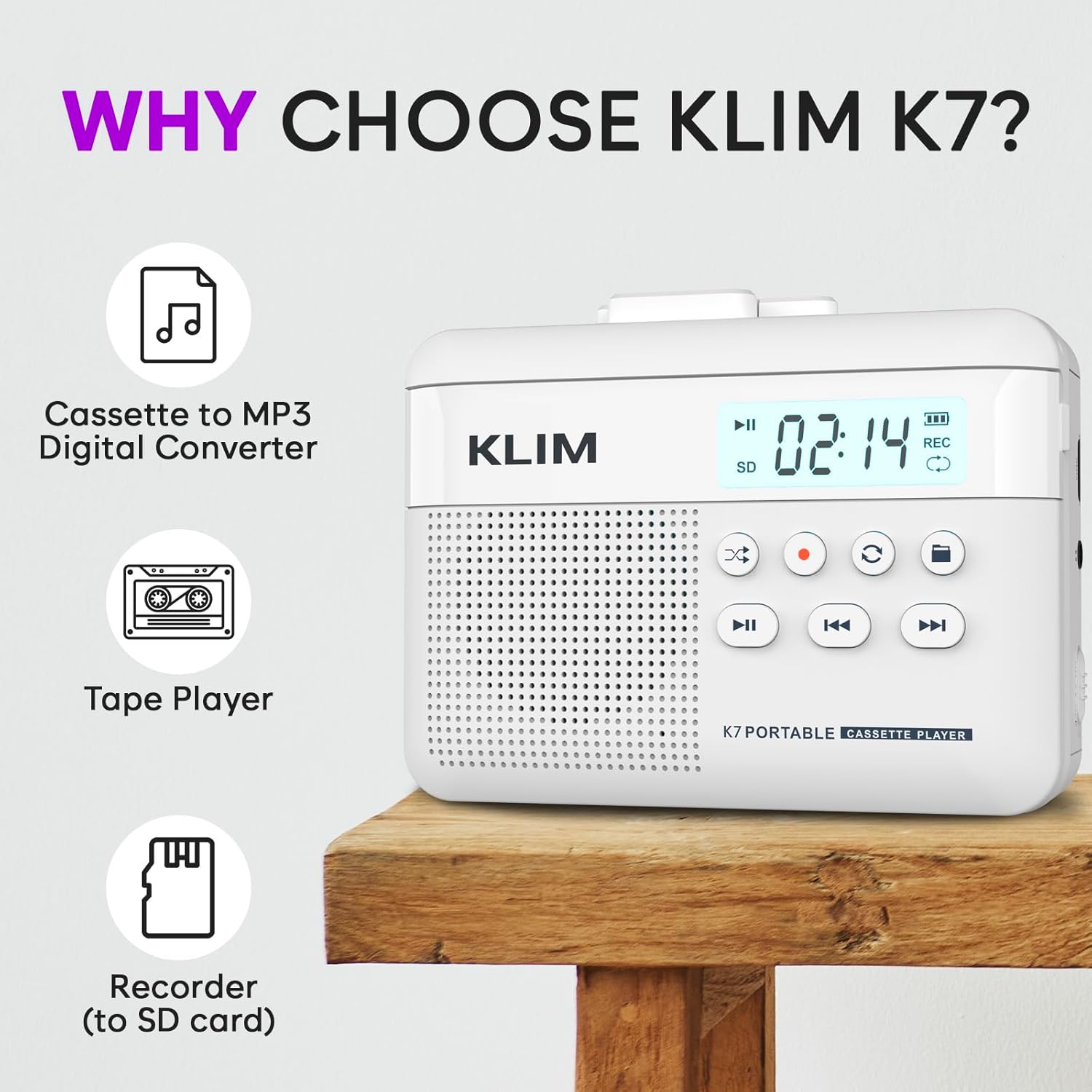
Kuva 1: Edessä view of the KLIM K7 Cassette Player, showing the speaker grille, LCD display, and control buttons (Play/Pause, Rewind, Fast Forward, Stop, Record, Mode, Folder, Loop).
- LCD-näyttö: Shows track number, recording status, and battery level.
- Kaiutin: Integroitu kaiutin äänentoistoon.
- Toista/tauko-painike (►▮): Aloittaa tai keskeyttää toiston.
- Rewind Button (◀◀): Rewinds the cassette tape or navigates backward through MP3 tracks.
- Fast Forward Button (►►): Fast forwards the cassette tape or navigates forward through MP3 tracks.
- Pysäytyspainike (■): Pysäyttää toiston tai tallennuksen.
- Record Button (●): Aloittaa tai pysäyttää tallennuksen.
- Tilapainike (↻): Switches between cassette playback and SD card MP3 playback.
- Folder Button (🖿): Navigates through folders on the SD card.
- Loop Button (⟳): Repeats the current track or all tracks.

Kuva 2: Sivu view of the KLIM K7 Cassette Player, highlighting the SD card slot, 3.5mm headphone jack, and On/Off switch.
- SD-korttipaikka: Insert your Micro SD card here for recording and MP3 playback.
- 3.5 mm: n kuulokeliitäntä: Connect the included earphones or other standard headphones.
- Päälle/pois-kytkin: Käynnistää tai sammuttaa laitteen.
- Äänenvoimakkuuden säätö: Säätää äänen ulostulon tasoa.

Kuva 3: Yläosa view of the KLIM K7 Cassette Player with the cassette compartment open, showing the tape mechanism.
- Kasettilokero: Aseta kasetit tähän.
- Cassette Door Release: Opens the cassette compartment.
Asennus
1. Akun lataaminen
Before first use, fully charge the KLIM K7. The device comes with a 1000mAh rechargeable battery.
- Locate the Type-C USB charging port on the side of the device.
- Connect the included Type-C USB cable to the charging port and the other end to a USB power adapter (not included) or a computer's USB port.
- The charging indicator on the LCD display will show charging status. A full charge typically takes approximately 2 hours.

Kuva 4: The KLIM K7 connected to a Type-C USB cable for charging.
2. SD-kortin asettaminen
An SD card (16GB included) is required for converting tapes to MP3 and for recording with the built-in microphone.
- Paikanna SD-korttipaikka laitteen sivusta (katso kuva 2).
- Aseta Micro SD -kortti varovasti korttipaikkaan kultaiset koskettimet alaspäin, kunnes se napsahtaa paikalleen.
- To remove, push the SD card inward until it clicks, then release, and it will eject.

Kuva 5: Inserting the Micro SD card into the KLIM K7.
3. Kasetin asettaminen
- Press the Cassette Door Release button to open the cassette compartment.
- Insert your cassette tape with the open side facing upwards and the tape reels aligned with the player's mechanism.
- Sulje kasettipesän luukku tiiviisti, kunnes se napsahtaa.
Käyttöohjeet
1. Kasettien toisto
- Ensure the device is powered on using the On/Off switch.
- Insert a cassette tape as described in the Setup section.
- Paina Toista/tauko (►▮) -painiketta toiston aloittamiseksi.
- Säädä äänenvoimakkuutta äänenvoimakkuuden säätimellä.
- Käytä Rewind (◀◀) ja Fast Forward (►►) painikkeita nauhan selaamiseen.
- Paina Pysähdy (■) -painiketta toiston lopettamiseksi.
2. Converting Cassette Tapes to MP3
The KLIM K7 allows direct conversion of cassette audio to MP3 files on the inserted SD card, without needing a computer or additional software.
- Ensure an SD card is inserted and the device is powered on.
- Aseta kasetti, jonka haluat muuntaa, paikalleen.
- Paina Toista/tauko (►▮) button to start playing the tape.
- Pitkä painallus the Record (●) button. The 'REC' indicator on the LCD display will illuminate, indicating that recording has started.
- Lopeta nauhoitus painamalla Record (●) button again. The 'REC' indicator will turn off. The recorded audio will be saved as an MP3 file SD-kortilla.
- You can then remove the SD card and use the included SD card reader to transfer the MP3 files to a computer or other device.

Kuva 6: Visual guide for converting cassette audio to MP3 files.
3. Using the Built-in Microphone for Recording
The KLIM K7 can also record audio directly from its built-in microphone to the SD card.
- Ensure an SD card is inserted and the device is powered on.
- Paina Mode (↻) button until the device is in SD card mode (no cassette playing).
- Pitkä painallus the Record (●) button. The 'REC' indicator will light up, and the device will start recording audio from its microphone.
- Lopeta nauhoitus painamalla Record (●) button again. The 'REC' indicator will turn off, and the recording will be saved as an MP3 file.

Kuva 7: Using the KLIM K7's built-in microphone for recording.
4. MP3-tiedostojen toistaminen FileSD-kortilta
- Varmista, että SD-kortilla on MP3-tiedostoja files is inserted and the device is powered on.
- Paina Mode (↻) button to switch to SD card playback mode. The LCD display will show track information.
- Paina Toista/tauko (►▮) -painiketta toiston aloittamiseksi.
- Käytä Rewind (◀◀) ja Fast Forward (►►) painikkeita kappaleiden ohittamiseksi.
- The Folder (🖿) button allows navigation through different folders on the SD card.
- The Loop (⟳) button can be used to repeat the current track or all tracks.
- Säädä äänenvoimakkuutta äänenvoimakkuuden säätimellä.
- Paina Pysähdy (■) -painiketta toiston lopettamiseksi.

Kuva 8: Enjoying audio with the KLIM K7 and included earphones.
Huolto
Proper maintenance ensures the longevity and optimal performance of your KLIM K7.
- Puhdistus: Puhdista laitteen ulkopinta pehmeällä, kuivalla liinalla. Älä käytä nestemäisiä puhdistusaineita tai liuottimia.
- Kasettilokero: Puhdista teippipäät ja puristusrullat säännöllisesti kevyesti vanupuikolla.ampened with isopropyl alcohol to prevent audio quality degradation. Ensure the device is off and dry before use.
- Varastointi: Säilytä laitetta viileässä, kuivassa paikassa, poissa suorasta auringonvalosta ja äärimmäisistä lämpötiloista.
- Akun hoito: Pitkäaikaista säilytystä varten lataa akku noin 50 %:iin muutaman kuukauden välein akun kunnon ylläpitämiseksi.
Vianetsintä
If you encounter any issues with your KLIM K7, please refer to the following common solutions:
| Ongelma | Mahdollinen syy | Ratkaisu |
|---|---|---|
| Laite ei käynnisty. | Akku on tyhjä. | Lataa laite mukana toimitetulla Type-C USB-kaapelilla. |
| Ei ääntä kasetin toiston aikana. | Äänenvoimakkuus on liian alhainen tai kuulokkeita ei ole kytketty oikein. | Increase the volume. Ensure headphones are fully plugged into the 3.5mm jack. |
| Recording to MP3 fails or produces no file. | SD card is full, not inserted correctly, or corrupted. | Check SD card insertion. Ensure sufficient space on the SD card. Try reformatting the SD card (this will erase all data). |
| Poor audio quality from cassette. | Dirty tape heads or worn-out cassette tape. | Clean the tape heads and pinch rollers. Try a different cassette tape to determine if the issue is with the tape itself. |
| Laite jumiutuu tai lakkaa reagoimasta. | Väliaikainen ohjelmistohäiriö. | Turn the device off and then on again. If the issue persists, allow the battery to fully discharge and then recharge. |
Tekniset tiedot
- Tuotteen mitat: 4.76 x 3.61 x 1.56 tuumaa
- Tuotteen paino: 9.9 unssia
- Akku: 1 litiumioniakku (mukana), 1000 mAh
- Latausaika: Noin 2 tuntia
- Varastointi: Supports Micro SD card (16GB included)
- Äänilähtö: Sisäänrakennettu kaiutin, 3.5 mm:n kuulokeliitäntä
- Tallennusmuoto: MP3

Kuva 9: Dimensions of the KLIM K7 Cassette Player.
Takuu ja tuki
KLIM is committed to producing quality electronics. The KLIM K7 Cassette Tape Player comes with a 5 vuoden takuu. If you encounter any problems with your device, please contact KLIM customer support for assistance.
Lisäsuojaussuunnitelmia voi olla saatavilla ostettavaksi:
- 2 vuoden suojaussuunnitelma: $3.99 (one-time)
- 3 vuoden suojaussuunnitelma: $5.99 (one-time)
- NEW Complete Protect: $16.99 (monthly)
Saat lisätukea osoitteesta KLIM Store on Amazon.