
Kidsneed SM935A-2
Kidsneed Baby Monitor with 2 Cameras User Manual
Model: SM935A-2
Johdanto
Thank you for choosing the Kidsneed Baby Monitor with 2 Cameras. This manual provides detailed instructions for setting up, operating, and maintaining your baby monitor system. Please read this manual thoroughly before use to ensure proper functionality and safety. This system is designed to help you monitor your baby with high-resolution video, two-way audio, and various smart features.

Image: The Kidsneed Baby Monitor system, featuring the parent unit (monitor) and two baby cameras.
Mitä laatikossa on
Tarkista pakkauksen sisältö varmistaaksesi, että kaikki osat ovat mukana:
- 1 x vanhempien yksikkö (näyttö)
- 2 x Baby Camera Units
- 3 x Power Adapters (for Parent Unit and Camera Units)
- 1 x Käyttöohje
Asennus
1. Vanhemman yksikön lataaminen
Before first use, fully charge the parent unit for approximately 8 hours. Connect the small end of the power adapter to the parent unit's charging port and the other end to a power outlet.

Image: A hand plugging the power adapter into the parent unit, illustrating the charging process.
2. Positioning the Baby Camera Units
Place the baby camera units in a location that provides a clear view of your baby. Ensure the camera is at least 3 feet (1 meter) away from the baby's crib or bed to prevent entanglement hazards. Connect each camera unit to a power outlet using its dedicated power adapter.
3. Pairing Cameras (if necessary)
The cameras are typically pre-paired with the parent unit. If a camera loses connection or you are adding a new camera, refer to the 'Add Camera' option in the parent unit's menu. Follow the on-screen prompts to complete the pairing process.
Näytön käyttö
Vanhempainyksikkö ohiview

Image: An illustration highlighting key features of the Kidsneed Baby Monitor system, including remote pan/tilt/zoom, infrared night vision, two-way communication, room temperature display, lullabies, 960ft range, and 1200mAh battery.
1. Virta päälle/pois
Press and hold the Power button on the parent unit to turn it on or off. The camera units will power on automatically when connected to power.
2. Panorointi, kallistus ja zoomaus (PTZ)
Käytä vanhemman yksikön suuntapainikkeita säätääksesi kameran asetuksia etänä. viewing angle. Press the 'Zoom' button to zoom in (2x) or out on the image.

Image: The parent unit displaying a baby, alongside a camera unit with arrows indicating its 355-degree pan and 120-degree tilt capabilities, demonstrating comprehensive room coverage.

Image: A visual comparison on the parent unit screen, showing a baby at 1x zoom and then at 2x zoom, illustrating the digital zoom function.
3. Night Vision
The camera automatically switches to infrared night vision mode in low-light conditions, providing a clear greyscale image of your baby.

Image: The parent unit screen showing a baby sleeping in a crib, depicted in clear greyscale, demonstrating the automatic night vision feature in a dark room.
4. Kaksisuuntainen keskustelu
Press and hold the microphone button on the parent unit to speak to your baby through the camera's speaker. Release the button to hear your baby.
5. Kehtolaulut
Access the menu to select and play from 4 pre-programmed lullabies to soothe your baby. You can also stop the lullabies from the menu.

Image: A baby camera unit with musical notes emanating from it, indicating the lullaby function, and a thermometer icon, representing the temperature sensor.
6. Lämpötilan valvonta
The camera unit has a built-in temperature sensor that displays the room temperature on the parent unit. Alerts can be set for temperature deviations.
7. VOX Mode (Voice Operated Exchange)
In VOX mode, the parent unit's screen will turn off to save battery, but it will automatically activate and display video when sound is detected from the baby's room. You can adjust the VOX sensitivity level in the settings.
8. Akun kesto
The parent unit features a 1200mAh battery. Battery life varies depending on usage:
- Audio Only Mode: Up to 12 hours
- Live Screen Mode: Up to 4 hours

Image: The parent unit displaying battery life information, indicating 12 hours in audio-only mode and 4 hours with the live screen on.
9. Usean kameran tuki
The system supports up to four cameras. You can switch between cameras manually or set it to scan mode, which cycles through connected cameras automatically.
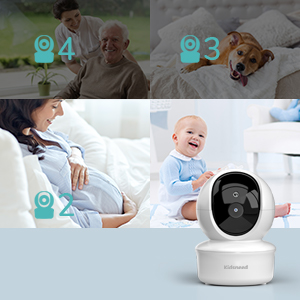
Image: A graphic illustrating the capability to connect and monitor up to four cameras simultaneously, showing different scenarios like monitoring a baby, an elderly person, or a pet.
Huolto
To ensure optimal performance and longevity of your Kidsneed Baby Monitor, follow these maintenance guidelines:
- Puhdistus: Use a soft, dry cloth to clean the surfaces of the parent unit and camera units. Do not use abrasive cleaners or solvents.
- Varastointi: If storing the unit for an extended period, ensure the parent unit's battery is fully charged, then power it off. Store in a cool, dry place.
- Akun hoito: Avoid fully discharging the parent unit's battery frequently. Charge it regularly to maintain battery health.
Vianetsintä
| Ongelma | Mahdollinen syy | Ratkaisu |
|---|---|---|
| Ei kuvaa/ääntä vanhemman yksikössä | Parent unit or camera is off; Out of range; Camera not paired. | Ensure both units are powered on. Move units closer. Re-pair camera if necessary. |
| Huono kuvanlaatu | Low light (night vision active); Lens dirty; Interference. | This is normal for night vision. Clean camera lens. Move away from other electronic devices. |
| Staattinen tai häiriö | Too far from camera; Obstructions; Other 2.4GHz devices. | Move parent unit closer to camera. Reduce obstructions. Turn off other 2.4GHz devices temporarily. |
| Vanhemman yksikön akku tyhjenee nopeasti | Jatkuva näyttö päällä; Vanha akku. | Use VOX mode. Ensure full charge before use. Battery may need replacement over time. |
Tekniset tiedot
- Malli: SM935A-2
- Näytön koko: 3.5 tuuman LCD
- Videon resoluutio: 480p
- Liitettävyys: 2.4GHz FHSS (Wireless, No Wi-Fi/App required)
- Alue: Jopa 960 jalkaa (näkökenttä)
- Kameran ominaisuudet: Pan (355°), Tilt (120°), 2x Zoom, Automatic Night Vision, Two-Way Talk, Temperature Sensor
- Vanhemman yksikön akku: 1200 mAh litiumioniakku (sisältyy pakkaukseen)
- Virtalähde: Johdollinen sähkö
- Mukana tulevat komponentit: 1 Monitor Part, 2 Camera Parts
- Sisä-/ulkokäyttö: Sisätiloissa
Takuu ja tuki
Kidsneed products are designed for reliability and performance. For warranty information or technical support, please refer to the contact details provided on the product packaging or visit the official Kidsneed websivusto. Säilytä ostokuitti ostotodistuksena takuuvaatimuksia varten.
Ask a question about this manual
Ask about setup, troubleshooting, compatibility, parts, safety, or missing instructions. Manuals+ will review the question and use this page’s manual context to help answer it.