
Johdanto
This manual provides essential instructions for the safe and effective use of your Sony PXW-Z200 4K XDCAM Camcorder. The PXW-Z200 is designed for professional video production, offering UHD 4K60 HDR capture, advanced autofocus, and versatile recording and streaming capabilities. Please read this manual thoroughly before operating the camcorder and retain it for future reference.
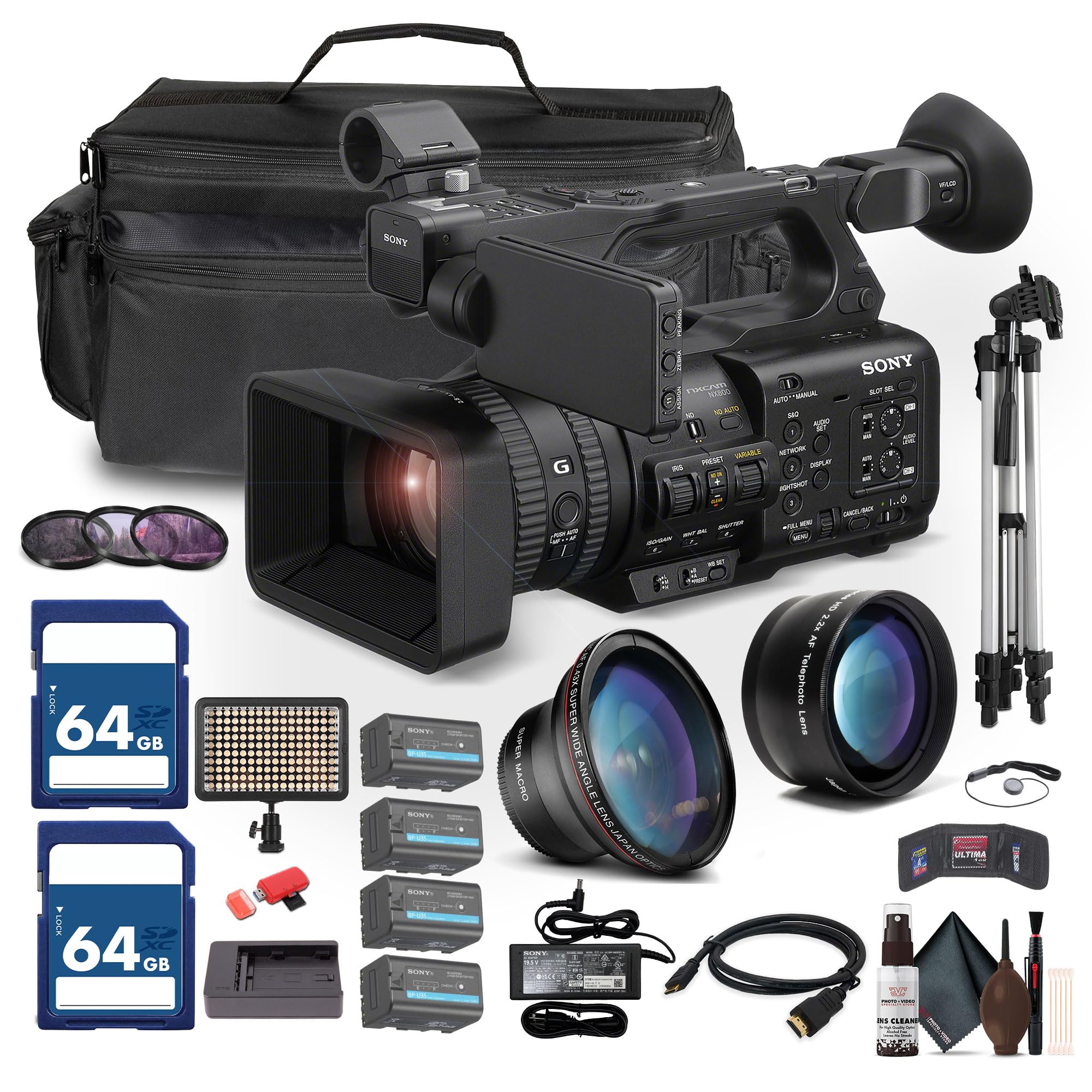
Figure 1: Sony PXW-Z200 4K XDCAM Camcorder, showing the lens, handle, and main body.
Asennus
1. Pakkauksen purkaminen ja sisällön tarkistaminen
Carefully unpack all items and ensure the following components are present. If any item is missing or damaged, contact your dealer.
- Sony PXW-Z200 4K 1" CMOS Sensor XDCAM Camcorder
- AC-sovitin
- Virtajohto
- Akkulaturi
- Battery Pack (BP-U35 or similar)
- LCD Hood
- Linssinsuoja
- Silmäkuppi
- Mikrofonin pidike
- Cold Shoe Kit
2. Vastavalosuojan kiinnittäminen
Align the lens hood with the front of the lens and twist gently until it locks into place. The lens hood helps to reduce flare and protect the lens.
3. Akun asentaminen
- Varmista, että videokameran virta on katkaistu.
- Paikanna videokameran takaosasta akkulokero.
- Slide the battery pack (e.g., BP-U35) into the compartment until it clicks securely into place.
- Irrota akku painamalla akun vapautuspainiketta ja liu'uttamalla akku ulos.

Kuva 2: Vasen puoli view of the camcorder, showing the battery compartment area.
4. Muistikorttien asettaminen
The PXW-Z200 supports dual CFexpress Type-A/SD card slots.
- Avaa muistikorttipaikan kansi.
- Insert the CFexpress Type-A or SD card into the appropriate slot with the correct orientation until it clicks.
- Sulje muistikorttipaikan kansi.
- Format new memory cards in the camcorder before first use to ensure optimal performance. Refer to the "Operating" section for formatting instructions.
5. Verkkolaitteen kytkeminen
Connect the supplied AC adapter to the camcorder's DC IN jack and then to a wall outlet to power the camcorder or charge the battery while installed.
Videokameran käyttö
1. Virta päälle / pois
Käynnistä videokamera liu'uttamalla POWER-kytkin ON-asentoon. Katkaise virta liu'uttamalla se OFF-asentoon.
2. Perustallennus
- Ensure a formatted memory card is inserted.
- Set the desired shooting mode (e.g., Automatic, Manual) using the mode dial or menu settings.
- Rajaa otoksesi käyttämällä viewfinder or the flip-out LCD monitor.
- Paina REC START/STOP -painiketta aloittaaksesi tallennuksen. Tallennuksen merkkivalo syttyy.
- Paina REC START/STOP -painiketta uudelleen lopettaaksesi nauhoituksen.

Figure 3: The PXW-Z200 camcorder being used to record an event, demonstrating its operational context.
3. Tarkennuksen hallinta
The PXW-Z200 offers both automatic and manual focus options.
- Automaattinen tarkennus: The camcorder features AI-powered autofocus. Ensure the AUTO/MANUAL switch for focus is set to AUTO.
- Manuaalinen tarkennus: To manually adjust focus, set the AUTO/MANUAL switch to MANUAL and rotate the focus ring on the lens.

Figure 4: Detail of the camcorder's control panel, showing the AUTO/MANUAL switch for focus and other settings.
4. Zoomaustoiminto
Use the zoom rocker on the handle or the zoom ring on the lens to adjust the focal length. The camcorder features a 20x optical zoom and a 30x Clear Image Zoom in 4K.
5. Recording Formats and Settings
The PXW-Z200 supports various recording formats including XAVC S-I, HS-L, S-L, and HD/QFHD. Access the menu system to select your desired format, frame rate (up to 4K120 and 1080p240), and color profiles (S-Cinetone, ITU709, 709tone, HLG).
6. Audio Input and Monitoring
The camcorder features 4-channel audio input. Connect external microphones via the XLR inputs. Monitor audio levels on the LCD screen and through headphones connected to the headphone jack.
7. Yhteydet ja suoratoisto
The PXW-Z200 offers multiple connectivity options:
- 12G-SDI-lähtö: For high-quality video output to professional monitors or switchers.
- HDMI-lähtö: For connecting to consumer displays or recorders.
- Wi-Fi/Ethernet: Utilize the integrated 2.4/5 GHz Wi-Fi or Ethernet port for live streaming via RTMP/RTMPS, SRT, and FTP.
- Sony Monitor & Control App: Use the dedicated app for remote monitoring and control of the camcorder via a compatible smartphone or tablet.
Huolto
Oikea huolto varmistaa videokamerasi pitkän käyttöiän ja optimaalisen suorituskyvyn.
- Linssien puhdistus: Use a soft, lint-free cloth and a specialized lens cleaning solution to gently clean the lens surface. Avoid touching the lens with bare fingers.
- Kehon puhdistus: Pyyhi videokameran runko kuivalla, pehmeällä liinalla. Pinttyneeseen likaan pyyhi kevyestiampen the cloth with water. Do not use strong detergents or solvents.
- Anturin puhdistus: Sensor cleaning should ideally be performed by authorized service personnel. Avoid attempting to clean the sensor yourself unless you are experienced.
- Akun hoito: Store batteries in a cool, dry place. Avoid fully discharging or overcharging batteries frequently to prolong their lifespan.
- Varastointi: When not in use, store the camcorder in a dry, dust-free environment, preferably in a padded case to protect it from impacts.
Vianetsintä
If you encounter issues with your PXW-Z200, refer to the following common troubleshooting steps:
| Ongelma | Mahdollinen syy / Ratkaisu |
|---|---|
| Videokamera ei käynnisty. |
|
| Videon tallennus ei onnistu. |
|
| Image is out of focus. |
|
| Ei äänitallennusta. |
|
Saat tarkempia vianmääritysohjeita tai ratkaisuja jatkuviin ongelmiin Sonyn virallisesta tukipalvelusta. websivustolta tai ota yhteyttä Sonyn asiakaspalveluun.
Tekniset tiedot
Key technical specifications for the Sony PXW-Z200 Camcorder:
| Ominaisuus | Yksityiskohta |
|---|---|
| Merkki | Sony |
| Mallin nimi | PXW-Z200 |
| Valokuvatunnistintekniikka | CMOS |
| Videon sieppaustarkkuus | 4K, 720p, 480p |
| Suurin polttoväli | 154.21 millimetriä |
| Suurin aukko | 1.8 f |
| Videon kaappausmuoto | XAVC S-I |
| Tuettu äänimuoto | Dolby Digital/AC-3 |
| Yhteystekniikka | HDMI |
| Optinen zoom | 20 XNUMX x |
| Anturin tyyppi | CMOS |
| Vedenkestävyystaso | Ei vedenkestävä |
| Kuvanvakautus | Ei |
| Tuotteen paino | 4.32 puntaa |
| Linssin tyyppi | Wide Angle, Zoom |
| Tarkennustyyppi | Automaattinen tarkennus |
| Kuvaustilat | Automatic, Landscape, Low Light, Manual, Night, Portrait, Slow Motion, Sports |
| Kuvan kuvasuhde | 16:9 |
| File Muoto | XAVC S-I, HS-L, S-L, HD/QFHD |
| Tehokas videoresoluutio | 3840 pikseliä |
| Yhteensopivat laitteet | Smartphone, Laptop, Personal Computer, Tablet, Devices with SDI input, Devices with HDMI input |
| Videokameran tyyppi | Videokamera |
| Näytön resoluutio maksimi | 4K UHD |
| Zoomaa | Optinen, digitaalinen |
Takuu ja tuki
The Sony PXW-Z200 Camcorder is manufactured by Sony. For detailed warranty information, product registration, software updates, and technical support, please visit the official Sony support websivusto. Säilytä ostokuitti ostotodistuksena takuuvaatimuksia varten.
Sonyn virallinen tuki Websivusto: https://www.sony.com/electronics/support
For video tutorials and additional resources, please check the official Sony Professional YouTube channel or their product pages.