
1. Johdanto
Welcome to the WONNIE DC105P Digital Camera user manual. This guide provides essential information for setting up, operating, and maintaining your new camera. Designed for ease of use, this camera captures vivid 56MP photos and Full HD 1080P videos, making it perfect for young photographers to explore their creativity.
2. Turvallisuustiedot
- Älä altista kameraa vedelle tai äärilämpötiloille.
- Pidä kamera poissa voimakkaista magneettikentistä.
- Use only the specified batteries and charging cable.
- Vältä kameran pudottamista tai sen altistamista voimakkaille iskuille.
- Puhdista linssi pehmeällä, kuivalla liinalla.
3. Mitä laatikossa on
Upon unboxing your WONNIE DC105P Digital Camera, please ensure all the following items are present:
- WONNIE DC105P Digital Camera
- 32GB TF-kortti
- Ladattavat paristot (x2)
- C-tyypin USB-kaapeli
- Nauha
- Säilytyspussi
- Käyttöopas (tämä asiakirja)
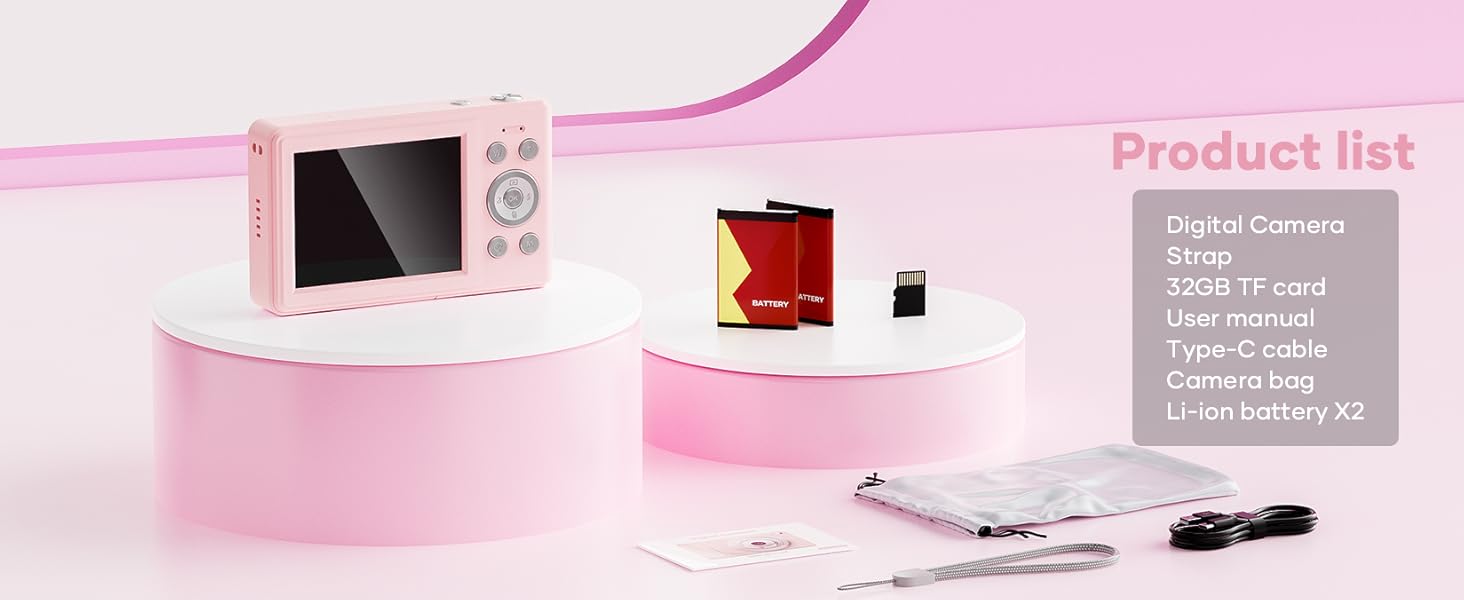
This image displays the WONNIE DC105P Digital Camera alongside its accessories: two rechargeable batteries, a 32GB TF card, a Type-C USB cable, a lanyard, and a soft storage bag, all neatly arranged.
4. Tuote ohiview
Tutustu kameran osiin ja säätimiin.
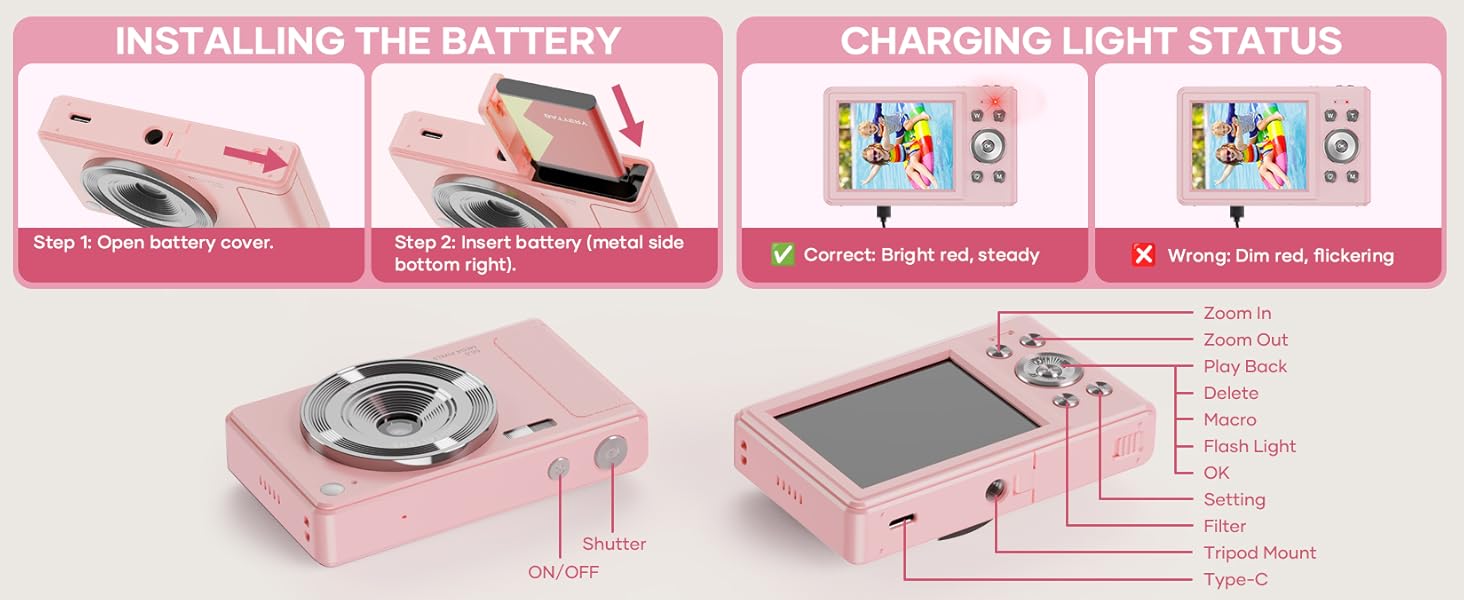
This diagram highlights the various buttons and ports on the WONNIE DC105P Digital Camera, including the power button, shutter button, zoom controls, playback button, menu button, OK button, flash light, tripod mount, and Type-C port.
Tärkeimmät komponentit:
- Linssi: Ottaa kuvia ja videoita.
- Flash: Tarjoaa valaistusta hämärässä.
- Suljinpainike: Paina ottaaksesi valokuvan tai aloittaaksesi/lopettaaksesi videon tallennuksen.
- Virtapainike: Kytkee kameran päälle tai pois päältä.
- LCD-näyttö: Näyttää reaaliajassa view, menus, and playback.
- Navigointipainikkeet (ylös/alas/vasemmalle/oikealle/OK): Käytetään valikoissa navigointiin ja vaihtoehtojen valintaan.
- Zoomauspainikkeet (L/T): Säätää digitaalista zoomia.
- Toistopainike: Siirtyy toistotilaan view kaapattua mediaa.
- Valikkopainike: Avaa kameran asetukset.
- C-tyypin portti: Lataamiseen ja tiedonsiirtoon.
- Jalustan kiinnitys: Kameran kiinnittämiseen jalustaan.
5. Asennus
5.1 Akun asennus
- Avaa kameran sivussa sijaitsevan akkulokeron kansi.
- Insert the rechargeable battery with the metal contacts facing down and to the right, ensuring it clicks into place.
- Sulje paristolokeron kansi kunnolla.
This image illustrates the two steps for battery installation: first, opening the battery cover, and second, inserting the battery with the metal side facing down and to the right.
5.2 SD-kortin asennus
The camera supports a 32GB TF (Micro SD) card. Insert the TF card into the designated slot in the battery compartment until it clicks.
5.3 Akun lataaminen
- Connect the camera to a power source using the provided Type-C USB cable.
- The charging indicator light will show the charging status. A bright red, steady light indicates correct charging. A dim, flickering light indicates an issue.
This image displays the camera's charging light status: a bright red, steady light for correct charging, and a dim, flickering light indicating an incorrect status.
5.4 Kantohihnan kiinnittäminen
Thread the lanyard through the designated loop on the camera body to prevent accidental drops.
6. Kameran käyttö
6.1 Virta päälle/pois
Press and hold the Power button (labeled ON/OFF) on the top of the camera to turn it on or off.
6.2 Valokuvien ottaminen
In photo mode, frame your shot using the LCD screen and press the Shutter button to capture an image. The camera features 56MP resolution for clear photos.

This image shows a child holding the pink WONNIE DC105P Digital Camera, with the screen displaying a photo of children. Other children are in the foreground, emphasizing the camera's ease of use for capturing vibrant 56MP photos and smooth FHD 1080P videos.
Special Photo Features:
- 16x digitaalinen zoom: Use the 'W' and 'T' buttons to zoom in or out.
- 20 Fun Filters: Apply various creative filters to your photos via the menu.
- Itselaukaisin: Set a delay (2s, 5s, 10s) before taking a photo, ideal for group shots.
- Continuous Shooting (Burst Mode): Capture a rapid sequence of 3 photos.
- Anti-Shake: Digitaalinen kuvanvakautus auttaa vähentämään kameran liikkeen aiheuttamaa epäterävyyttä.
- Täytevalo: Activate the built-in fill light for brighter photos in dim environments. (Note: Fill light won't activate in macro mode or when battery is too low.)
- Smile Recognition: Ottaa kuvan automaattisesti, kun hymy havaitaan.
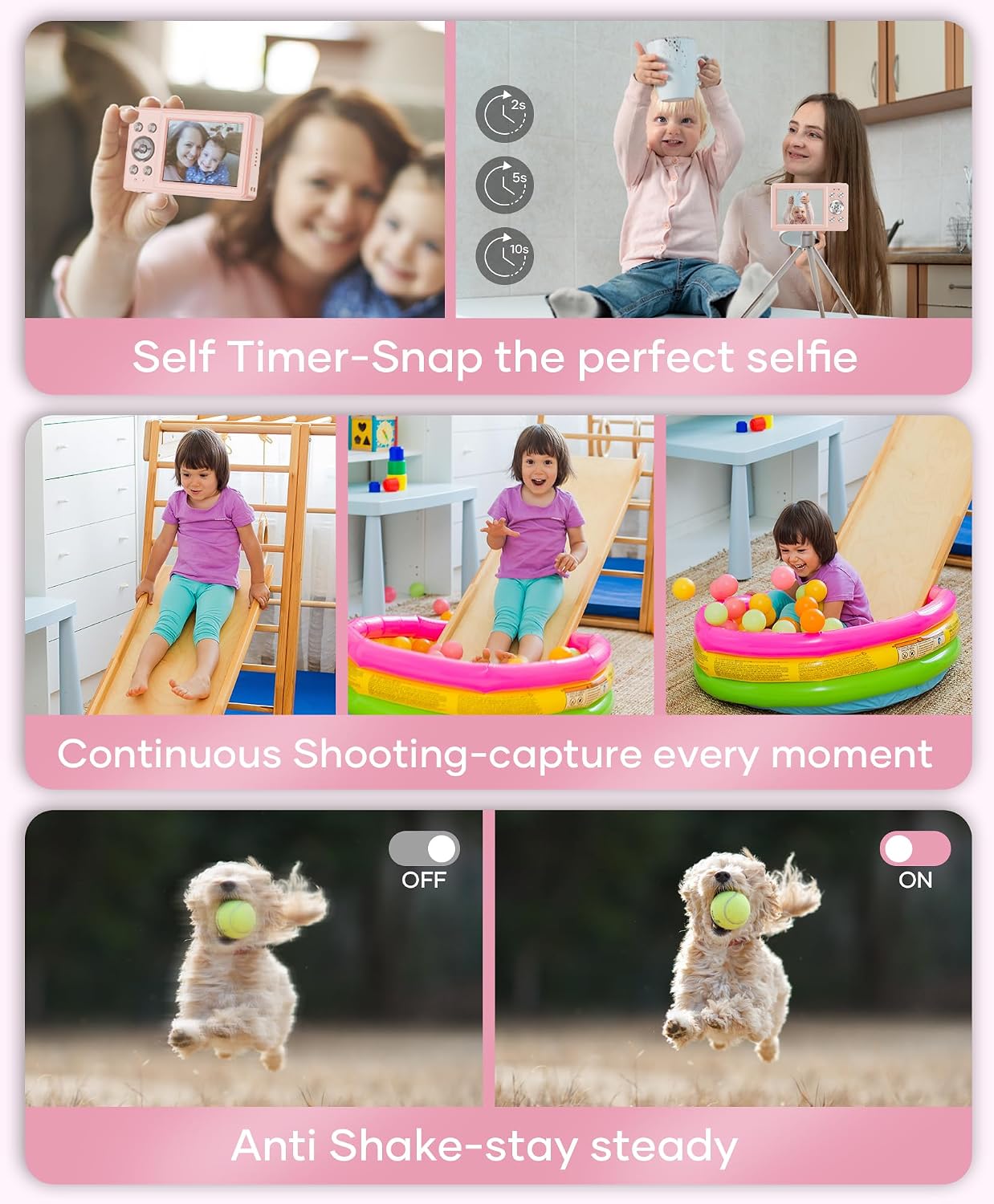
This image showcases three key features: Self Timer for perfect selfies, Continuous Shooting to capture every moment, and Anti Shake for steady shots.

This image illustrates the camera's 16x digital zoom capability with examples at 4x, 8x, and 16x, alongside a selection of 20 fun filters like Normal, Cold Filter, Warm Filter, and more, for endless creativity.
6.3 Videoiden tallentaminen
Switch to video mode (usually indicated by a camcorder icon in the menu) and press the Shutter button to start recording. Press again to stop. Videos are recorded in FHD 1080P with a built-in microphone.
6.4 Playback/Viewing Media
Press the Playback button to enter playback mode. Use the navigation buttons to scroll through your photos and videos. Press the OK button to play videos.
6.5 Siirto Files
You have several options to transfer your media:
- USB tietokoneeseen: Connect the camera to your computer using the Type-C cable. The camera will appear as a removable disk.
- OTG to Phone: Use a compatible OTG cable adapter (sold separately) to connect the camera to your smartphone (e.g., iPhone 15, Samsung).
- Kortinlukija: Remove the TF card and insert it into a card reader to transfer files to a computer or phone.

This image illustrates three convenient ways to view and transfer media: directly connecting the camera via USB to a PC, using an OTG adapter to connect to a smartphone, or using a card reader with a smartphone.
6.6 Webnokka-akselin toiminnallisuus
Connect the camera to a computer via the Type-C USB cable. Select 'Webcam' mode on the camera (if prompted) to use it for video calls or live streaming.

This image demonstrates the WONNIE DC105P Digital Camera's capability to function as a webcam, showing it mounted on a laptop for a video call and for live streaming.
7. Videoesittely
Tämä video tarjoaa yleiskuvanview of the WONNIE Digital Camera, highlighting its features and suitability for kids and teens.
This video offers an introduction to the digital camera, demonstrating its basic functions and design.
8. Huolto
- Puhdistus: Use a soft, lint-free cloth to clean the camera body and screen. For the lens, use a specialized lens cleaning cloth and solution.
- Varastointi: Store the camera in its provided storage bag in a cool, dry place away from direct sunlight and humidity. Remove the battery if the camera will not be used for an extended period.
- Akun hoito: Fully charge batteries before first use. Avoid completely draining the battery frequently to prolong its lifespan.
9. Vianmääritys
| Ongelma | Mahdollinen ratkaisu |
|---|---|
| Kamera ei käynnisty. | Varmista, että akku on oikein asetettu ja ladattu täyteen. |
| Ei voi ottaa valokuvia/tallentaa videoita. | Check if the SD card is inserted correctly and has sufficient free space. Ensure the battery is not critically low. |
| Kuvat ovat epäselviä. | Ensure the lens is clean. Use the anti-shake feature. Hold the camera steady while shooting. |
| Ei voi siirtää files to computer/phone. | Verify the USB cable connection. Ensure the camera is in the correct mode for data transfer (if prompted). Try a different USB port or cable. For phones, ensure OTG compatibility and adapter. |
| Charging indicator is flickering. | Refer to Figure 5.2 for correct charging status. Re-insert the cable or try a different power source. |
10. Tekniset tiedot
| Ominaisuus | Yksityiskohta |
|---|---|
| Valokuvaanturin resoluutio | 56 MP |
| Videon resoluutio | 1080p FHD |
| Optinen zoom | 16x digitaalinen zoom |
| Näytön koko | 2.8 tuuman LCD |
| Kuvanvakautus | Digitaalinen |
| Tallennusvälineet | 32GB TF Card (included), Max 32GB supported |
| Yhteydet | OTG, USB Type-C |
| Erikoisominaisuudet | Aika Stamp, Anti-shake, Time-lapse, Continuous Shoot, Face Detection, Self-timer, Webcam, Filter Effect, Fill light, Selfie mirror, Auto Shut-off, Built-in Microphone |
| Tuotteen paino | 0.22 kiloa (noin 0.48 paunaa) |
| Mitat | Noin 3.8 x 0.78 x 2.4 tuumaa (kuvan perusteella) |
| Akun tyyppi | Lithium Ion (1000mAh, 3.8V) |
11. Takuu ja tuki
Your WONNIE DC105P Digital Camera comes with a 1 vuoden takuu. We are committed to providing excellent customer service and offer a hassle-free replacement policy. For any inquiries, missing accessories, or support needs, please contact our customer service team. We aim to respond within 24 hours.
For further assistance, please visit the official WONNIE Store on Amazon: WONNIE Store