
AKEEYO AKEEYO-EYES-01
AKEEYO EYES 3-Channel Dash Cam User Manual
Model: AKEEYO-EYES-01
1. Johdanto
This manual provides comprehensive instructions for the installation, operation, and maintenance of your AKEEYO EYES 3-Channel Dash Cam. This device is designed to enhance driving safety and provide reliable video evidence with its advanced features, including AI driver assistance, multi-lens recording, and 24/7 parking surveillance.
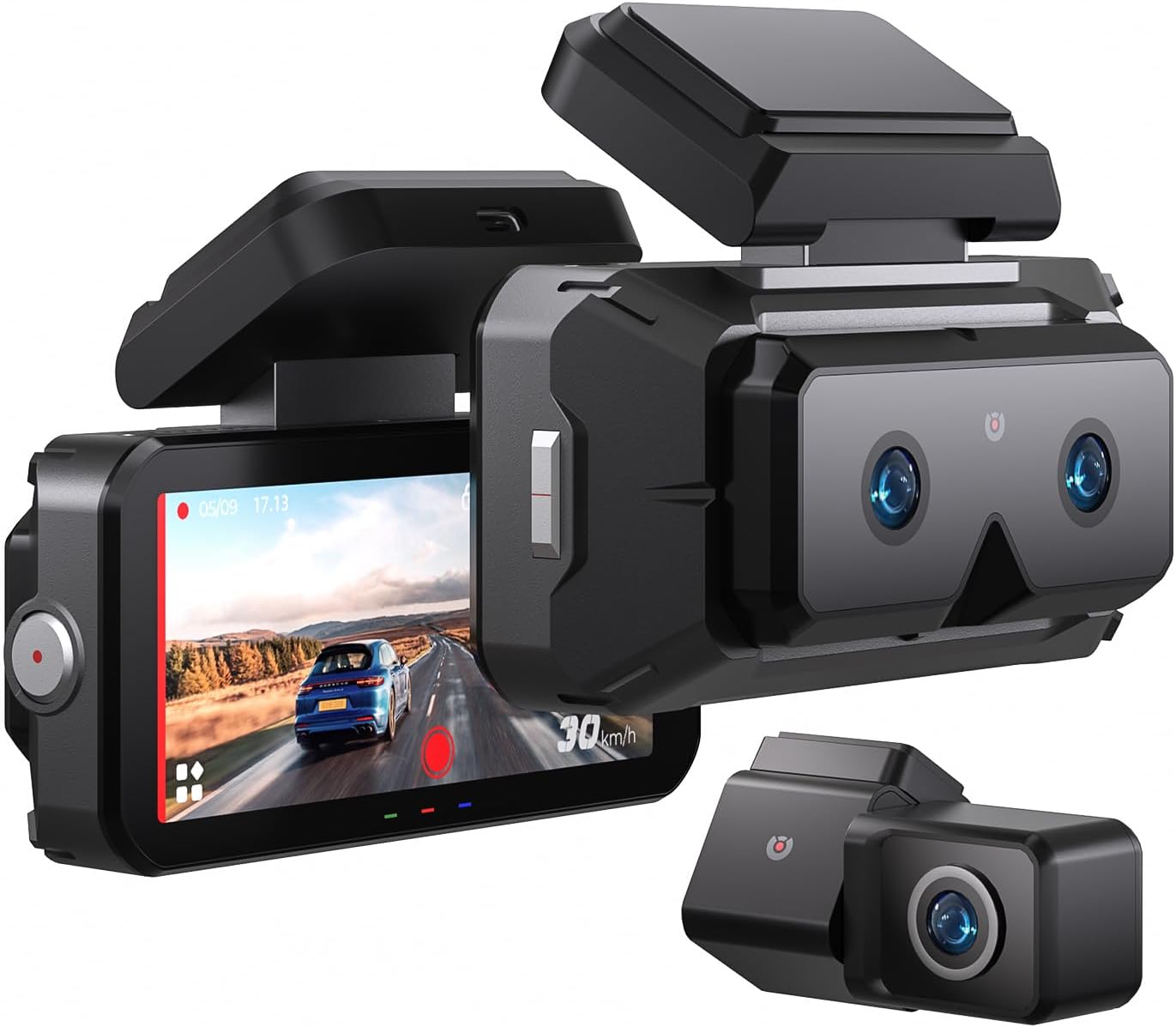
Image 1.1: The AKEEYO EYES 3-Channel Dash Cam, showing the main unit with its 4-inch IPS touchscreen and the separate rear camera.
2. Tuotteen ominaisuudet
- 3-kanavainen tallennus: Simultaneous recording from front (telephoto and wide-angle) and rear cameras.
- 2K-resoluutio: High-definition video capture for clear details.
- 4 tuuman IPS-kosketusnäyttö: Intuitive interface for live view ja asetusten säätö.
- AI Driver Assistance (ADAS & BSD): Real-time alerts for collision, lane departure, blind spot detection, pedestrian detection, and front vehicle start reminders.
- WDR-yönäkö: Parannettu selkeys hämärässä.
- Ääniohjaus: Hands-free operation for key functions.
- Sisäänrakennettu GPS: Records speed and location data.
- 5G Wi-Fi Connectivity: Fast data transfer to mobile devices via app.
- G-sensori: Automatic emergency recording upon impact.
- Loop-tallennus: Jatkuva tallennus, vanhimman päällekirjoittaminen files when storage is full (emergency videos are protected).
- 24/7 Parking Mode: Monitors vehicle activity when parked (requires separate hardware kit).
- Superkondensaattori: Provides durability and resistance to extreme temperatures.
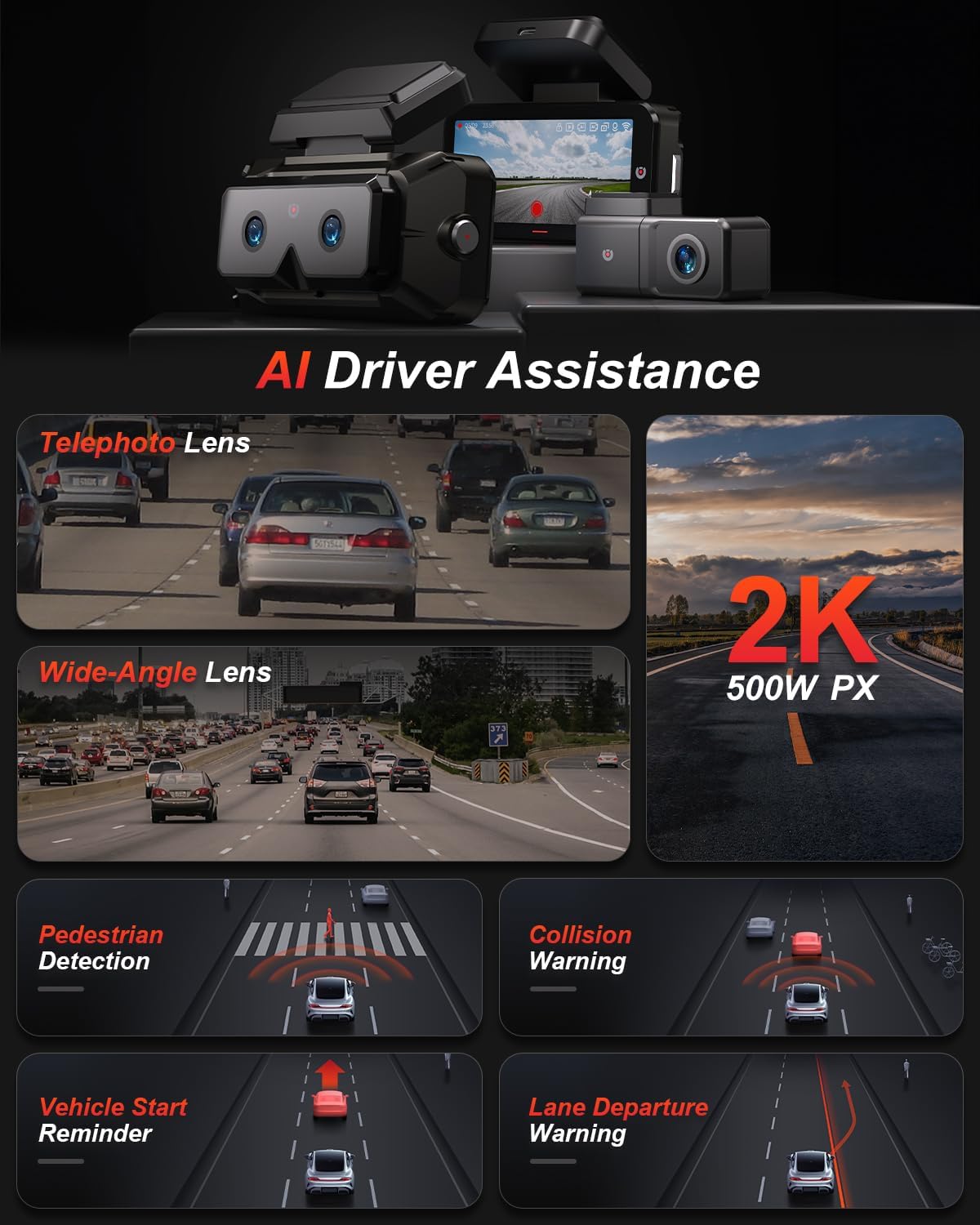
Kuva 2.1: ohiview of AI Driver Assistance features, including ADAS and BSD.

Kuva 2.2: Yksityiskohtainen view of the dash cam's main unit and rear camera, highlighting the 3.99-inch display, wide-angle and telephoto lenses, and 360-degree rotating rear camera.
3. Pakkauksen sisältö
Varmista, että pakkauksessa on kaikki tarvittavat osat:
- AKEEYO EYES Dash Cam (Main Unit)
- Takakamera
- Auton laturi
- Takakameran kaapeli
- PC Data Transmission Wire
- Sorkkarauta (kaapelin reititykseen)
- Static Electricity Sticker
- Vartalokiinnitys
- 3M liimatyynyt

Image 3.1: All components included in the AKEEYO EYES Dash Cam package.
4. Asennus ja asennus
4.1 MicroSD-kortin asennus
- Varmista, että kojelautakamera on sammutettu.
- Insert a compatible MicroSD card (Class 10 or higher, U3 V30 A2 recommended, up to 256GB) into the designated slot on the main unit until it clicks.
- Irrota kortti painamalla sitä varovasti, kunnes se ponnahtaa ulos.
4.2 Kojelaudan kameran asennus keulaan
- Puhdista tuulilasin alue, johon kojelaudan kamera asennetaan.
- Attach the static electricity sticker to the chosen area on the windshield.
- Affix the body mount with 3M adhesive to the static electricity sticker.
- Slide the main dash cam unit onto the body mount.
- Säädä kojelaudan kulmaa varmistaaksesi selkeä view edessä olevasta tiestä.
4.3 Takakameran asennus
- Choose a mounting location for the rear camera, either inside the rear window or outside near the license plate (IP67 rated for outdoor use).
- Puhdista asennuspinta huolellisesti.
- Kiinnitä takakamera mukana toimitetulla 3M-liimalla.
- Route the rear camera cable to the main dash cam unit, ensuring it does not interfere with airbags or vehicle operation. Use the crowbar to tuck cables neatly.
- Liitä takakameran kaapeli pääyksikön AV-IN-porttiin.
- If the rear camera is installed upside down, detach it from its quick-release mount and reattach it in the correct orientation. No software adjustment is needed.
4.4 Virtaliitäntä
- Connect the car charger to the Type-C port on the main dash cam unit.
- Kytke autolaturi ajoneuvosi tupakansytytinliitäntään.
- Vedä virtajohto siististi niin, ettei se estä sitä.

Image 4.1: Visual guide for the installation of the dash cam system.
5. Käyttöohjeet
5.1 Virta päälle/pois
- Kojelautakamera käynnistyy automaattisesti ja aloittaa tallennuksen, kun ajoneuvon sytytysvirta kytketään päälle.
- Se sammuu automaattisesti, kun virta katkaistaan.
- Voit käynnistää/sammuttaa virran manuaalisesti painamalla virtapainiketta ja pitämällä sitä painettuna.
5.2 Using the 4-inch IPS Touchscreen
The touchscreen allows for easy navigation and viewing:
- Elää View: Näyttää reaaliaikaisen footage from the cameras. You can view all three channels simultaneously or focus on a single camera.
- Asetukset: Access various settings such as resolution, loop recording duration, G-sensor sensitivity, and Wi-Fi.
- Toisto: Review tallennettuja videoita suoraan näytölle.
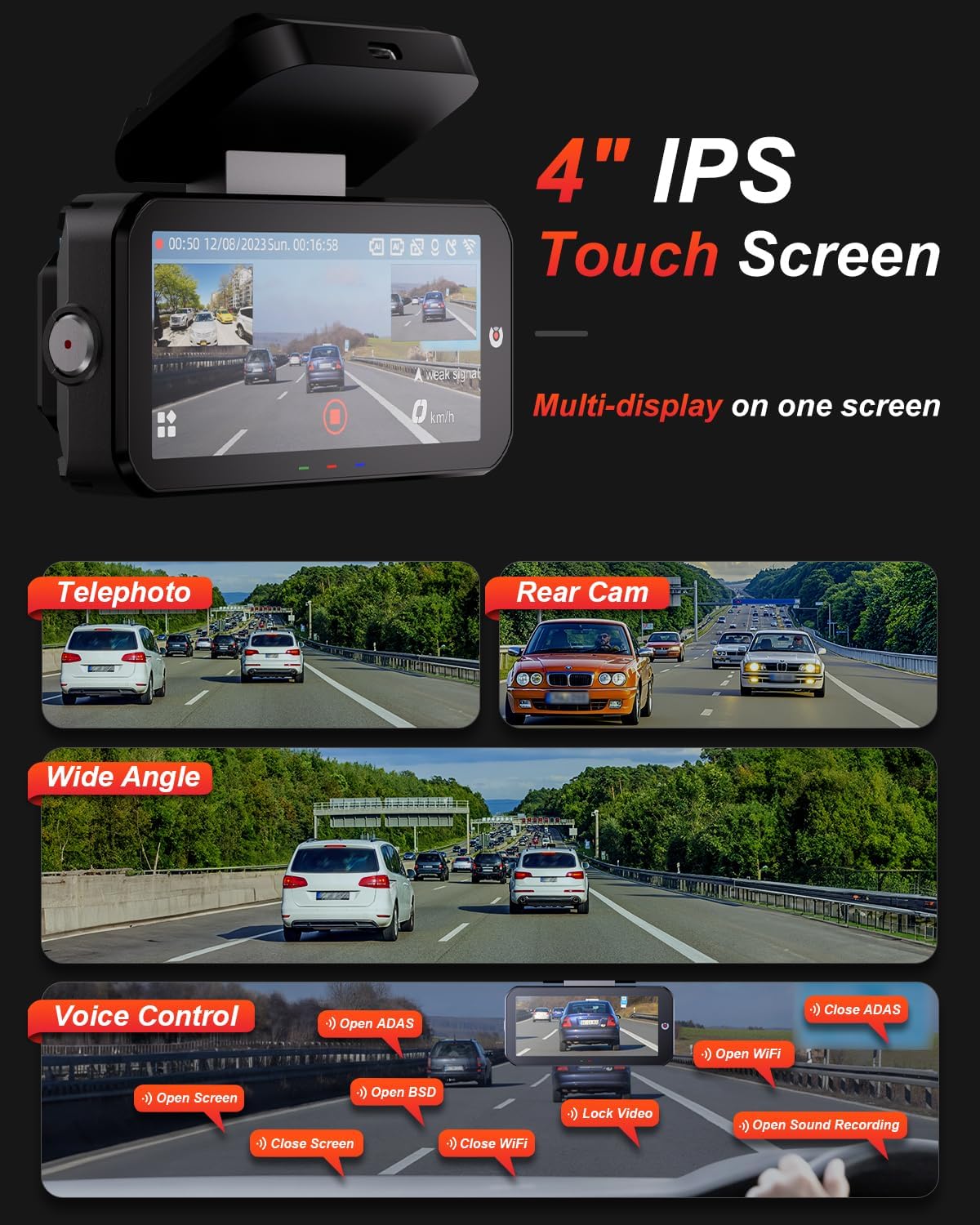
Image 5.1: The dash cam's 4-inch IPS touchscreen interface.
5.3 Ääniohjaus
Operate key functions hands-free using voice commands. Exampsisältää:
- "Open ADAS" / "Close ADAS"
- "Open BSD" / "Close BSD"
- "Open Screen" / "Close Screen"
- "Open WiFi" / "Close WiFi"
- "Lock Video" (to protect current recording)
- "Open Sound Recording"

Image 5.2: Voice control commands for hands-free operation.
5.4 Tallennustilat
- Loop-tallennus: The dash cam records continuously in segments. When the memory card is full, it automatically overwrites the oldest unlocked files.
- G-sensori: In the event of a sudden impact or collision, the built-in G-sensor automatically detects the event and locks the current video segment to prevent it from being overwritten.

Image 5.3: Loop Recording mechanism.
5.5 Pysäköintitila 24/7
When properly configured with the optional AKEEYO hardware kit (ASIN B0DHZPR4XW, sold separately), the dash cam can monitor your vehicle 24/7. It detects vibrations and records abnormal events, providing security against theft or collisions while parked. Low framerate recording can conserve storage during parking surveillance.

Image 5.4: 24/7 Parking Monitor functionality.
5.6 GPS and Wi-Fi Connectivity
- GPS: The built-in GPS module records your vehicle's speed and location data, which can be reviewed via the mobile app or PC player.
- 5G Wi-Fi: Connect your smartphone to the dash cam via the AKEEYO app (available on App Store and Google Play) using 5G Wi-Fi for fast video download, playback, editing, and sharing.

Image 5.5: 5G Wi-Fi and Global GPS connectivity.
5.7 AI Driver Assistance (ADAS & BSD)
The dash cam provides real-time alerts to enhance driving safety:
- Collision Warning: Alerts you if your vehicle is too close to the vehicle ahead or if a car slows down abruptly.
- Kaistapoikkeamisvaroitus: Ilmoittaa, jos ajoneuvosi ajautuu pois kaistaltaan ilman vilkkua.
- Kuolleen kulman valvonta (BSD): Monitors vehicles in your blind spots and provides alerts when changing lanes.
- Jalankulkijoiden havaitseminen: Identifies pedestrians in front of you at low speeds and issues an alarm.
- Etuajoneuvon käynnistysmuistutus: Reminds you when the vehicle ahead starts to move.

Image 5.6: Collision Warning system in action.

Image 5.7: Blind Spot Detection system.
6. Huolto
6.1 Laitteen puhdistaminen
- Puhdista kojelautakameran runko ja näyttö pehmeällä, kuivalla liinalla.
- For lenses, use a specialized lens cleaning cloth to avoid scratches.
- Älä käytä hankaavia puhdistusaineita tai liuottimia.
6.2 MicroSD-kortin hallinta
- Regularly format the MicroSD card (at least once a month) through the dash cam's settings to ensure optimal performance and prevent data corruption.
- Replace the MicroSD card periodically, as continuous overwriting can degrade its lifespan.
6.3 Lämpötilahuomiot
The dash cam is designed to withstand temperatures up to 176°F (80°C). However, prolonged exposure to extreme heat can affect performance. If the device becomes excessively hot, allow it to cool down before handling or removing the SD card.
7. Vianmääritys
- Kojelautakamera ei käynnisty: Check the power connection to the car charger and ensure the vehicle's cigarette lighter socket is functional.
- Tallennusongelmat: Ensure a compatible MicroSD card is inserted and formatted. Check if the card is full or corrupted. Try formatting the card or using a new one.
- Camera shutting down randomly: This could be due to a faulty SD card or extreme temperatures. Try replacing the SD card. If the issue persists, contact customer support.
- Rear camera fogging/malfunctioning: Ensure the rear camera is properly sealed if mounted externally. If mounted internally, check for condensation.
- AI features (ADAS/BSD) providing false alerts or not working: Ensure the camera lenses are clean and unobstructed. Calibrate the system if an option is available in settings. Adjust sensitivity if alerts are too frequent.
- Wi-Fi-yhteysongelmat: Ensure Wi-Fi is enabled on the dash cam and your smartphone. Restart both devices and try connecting again.
- GPS ei seuraa: Varmista, että kojelautakameran view taivaalta.
For further assistance, please contact AKEEYO customer support.
8. Tekniset tiedot
| Ominaisuus | Erittely |
|---|---|
| Tuotteen mitat | 10.24 x 7.48 x 2.76 tuumaa |
| Tuotteen paino | 2.34 kiloa |
| Mallinumero | AKEEYO-EYES-01 |
| Videon sieppaustarkkuus | 1440p (2K) |
| Näyttö | 4 tuuman IPS-kosketusnäyttö |
| Yhteystekniikka | Powerline, USB, Voice, Wi-Fi (5G) |
| Erikoisominaisuudet | 3-Channel 2K+2K+2K, GPS, Night Vision, Voice Control, Touch Control, AI ADAS & BSD Assistance, Wide-Angle, Loop Recording, G-Sensor, Telephoto Lens, 24H Parking Mode |
| Asennustyyppi | Tuulilasin kiinnike |
| Väri | Musta |
| Kenttä View | 160 Feet (Front Telephoto) / 135° (Front Wide-Angle) / 154° (Rear) |
| Tallennustuki | Up to 256GB MicroSD (Class 10, U3 V30 A2 recommended) |
| Käyttölämpötila | Jopa 176 °F (80 °C) |
9. Takuu ja tuki
- Takuu: The AKEEYO EYES Dash Cam comes with an 18-month warranty.
- Palautukset: You are eligible for returns within 30 days of purchase.
- Asiakaspalvelu: AKEEYO provides 24-hour customer service. For support, please visit the official AKEEYO websivustolta tai ota yhteyttä suoraan heidän asiakaspalveluunsa.
Ask a question about this manual
Ask about setup, troubleshooting, compatibility, parts, safety, or missing instructions. Manuals+ will review the question and use this page’s manual context to help answer it.