
1. Johdanto
The M-VAVE Chocolate-Plus is a compact and versatile wireless MIDI pedal designed to provide musicians with advanced control over their digital audio workstations (DAWs), effects pedals, and amp modelers. This portable device offers seamless integration with Windows, Mac, iOS, and Android platforms, enhancing creative freedom in studio and live performance settings.
Its durable and lightweight design, combined with a long-lasting rechargeable battery, makes it an ideal companion for any musician seeking to streamline their setup and expand their control capabilities without the clutter of cables.

Kuva: Kulmikas view of the M-VAVE Chocolate-Plus Wireless MIDI Pedal, showcasing its compact design and footswitches.
2. Tuote ohiview
2.1. Pakkauksen sisältö
Avattuasi laatikon varmista, että kaikki osat ovat mukana:
- M-VAVE Chocolate-Plus Wireless MIDI Pedal
- USB Type-C -latauskaapeli
- Käyttöopas

Image: M-VAVE Chocolate-Plus package contents, including the pedal, user manual, USB-C cable, and product box.
2.2. Laitteen asettelu
Familiarize yourself with the main components of the Chocolate-Plus pedal:
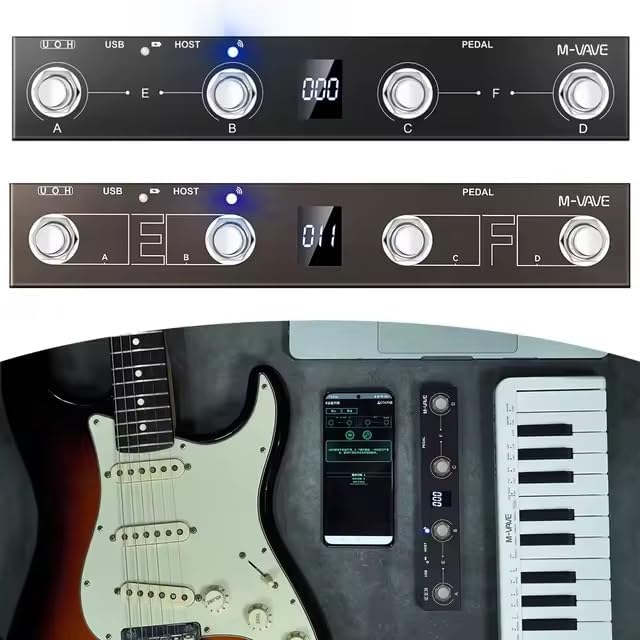
Kuva: Yläosa view of the M-VAVE Chocolate-Plus pedal, highlighting the four footswitches (A, B, C, D), the central digital display, and LED indicators for USB and HOST connections.
- Footswitches (A, B, C, D): Four programmable footswitches for triggering commands.
- Digitaalinen näyttö: Provides instant visual feedback on current settings, bank numbers, and other operational information.
- USB-portti: For wired connection to computers and charging.
- HOST-portti: For connecting and controlling other MIDI devices.
- Expression-pedaalin syöttö: For connecting an external expression pedal for dynamic control.
- Virtakytkin: Laitteen kytkeminen päälle tai pois päältä.
3. Asennus
3.1. Laitteen lataaminen
Before initial use, fully charge the Chocolate-Plus pedal. Connect the provided USB Type-C cable to the pedal's USB port and to a standard USB power adapter (not included) or a computer's USB port.
- Latausilmaisin: The LED indicator will glow punainen latauksen aikana.
- Täyden latauksen ilmaisin: LED-merkkivalo syttyy sininen kun lataus on valmis.
- Täysi lataus kestää noin 2.5 tuntia ja tarjoaa jopa 12 tuntia jatkuvaa käyttöä.
3.2. Virta päälle / pois
Locate the power switch on the side of the pedal. Slide it to the "ON" position to power on the device. Slide it to "OFF" to power off.
3.3. App Installation (for Wireless Control)
For wireless control via smartphone or tablet, download the official M-VAVE app from your device's app store (e.g., Apple App Store for iOS, Google Play Store for Android). Follow the in-app instructions for pairing and configuration.
3.4. Yhteyden muodostaminen laitteisiin
3.4.1. Wireless Connection (Bluetooth MIDI)
- Ensure the Chocolate-Plus pedal is powered on.
- Open the M-VAVE app on your iOS/Android device.
- Navigate to the connection or device pairing section within the app.
- Select "Chocolate-Plus" from the list of available devices to establish a Bluetooth MIDI connection.
- The wireless connection LED indicator will blink when searching and become solid when connected.
3.4.2. Wired Connection (USB MIDI)
- Connect the USB Type-C cable from the Chocolate-Plus pedal to a USB port on your Windows or Mac computer.
- The pedal will be recognized as a standard MIDI device.
- Open your DAW or music software and select "M-VAVE Chocolate-Plus" as a MIDI input device in the software's preferences or settings.
3.4.3. MIDI Host Connection
The integrated MIDI host port allows you to connect and control other MIDI-compatible hardware devices directly from the Chocolate-Plus pedal. Refer to the specific MIDI device's manual for connection and configuration details.
4. Operating the Chocolate-Plus
4.1. Footswitch Functions
The four footswitches (A, B, C, D) are highly customizable. Each can be programmed to send specific MIDI messages or trigger keyboard shortcuts.
- Individual Triggers: Pressing a single footswitch (A, B, C, or D) will activate its assigned function.
- Combination Triggers: Pressing two adjacent footswitches simultaneously (A+B or C+D) can activate a second set of functions, effectively doubling your control options. This is useful for complex actions like activating a looper while changing an effect bank.

Kuva: Lähikuva view of the M-VAVE Chocolate-Plus pedal's footswitches and digital display, illustrating the control interface.
4.2. Digitaalinen näyttö
The central digital display provides real-time feedback on the pedal's status, including:
- Current bank number.
- Active preset or mode.
- Yhteyden tila.
4.3. Customization and Bank Switching
The Chocolate-Plus offers extensive customization options through its dedicated app or software interface:
- Advanced Customization Mode: Program each footswitch and combination trigger to send specific MIDI CC messages, Program Change messages, or keyboard shortcuts.
- Pankin vaihto: Organize your customized presets and effect configurations into different banks. This allows for quick and organized access to various setups for different songs, sets, or projects.
- Keyboard Shortcut Mapping: Map specific keyboard commands (e.g., for DAW functions) to the footswitches, providing physical control over software actions.
4.4. Expression Pedal Input
Connect an external expression pedal (not included) to the dedicated input jack to gain dynamic, continuous control over parameters such as volume, wah, or other effects within your software or connected MIDI devices.
5. Huolto
To ensure the longevity and optimal performance of your M-VAVE Chocolate-Plus pedal, follow these maintenance guidelines:
- Puhdistus: Use a soft, dry cloth to wipe the pedal's surface. Avoid abrasive cleaners, solvents, or excessive moisture.
- Varastointi: Säilytä laitetta viileässä, kuivassa paikassa, poissa suorasta auringonvalosta, äärimmäisistä lämpötiloista ja korkeasta kosteudesta.
- Akun hoito:
- Vältä akun usein toistuvaa täydellistä tyhjentymistä.
- If storing for extended periods, charge the battery to approximately 50% every few months.
- Älä altista akkua äärimmäiselle kuumuudelle tai kylmyydelle.
- Vältä fyysisiä vaurioita: Protect the footswitches and display from heavy impacts.
6. Vianmääritys
If you encounter issues with your Chocolate-Plus pedal, refer to the following common problems and solutions:
- Laite ei käynnisty:
- Ensure the battery is charged. Connect the USB-C cable and check the charging indicator.
- Varmista, että virtakytkin on "ON"-asennossa.
- Ei langatonta yhteyttä:
- Varmista, että Bluetooth on käytössä älypuhelimellasi/tabletissasi.
- Ensure the M-VAVE app is open and attempting to connect.
- Restart both the pedal and your mobile device.
- Tarkista, onko poljin jo yhdistetty toiseen laitteeseen.
- No Wired Connection (USB MIDI):
- Ensure the USB-C cable is securely connected to both the pedal and your computer.
- Kokeile toista tietokoneesi USB-porttia.
- Verify that the Chocolate-Plus is selected as a MIDI input device in your DAW/software settings.
- Kokeile toista USB-C-kaapelia.
- Footswitches Not Responding:
- Check the digital display to ensure the pedal is in the correct operating mode or bank.
- Verify that the footswitches are correctly mapped within the M-VAVE app or your DAW.
- Ensure the pedal is properly connected (wired or wireless) to your control device.
- Difficulty with Configuration:
- Refer to the detailed instructions within the M-VAVE app for advanced customization.
- Consult online resources or the manufacturer's support for specific software integration guides.
7. Tekniset tiedot
| Merkki | M-VAVE |
| Malli | Chocolate-Plus |
| Yhteystekniikka | USB, Wireless (Bluetooth MIDI) |
| Erikoisominaisuudet | Digital display, Portable, Wireless connection |
| Mitat (P x L x K) | 230mm x 40mm x 40mm |
| Paino | 250 grammaa |
| Yhteensopivat laitteet | Computer (desktop/laptop), Smartphone, Tablet |
| Compatible Software/OS | Windows, Mac, iOS, Android |
| Ohjaustyyppi | Buttons and pedal controller |
| Laitteistorajapinta | USB, USB 2.0 |
| Valvontamenetelmä | Sovellus |
| Akun kesto | Jopa 12 tuntia |
| Latausaika | Noin 2.5 tuntia (USB Type-C:n kautta) |
8. Takuu ja tuki
8.1. Rajoitettu takuu
The M-VAVE Chocolate-Plus pedal comes with a limited warranty. Please refer to the manufacturer's official website or the warranty card included in your package for specific terms and conditions regarding warranty coverage and duration.
8.2. Asiakastuki
For further assistance, technical support, or inquiries not covered in this manual, please visit the official M-VAVE websivustolla tai ota yhteyttä heidän asiakaspalveluunsa. Yhteystiedot löytyvät yleensä tuotepakkauksesta tai valmistajan websivusto.


