
1. Tuote ohiview
The GEARELEC S3 is an advanced motorcycle helmet Bluetooth headset integrated with a 1080P HD camera. Designed for enhanced communication and recording during rides, it features full-duplex intercom for up to 8 riders, G-Sensor lock for collision footage, and a 128GB TF card for extensive recording. It also includes HiFi stereo sound, music sharing, FM radio, and triple noise reduction technology for clear audio even at high speeds. The device is built with an IP65 waterproof rating and a long-lasting 2000mAh battery.
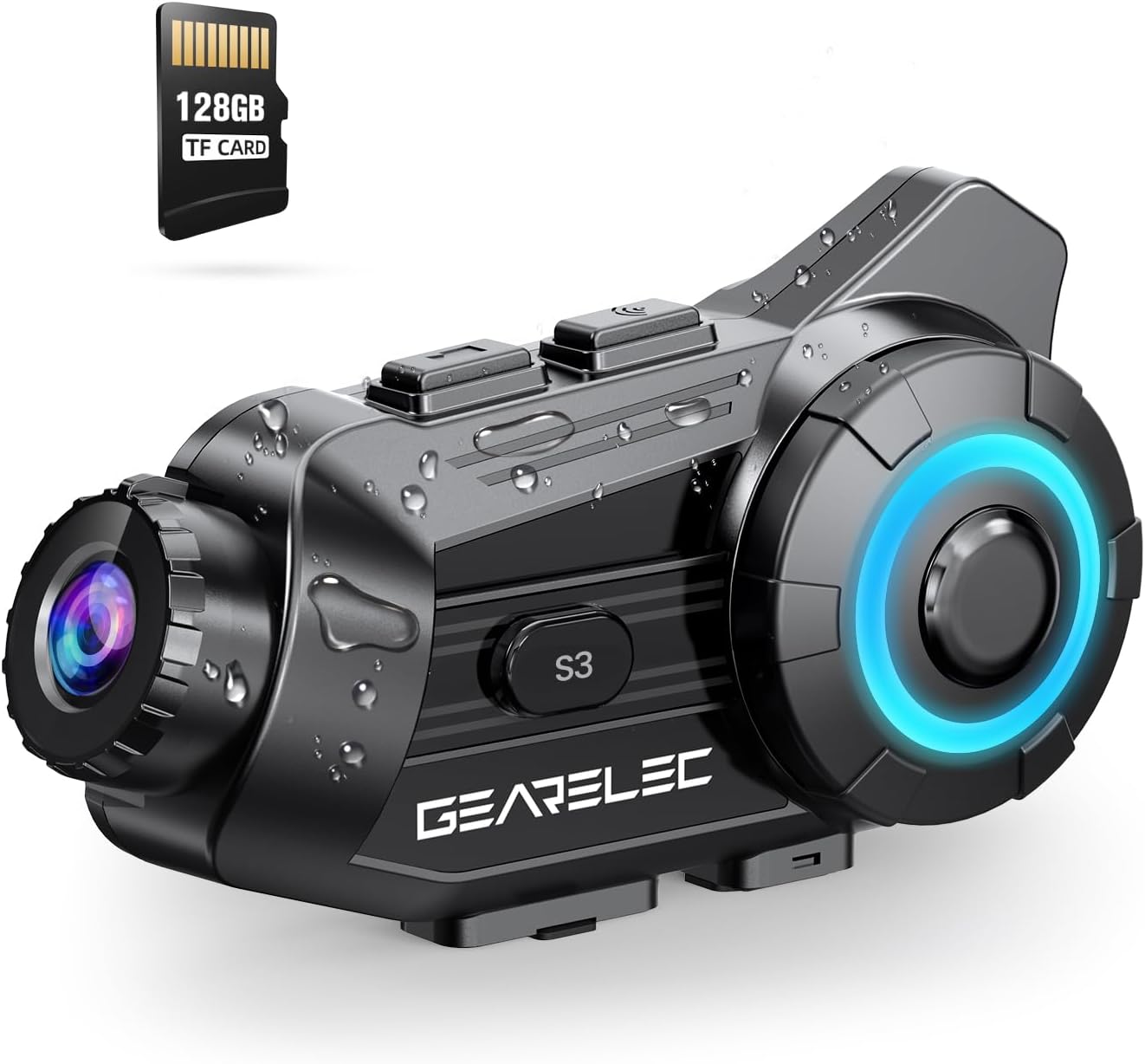
Figure 1: GEARELEC S3 Main Unit with 128GB TF Card.
2. Pakkauksen sisältö
Varmista, että pakkauksessa on kaikki tarvittavat osat:
- GEARELEC S3 Main Unit
- Headset Speakers and Microphone Kit
- Mounting Bracket (Clip and Adhesive)
- USB-latauskaapeli
- 128GB TF-kortti (esiasennettu tai erillinen)
- Käyttöopas (tämä asiakirja)
3. Asennus ja asennus
3.1 Laitteen lataaminen
Before first use, fully charge the S3 unit. Connect the provided USB charging cable to the charging port on the S3 unit and to a standard USB power adapter (not included). The charging indicator light will show the charging status. A full charge takes approximately 3 hours.

Figure 2: Battery capacity and charging details. The 2000mAh battery provides up to 100 hours of music time and 7 hours of video recording.
3.2 TF-kortin asentaminen
The S3 comes with a 128GB TF card. Locate the TF card slot on the unit. Gently insert the TF card into the slot until it clicks into place. Ensure the card is inserted correctly to enable video recording and storage.
3.3 Kiinnitys kypärään
Choose between the clip-on bracket or the adhesive bracket for mounting the S3 unit to your helmet. Ensure the mounting location allows for optimal camera view and easy access to controls. Securely attach the speakers inside the helmet's ear pockets and position the microphone near your mouth for clear audio.
4. Käyttöohjeet
4.1 Virta päälle/pois
- Virta päälle: Paina virtapainiketta ja pidä sitä painettuna noin 3 sekuntia, kunnes merkkivalo syttyy.
- Virta pois: Paina virtapainiketta ja pidä sitä painettuna noin neljän sekunnin ajan, kunnes merkkivalo sammuu.
4.2 Bluetooth-pariliitos mobiililaitteen kanssa
- Ensure the S3 unit is powered off.
- Press and hold the Power button for about 5-7 seconds until the indicator light flashes rapidly, indicating pairing mode.
- Ota Bluetooth käyttöön matkapuhelimessasi ja hae käytettävissä olevia laitteita.
- Select "GEARELEC S3" from the list.
- Kun pariliitos on muodostettu, merkkivalo muuttuu ja kuulet vahvistusäänen.
4.3 Sisäpuhelinkommunikaatio
The S3 supports full-duplex intercom for 2 to 8 riders within a 2000-meter range.
- Ensure all S3 units are powered on and within range.
- Initiate intercom pairing according to the specific instructions for multi-unit connection (refer to the quick start guide for detailed steps on group pairing).
- Once connected, riders can communicate freely.

Figure 3: Intercom communication for multiple riders.
4.4 Camera Operation and Recording
The integrated 1080P HD camera captures video at 30 frames per second and 2MP still images. It features a 135° wide-angle lens and 20° lens rotation for flexible shooting angles.
- Aloita/Lopeta tallennus: Press the Camera button once to start recording. Press again to stop.
- Ota valokuva: Press and hold the Camera button briefly to capture a still image.
- G-sensorin lukitus: The built-in gravity sensor automatically detects collisions and locks the current recording segment to prevent it from being overwritten, serving as protected evidence.
- Loop-tallennus: When the TF card is full, the system automatically overwrites the oldest unprotected files, varmistaen jatkuvan tallennuksen.

Figure 4: 1080P HD lens with 20° rotation for clear shooting.

Figure 5: Loop Recording and Gravity Sensor functionality.
4.5 Using the "RoadCam" App
The S3 has a built-in Wi-Fi module, allowing you to connect to the "RoadCam" application on your smartphone (available on Google Play and the App Store). This app enables you to view recorded videos and photos directly on your phone, and download them for sharing or backup.

Figure 6: "RoadCam" App for viewing and downloading media.
4.6 Audio Features (Music, FM, Noise Reduction)
- Musiikin toisto: Once paired with your phone, play music through your phone's media player. The S3's 40MM HiFi stereo speakers provide strong bass and clear sound.
- Musiikin jakaminen: The S3 supports music sharing between two riders within 30-50 meters. Activate this feature through the device controls or app.
- FM-radio: Tune into FM radio stations directly from the S3 unit.
- Melunvaimennus: Equipped with DSP & CVC noise reduction and a windproof microphone, the S3 minimizes wind and engine noise, ensuring clear calls and music even at speeds up to 80mph.

Figure 7: HiFi Stereo Sound with 40mm speakers.

Figure 8: Triple Noise-Reduction Technology for clear audio.
5. Huolto ja hoito
- Puhdistus: Wipe the S3 unit with a soft, damp kangas. Älä käytä voimakkaita kemikaaleja tai hankaavia puhdistusaineita.
- Vedenkestävyys: The S3 has an IP65 waterproof rating, making it suitable for use in rain and snow. However, avoid submerging the device in water.
- Varastointi: Säilytä laitetta viileässä ja kuivassa paikassa, kun sitä ei käytetä. Vältä äärimmäisiä lämpötiloja.
- Akun hoito: For optimal battery life, avoid fully discharging the battery frequently. Charge the device regularly, even if not in active use for extended periods.
6. Vianmääritys
| Ongelma | Mahdollinen syy | Ratkaisu |
|---|---|---|
| Laite ei käynnisty. | Akku vähissä. | Lataa laitetta vähintään 3 tuntia. |
| Ei voi muodostaa pariliitosta puhelimen kanssa. | Laite ei ole pariliitostilassa; Bluetooth pois päältä puhelimesta; liian monta paritettua laitetta. | Ensure S3 is in pairing mode. Turn phone Bluetooth off/on. Clear old Bluetooth connections on phone. |
| Huono äänenlaatu/kohinaa. | Microphone not positioned correctly; high wind noise; speaker placement. | Adjust microphone closer to mouth. Ensure speakers are aligned with ears. Noise reduction works best at certain speeds. |
| Kamera ei tallenna. | TF card full or not inserted correctly; card error. | Check TF card insertion. Format TF card (backup data first). Ensure sufficient space. |
| Intercom connection unstable. | Kantaman ulkopuolella; häiriö; akku vähissä. | Ensure riders are within 2000m. Avoid obstacles. Charge devices. |
7. Tekniset tiedot
| Ominaisuus | Yksityiskohta |
|---|---|
| Mallin nimi | S3 |
| Videokameran tyyppi | Toimintakamera |
| Videon sieppaustarkkuus | 1080p |
| Videon kaappausmuoto | MP4 |
| Valokuvatunnistintekniikka | CMOS |
| Suurin aukko | 1.8 millimetriä |
| Linssin kulma | 135° laajakulma |
| Linssin kierto | 20° |
| Yhteystekniikka | Langaton (Bluetooth, Wi-Fi) |
| Erikoisominaisuudet | Noise Cancellation (DSP & CVC), G-Sensor Lock, Loop Recording, Music Sharing, FM Radio |
| Intercom-alue | Up to 2000 meters (full-duplex) |
| Max Riders (sisäpuhelin) | 8 ratsastajaa |
| Akun kapasiteetti | 2000 mAh |
| Latausaika | Noin 3 tuntia |
| Musiikin aika | Jopa 100 tuntia |
| Videon tallennusaika | Jopa 7 tuntia |
| Vesitiivis luokitus | IP65 |
| Tuotteen paino | 15.2 unssia |
| Väri | Musta |
8. Takuu ja tuki
For any questions, technical assistance, or warranty inquiries regarding your GEARELEC S3, please contact the seller directly. The seller, RuiSi Elctric, typically responds to inquiries within 6 hours.
To contact support, please visit the product page on Amazon and click on the seller's name "RuiSi Elctric" followed by "ASK A QUESTION".