
1. Johdanto
The Inrico T320 is a sophisticated 4G Internet Mobile Radio designed for reliable and efficient communication. This device combines the functionality of a walkie-talkie with the versatility of an Android 7.0 smartphone, offering global intelligent intercom capabilities, WiFi, Bluetooth, and GPS positioning. Built with military-grade robustness, the T320 is suitable for various demanding environments.
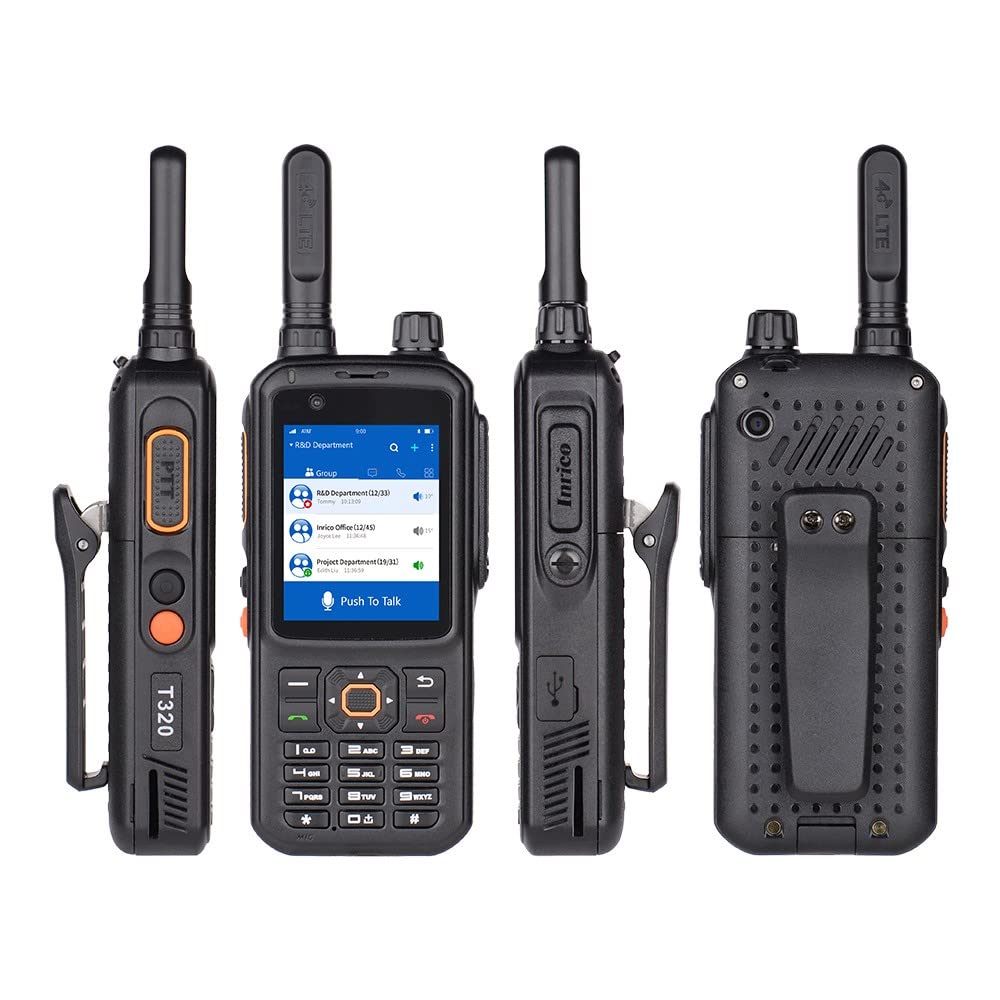
Image 1.1: The Inrico T320 radio highlighting its multifunctional design, smart touch screen, integrated WiFi/Bluetooth/GPS, dual camera, and clear audio.
2. Turvallisuustiedot
Please read all safety information before using the device to ensure safe and proper operation. Keep this manual for future reference.
- Akun turvallisuus: Use only the specified battery and charger. Do not disassemble, puncture, or short-circuit the battery. Dispose of batteries properly according to local regulations.
- Lataus: Charge the device in a well-ventilated area. Do not charge near flammable materials.
- Vedenkestävyys: The device is IP67 rated for water and dust resistance. Ensure all port covers are securely closed before exposure to water or dust. Do not intentionally submerge the device.
- Toimintaympäristö: Vältä altistamasta laitetta äärimmäisille lämpötiloille, suoralle auringonvalolle tai korkealle kosteudelle.
- Häiriöt: Turn off the device in areas where radio communication is prohibited or when it may cause interference or danger, such as in hospitals, aircraft, or near blasting sites.
3. Pakkauksen sisältö
Carefully unpack your Inrico T320 and check for the following items:
- 1 x Inrico T320 Walkie Talkie
- 1 x litiumioniakku
- 1 x Antenna
- 1 x USB-laturi
- 1 x vyöklipsi
- 1 x Lanyard (Hanging Strap)
- 1 x Käyttöohje
Jos jokin osa puuttuu tai on vaurioitunut, ota yhteyttä jälleenmyyjään.
4. Tuote ohiview
4.1 Tärkeimmät ominaisuudet
- 4G LTE/PoC Connectivity: Supports global intelligent intercom over 4G networks.
- Android 7.0 -käyttöjärjestelmä: Provides a familiar and versatile user experience.
- Zello/Real PTT Compatibility: Seamless integration with popular Push-to-Talk over Cellular applications.
- Integrated WiFi & Bluetooth: For wireless connectivity and data transfer. Can function as a WiFi hotspot.
- GPS-paikannusjärjestelmä: For location tracking and navigation.
- Kaksoiskamerat: Front and rear cameras with autofocus function.
- Robust & Durable Design: Military-grade quality, IP67 dust and water resistance.
- Parannettu ääni: 36mm diameter speaker with noise reduction capabilities.

Image 4.1: The Inrico T320 display showing icons for GPS, WiFi, Bluetooth, and SOS functions, indicating its integrated features.
4.2 Fyysiset komponentit
Familiarize yourself with the various parts of your T320 radio:
- Antenni: Signaalin vastaanottoa ja lähetystä varten.
- PTT-painike: Push-to-Talk-painike välitöntä viestintää varten.
- Virtapainike: To turn the device on/off and manage screen lock.
- Äänenvoimakkuuden säätö: Buttons or knob to adjust audio levels.
- Näyttö: Touchscreen interface for navigation and information display.
- Front/Rear Cameras: For capturing images and video.
- USB-portti: Lataamiseen ja tiedonsiirtoon.
- Kaiutin/mikrofoni: Äänituloa ja -lähtöä varten.

Kuva 4.2: Ylä- ja sivukuva views of the Inrico T320, illustrating the antenna connection, various ports, and control buttons.

Kuva 4.3: Yksityiskohtainen sivukuva views of the Inrico T320, highlighting the Push-to-Talk (PTT) button and the USB charging/data port.
5. Asennus
5.1 Akun asennus
- Varmista, että laitteen virta on katkaistu.
- Paikanna laitteen takaosassa oleva paristolokeron kansi.
- Open the cover by sliding or lifting it according to the markings.
- Insert the Lithium-Ion battery, aligning the contacts correctly.
- Sulje paristolokeron kansi tiiviisti, kunnes se napsahtaa paikalleen.
5.2 SIM Card / SD Card Installation
The T320 supports 4G connectivity and expandable storage. Refer to the device's specific slot locations for SIM and SD card insertion. Typically, these slots are located under the battery or on the side, protected by a cover.
- Power off the device and remove the battery if necessary.
- Open the SIM/SD card slot cover.
- Insert the SIM card (and optional SD card) into the designated slots with the gold contacts facing down.
- Close the cover firmly to maintain water and dust resistance.
5.3 Antennin kiinnitys
- Paikanna antennin liitin laitteen yläosasta.
- Kierrä mukana toimitettua antennia myötäpäivään liittimeen, kunnes se on sormitiukalla. Älä kiristä liikaa.
5.4 Ensimmäinen lataus
Lataa laite täyteen ennen ensimmäistä käyttökertaa.
- Connect the USB charger cable to the device's USB port.
- Liitä laturi pistorasiaan.
- The charging indicator will illuminate. Charging is complete when the indicator changes color or turns off (refer to device screen for battery status).
6. Käyttöohjeet
6.1 Virta päälle/pois
- Virran kytkeminen: Press and hold the Power button until the screen lights up and the device boots.
- Virran sammuttaminen: Press and hold the Power button until the power options appear on the screen. Select 'Power Off'.
6.2 Perusnavigointi
The T320 features an Android 7.0 operating system with a touchscreen interface. Navigate through menus and applications by tapping, swiping, and using the physical buttons as needed.
6.3 Push-to-Talk (PTT) Functionality
The T320 is compatible with PTT over Cellular (PoC) applications like Zello and Real PTT. Ensure the application is installed and configured.
- Open your preferred PTT application (e.g., Zello).
- Select the desired contact or group for communication.
- Press and hold the dedicated PTT button on the side of the device to transmit your voice.
- Release the PTT button to listen for incoming messages.
6.4 WiFi-yhteys
- Siirry osoitteeseen Asetukset > Wi-Fi.
- Wi-Fi päälle/pois On.
- Valitse haluamasi verkko luettelosta ja anna salasana, jos sitä pyydetään.
- The device can also act as a WiFi hotspot when a SIM card with a data plan is active.
6.5 Bluetooth -pariliitos
- Siirry osoitteeseen Asetukset > Bluetooth.
- Kytke Bluetooth päälle On.
- Laite etsii käytettävissä olevia Bluetooth-laitteita.
- Select the device you wish to pair with and follow the on-screen instructions.
6.6 GPS-paikannus
The T320 has an integrated GPS system for location services. Ensure location services are enabled in the device settings for applications to utilize GPS data.
6.7 Kameran käyttö
The device features front and rear cameras with autofocus. Open the camera application from the home screen or app drawer to capture photos and videos.

Image 6.1: The Inrico T320 showcasing its front and rear cameras, both equipped with autofocus functionality.
7. Huolto
7.1 Puhdistus
- Pyyhi laite pehmeällä, damp kangas. Älä käytä voimakkaita kemikaaleja tai hankaavia puhdistusaineita.
- Varmista, että kaikki porttien kannet ovat kiinni ennen puhdistamista mainoksellaamp kangas.
7.2 Akun hoito
- Akun käyttöiän pidentämiseksi vältä akun usein tapahtuvaa täydellistä tyhjentymistä.
- Säilytä laitetta osittain ladatulla akulla, jos sitä ei käytetä pitkään aikaan.
7.3 Varastointi
- Säilytä laitetta viileässä, kuivassa paikassa, poissa suorasta auringonvalosta ja äärimmäisistä lämpötiloista.
- Keep the device away from magnetic fields.
8. Vianmääritys
If you encounter issues with your Inrico T320, refer to the following common problems and solutions:
| Ongelma | Mahdollinen syy | Ratkaisu |
|---|---|---|
| Laite ei käynnisty | Akun varaus vähissä; Akku ei ole asennettu oikein; Laitteen toimintahäiriö. | Charge the battery; Reinstall the battery; Contact support. |
| Ei verkkoyhteyttä | No SIM card; SIM card not activated; Out of network coverage; WiFi off. | Install SIM card; Contact service provider; Move to an area with coverage; Enable WiFi. |
| Huono äänenlaatu / Kohinaa | Weak signal; Obstructions; Speaker/microphone blocked. | Move to an open area; Clear speaker/microphone openings. |
| PTT not working | PTT application not running; No internet connection; Incorrect group/contact selected. | Launch PTT app; Check network connection; Verify PTT app settings. |
Jos ongelma jatkuu näiden ratkaisujen kokeilemisen jälkeen, ota yhteyttä asiakastukeen.
9. Tekniset tiedot
| Mallinumero | T320 |
| Mitat (P x L x K) | 14 x 6.4 x 2.8 cm |
| Paino | 257 g |
| Akun tyyppi | 1 litiumionia |
| Average Battery Duration | 9 tuntia |
| Käyttöjärjestelmä | Android 7.0 |
| Yhteydet | 4G LTE (GSM B2/B3/B5/B8, WCDMA B1/B2/B5/B8, TDD-LTE B38/B39/B40/B41, FDD-LTE: B1/B3/B5/B7/B8/B20/B28a/B28b), WiFi, Bluetooth |
| Vedenkestävyysluokitus | IP67 |
| Erikoisominaisuudet | GPS, Dual Cameras (Autofocus), Dustproof, Long Range, Lightweight, Rechargeable, Noise Reduction |
| Kanavien lukumäärä | 2 |
| Virittimen tyyppi | UHF |
| FCC-tunnus | 2AIV6-T320 |
10. Takuu ja tuki
For warranty information, please refer to the documentation provided at the time of purchase or contact your retailer. The manufacturer of this product is G camolech.
For technical support or service inquiries, please contact the seller or manufacturer directly. Keep your purchase receipt and product model number (T320) handy when seeking support.