
Johdanto
This manual provides detailed instructions for the installation, operation, and maintenance of your DEXTER PP120 Smart Digital Handle Lock. Please read this guide carefully before attempting to install or operate the lock to ensure proper functionality and safety. Keep this manual for future reference.
Tuotteen ominaisuudet
The DEXTER PP120 Smart Digital Handle Lock offers multiple convenient and secure access methods:
- Sovelluksen hallinta: Unlock and manage your lock remotely via a dedicated smartphone application.
- Sormenjälkien tunnistus: Fast and secure access using registered fingerprints.
- Key Access: Traditional mechanical key override for emergency situations.
- Numeerinen salasana: Keypad entry with a customizable numeric code.
- Unlock Card: Convenient access using RFID unlock cards.
- IP53-vedenkestävyys: Designed to withstand splashes and dust, suitable for various environments.
- Wi-Fi-yhteys: Seamless integration with your home network for remote management and monitoring.
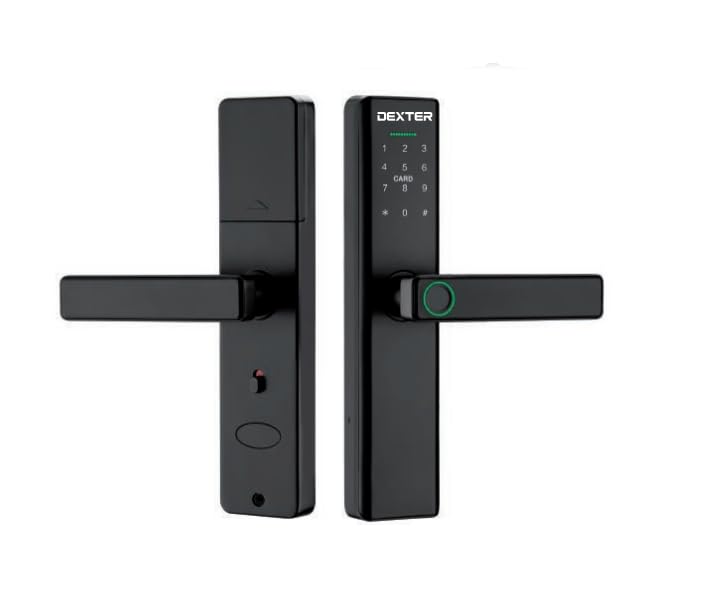
This image illustrates the DEXTER PP120 Smart Digital Handle Lock, highlighting its key features: App control, fingerprint recognition, key access, numeric passcode, unlock card functionality, IP53 water resistance, and Wi-Fi connectivity. The image also includes a table detailing model variations (PP120 and PP120 WIFI) with their article numbers, type (Embutir - Mortise), finish (Negro - Black), and master quantity.
Pakkauksen sisältö
Ennen asennuksen aloittamista varmista, että pakkauksessa on kaikki seuraavat osat:
- Front Handle Assembly (with keypad and fingerprint sensor)
- Rear Handle Assembly (with battery compartment)
- Kiinnityslukon runko
- Vastalevy ja vastarasia
- Kiinnitysruuvit ja tarvikkeet
- Physical Keys (Emergency Override)
- Unlock Cards
- Käyttöopas
Asennus ja asennus
Proper installation is crucial for the lock's performance. If you are unsure about any step, consult a professional locksmith.
- Oven valmistelu: Ensure your door meets the lock's specifications regarding thickness and backset. Use the provided template to drill necessary holes if your door is not pre-drilled for a smart lock.
- Kiinnityslukon asennus: Insert the mortise lock body into the edge of the door. Secure it with the provided screws.
- Handle Assembly Installation: Connect the cable from the front handle assembly to the rear handle assembly. Carefully align and insert the spindle and mounting posts through the mortise lock. Secure both handle assemblies to the door using the provided screws.
- Akun asennus: Open the battery cover on the rear handle assembly. Insert four (4) AA alkaline batteries, ensuring correct polarity. Close the battery cover.
- Sovelluksen lataus ja pariliitos:
- Download the DEXTER smart lock application from your device's app store.
- Luo tili ja kirjaudu sisään.
- Follow the in-app instructions to add your new lock. This typically involves activating Bluetooth on your phone and bringing it close to the lock.
- Once paired via Bluetooth, the app will guide you through connecting the lock to your home Wi-Fi network for remote access and advanced features.
- Alkuasennus: Set up an administrator passcode and fingerprint through the app immediately after pairing.
Käyttöohjeet
Oven lukituksen avaaminen
- Sovelluksen käyttäminen: Open the DEXTER app, select your lock, and tap the unlock icon.
- Sormenjäljen käyttö: Place a registered finger flat on the fingerprint sensor located on the handle. The lock will unlock if the fingerprint is recognized.
- Using Numeric Passcode: Touch the keypad to activate it. Enter your registered 6-10 digit passcode, followed by the '#' key.
- Using Unlock Card: Present a registered unlock card to the card reader area on the front handle. The lock will unlock upon successful recognition.
- Using Physical Key: In case of battery depletion or electronic malfunction, insert the physical key into the emergency keyhole (usually hidden) and turn to unlock.
Oven lukitseminen
- Automaattinen lukitus: The lock is designed to automatically re-lock after a preset time (configurable in the app) once the door is closed.
- Manuaalinen lukitus (sisältä): Lift the handle upwards from the inside to engage the deadbolt.
- Manual Locking (via App): Use the DEXTER app to remotely lock the door.
User Management (via DEXTER App)
The DEXTER app allows you to manage access for various users:
- Käyttäjien lisääminen: Grant access to family members or guests by adding their fingerprints, creating unique passcodes, or assigning unlock cards.
- Modifying Access: Change existing passcodes, update fingerprints, or set time-limited access for specific users.
- Käyttäjien poistaminen: Revoke access by deleting user profiles, fingerprints, passcodes, or unlock cards.
- Käyttölokit: View a history of who entered and when (requires Wi-Fi connection).
Huolto
To ensure the longevity and optimal performance of your DEXTER PP120 lock, follow these maintenance guidelines:
- Akun vaihto: Replace all four AA batteries when the low battery warning is indicated by the lock or in the app. Always use new, high-quality alkaline batteries. Do not mix old and new batteries or different battery types.
- Puhdistus: Pyyhi lukon pinta pehmeällä, kuivalla liinalla. Vältä hankaavien puhdistusaineiden, liuottimien tai voimakkaiden kemikaalien käyttöä, sillä ne voivat vahingoittaa pintakäsittelyä ja elektronisia komponentteja.
- Laiteohjelmistopäivitykset: Regularly check the DEXTER app for available firmware updates. Installing updates ensures your lock has the latest features, security enhancements, and bug fixes.
- Mekaaninen tarkistus: Periodically check that all screws are tight and the handle operates smoothly. Do not force the handle if it feels stiff.
Vianetsintä
If you encounter issues with your DEXTER PP120 lock, refer to the following common problems and solutions:
- Lukko ei vastaa:
- Tarkista akun taso ja vaihda tarvittaessa.
- Varmista, että lukko on asennettu oikein ja kaikki kaapelit on kytketty.
- If using the app, ensure Bluetooth is enabled and you are within range.
- Sormenjälkeä ei tunnistettu:
- Varmista, että sormesi on puhdas ja kuiva.
- Kokeile asettaa sormesi anturille eri asentoihin.
- If issues persist, delete and re-register your fingerprint in the app.
- Numeric passcode not working:
- Ensure you are entering the correct passcode followed by the '#' key.
- Check if the passcode has expired or been disabled in the app.
- Wi-Fi-yhteysongelmat:
- Varmista, että kotisi Wi-Fi-verkko on aktiivinen ja vakaa.
- Ensure the lock is within range of your Wi-Fi router.
- Try reconnecting the lock to Wi-Fi through the DEXTER app settings.
- Lock is jammed or stiff:
- Älä pakota kahvaa.
- Check for any obstructions in the door frame or mortise.
- Ensure the lock is correctly aligned and installed.
Tekniset tiedot
| Erittely | Yksityiskohta |
|---|---|
| Merkki | DEXTER |
| Mallin nimi | Dexter Pp120 |
| Mallinumero | Dexter Pp120 |
| Lukon tyyppi | Elektroninen lukko |
| Valvontamenetelmä | Sovellus |
| Yhteydet | Bluetooth, WiFi |
| Vedenkestävyys | IP53 |
| GTIN-koodi / UPC-koodi | 633349060758 |
Takuu ja tuki
For detailed warranty information, product registration, and technical support, please visit the official DEXTER website or contact DEXTER customer service directly. Keep your purchase receipt as proof of purchase for warranty claims.