
Johdanto
The Linsoul Kiwi Ears Allegro Mini is a compact and portable Digital-to-Analog Converter (DAC) and amplifier designed to elevate your audio experience. It provides high-fidelity sound for your in-ear monitors (IEMs) and headphones, connecting seamlessly to various devices via USB-C. This manual will guide you through the setup, operation, and maintenance of your Allegro Mini to ensure optimal performance.

Image: The Kiwi Ears Allegro Mini, a compact silver DAC with a USB-C connector and audio output ports.
Mitä laatikossa on
- Kiwi Ears Allegro Mini Portable IEM DAC
- Käyttöopas
Asennus
- Yhdistä laitteeseen: Insert the USB-C connector of the Allegro Mini into the USB-C port of your smartphone, tablet, or computer. Ensure a secure connection.
- Connect Headphones/IEMs: Plug your 3.5mm single-ended or 4.4mm balanced headphones/IEMs into the corresponding output port on the Allegro Mini.
- Automaattinen tunnistus: Most modern Android devices (version 5.1 and above), PCs, and other compatible devices will automatically recognize the Allegro Mini as an external audio output device. No additional drivers are typically required for basic functionality.
- Äänenvoimakkuuden säätö: Säädä äänenvoimakkuutta yhdistetyn laitteen äänenvoimakkuuden säätimillä.
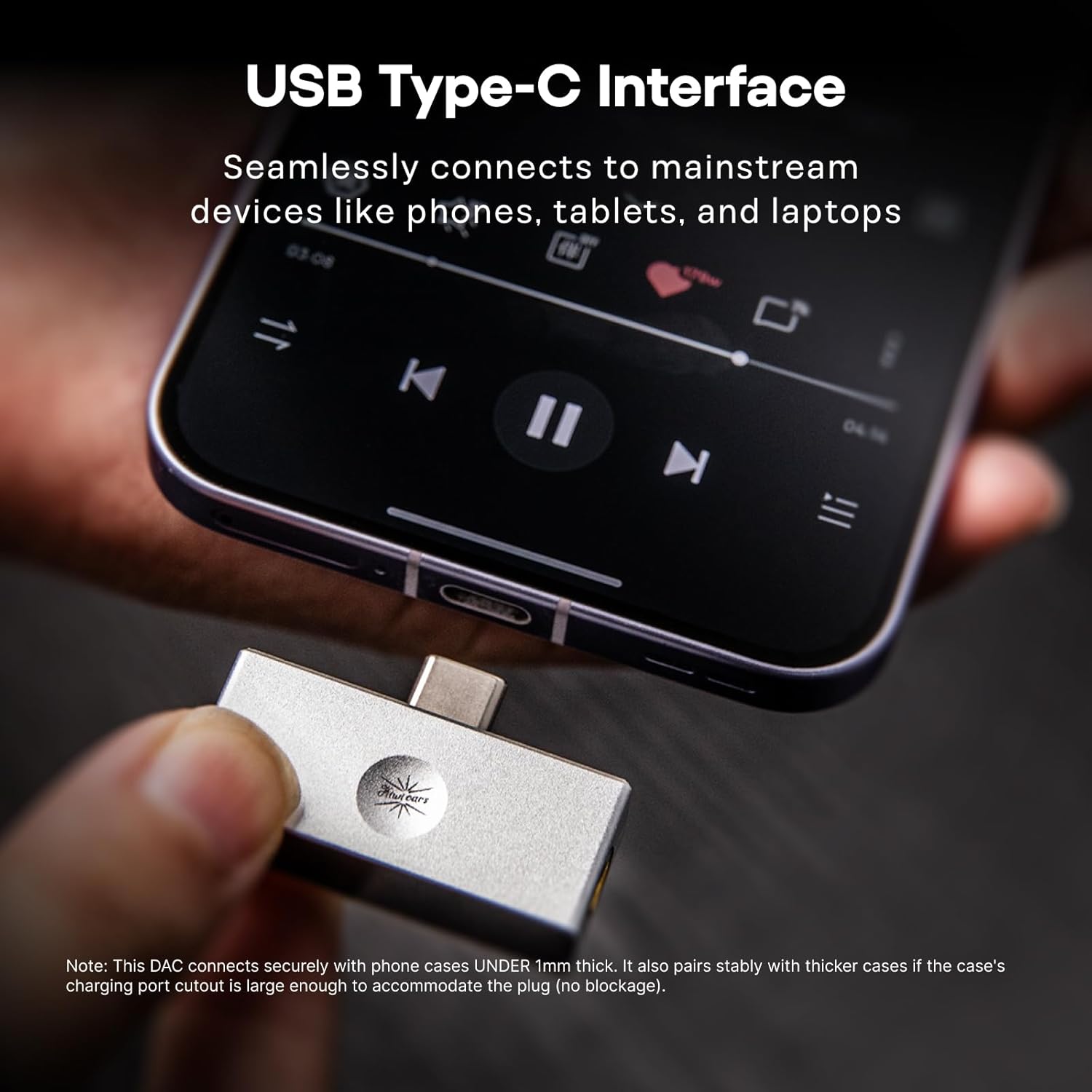
Image: The Allegro Mini connected to a smartphone via its USB-C port, with an IEM cable plugged into the 3.5mm output.
Käyttöohjeet
- Plug and Play: The Allegro Mini is designed for immediate use. Simply connect it to your source device and audio output.
- Äänen toisto: Begin playing audio from your device. Sound will be routed through the Allegro Mini to your connected headphones or IEMs.
- Äänenvoimakkuuden säätö: Use the volume buttons on your connected smartphone, tablet, or computer to adjust the playback volume.
- Lähtövaihtoehdot: The Allegro Mini features both 3.5mm single-ended and 4.4mm balanced output ports. Choose the appropriate port for your headphones or IEMs. The 4.4mm balanced output may offer improved sound quality and power for compatible headphones.

Image: The Allegro Mini connected to a smartphone, demonstrating its plug-and-play functionality for audio playback.
Ominaisuudet
- Kompakti ja kannettava muotoilu: Inspired by the original Allegro, the Mini version offers high-fidelity sound in a smaller, all-aluminum alloy body for enhanced durability and a minimalist aesthetic.
- Flexible Output Options: Equipped with both 4.4mm balanced and 3.5mm single-ended outputs to accommodate a wide range of headphones and IEMs.
- High-Resolution Audio Performance: Supports PCM up to 32bit/384kHz and DSD up to DSD128, ensuring detailed and clear audio reproduction.
- Yleinen yhteensopivuus: Features a USB Type-C interface for seamless plug-and-play connection with most modern Android devices (version 5.1 and above), as well as PCs and other compatible devices.
- Superior Audio Clarity: Achieves an ultra-low THD+N of 0.004% at 32 Ohms, providing pure, undistorted sound with a wide frequency response and excellent signal-to-noise ratio.

Image: The Allegro Mini highlighting its 3.5mm single-ended and 4.4mm balanced output options.
Tekniset tiedot
| Attribuutti | Arvo |
|---|---|
| Merkki | Linsoul |
| Mallin nimi | Kiwi Ears Allegro Mini |
| Väri | Hopea |
| Yhteystekniikka | Wired (USB Type-C input) |
| Lähtöportit | 3.5 mm:n yksipäinen, 4.4 mm:n tasapainotettu |
| PCM -tuki | Jopa 32bit/384kHz |
| DSD-tuki | DSD128 asti |
| THD+N | 0.004% (at 32 Ohms) |
| Muototekijä | Mini kannettava |
| Valmistaja | Linsoul |
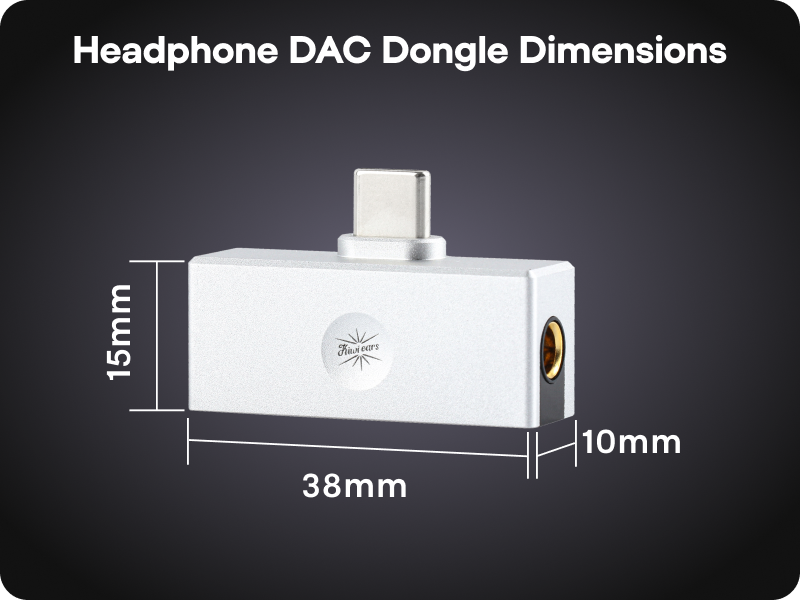
Image: A diagram illustrating the compact dimensions of the Kiwi Ears Allegro Mini.
Huolto
- Puhdistus: Use a soft, dry cloth to wipe the exterior of the Allegro Mini. Avoid using liquid cleaners or abrasive materials.
- Varastointi: Säilytä laitetta viileässä, kuivassa paikassa, poissa suorasta auringonvalosta ja äärimmäisistä lämpötiloista.
- Käsittele varovasti: While durable, avoid dropping the device or subjecting it to strong impacts.
- Portin suojaus: When not in use, consider using dust caps for the USB-C and audio ports to prevent dust and debris accumulation.
Vianetsintä
- Ei äänilähtöä:
- Ensure the Allegro Mini is securely connected to both your source device and headphones/IEMs.
- Tarkista laitteesi äänenvoimakkuusasetukset ja varmista, ettei sitä ole mykistetty.
- Verify that your source device recognizes the Allegro Mini as the active audio output. This can usually be checked in your device's sound settings.
- Test with different headphones/IEMs to rule out an issue with your audio output device.
- Hiljainen äänenvoimakkuus tai vääristynyt ääni:
- Lisää lähdelaitteesi äänenvoimakkuutta.
- Ensure your headphones/IEMs are fully plugged into the Allegro Mini. A partial connection can cause distortion or sound only in one channel.
- If using a phone case, ensure it does not obstruct the USB-C connection, as this can prevent a full connection.
- For optimal performance, especially with demanding headphones, use the 4.4mm balanced output if your headphones support it.
- Laitetta ei tunnisteta:
- Disconnect and reconnect the Allegro Mini.
- Try connecting to a different USB-C port or a different compatible device to isolate the issue.
- Varmista, että laitteesi käyttöjärjestelmä on ajan tasalla.
Viralliset tuotevideot
Linsoul Kiwi Ears Allegro Mini Portable IEM DAC Overview
Video: Virkamies yliview of the Linsoul Kiwi Ears Allegro Mini Portable IEM DAC, showcasinsen ominaisuudet ja muotoilu.
Linsoul Kiwi Ears In-Ear Monitor Manufacturing Process
Video: A detailed look into the manufacturing process of Linsoul Kiwi Ears in-ear monitors, demonstrating the craftsmanship and quality control.
Takuu ja tuki
The Linsoul Kiwi Ears Allegro Mini comes with a 1 vuoden takuu ostopäivästä lukien. Tämä takuu kattaa valmistusvirheet ja normaalista käytöstä johtuvat ongelmat.
For technical support, warranty claims, or any questions regarding your product, please contact Linsoul Audio customer service through their official websivustolta tai jälleenmyyjältä, jolta ostit tuotteen. Säilytä ostokuitti takuun voimassaoloa varten.
You can visit the Linsoul Store for more information: Linsoul Official Store