
Tuote loppuview
The TP-Link Archer MR505 is a 4G+ Cat6 AC1200 Wireless Dual Band Gigabit Router designed to provide reliable internet connectivity. This router supports dual-band Wi-Fi (2.4 GHz and 5 GHz) and features Gigabit Ethernet ports for high-speed wired connections. It is compatible with 4G+ Cat6 networks, offering mobile broadband access.

Kuva 1: Etuosa view of the Archer MR505 router.
Kuva 2: Sivu view of the Archer MR505 router.
Pakkauksen sisältö
Varmista, että pakkauksessasi on kaikki tarvittavat osat:
- TP-Link Archer MR505 -reititin
- Virtalähde
- Pika-asennusopas
- RJ45 Ethernet-kaapeli

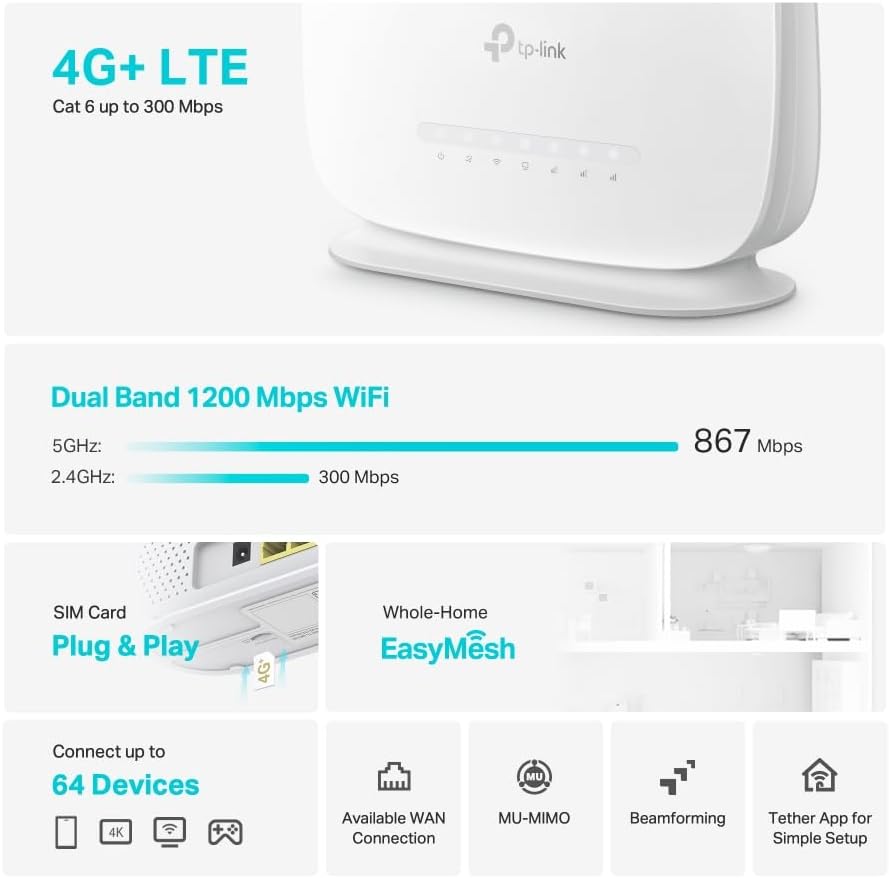
Figure 3: Key features and components of the Archer MR505.
Asennusohjeet
Follow these steps to set up your Archer MR505 router:
- Aseta SIM-kortti: Locate the SIM card slot on the router. Insert your 4G/LTE SIM card into the slot until it clicks into place. Ensure the SIM card is a normal data SIM for optimal compatibility. Some data-only SIM cards may require specific configurations or may not be fully compatible.
- Liitä virta: Kytke toimitettu virtalähde reitittimen virtaliitäntään ja sitten pistorasiaan. Reititin käynnistyy automaattisesti.
- Odota alustusta: Allow a few minutes for the router to boot up and establish a connection to the 4G/LTE network. The LED indicators on the front panel will show the connection status.
- Ensimmäinen Wi-Fi-yhteys:
- Find the default Wi-Fi network name (SSID) and password printed on the label at the bottom of the router.
- Yhdistä tietokoneesi tai mobiililaitteesi tähän Wi-Fi-verkkoon.
- Reitittimen hallinta:
- Avaa a web browser and enter the default management address (e.g., http://tplinkwifi.net or http://192.168.1.1).
- Kirjaudu sisään käyttämällä oletuskäyttäjätunnusta ja -salasanoja (yleensä admin/admin or specified on the label).
- Määritä verkkoasetukset: Follow the on-screen Quick Setup wizard to configure your internet connection, change the Wi-Fi network name (SSID), and set a strong, unique password for both your Wi-Fi and router management interface.
- Tether App Setup (Optional): Download the TP-Link Tether app from your device's app store. The app provides an intuitive way to manage your router settings from your smartphone or tablet.
- Ulkoinen antenni (valinnainen): If using external antennas (not included), connect them to the designated ports on the back of the router. You may need to manually enable external antenna usage through the router's web käyttöliittymä tai Tether-sovellus.
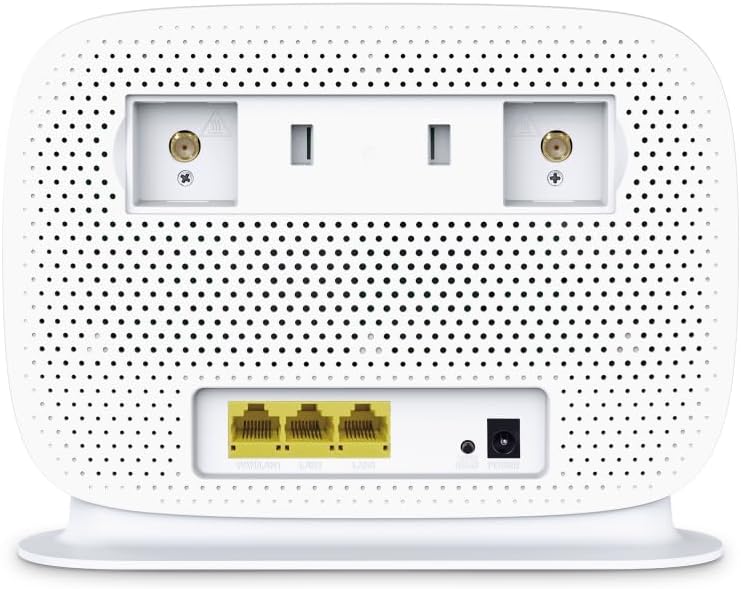
Figure 4: Rear panel of the Archer MR505 with ports and SIM slot.

Figure 5: Archer MR505 in various usage scenarios.
Käyttöohjeet
The Archer MR505 provides robust wireless and wired connectivity:
- Kaksikaistainen Wi-Fi: The router operates on both 2.4 GHz and 5 GHz bands, offering speeds up to 300 Mbps and 867 Mbps respectively, for a total of AC1200 Wi-Fi.
- 4G+ Cat6 Connectivity: Enjoy mobile broadband speeds up to 300 Mbps download and 300 Mbps upload (maximum upstream data transfer rate).
- Gigabit Ethernet -portit: Four Gigabit LAN ports (1000 Mbps) are available for high-speed wired connections to devices like computers, gaming consoles, or smart TVs. One port can also function as a WAN port for traditional broadband connections.
- Laitteen kapasiteetti: The router can support connectivity for up to 64 devices simultaneously.
- Smart Connect: This feature automatically assigns devices to the best available Wi-Fi band (2.4 GHz or 5 GHz) for optimized performance.
- EasyMesh-yhteensopivuus: The Archer MR505 is compatible with TP-Link EasyMesh, allowing you to create a seamless whole-home mesh Wi-Fi network by adding compatible range extenders.
- Kehittyneet tekniikat: Features like MU-MIMO and Beamforming enhance Wi-Fi efficiency and range, especially for multiple connected devices.
- Turvallisuus: The router supports WPA3 encryption for enhanced network security.

Figure 6: Versatile connectivity and speed capabilities.

Figure 7: Whole-Home EasyMesh integration.
Huolto
To ensure optimal performance and security of your router:
- Laiteohjelmistopäivitykset: Tarkista säännöllisesti uusimmat laiteohjelmistopäivitykset TP-Linkin viralliselta sivustolta ja asenna ne. website or via the Tether app. Firmware updates often include security patches and performance improvements.
- Suojatut salasanat: Use strong, unique passwords for your Wi-Fi network and router management interface. Change them periodically.
- Fyysinen sijoittelu: Aseta reititin keskeiselle paikalle, kauas esteistä ja häiriölähteistä (esim. mikroaaltouunit, langattomat puhelimet) Wi-Fi-yhteyden maksimoimiseksi.
- Puhdistus: Keep the router clean and free from dust. Ensure ventilation holes are not blocked.
- Käynnistä uudelleen säännöllisesti: Restarting the router occasionally can help resolve minor network issues and improve performance.
Vianetsintä
If you encounter issues with your Archer MR505 router, consider the following:
- No Internet Connection via 4G/LTE:
- Varmista, että SIM-korttisi on asetettu oikein ja aktivoitu.
- Verify that your SIM card is a normal data SIM. Some data-only SIM cards may require specific APN settings or might not be fully compatible. Contact your mobile service provider for details.
- Check the 4G/LTE signal strength indicated by the router's LEDs. If the signal is weak, try repositioning the router or consider using external antennas (if supported and configured).
- Käynnistä reititin ja siihen liitetyt laitteet uudelleen.
- Wi-Fi-yhteysongelmat:
- Varmista, että laitteesi on reitittimen Wi-Fi-verkon kantaman sisällä.
- Varmista, että käytät oikeaa Wi-Fi-salasanaa.
- If a device frequently connects and disconnects, try restarting that specific device.
- Tarkista muiden elektronisten laitteiden aiheuttama häiriö.
- Hidas internet-nopeus:
- Check your 4G/LTE signal strength. Weak signal can significantly reduce speed.
- Varmista, etteivät muut sovellukset tai laitteet kuluta liikaa kaistanleveyttä.
- If using Wi-Fi, try connecting to the 5 GHz band for faster speeds, if your device supports it.
- Perform a speed test to confirm the actual speed you are receiving.
- Reitittimen hallintasivulle ei pääse:
- Varmista, että laitteesi on yhdistetty reitittimen verkkoon (joko Wi-Fi-yhteydellä tai Ethernet-kaapelilla).
- Verify you are entering the correct management address (e.g., http://tplinkwifi.net).
- Kokeile tyhjentää selaimesi välimuisti tai käyttää toista selainta.
Tekniset tiedot
| Merkki | TP-linkki |
| Mallin nimi | Archer MR505 |
| Langaton standardi | 802.11ac (Wi-Fi 5) |
| Taajuuskaistaluokka | Kaksikaistainen (2.4 GHz ja 5 GHz) |
| Wi-Fi-tiedonsiirtonopeus | Up to 300 Mbps (2.4 GHz), Up to 867 Mbps (5 GHz) - AC1200 Total |
| 4G+ Cat6 -nopeus | Up to 300 Mbps Download, Up to 300 Mbps Upload |
| Ethernet-portit | 4 x Gigabit LAN Ports (1000 Mbps), 1 x WAN/LAN Port |
| Antenni tyyppi | Internal (External antenna support available) |
| Suojausprotokolla | WPA3 |
| Valvontamenetelmä | App (TP-Link Tether) |
| Yhteensopivat laitteet | Laptop, Personal Computer, Smart Television, Smartphone, Tablet |
| Virransyöttö | 12 volttia |
| Tuotteen paino | 0.93 kiloa |
| Mukana olevat komponentit | Archer MR505, Power Adapter, Quick Installation Guide, RJ45 Ethernet Cable |
Takuu ja tuki
Takuutiedot löytyvät tuotteen mukana toimitetusta takuukortista tai TP-Linkin viralliselta verkkosivustolta. website for your region. Support resources, including FAQs, firmware downloads, and contact information, are available on the TP-Link support website and through the TP-Link Tether app.
Virallinen TP-Link Websivusto: https://www.tp-link.com
TP-Link Tether -sovellus: Available on iOS App Store and Google Play Store.