
Johdanto
This manual provides detailed instructions for the installation, operation, and maintenance of your Vanxse 4.3 Inch TFT LCD Car Mirror Monitor and Rear View Reverse Backup Camera System. Please read this manual thoroughly before use to ensure proper functionality and safety.
- Auton takaosa View Kamera: 100% waterproof high-definition car rear view camera with night vision. Suitable for most 12V vehicles.
- 4.3" TFT LCD Mirror Monitor: High-quality 4.3" LCD Mirror Monitor helps prevent accidents when reversing by providing clear visibility.
- High Image Definition and Night Vision: Delicate design, stable performance, sharp images, and excellent color effect. Features 8 individual infrared (IR) LEDs for sharp images in low light conditions, especially at night.
- IP68 vedenpitävä muotoilu: This backup camera has been rigorously tested to be waterproof even in heavy rain or vehicle cleaning, and is also shockproof.
Pakkauksen sisältö
Varmista, että pakkauksessasi on kaikki alla luetellut tuotteet:
- 1 x 4.3" TFT LCD Mirror Monitor
- 1 x auton takaosa View Kamera
- 1 x Monitor Power Cable
- 1 x videokaapeli (6 metriä)
- 1 x Kameran virtajohto
- 1 x Käyttöohje

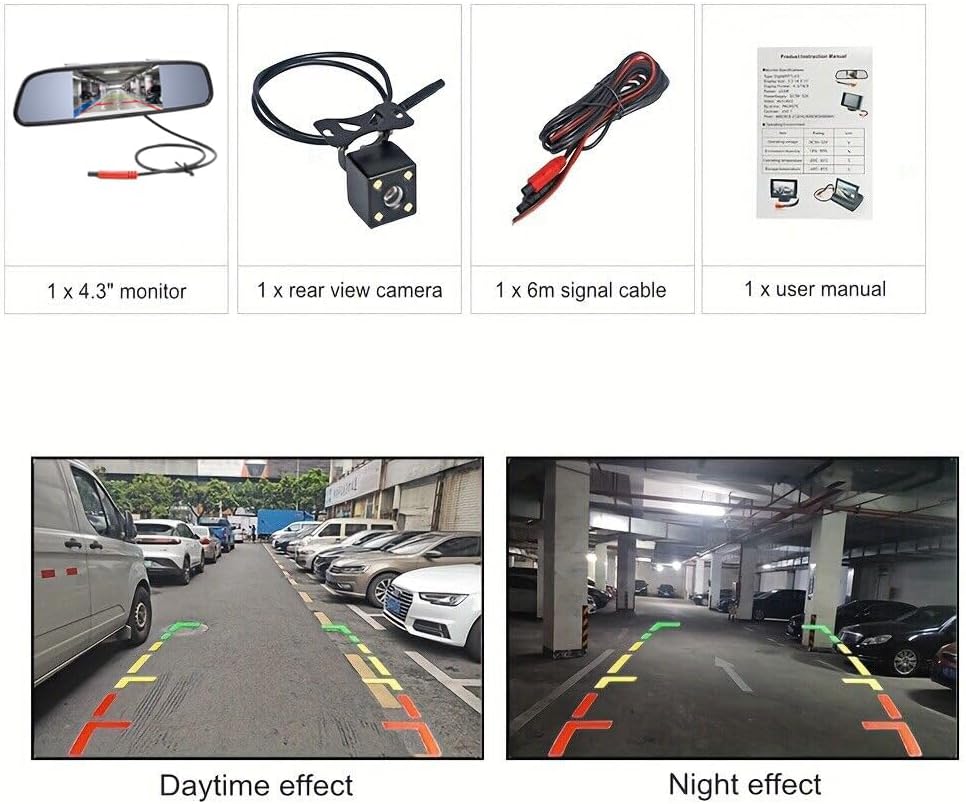
Image: All components included in the Vanxse 4.3 Inch TFT LCD Car Mirror Monitor and Rear View Reverse Backup Camera System package.
Asennus ja asennus
Follow these steps to properly install your Vanxse backup camera system:
- Näytön kiinnittäminen: The 4.3-inch TFT LCD mirror monitor is designed to clip over your existing rearview mirror. Ensure it is securely attached.
- Asenna kamera: The camera can be mounted near the license plate. It features an IP68 waterproof design and 8 IR LEDs for night vision.
- Connect Power to Monitor: Connect the monitor power cable to a 12V power source in your vehicle.
- Connect Power to Camera: Connect the camera power cable. For automatic activation when reversing, connect the camera's power wire to your vehicle's reverse light circuit.
- Liitä videokaapeli: Use the 6-meter video cable to connect the camera to the monitor. Ensure all connections are secure.

Kuva: Yksityiskohtainen view of the 4.3-inch mirror monitor and the rear view camera with its mounting bracket and cables.
Video: This video demonstrates the installation process of the Vanxse 4.3 Inch Car Mirror Monitor Backup Camera Kit, showing how to connect the components and mount them in a vehicle.
Video: This video provides an unboxing and connection guide for a similar 4.3 inch reversing system, illustrating how to assemble the monitor and camera components.
Käyttöohjeet
Once installed, the system operates as follows:
- Automaattinen aktivointi: When the vehicle is shifted into reverse gear, the monitor will automatically display the rear view kamerasta.
- Manuaalinen aktivointi: If not wired to the reverse light, the monitor can be manually turned on/off via its power button.
- Näytön asetusten säätäminen: Use the buttons on the monitor to adjust brightness, contrast, saturation, and tint for optimal viewing.
- Pysäköintilinjat: The system may feature adjustable parking lines to assist with accurate parking. These can typically be toggled on or off through the monitor's menu.

Image: The Vanxse 4.3-inch mirror monitor showing a clear rear view värillisillä pysäköintiohjeilla.
Video: This video demonstrates the operation of a similar 4.3 inch reversing system, including menu navigation for brightness, contrast, saturation, language, and toggling parking lines on/off, as well as real-world daytime and nighttime views.
Video: This video shows the 4.3 Inch TFT LCD Car Monitor in action, providing a clear rear view during driving and parking maneuvers in various conditions.
Huolto
To ensure the longevity and optimal performance of your system:
- Puhdistus: Puhdista kameran linssi ja näyttöruutu säännöllisesti pehmeällä,amp kangas. Vältä hankaavia puhdistusaineita.
- Vedenpitävä muotoilu: The camera is IP68 waterproof, allowing it to withstand heavy rain and car washes. However, avoid directing high-pressure water jets directly at the camera for extended periods.
- Lämpötilankestävyys: The system is designed to operate in a wide range of temperatures.
Kuva: Takaosa view camera highlighting its IP68 waterproof rating and resistance to extreme temperatures (-20°C to 80°C), suitable for various weather conditions and car washes.
Vianetsintä
Jos kohtaat ongelmia, tutustu seuraaviin yleisiin ongelmiin ja ratkaisuihin:
- Ei kuvaa näytöllä:
- Check all power connections to both the monitor and camera. Ensure they are securely connected to a 12V power source.
- Verify the video cable is properly connected between the camera and monitor.
- Ensure the vehicle is in reverse gear (if wired for automatic activation).
- Välkkyvä tai vääristynyt kuva:
- Check for loose connections in the video cable.
- Ensure the power supply is stable and free from interference.
- Huono yönäkö:
- Ensure the camera lens is clean and free from dirt or obstructions.
- Verify the IR LEDs on the camera are functioning.
Tekniset tiedot
| Merkki | Vanxse |
| Mallinumero | VS-M4301 |
| Näytön koko | 4.3 tuumaa |
| Näyttötekniikka | LCD |
| Tuotteen mitat | 4.3 cm P x 0.1 cm L x 3 cm K |
| Tuotteen paino | 3.2 unssia |
| Voitage | 12 volttia |
| Optinen anturitekniikka | Infrapuna |
| Asennustyyppi | Lip Mount |
| Yhteensopivat laitteet | Car/Truck/Bus/Trailer/SUV/RV/Van all vehicles |
Takuu ja tuki
Your Vanxse product is designed for reliability and performance. If you encounter any problems or have questions regarding your product, please do not hesitate to contact us. We are committed to providing satisfactory solutions to our customers.
For support, please refer to the contact information provided with your purchase or visit the official Vanxse websivusto.