
1. Johdanto ja loppuview
This manual provides detailed instructions for the installation, operation, and maintenance of your JideTech 4K 8 Channel PoE Network Video Recorder (NVR). This NVR is designed for home security camera systems, supporting up to 12 channels and resolutions up to 12MP. It features Power over Ethernet (PoE) for simplified camera connections, remote access capabilities, and advanced video compression.
2. Mitä laatikossa on
Tarkista pakettisi sisältö alla olevaa luetteloa vasten:
- 1x 8 Channel NVR PoE Unit
- 1x käyttöopas
- 1x NVR-virtalähde
- 1x 1M Network Cable
- Hiiri
- Ruuvit (kiintolevyn asennusta varten)

Image: The JideTech 4K 8 Channel PoE NVR unit.
3. Asennusohjeet
3.1. Fyysiset yhteydet
Follow these steps to connect your NVR to your network and display:
- Liitä NVR virtalähteeseen mukana toimitetulla virtalähteellä.
- Connect the NVR to your router using the included network cable.
- Liitä näyttö NVR-laitteeseen joko HDMI- tai VGA-portin kautta.
- Connect the USB mouse to a USB port on the NVR for local control.
- Connect your PoE cameras to the NVR's PoE ports. For non-PoE cameras, connect them to your network via a router and ensure they are powered separately.
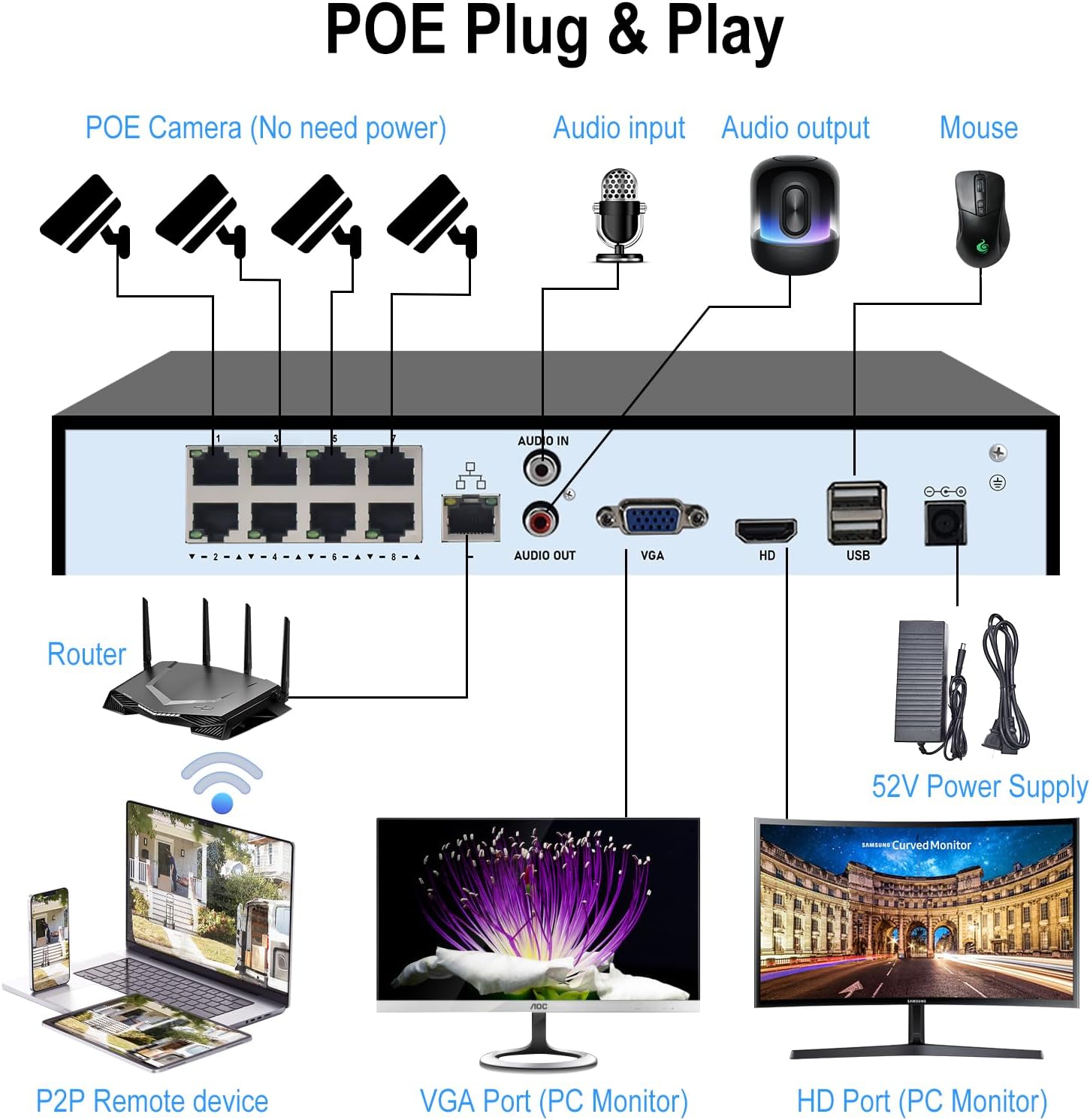
Image: Connection diagram illustrating how to connect PoE cameras, router, monitor, and mouse to the NVR.

Image: Diagram detailing the connection of a wired ONVIF camera to the NVR, requiring a power adapter and Ethernet cable.
3.2. Hard Drive Installation (HDD Not Included)
The NVR requires a 3.5-inch SATA hard drive (up to 14TB) for recording. Please follow these steps to install it:
- Unscrew and remove the top cover of the NVR unit.
- Connect the SATA data cable and power cable from the NVR to the hard drive.
- Secure the hard drive inside the NVR chassis using the provided screws.
- Replace the NVR cover and fasten the screws.
Video: Instructions on how to install a hard drive into the NVR unit.

Image: The NVR unit shown with a hard drive, highlighting its maximum storage capacity of 14TB.
4. Käyttöohjeet
4.1. Etäkäyttö
The NVR supports remote access via PC/Mac or the Videolink App for Android/iOS. Once connected to the internet, you can view reaaliaikainen footage and playback recordings from anywhere.

Image: Illustration of remote access to the NVR system using various devices like a PC, tablet, and smartphone application.
4.2. Motion Detection and Smart Playback
Configure motion detection settings to receive instant notifications and email alerts on your phone when movement is detected. The smart playback feature allows you to quickly review recorded video at up to 16x speed to locate specific events.

Image: Depiction of the smart human detection feature, triggering app alerts when motion is detected.
5. Tärkeimmät ominaisuudet
- 4K UltraHD -resoluutio: Supports recording, playback, and live view up to 12MP resolution. HDMI output up to 4K@30fps, VGA output up to 1080P@30fps.
- 12 Channel Expandable NVR: Built-in 8 PoE ports (IEEE802.3at, up to 30W per port) for 8 PoE cameras. Expandable to 12 channels with additional PoE switches.
- ONVIF-yhteensopivuus: Works with most third-party ONVIF IP cameras.
- Edistynyt videonpakkaus: Supports H.265+/H.265/H.264 formats, reducing storage space and bandwidth by up to 75%.
- Suuri säilytyskapasiteetti: Equipped with 1 SATA interface, supporting a single hard drive up to 14TB (HDD not included).
- Motion Detection & Smart Playback: Instant notifications and email alerts for detected motion. Playback recording at up to 16x speed.
- Local & Remote Access: Easy configuration and control via PC/Mac or Videolink App (Android/iOS).
Video: Demonstration of how to connect a network video recorder surveillance system.
6. Tekniset tiedot
| Merkki | JideTech |
| Mallinumero | 8CH-NVR |
| Yhteystekniikka | Ethernet, HDMI, USB, VGA |
| Yhteensopivat laitteet | IP Camera, PoE Camera |
| Tuotteen mitat (P x L x K) | 9.88 cm x 8.42 cm x 1.57 cm |
| Muistin tallennuskapasiteetti | Jopa 14 TB (kiintolevy ei sisälly) |
| Kanavien lukumäärä | 8 (Laajennettavissa 12:ään) |
| Media Format Digital Video | HDD |
| Äänitulo | RCA |
| USB-portteja yhteensä | 2 |
| Videotulo | HDMI, VGA |
| Tuotteen paino | 2.8 puntaa |
7. Huolto
To ensure optimal performance and longevity of your NVR, consider the following maintenance tips:
- Säännöllinen puhdistus: Keep the NVR unit free from dust and debris. Use a soft, dry cloth for cleaning. Ensure ventilation openings are not blocked.
- Laiteohjelmistopäivitykset: Tarkista säännöllisesti valmistajan website for firmware updates. Keeping your NVR's firmware up-to-date can improve performance, add new features, and enhance security.
- Tietojen varmuuskopiointi: Regularly back up important recordings to an external storage device or cloud service to prevent data loss.
- Ympäristöolosuhteet: Operate the NVR within recommended temperature and humidity ranges to prevent damage. Avoid direct sunlight and excessive heat.
8. Vianmääritys
If you encounter issues with your JideTech NVR, refer to the following common troubleshooting steps:
- Ei virtaa:
- Ensure the power adapter is securely connected to both the NVR and a working power outlet.
- Varmista pistorasian toiminta kytkemällä siihen toinen laite.
- Ei videolähtöä:
- Check HDMI/VGA cable connections between the NVR and the monitor.
- Varmista, että näyttö on päällä ja asetettu oikealle tulolähteelle.
- Try a different HDMI/VGA cable or monitor if available.
- Kamerat, joita ei näytetä:
- For PoE cameras, ensure they are properly connected to the NVR's PoE ports and receiving power.
- For non-PoE cameras, verify they are powered on and connected to the same local network as the NVR.
- Check camera IP addresses and ensure they are not conflicting.
- Confirm cameras are ONVIF compatible and added correctly to the NVR system.
- Etäkäyttöongelmat:
- Varmista, että NVR-laite on yhteydessä internetiin.
- Verify network settings (IP address, gateway, DNS) on the NVR.
- Tarkista reitittimesi palomuuriasetukset, jotka saattavat estää pääsyn.
- Ensure the Videolink App or PC software is up-to-date.
- Tallennusongelmat:
- Confirm a hard drive is installed and properly formatted by the NVR.
- Check the hard drive status in the NVR's system settings.
- Ensure recording schedules are correctly configured.
If these steps do not resolve your issue, please contact JideTech customer support for further assistance.
9. Takuu ja tuki
JideTech offers comprehensive support for its products. For specific warranty details, please refer to the documentation included with your purchase or visit the official JideTech websivusto.
Lisäsuojaussuunnitelmia on saatavilla ostettavaksi:
- 2 vuoden suojaussuunnitelma
- 3 vuoden suojaussuunnitelma
- Täydellinen suojaus (kuukausittainen laskutus)
For technical support, troubleshooting, or any product-related inquiries, please contact JideTech customer service.