
Johdanto
This manual provides comprehensive instructions for the ECONTROLLY EUR7729KE0 Replacement Remote Control. This remote is designed to function as a direct replacement for various Panasonic DVD HDD TV Recorders, offering full functionality without the need for complex programming.
Yhteensopivat mallit:
- UR7729KE0
- EUR7721X10
- DMR-EH50
- DMR-E55K
- DMR-EH50S
- DMR-E55P9
- DMR-E55S
- DMR-ES10
- DMR-EH50P
- DMR-EH60
This replacement remote control covers all functions of the original remote, ensuring a seamless user experience.
Asennus
Akun asennus
The EUR7729KE0 remote control requires two AAA batteries (not included) for operation. Please follow these steps to install the batteries:
- Paikanna paristolokero kaukosäätimen takana.
- Liu'uta paristolokeron kantta alaspäin ja nosta se pois.
- Aseta kaksi AAA-paristoa paikoilleen varmistaen, että positiiviset (+) ja negatiiviset (-) navat ovat oikein lokeron sisällä olevien merkintöjen kanssa.
- Sulje paristolokeron kansi liu'uttamalla sitä takaisin paikalleen, kunnes se napsahtaa tukevasti kiinni.

Takaosa view of the ECONTROLLY EUR7729KE0 remote control with the battery cover removed, showing the compartment for two AAA batteries.
Huomautus: Vaihda aina molemmat paristot samanaikaisesti uusiin. Älä sekoita vanhoja ja uusia paristoja tai erityyppisiä paristoja.
Käyttöohjeet
To operate the remote control, point it directly at the infrared sensor on your Panasonic DVD HDD TV Recorder. Ensure there are no obstructions between the remote and the device.
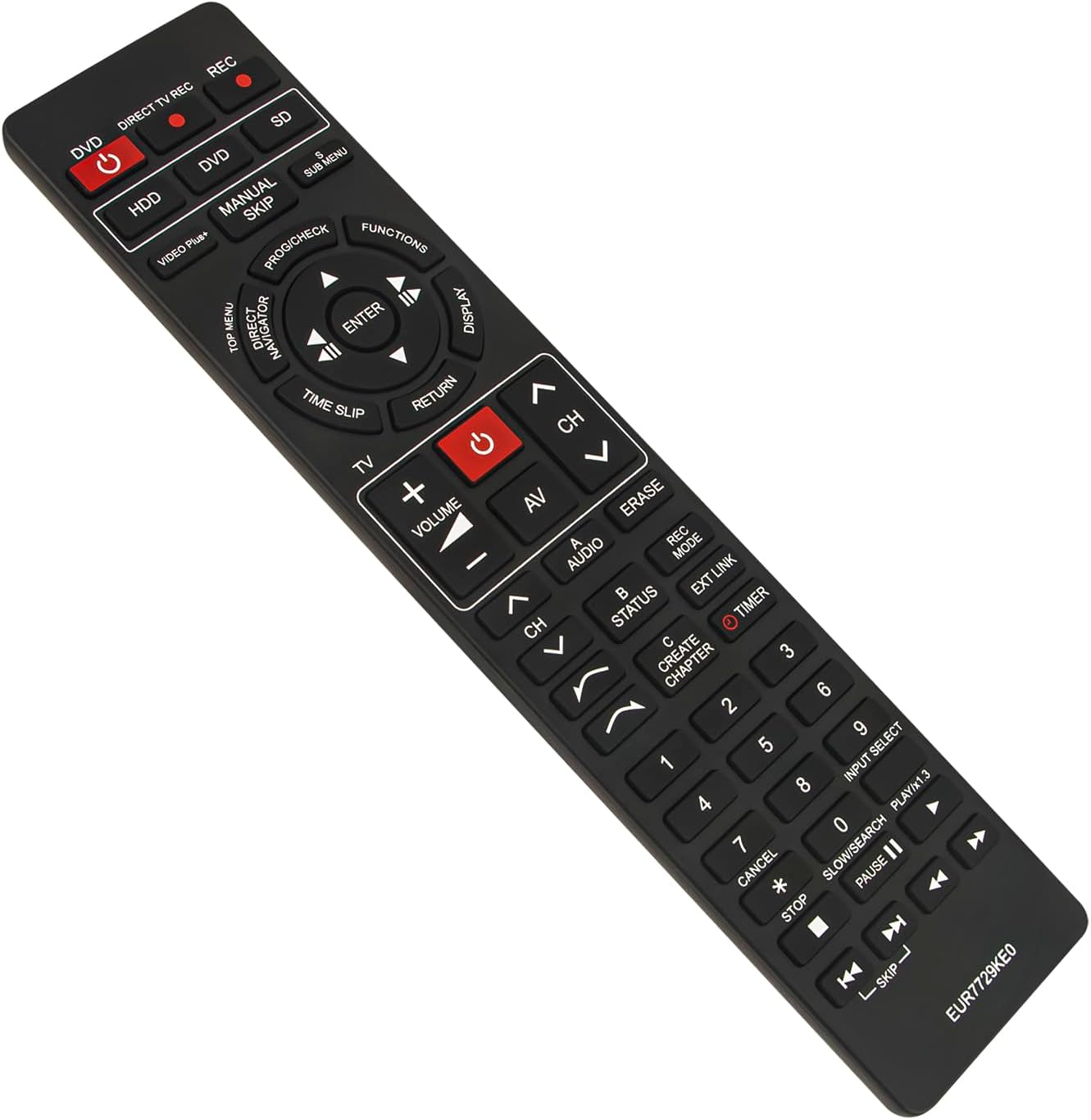
Edessä view of the ECONTROLLY EUR7729KE0 replacement remote control, showing all buttons and their labels.
Avaintoiminnot ohiview:
- Power Buttons (DVD, HDD, DIRECT TV REC, REC, SD): Used to power on/off or select specific modes for the respective components.
- Numeropainikkeet (0-9): For direct channel selection, inputting numbers, or menu navigation.
- Äänenvoimakkuus (+/-): Säätää äänenvoimakkuutta.
- Channel (CH ^/v): Vaihtaa kanavia ylös tai alas.
- Navigointinäppäimistö (Ylös, Alas, Vasen, Oikea, ENTER): Käytetään valikoissa navigointiin ja valintojen vahvistamiseen.
- Playback Controls (PLAY/x1.3, PAUSE, STOP, SKIP, SLOW/SEARCH): Median toiston vakiosäätimet.
- MENU Buttons (TOP MENU, SUB MENU, DIRECT NAVIGATOR): Access various menu options for DVD, HDD, or TV functions.
- Special Function Buttons (PROG/CHECK, FUNCTIONS, DISPLAY, TIME SLIP, RETURN, AV, AUDIO, ERASE, STATUS, REC MODE, EXT LINK, CREATE CHAPTER, TIMER): These buttons provide access to advanced features specific to your Panasonic recorder, such as recording options, chapter creation, and display settings. Refer to your recorder's manual for detailed use of these functions.

Comparison image showing the ECONTROLLY EUR7729KE0 replacement remote control on the left and an original Panasonic remote control on the right, highlighting their similar button layouts.
Huolto
Puhdistus
Puhdista kaukosäädin pehmeällä, kuivalla liinalla. Pinttyneeseen likaan, hankaa kevyesti.ampPyyhi liina vedellä tai miedolla puhdistusliuoksella. Vältä hankaavien puhdistusaineiden, alkoholin tai liuottimien käyttöä, sillä ne voivat vahingoittaa kaukosäätimen pintaa tai sisäisiä komponentteja.
Varastointi
Säilytä kaukosäädintä viileässä, kuivassa paikassa, poissa suorasta auringonvalosta ja äärimmäisistä lämpötiloista. Jos kaukosäädintä ei käytetä pitkään aikaan, on suositeltavaa poistaa paristot vuotojen ja mahdollisten vaurioiden estämiseksi.
Vianetsintä
- Kaukosäädin ei vastaa:
- Tarkista, että paristot on asetettu oikein päin ja oikea napaisuus (+/-).
- Vaihda paristot uusiin.
- Ensure there are no obstructions between the remote control and the device's infrared sensor.
- Make sure you are pointing the remote directly at the device.
- Jotkin painikkeet eivät toimi:
- This remote is designed to replicate all functions of the original. If specific buttons are not working, ensure your device is in the correct mode (e.g., DVD mode for DVD functions).
- Clean the remote's surface, as dirt or debris might be interfering with button presses.
If the issue persists after following these steps, please refer to the support section for further assistance.
Tekniset tiedot
| Merkki | HALLINTAAN |
| Mallin nimi | EUR7729KE0 |
| Väri | Musta |
| Erikoisominaisuus | Ohjelmointia ei vaadita |
| Yhteensopivat laitteet | DVD HDD TV Recorder (Panasonic DMR-EH50, etc.) |
| Yhteystekniikka | Infrapuna |
| Ohjaimen tyyppi | Painikkeiden ohjaus |
| Suurin kantama | 33 jalkaa |
| Tuotteen paino | 1 unssia |
| Tuotteen mitat (P x L x K) | 5"P x 2"L x 0.6"K (noin 22.4 cm x 5 cm x 1.5 cm) |

Image displaying the dimensions of the ECONTROLLY EUR7729KE0 remote control: approximately 22.4 cm (8.82 inches) in length and 5 cm (1.97 inches) in width.
Takuu ja tuki
This ECONTROLLY product has been tested to ensure proper functionality before shipping. As a replacement remote control, it is designed for immediate use without additional setup.
For further assistance, compatibility inquiries, or troubleshooting that is not covered in this manual, please contact ECONTROLLY customer support through the retailer's platform where the product was purchased. Provide your product model number (EUR7729KE0) and a detailed description of your issue for efficient support.