
1. Johdanto
Thank you for choosing the Hama DR2002BT Digital Radio. This device offers a comprehensive audio experience with FM, DAB/DAB+ digital radio reception, and Bluetooth connectivity. Its user-friendly design, featuring large buttons and a clear 4.3-inch TFT color display, makes it suitable for all users. This manual will guide you through the setup, operation, and maintenance of your new digital radio.
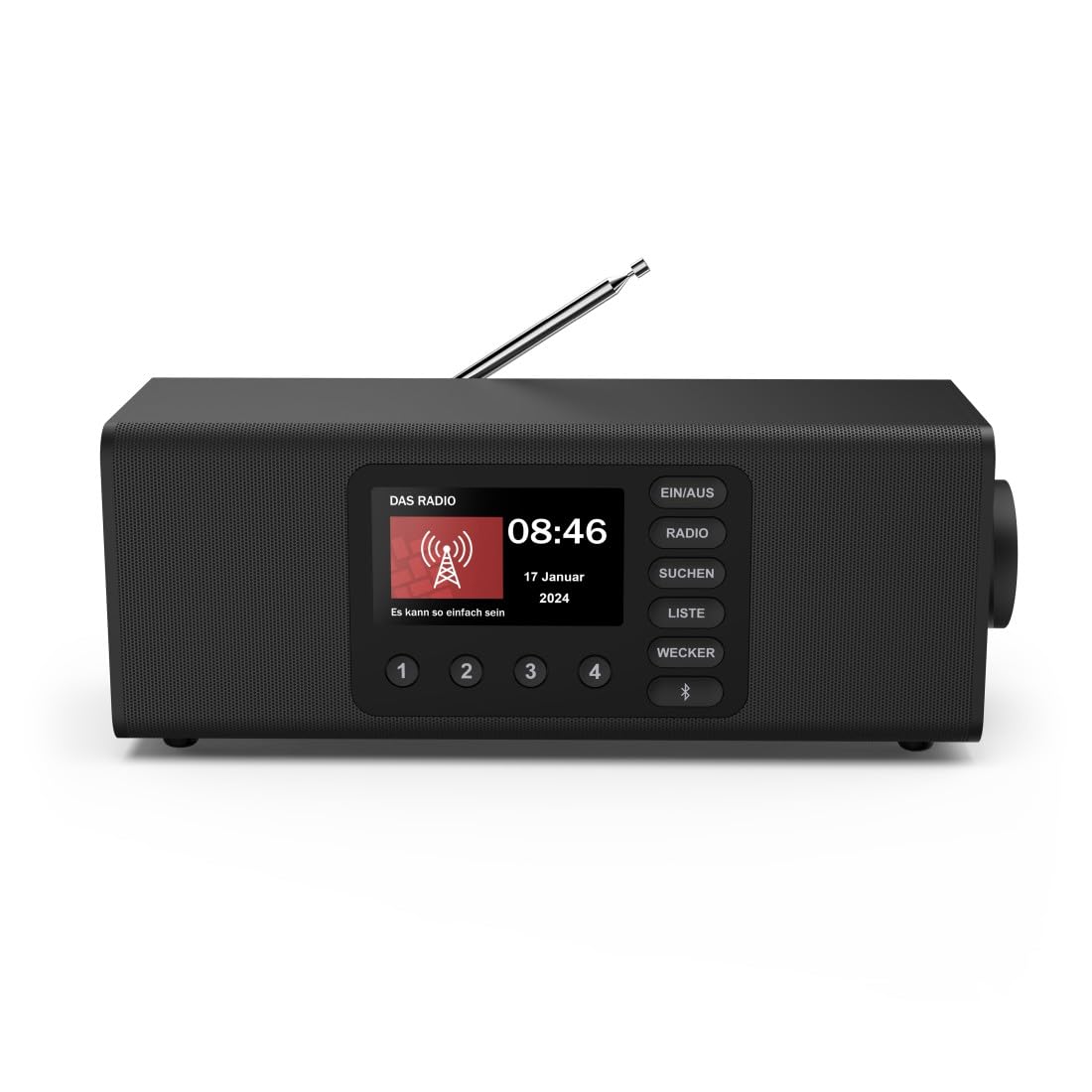
Kuva: Edessä view of the Hama DR2002BT Digital Radio, showcasing sen näyttö ja ohjauspainikkeet.
2. Turvallisuustiedot
Lue nämä turvallisuusohjeet huolellisesti ennen laitteen käyttöä. Säilytä tämä käyttöohje myöhempää tarvetta varten.
- Älä altista laitetta kosteudelle, sateelle tai äärimmäisille lämpötiloille.
- Vältä sijoittamasta laitetta lämmönlähteiden lähelle tai suoraan auringonpaisteeseen.
- Älä avaa laitetta casing. Korjauksia saa suorittaa vain pätevä henkilöstö.
- Käytä vain mukana toimitettua virtalähdettä.
- Varmista riittävä ilmanvaihto laitteen ympärillä.
3. Pakkauksen sisältö
Varmista, että kaikki osat ovat mukana purkaessasi pakkauksesta:
- Hama DR2002BT Digital Radio
- Virtalähde
- Käyttöopas
4. Tuote ohiview
4.1 Etupaneelin säätimet ja näyttö

Image: Front panel of the radio highlighting the display and control buttons, with icons for Bluetooth, DAB+, and Alarm functions.
The front panel features a 4.3-inch TFT color display, large control buttons, and a rotary knob for easy navigation and selection. Key buttons include:
- EIN/AUS (ON/OFF): Käynnistää tai sammuttaa laitteen.
- RADIO: Switches between FM and DAB/DAB+ modes.
- SUCHEN (SEARCH): Käynnistää asemien skannauksen.
- LISTE (LIST): Avaa luettelon saatavilla olevista asemista.
- WECKER (ALARM): Määrittää hälytysasetukset.
- Bluetooth-painike: Aktivoi Bluetooth-pariliitostilan.
- Esiasetuspainikkeet (1–4): Nopea pääsy tallennettuihin suosikkiasemiin.
- Pyörivä nuppi (LAUTSTÄRKE/NAVIGIEREN): Controls volume and navigates menus.
4.2 Takapaneelin liitännät
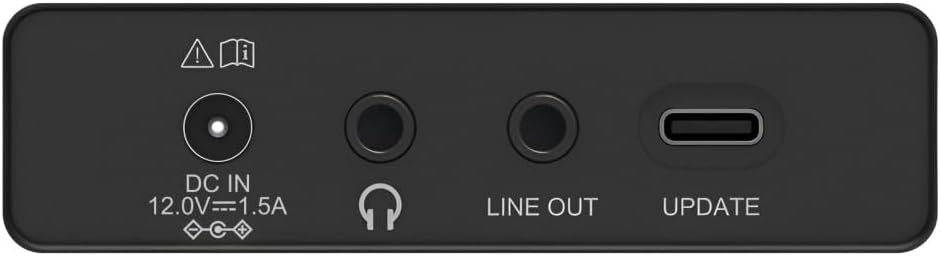
Image: Close-up of the rear panel showing the DC IN, Headphone, Line Out, and UPDATE (USB-C) ports.
Takapaneeli tarjoaa tärkeimmät liitäntävaihtoehdot:
- DC IN 12.0V --- 1.5A: Power input for the external adapter.
- Kuulokeliitäntä (3.5 mm): Yksityiseen kuunteluun.
- LINE OUT: Äänilähtö ulkoiseen laitteeseen liittämistä varten ampnostimet tai kaiuttimet.
- UPDATE (USB-C): Laiteohjelmistopäivityksiä varten.
- Teleskooppiantenni: FM- ja DAB/DAB+-vastaanottoa varten.

Kuva: Takaosa view of the Hama DR2002BT Digital Radio with its telescopic antenna extended for optimal signal reception.
5. Asennus
5.1 Virtaliitäntä
- Kytke toimitettu virtalähde pistorasiaan DC IN radion takana olevaan porttiin.
- Liitä verkkolaite sopivaan pistorasiaan.
- Radio käynnistyy automaattisesti tai siirtyy valmiustilaan.
5.2 Antennin sijoittaminen
For optimal FM and DAB/DAB+ reception, fully extend the telescopic antenna. Position the radio near a window if reception is poor.
5.3 Alkuasetukset (ensimmäinen käyttökerta)
Upon first power-on, the radio may guide you through an initial setup process, including language selection and an automatic DAB station scan. Follow the on-screen prompts.
6. Käyttöohjeet
6.1 Virta päälle/pois
Paina EIN/AUS painiketta radion kytkemiseksi päälle tai pois päältä.
6.2 DAB/DAB+ -radiotila
- Paina RADIO -painiketta valitaksesi DAB-tilan.
- If this is the first time in DAB mode or if you want to rescan, press SUCHEN to perform a full scan for available stations.
- Use the rotary knob to navigate through the station list. Press the knob to select a station.
- Vastaanottaja view the station list, press the LISTA -painiketta.
6.3 FM-radiotila
- Paina RADIO -painiketta valitaksesi FM-tilan.
- Paina SUCHEN hakeaksesi automaattisesti seuraavan saatavilla olevan FM-aseman.
- Alternatively, use the rotary knob to manually tune to a frequency.
6.4 Esiasetusten tallentaminen ja hakeminen
The radio allows you to store up to 4 favorite stations using the dedicated preset buttons (1-4).
- Viritä haluamallesi asemalle (DAB tai FM).
- Press and hold one of the preset buttons (1-4) until the display confirms the station has been saved.
- To recall a preset station, simply press the corresponding preset button (1-4).
6.5 Bluetooth-käyttö

Kuva: Edessä view of the radio with Bluetooth and stereo speaker icons, indicating its wireless audio streaming capability.
The Hama DR2002BT can stream audio from your smartphone, tablet, or laptop via Bluetooth 5.0.
- Press the Bluetooth button on the front panel to enter Bluetooth pairing mode. The display will show a pairing indicator.
- Ota Bluetooth käyttöön ulkoisessa laitteessasi (älypuhelin, tabletti) ja hae käytettävissä olevia laitteita.
- Select "Hama DR2002BT" from the list of devices to pair.
- Once paired, you can play audio from your device, and it will be output through the radio's speakers.
6.6 Herätyskellotoiminto

Image: A person waking up with the Hama DR2002BT Digital Radio placed on a bedside table, illustrating its alarm clock functionality.
The radio features two independent alarm settings.
- Paina WECKER -painiketta hälytysasetusten käyttämiseksi.
- Use the rotary knob to select Alarm 1 or Alarm 2.
- Configure the alarm time, source (buzzer or radio station), and repetition (once, daily, weekdays, weekends, or specific days).
- Press the rotary knob to confirm each setting.
- To quickly activate/deactivate an alarm, press the WECKER button and use the rotary knob to toggle the alarm status.

Image: A person interacting with the Hama DR2002BT Digital Radio, demonstrating its ease of use for setting functions like alarms or tuning stations.
7. Huolto
To ensure the longevity and optimal performance of your Hama DR2002BT Digital Radio, follow these maintenance guidelines:
- Puhdistus: Puhdista radion ulkopinta pehmeällä, kuivalla ja nukkaamattomalla liinalla. Älä käytä hankaavia puhdistusaineita, vahoja tai liuottimia.
- Pöly: Regularly dust the device to prevent accumulation in vents and ports.
- Varastointi: Jos radiota säilytetään pitkään, irrota se virtalähteestä ja säilytä sitä viileässä ja kuivassa paikassa.
- Antenni: Käsittele teleskooppiantennia varovasti, jotta se ei taivu tai katkea.
8. Vianmääritys
Jos radiossasi on ongelmia, katso seuraavat yleiset ongelmat ja ratkaisut:
| Ongelma | Mahdollinen syy | Ratkaisu |
|---|---|---|
| Ei virtaa | Virtasovitin ei ole kytketty; Virtapistoke viallinen | Tarkista virtalähteen liitäntä; Kokeile toista pistorasiaa. |
| Huono radiovastaanotto (DAB/FM) | Antenna not extended; Weak signal area; Interference | Fully extend the telescopic antenna; Reposition the radio (e.g., near a window); Perform a new station scan. |
| Bluetooth-pariliitos epäonnistuu | Bluetooth not enabled on external device; Radio not in pairing mode; Device too far | Ensure Bluetooth is on and visible on your device; Press the Bluetooth button on the radio; Move devices closer (within 10m). |
| Ei ääntä | Äänenvoimakkuus liian alhainen; Mykistys aktivoitu; Väärä lähde valittu | Increase volume using the rotary knob; Check if mute is active; Ensure the correct mode (DAB, FM, Bluetooth) is selected. |
| Hälytys ei soi | Alarm not activated; Incorrect alarm time/day set | Verify alarm is enabled in settings; Check alarm time and repetition settings. |
9. Tekniset tiedot

Image: Diagram showing the dimensions of the Hama DR2002BT Digital Radio: 35 cm (width), 12.5 cm (depth), and 13 cm (height).
| Ominaisuus | Yksityiskohta |
|---|---|
| Mallinumero | DR2002BT (00054298) |
| Vastaanotto | DAB, DAB+, FM |
| Bluetooth-versio | 5.0 |
| Lähtöteho (RMS) | 10 W (Stereo) |
| Näyttö | 4.3 tuuman TFT-värinäyttö |
| Liitännät | 3.5mm Jack (Headphone), USB-C (Update), Line Out, DC IN |
| Virtalähde | Ulkoinen virtalähde |
| Mitat (L x S x K) | 35 x 12.5 x 13 cm |
| Paino | 1788 grammaa |
| Materiaali | Muovi |
| Väri | Musta |
| Lisäominaisuudet | Alarm Function (2 alarms), Direct Selection Keys |
10. Takuu ja tuki
Hama GmbH & Co KG myöntää tälle tuotteelle takuun. Katso pakkauksessa oleva takuukortti tai käy Haman virallisella verkkosivustolla. websivustolta tarkemmat takuuehdot.
For technical support, troubleshooting assistance, or spare parts, please contact Hama customer service or visit their websivusto. Varaosien saatavuus EU:ssa on taattu 7 vuodeksi.
- Valmistaja: Hama GmbH & Co KG
- Alkuperämaa: Saksa
- EU-varaosien saatavuus: 7 vuotta