
Tecmojo 6U/23.6in Depth/Mesh Door
Tecmojo 6U Wall Mount Server Network Rack Instruction Manual
Model: 6U/23.6in Depth/Mesh Door
Merkki: Tecmojo
Johdanto
This manual provides detailed instructions for the safe and efficient installation, operation, and maintenance of your Tecmojo 6U Wall Mount Server Network Rack. Please read this manual thoroughly before beginning assembly or use to ensure proper functionality and safety.
Turvallisuustiedot
- Käytä aina asianmukaisia henkilönsuojaimia asennuksen aikana.
- Ensure the mounting surface can support the combined weight of the rack and all installed equipment. This rack supports up to 176 lbs when wall-mounted.
- Use appropriate tools and follow all local building codes and safety regulations.
- Do not overload the rack. Distribute equipment weight evenly.
- Keep children and pets away from the work area during assembly.
Pakkauksen sisältö
Varmista, että kaikki alla luetellut osat ovat mukana ja vahingoittumattomia ennen kokoamisen aloittamista.
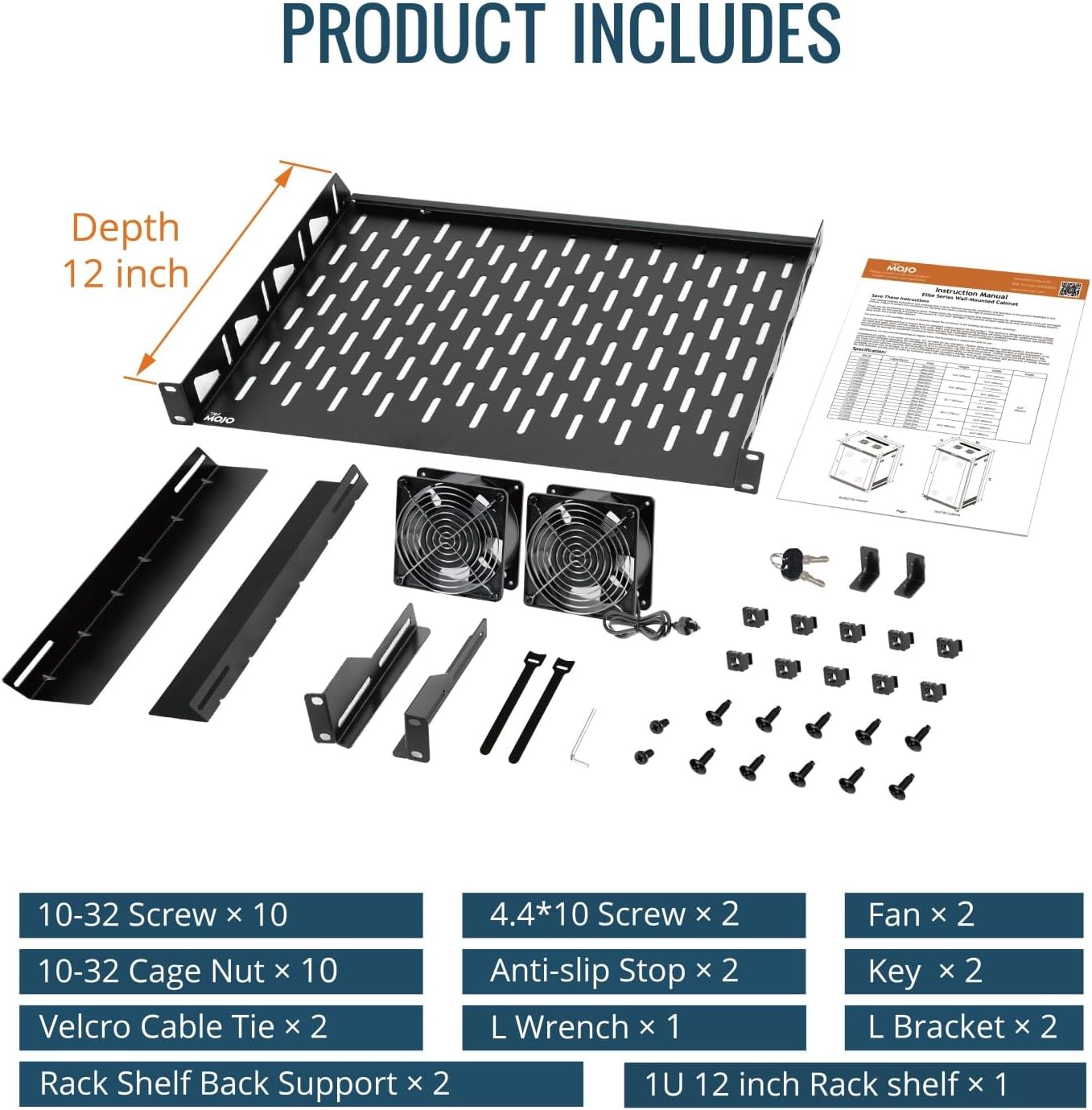
Image: All components included in the Tecmojo 6U Wall Mount Rack package. This includes various screws, cage nuts, Velcro cable ties, two cooling fans, L brackets, and a 1U 12-inch rack shelf.
- Alapaneeli
- Top Cover (with pre-installed fans)
- Front Mesh Door
- Front Frames (2)
- Rack Rails (4)
- Sivupaneelit (2)
- Takakansi
- 1U Cantilever Shelf
- Mounting Hardware (10-32 Screws, 10-32 Cage Nuts, 4.4*10 Screws, Anti-slip Stops, L Wrench, Keys)
- Velcro Cable Ties (2)
Asennus ja asennus
Follow these steps for assembling and mounting your Tecmojo 6U Wall Mount Server Network Rack.
Video Guide: Standard Wall Mount Cabinet Installation
Video: A detailed installation guide for the Tecmojo Standard Wall Mount Cabinet, demonstrating step-by-step assembly and mounting procedures.
Vaiheittainen kokoonpano
- Kokoa päärunko:
Attach the two front frames to the vented side of the bottom panel using the provided screws. Ensure they are securely fastened and aligned.

Image: The bottom panel and two vertical frame pieces are shown, illustrating the initial assembly of the rack's main structure.
- Kiinnitä takakansi:
Secure the back cover to the bottom panel and the two front frames. This forms the rear structure of the cabinet.
- Asenna yläkansi:
Place the top cover onto the assembled frame and fasten it with the provided screws. Verify all parts are correctly aligned and secured.
- Asenna telinekiskot:
Install the four rack rails inside the cabinet. These rails can be adjusted to your desired depth and are compatible with both square and tapped holes for versatile equipment mounting.
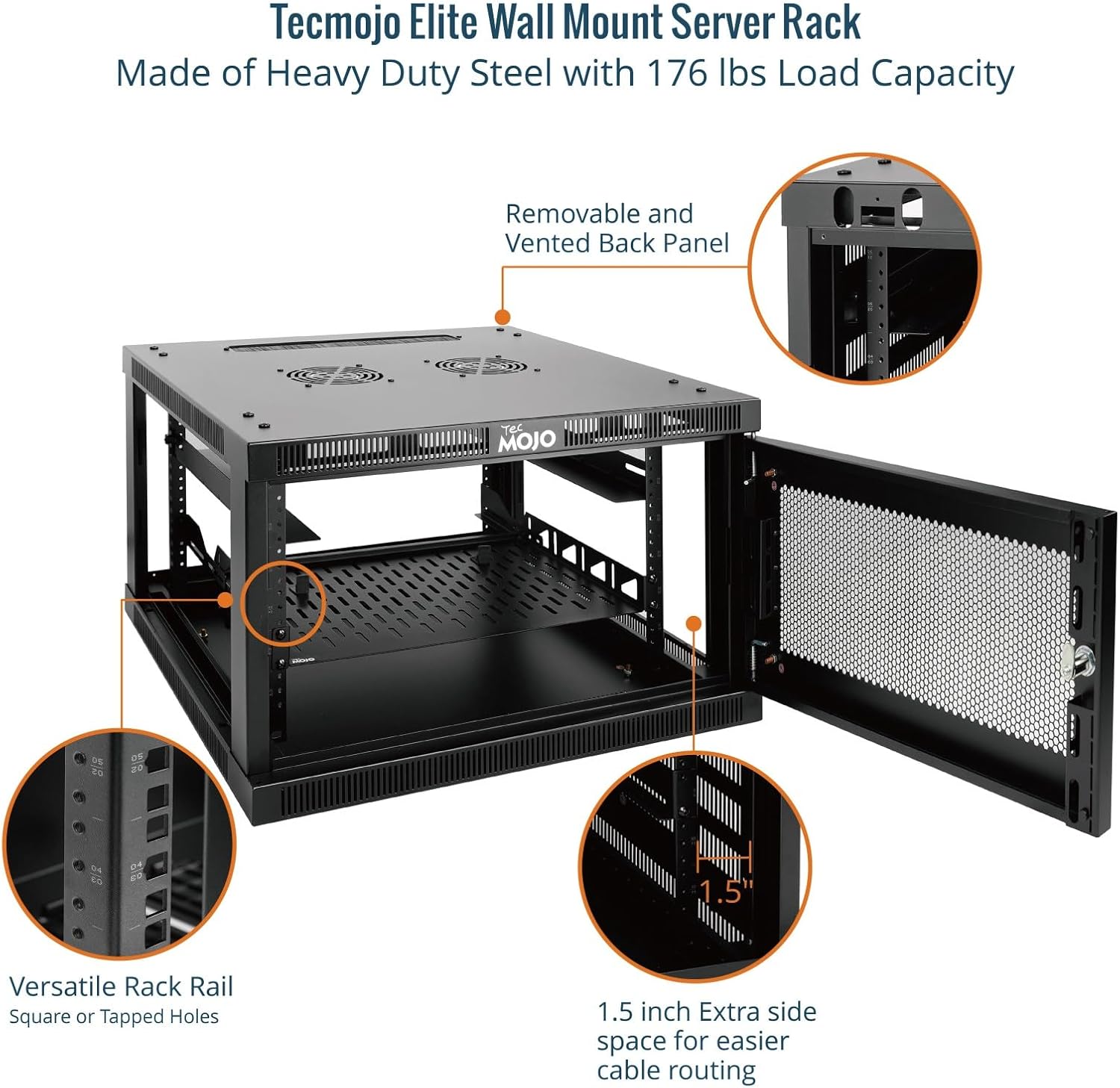
Kuva: Sisäinen view highlighting the versatile rack rails, which can accommodate square or tapped holes, and the 1.5-inch extra side space for cable routing.
- Kokoa sivupaneelit:
Attach the two side panels to the main frame. These panels are lockable for enhanced security.
- Asenna etuovi:
Install the front mesh door. This door is reversible and lockable, providing security and airflow.

Image: The fully assembled Tecmojo 6U Wall Mount Rack with its mesh door, ready for installation.
- Install Cantilever Shelf:
Mount the 1U cantilever shelf inside the rack at your desired height to support non-rack equipment.
Seinäasennus
Use the provided mounting hole drilling template to mark the positions on your wall. Ensure the wall is structurally sound to support the rack's weight. Secure the wall hanging panel to the wall using appropriate fasteners (not included, as wall types vary). Then, hang the assembled cabinet onto the wall hanging panel and secure it with screws.

Image: The Tecmojo Elite Wall Mount Server Cabinet highlighting key features such as top and bottom brush panels for cable management, two cooling fans, and lockable door and side panels for security.
Käyttöohjeet
Your Tecmojo 6U Wall Mount Server Network Rack is designed for optimal performance and security.
- Jäähdytysjärjestelmä: The cabinet features dual top-mounted cooling fans for active ventilation. These fans help maintain an optimal temperature for your equipment.
- Turvallisuus: The front mesh door and side panels are lockable to protect your valuable IT equipment from unauthorized access. Use the provided keys to secure the cabinet.
- Kaapelin hallinta: Utilize the 1.5-inch extra side space and top/bottom brush panels for efficient cable routing and management, ensuring a tidy and organized setup.
- Termostaatin ohjaus: This Elite Series cabinet includes a thermostat for precise temperature management. Adjust the thermostat to your preferred temperature to ensure optimal operating conditions for your equipment.
Video Guide: Tecmojo Elite Series Wall Mount Cabinet Features
Video: Yliview of the features of the Tecmojo Elite Series wall mount cabinet, including its thermostat control and robust design.
Huolto
- Puhdistus: Regularly wipe down the exterior surfaces with a soft, damp kangas. Vältä hankaavia puhdistusaineita.
- Tuulettimen tarkastus: Periodically check the cooling fans for dust buildup and ensure they are operating correctly to maintain proper airflow. Clean fan blades gently if necessary.
- Laitteiston tarkistus: Periodically inspect all screws and fasteners to ensure they remain tight. Re-tighten if any looseness is detected.
- Ovi ja lukko: Ensure the door hinges and locking mechanism operate smoothly. Lubricate if needed.
Vianetsintä
| Ongelma | Mahdollinen syy | Ratkaisu |
|---|---|---|
| Difficulty with screw installation during assembly. | Misalignment of parts or tight threading. | Ensure proper alignment before tightening. Apply gentle pressure and turn slowly. For very tight threads, a small amount of lubricant can help. |
| Door does not close smoothly or requires force. | Väärin linjatut saranat tai salpamekanismi. | Check hinge alignment and adjust if necessary. Ensure the latch mechanism is free of obstructions and lubricate if stiff. |
| Cabinet feels unstable after wall mounting. | Improper wall fasteners or insufficient wall support. | Verify that the wall is suitable for mounting heavy loads. Use appropriate anchors and ensure all mounting screws are securely fastened into wall studs or robust anchors. Consult a professional if unsure. |
| Cooling fans are not operating. | Power issue or fan malfunction. | Check power connection to the fans. Ensure the thermostat is set to an appropriate temperature that would trigger fan operation. If issues persist, contact customer support. |
Tekniset tiedot

Image: Visual representation of the Tecmojo 6U Wall Mount Rack's dimensions and key specifications.
- Tuotteen mitat: 23.6" S x 23.6" L x 14.6" K
- Tuotteen paino: 56.9 kiloa
- Materiaali: Seosteräs (raskaat kylmävalssatut teräkset)
- Koko: 6U
- Syvyys: 23.6 tuumaa
- Oven tyyppi: Mesh Door (Reversible, Lockable)
- Kantavuus: 176 lbs (wall-mounted), 350 lbs (floor-mounted)
- Yhteensopivuus: Standard 19-inch rackmount devices
- Jäähdytys: Dual top-mounted cooling fans
- Turvallisuus: Lockable front door and side panels
- Sertifikaatit: EIA/ECA-310-E, CE, PCI, HIPAA, NEMA Type-1 standards
Takuu ja tuki
For warranty information, technical support, or to purchase replacement parts, please visit the official Tecmojo website or contact our customer service team. Keep your purchase receipt for warranty claims.
Tecmojo Customer Service: Visit the Tecmojo Store
Ask a question about this manual
Ask about setup, troubleshooting, compatibility, parts, safety, or missing instructions. Manuals+ will review the question and use this page’s manual context to help answer it.