
1. Tuote ohiview
The DEWALT 20V MAX XR 1/2 Inch Brushless Cordless Hammer Drill is designed for demanding drilling and fastening applications. This kit includes the DCD1007WW1 hammer drill, an 8AH battery, and a charger, providing a powerful and efficient solution for various tasks in wood, metal, and concrete.
Keskeisiä ominaisuuksia ovat:
- Korkea vääntömomenttilähtö: Delivers 2,100 in-lbs. of max torque for heavy-duty applications.
- Efficient Drilling: Capable of up to 275 holes per charge (with DCB2108 battery and 7/8" diameter auger in 1-1/2" thick fir).
- ANTI-ROTATION System: Automatically shuts down the tool if excessive rotational motion is detected, enhancing user control and safety.
- Kompakti muotoilu: Shortest length DEWALT premium 3-speed drill for improved maneuverability in tight spaces.
- 3-Speed High-Performance Transmission: All-metal transmission optimizes runtime and performance.
- Pivoting 3-Position LED: Illuminates dim work areas for better visibility.
- Nitro-Carburized Metal Chuck: 1/2 inch ratcheting chuck with carbide inserts ensures strong bit retention.
- TOOL CONNECT Chip Ready: Allows tracking and management within the TOOL CONNECT system (chip sold separately).
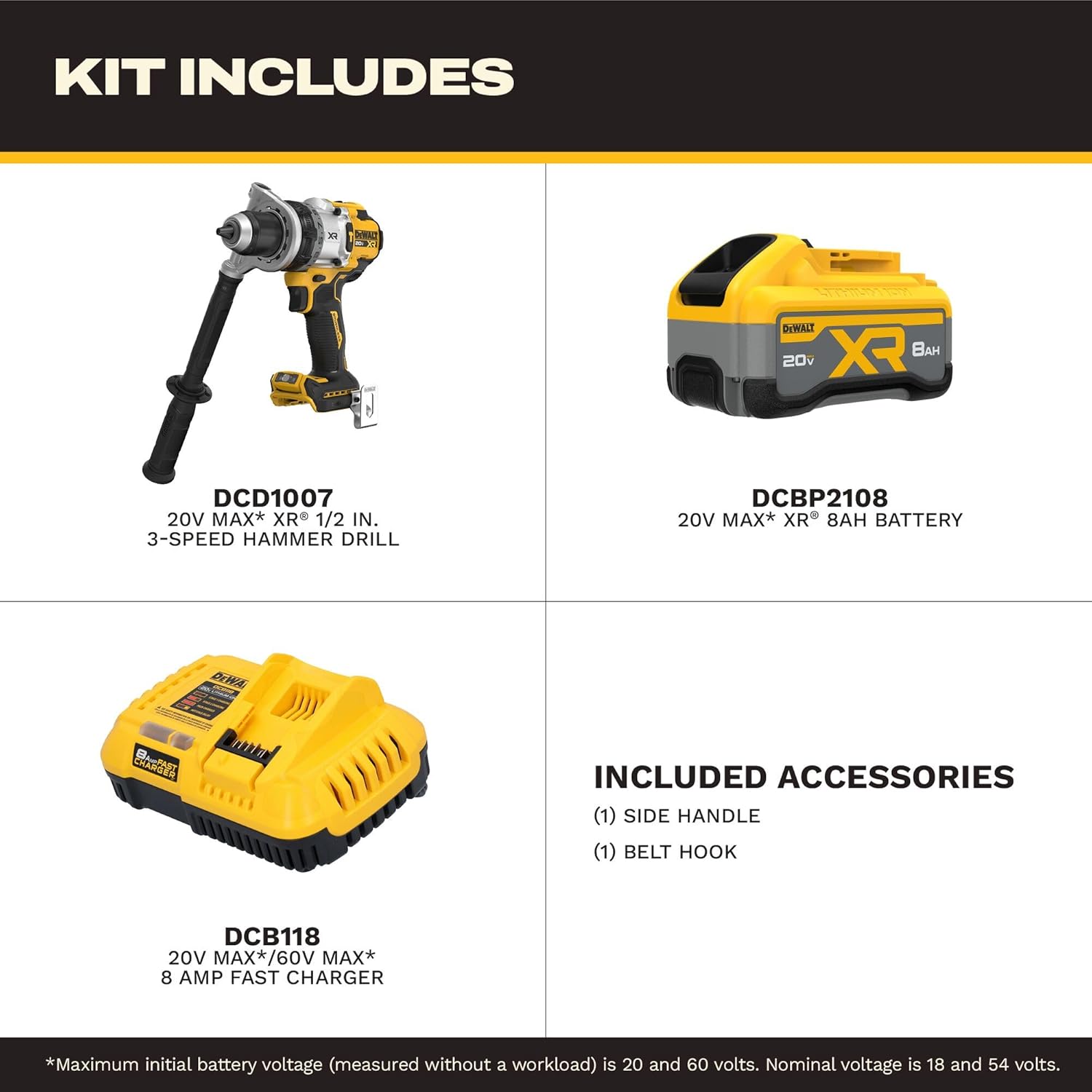
Image: The DEWALT DCD1007WW1 Hammer Drill Kit includes the drill, an 8AH battery, a charger, a side handle, and a belt hook.
2. Turvallisuusohjeet
Always follow basic safety precautions to reduce the risk of fire, electric shock, and personal injury when using power tools. Read all instructions before operating this product.
- Käytä asianmukaisia henkilönsuojaimia, kuten suojalaseja, kuulonsuojaimia ja käsineitä.
- Varmista, että työalue on puhdas ja hyvin valaistu. Epäsotkuiset tai pimeät alueet altistavat onnettomuuksille.
- Älä käytä sähkötyökaluja räjähdysvaarallisissa tiloissa, kuten syttyvien nesteiden, kaasujen tai pölyn lähellä.
- Pidä lapset ja sivulliset loitolla käyttäessäsi sähkötyökalua. Häiriöt voivat johtaa siihen, että menetät hallinnan.
- Käytä sovellukseesi oikeaa työkalua. Älä pakota työkalua.
- Irrota akku työkalusta ennen säätöjen tekemistä, lisävarusteiden vaihtamista tai työkalun varastointia.
- Säilytä käyttämättömät työkalut lasten ja muiden kouluttamattomien henkilöiden ulottumattomissa.
- Hoida työkaluja huolellisesti. Tarkista liikkuvien osien virheellinen kohdistus tai jumiutuminen, osat voivat olla rikkoutuneita tai muutoin vaurioituneita, jotka voivat vaikuttaa työkalun toimintaan.
- Käytä vain valmistajan määrittelemiä akkuja ja latureita.
3. Asennus ja kokoonpano
3.1 Sivukahvan kiinnittäminen
The adjustable side handle provides additional control and stability, especially during high-torque applications or when using larger drill bits.
- Löysää sivukahvaa kiertämällä sitä vastapäivään.
- Slide the handle onto the front of the drill housing, positioning it to your preferred angle for optimal grip and control.
- Kiristä kahva kiertämällä sitä myötäpäivään, kunnes se on tukevasti kiinni.

Image: A user attaching the side handle to the DEWALT hammer drill for enhanced control.
3.2 Akun asentaminen/irrottaminen
To install the battery pack, align it with the tool's battery port and slide it in until it clicks securely into place. To remove, press the release button on the battery pack and slide it out.
Video: Official DEWALT video demonstrating the DCD1007 Hammer Drill, including battery installation and removal.
3.3 Akun lataaminen
Connect the charger to a standard power outlet. Insert the battery pack into the charger. The indicator light on the charger will show the charging status. Refer to the charger's specific manual for detailed charging instructions and indicator light meanings.
4. Käyttöohjeet
4.1 Selecting Speed and Mode
The hammer drill features a 3-speed transmission and multiple operating modes (drilling, hammer drilling, driving). Use the gear selector switch on top of the drill to choose the desired speed (1, 2, or 3). Rotate the collar near the chuck to select the operating mode.
- Nopeus 1 (Matala): For high torque applications, driving fasteners, or drilling large diameter holes.
- Nopeus 2 (keskinopeus): For general drilling and fastening.
- Nopeus 3 (korkea): Pienten halkaisijoiden nopeaan poraamiseen.
- Poraustila: Puun, metallin ja muovin poraamiseen.
- Vasaraporaustila: For drilling in masonry and concrete.
- Ajotila: For driving screws with clutch settings.

Image: Diagram highlighting the 3-speed transmission and other features of the DEWALT hammer drill.
4.2 Poranterien/lisävarusteiden asentaminen
To install a drill bit or accessory, twist the chuck counter-clockwise to open the jaws. Insert the bit fully into the chuck and then twist clockwise to tighten securely. Ensure the bit is centered and firmly gripped before operation.
4.3 LED-työvalon käyttö
The integrated LED light can be activated by pressing the button near the base of the handle. It features a 3-position pivot to direct light where needed, improving visibility in dark work areas. The light can also be set to a 20-minute timer for use as a work light.
4.4 ANTI-ROTATION System
The PERFORM & PROTECT ANTI-ROTATION system is a safety feature that senses the rotational motion of the tool. If the tool binds up and experiences excessive rotation, the system will automatically shut it down to prevent injury. This system is particularly useful in high-torque situations where kickback can occur.

Kuva: Lähikuva view of the "ANTI-ROTATION" indicator on the DEWALT hammer drill, which illuminates when the system is active or has engaged.
5. Huolto
Säännöllinen huolto varmistaa optimaalisen suorituskyvyn ja pidentää työkalusi käyttöikää.
- Puhdistus: Keep the tool's ventilation slots clean to prevent overheating. Use a soft brush or dry cloth to remove dust and debris. Do not use water or chemical cleaners.
- Istukan huolto: Periodically clean the chuck jaws to ensure proper bit gripping.
- Akun hoito: Säilytä akkuja viileässä, kuivassa paikassa, poissa suorasta auringonvalosta ja äärimmäisistä lämpötiloista. Älä säilytä akkuja tyhjentyneessä tilassa pitkiä aikoja.
- Tarkastus: Regularly inspect the tool for any damaged parts, loose screws, or worn components. Replace damaged parts immediately.
- Voitelu: Tämä työkalu on tehtaalla voideltu, eikä se vaadi lisävoitelua.
6. Vianmääritys
| Ongelma | Mahdollinen syy | Ratkaisu |
|---|---|---|
| Työkalu ei käynnisty. | Akku ei ole ladattu tai se on asennettu väärin. | Lataa akku täyteen. Varmista, että akku on tukevasti paikallaan. |
| Tehon tai suorituskyvyn heikkeneminen. | Low battery charge; incorrect speed/mode setting; dull bit. | Recharge battery. Select appropriate speed and mode. Replace or sharpen bit. |
| Tool stops unexpectedly (ANTI-ROTATION engaged). | Excessive rotational motion detected (kickback). | Release trigger, reposition tool, and restart. Ensure proper grip and technique. |
| Istukka ei pidä terää tukevasti kiinni. | Chuck jaws are dirty or worn; bit shank is damaged. | Clean chuck jaws. Use bits with clean, undamaged shanks. If problem persists, chuck may need service. |
| Ylikuumeneminen. | Tuuletusaukot tukkeutuneet; jatkuva raskas käyttö. | Clear ventilation slots. Allow tool to cool down. Reduce load or use intermittently. |
7. Tekniset tiedot
| Ominaisuus | Yksityiskohta |
|---|---|
| Merkki | DEWALT |
| Mallinumero | DCD1007WW1 |
| Virtalähde | Paristokäyttöinen |
| Voitage | 20 V MAX* (Nimellinen 18 V) |
| Akun kapasiteetti | 8 Ah (sisältyy hintaan) |
| Suurin pyörimisnopeus | 2000 rpm |
| Suurin vääntömomentti | 2100 tuumaa |
| Nopeuksien määrä | 3 |
| Istukan koko | 1/2 tuumaa |
| Poran tyyppi | Vasarapora |
| Moottorin tyyppi | Harjaton |
| Mitat (P x L x K) | 15.5 cm P x 11.6 cm L x 12 cm K |
8. Takuu ja tuki
This DEWALT product is covered by a Manufacturer Warranty. For specific details regarding warranty coverage, limitations, and how to make a claim, please refer to the official warranty documentation included with your product or visit the DEWALT websivusto.
For further assistance, technical support, or to download the complete user guide in PDF format, please visit the official DEWALT support page or contact customer service.
Download User Guide (PDF): Napsauta tästä