
GN HEARING TV Streamer +
Resound TV Streamer+ User Manual
Model: TV Streamer +
1. Johdanto
The Resound TV Streamer+ is an innovative device designed to enhance your television viewing experience by wirelessly transmitting audio directly to your compatible Resound Nexia hearing aids. This allows for exceptional voice clarity and personalized volume control, ensuring you can fully enjoy your favorite programs and movies.
Keskeisiä ominaisuuksia ovat:
- Only compatible with Resound Nexia hearing aids.
- Instant voice clarity for better understanding.
- Auracast compatibility for improved sound quality.
- Audio streaming up to 7 meters away.
- Wireless audio streaming from TV to compatible hearing aids.
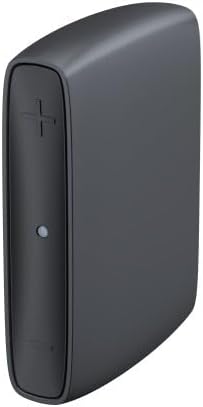
Image 1: The Resound TV Streamer+ device, a compact black unit with a plus sign button and an indicator light on the front.

Image 2: The Resound TV Streamer+ packaging, showing the device on a white background with "TV-Streamer+" text.
2. Asennus
Follow these steps to set up your Resound TV Streamer+:
- Pura laite pakkauksesta: Carefully remove the TV Streamer+ and all accessories from its packaging.
- Liitä virtalähteeseen: Plug the power adapter into the TV Streamer+ and then into a wall outlet. The indicator light on the device should illuminate.
- Connect to TV Audio Output:
- Optinen kaapeli (suositus): Connect one end of the optical cable to the optical audio output port on your TV and the other end to the optical input port on the TV Streamer+.
- RCA Cables (if optical is not available): Connect the red and white RCA cables to the corresponding audio output ports on your TV and the other ends to the RCA input ports on the TV Streamer+.
- Pair with Hearing Aids:
- Ensure your Resound Nexia hearing aids are turned on and within range (within 7 meters) of the TV Streamer+.
- Press and hold the pairing button on the TV Streamer+ (refer to the device diagram for exact location, usually a small button on the back or side) until the indicator light starts blinking rapidly.
- Open and close the battery doors of your hearing aids (or turn them off and on if rechargeable) to put them into pairing mode.
- The hearing aids should automatically connect to the TV Streamer+. The indicator light on the streamer will turn solid blue or green when connected.
- Testiyhteys: Play audio on your TV and confirm that the sound is streaming to your hearing aids. Adjust the TV volume as needed.
3. Käyttöohjeet
Once connected, the Resound TV Streamer+ provides a seamless audio experience:
- Automatic Streaming: When the TV Streamer+ is on and connected to your TV, and your hearing aids are within range, audio will automatically stream to your hearing aids.
- Äänenvoimakkuuden säätö: You can adjust the volume of the streamed audio directly through your hearing aid controls or via the Resound Smart 3D app on your smartphone. The TV's volume control will typically not affect the streamed audio volume to your hearing aids.
- Switching Programs: If you wish to switch between streamed audio and your hearing aids' regular microphone input, you can usually do so via your hearing aid program button or the Resound Smart 3D app.
- Auracast Compatibility: The device leverages Auracast technology for enhanced sound quality and a stable wireless connection, allowing for a richer audio experience.
4. Huolto
To ensure the longevity and optimal performance of your Resound TV Streamer+, follow these maintenance guidelines:
- Puhdistus: Wipe the device regularly with a soft, dry cloth. Do not use liquid cleaners, sprays, or abrasive materials.
- Varastointi: Säilytä laitetta viileässä, kuivassa paikassa, poissa suorasta auringonvalosta ja äärimmäisistä lämpötiloista.
- Vältä kosteutta: Pidä laite poissa vedestä ja korkeasta kosteudesta.
- Käsittele varovasti: Vältä laitteen pudottamista tai sen altistamista voimakkaille iskuille.
5. Vianmääritys
If you encounter issues with your Resound TV Streamer+, try the following solutions:
| Ongelma | Mahdollinen syy | Ratkaisu |
|---|---|---|
| No audio streaming to hearing aids. |
|
|
| Huono äänenlaatu. |
|
|
| Cannot pair hearing aids. |
|
|
Jos ongelma jatkuu, ota yhteyttä asiakastukeen.
6. Tekniset tiedot
| Ominaisuus | Yksityiskohta |
|---|---|
| Merkki | GN HEARING |
| Valmistaja | GN HEARING |
| Mallin nimi | TV Streamer + |
| Osanumero | 22926500 |
| Yhteystekniikka | Bluetooth |
| Muototekijä | TV Stick |
| Väri | Hiilenharmaa |
| Video Codec | H.264, H.265/HEVC |
| Maailmanlaajuinen kauppanumero (GTIN) | 05708296321216 |
| Ensimmäinen vapaapäivä | 2. heinäkuuta 2024 |
7. Takuu ja tuki
For warranty information, please refer to the documentation included with your purchase or contact your point of sale. GN HEARING provides support for its products.
If you require technical assistance, have questions about your device, or need to report a problem, please contact GN HEARING customer support through their official websivustolla tai tuotteen mukana toimitetuissa yhteystiedoissa.
Please have your model name (TV Streamer +) and part number (22926500) ready when contacting support.
Ask a question about this manual
Ask about setup, troubleshooting, compatibility, parts, safety, or missing instructions. Manuals+ will review the question and use this page’s manual context to help answer it.