
Johdanto
Thank you for choosing the WORKPRO 3.6V Electric Cordless Screwdriver. This manual provides essential information for the safe and efficient operation, maintenance, and care of your new tool. Please read this manual thoroughly before use and retain it for future reference.
Turvallisuustiedot
Noudata aina sähkötyökaluja käyttäessäsi perusturvallisuusohjeita tulipalon, sähköiskun ja henkilövahinkojen riskin vähentämiseksi.
- Pidä työalue puhtaana ja hyvin valaistuna. Sotkuiset tai tummat alueet aiheuttavat onnettomuuksia.
- Älä käytä sähkötyökaluja räjähdysvaarallisissa tiloissa, kuten syttyvien nesteiden, kaasujen tai pölyn lähellä. Sähkötyökalut luovat kipinöitä, jotka voivat sytyttää pölyn tai höyryt.
- Pidä lapset ja sivulliset loitolla käyttäessäsi sähkötyökalua. Häiriöt voivat johtaa siihen, että menetät hallinnan.
- Vältä vahingossa tapahtuvaa käynnistymistä. Varmista, että kytkin on pois päältä -asennossa ennen kuin kytket akun, nostat tai kannat työkalua.
- Älä kurota liikaa. Pysy koko ajan oikeassa asennossa ja tasapainossa. Tämä mahdollistaa sähkötyökalun paremman hallinnan odottamattomissa tilanteissa.
- Pukeudu kunnolla. Älä käytä väljiä vaatteita tai koruja. Pidä hiuksesi ja vaatteet etäällä liikkuvista osista. Löysät vaatteet, korut tai pitkät hiukset voivat tarttua liikkuviin osiin.
- Käytä turvavarusteita. Käytä aina suojalaseja. Asianmukaisissa olosuhteissa on käytettävä pölynaamaria, liukumattomia turvakenkiä, suojakypärää tai kuulosuojaimia.
Pakkauksen sisältö
Varmista, että pakkauksessasi on kaikki alla luetellut tuotteet:
- 1 PC Electric Cordless Screwdriver
- 1 PC USB Cable (Type-A to Type-C)
- 1 PC Carrying Case
- 1 PC 50mm Extension Rod
- 2 PCS 50mm Bits (PH2/PZ2)
- 19 PCS 25mm Bits (PH0/1/2/3, PZ1/2/3, H1/8, 5/32, 3/16, 1/4, T10/15/20/25, SL1/8, 5/32, 3/16, 1/4)
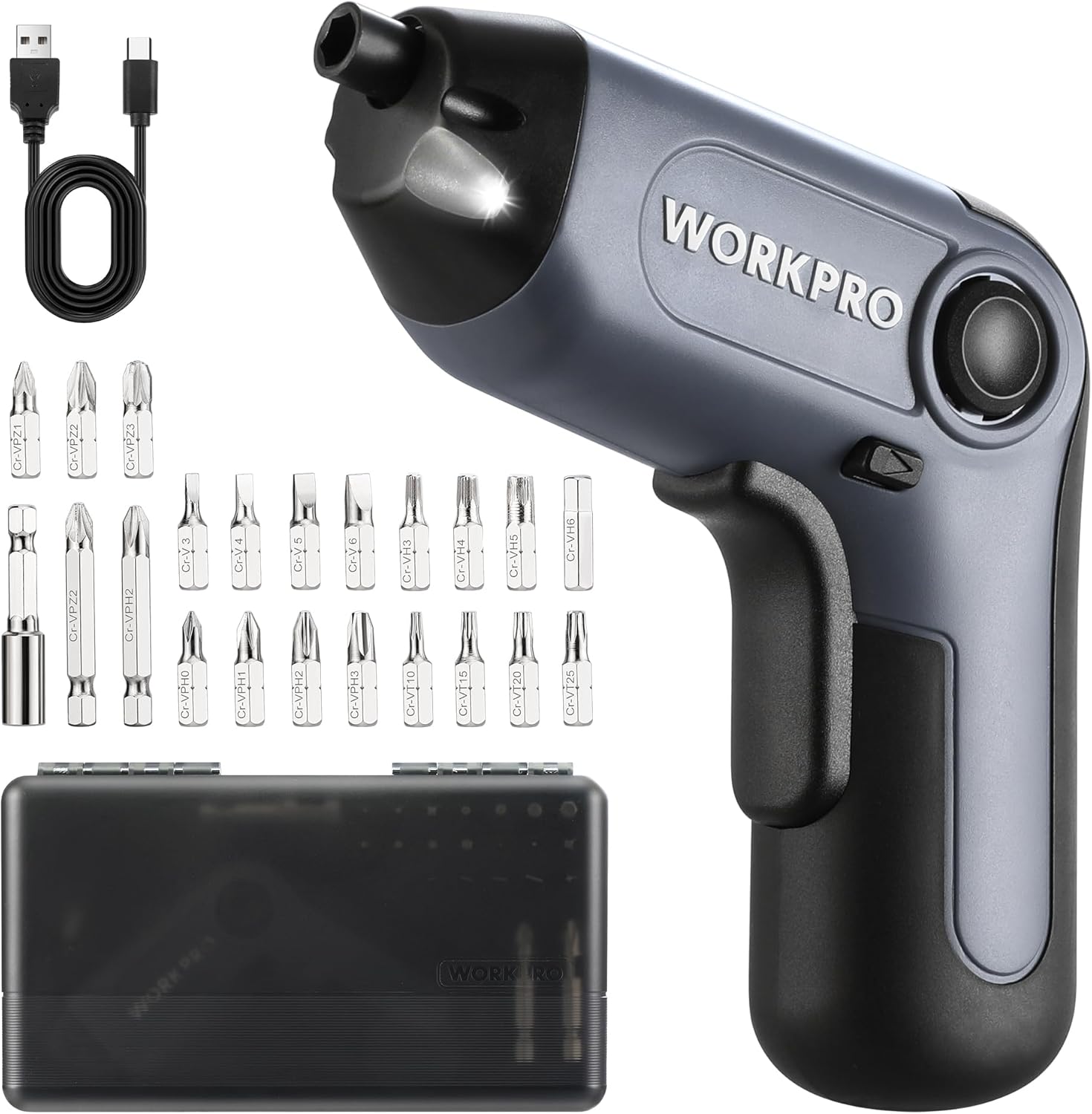
Image: The WORKPRO Electric Cordless Screwdriver, USB cable, carrying case, extension rod, and various screwdriver bits.
Tuote loppuview
Familiarize yourself with the components and features of your WORKPRO Electric Cordless Screwdriver.

Image: A diagram highlighting key parts of the screwdriver, including the 1/4" Collet Sleeve, LED Light, ON/OFF Switch, USB-C Cable port, Forward/Reverse/Lock Control, and Charge Port & Charge Indicator.
- Offset Driving Shaft: Designed for improved access in tight spaces and corners, offering greater flexibility compared to traditional center-driving tools.
- LED-valo: An integrated front LED light automatically illuminates the work area, enhancing visibility in dimly lit environments.
- Magnetic Chuck: The 1/4" magnetic chuck securely holds screwdriver bits in place during operation.
- Forward/Reverse/Lock Control: A convenient switch allows for easy selection of driving direction or locking the tool for manual use.
Asennus
Akun lataaminen
The screwdriver is equipped with a built-in rechargeable battery. Before first use, or when the battery is low, charge the tool using the provided USB cable.
- Connect the USB cable (Type-A to Type-C) to the charging port on the screwdriver.
- Connect the other end of the USB cable to a power source such as a power bank, USB charger (5V), car charger, or laptop/PC.
- The charge indicator light will show punainen latauksen aikana.
- Kun lataus on valmis, merkkivalo syttyy vihreä. A full charge typically takes 1.5-2 hours.

Image: The screwdriver being charged via USB-C, illustrating the built-in 2000mAh battery and compatible charging methods.
Teräterien asentaminen/vaihtaminen
The screwdriver features a 1/4" magnetic chuck for quick and secure bit changes.
- Ensure the screwdriver is in the 'Lock' position (center position of the Forward/Reverse switch) to prevent accidental activation.
- Insert the desired 1/4" hex bit directly into the magnetic chuck until it is firmly seated.
- Irrota terä vetämällä se suoraan ulos istukasta.
- For extended reach, insert the 50mm extension rod into the chuck first, then insert the desired bit into the extension rod.
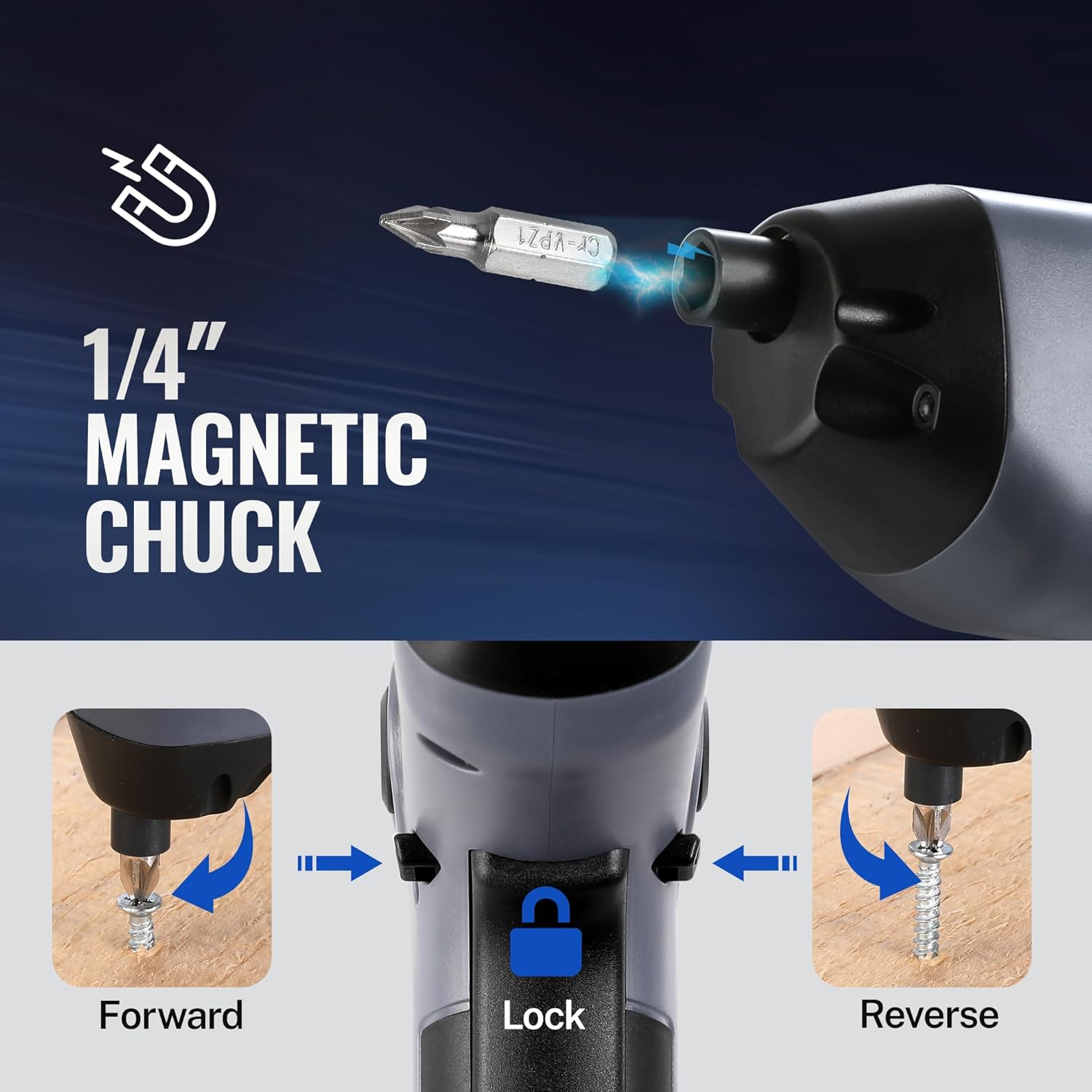
Image: A visual representation of inserting a bit into the magnetic chuck and the Forward, Lock, and Reverse positions of the control switch.
Käyttöohjeet
Virran kytkeminen päälle/pois
To operate the screwdriver, press the ON/OFF switch (trigger) located on the handle. Release the switch to stop the tool.
Eteen-/taaksepäin-toiminta
The Forward/Reverse/Lock control switch is located near the top of the handle.
- Push the switch forward (towards the bit) for eteenpäin rotation (to drive screws).
- Push the switch backward (towards the base) for päinvastoin rotation (to remove screws).
- Aseta kytkin asentoon keskusta position to lock the tool, preventing accidental activation and allowing for manual tightening/loosening if needed.
LED-valon käyttäminen
The integrated LED light automatically activates when the ON/OFF switch is pressed, illuminating your work area. It will turn off automatically when the switch is released.

Image: The screwdriver in use, demonstrating how the LED light illuminates the screw and surrounding area for better visibility.
Utilizing the Offset Driving Shaft
The offset design of this screwdriver allows it to reach screws in confined spaces and close to edges where traditional screwdrivers or drills might not fit.
- When working in corners or near obstacles, position the offset shaft to align the bit with the screw head.
- This design provides increased flexibility for precise work in challenging areas.

Image: A comparison showing a standard drill with a center driving shaft unable to reach a screw in a corner, contrasted with the WORKPRO screwdriver's offset driving shaft successfully accessing the screw in a narrow space.
Huolto
Oikea huolto varmistaa ruuvimeisselisi pitkän käyttöiän ja optimaalisen suorituskyvyn.
- Puhdistus: Pyyhi työkalu säännöllisesti pehmeällä,amp liinalla. Älä käytä voimakkaita kemikaaleja tai hankaavia puhdistusaineita. Pidä tuuletusaukot vapaina pölystä ja roskista.
- Varastointi: Store the screwdriver and its accessories in the provided carrying case in a dry, cool place, away from direct sunlight and moisture.
- Akun hoito: Pitkäaikaisvarastointia varten lataa akku noin 50 %:iin 3–6 kuukauden välein akun kunnon ylläpitämiseksi.
- Bittien tarkastus: Periodically inspect screwdriver bits for wear or damage. Replace worn bits to ensure effective screw driving and prevent damage to screw heads.
Vianetsintä
If you encounter issues with your WORKPRO Electric Cordless Screwdriver, refer to the following common problems and solutions:
- Screwdriver does not turn on:
- Ensure the battery is charged. Connect the tool to a power source and check the charging indicator.
- Verify the Forward/Reverse/Lock switch is not in the 'Lock' (center) position.
- Screwdriver lacks power/torque:
- Akun varaus voi olla heikko. Lataa työkalu.
- Ensure the correct bit size is used for the screw to prevent stripping and maximize torque transfer.
- Bit falls out of chuck:
- Ensure the bit is fully inserted into the magnetic chuck.
- Check if the bit is a standard 1/4" hex shank.
- Charging indicator light does not turn green:
- Ensure the USB cable is securely connected to both the screwdriver and the power source.
- Try a different USB cable or power adapter to rule out a faulty accessory.
Tekniset tiedot
| Ominaisuus | Erittely |
|---|---|
| Merkki | WORKPRO |
| Malli | 3.6V Electric Cordless Screwdriver |
| Akun tyyppi | Litiumioniakku (sisältyy) |
| Vääntömomentti | Jopa 5 Nm |
| Nopeus ilman kuormaa | 210 RPM |
| Latausaika | 1.5-2 tuntia |
| Latausportti | USB-C |
| Pään tyyli | Phillips, Pozidriv, Torx, Hex, Slotted |
| Bittikoko | 1/4" Hex Shank (25mm and 50mm bits included) |
| Tuotteen paino | 1.96 kiloa |
| Pakkauksen mitat | 9.96 x 5.71 x 2.64 tuumaa |
Takuu ja tuki
WORKPRO products are manufactured to high-quality standards. For warranty information, technical support, or service inquiries, please refer to the contact information provided with your purchase documentation or visit the official WORKPRO websivusto. Säilytä ostokuitti takuuvaatimuksia varten.


