
1. Johdanto
Kiitos ostoksestasiasing the Edifier R990BT Bluetooth Computer Speakers. These 2.0 active bookshelf speakers are designed to provide high-quality audio for your PC, smartphone, tablet, and other compatible devices. Featuring Bluetooth V5.4 connectivity and dual RCA inputs, the R990BT offers versatile audio options in a classic MDF enclosure. Please read this manual thoroughly to ensure proper setup and optimal performance of your speakers.
2. Pakkauksen sisältö
Varmista, että pakkauksessa on kaikki tarvittavat osat:
- Edifier R990BT Active Bookshelf Speakers (1 Pair)
- Kaiuttimen liitäntäkaapeli
- RCA-RCA-äänikaapeli
- 3.5 mm: n RCA-äänikaapeli
- Virtakaapeli
- Pika-aloitusopas
3. Asennus
3.1 Kaiuttimien sijoitus
Place the speakers on a stable, flat surface such as a desk or shelf. For optimal stereo imaging, position the speakers equidistant from your listening position, forming an equilateral triangle. Ensure there is adequate space behind the speakers for cable connections and ventilation.

Image: Edifier R990BT speakers positioned on a desk, demonstrating typical placement for computer use.
3.2 Kaiuttimien kytkeminen
- Passiivikaiuttimen liittäminen: Use the included speaker connection cable to link the active speaker (with controls) to the passive speaker. Ensure the correct polarity (+ to + and - to -) for proper sound reproduction.
- Liitä virtalähteeseen: Plug the power cable into the active speaker's power input and then into a wall outlet.
3.3 Äänilähteiden liittäminen
The R990BT speakers support both wired (RCA) and wireless (Bluetooth) connections.
Wired Connection (RCA)
The speakers feature two sets of RCA input ports (Line In 1 and Line In 2) for connecting two different wired audio devices simultaneously.
- Use the RCA to RCA cable to connect devices with RCA outputs (e.g., CD player, turntable with pre-amp).
- Use the 3.5mm to RCA cable to connect devices with a 3.5mm audio jack (e.g., computer, smartphone, tablet).

Image: Close-up of the rear panel of the active speaker, highlighting the dual RCA input ports (Line In 1 and Line In 2) and the power input.
Bluetooth-yhteys
The R990BT features Bluetooth V5.4 for wireless audio streaming.
- Turn on the speakers.
- Press the volume/input knob on the rear panel to select the Bluetooth input. The indicator light will flash blue.
- Ota Bluetooth käyttöön äänilaitteessasi (älypuhelin, tabletti, tietokone) ja hae käytettävissä olevia laitteita.
- Select "EDIFIER R990BT" from the list to pair. The indicator light will turn solid blue once connected.

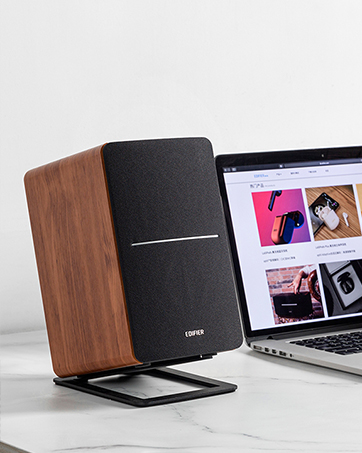
Image: A single Edifier R990BT speaker on a desk next to a laptop, symbolizing the ease of Bluetooth connectivity.
4. Käyttöohjeet
4.1 Virta päälle/pois
The power switch is located on the rear panel of the active speaker. Flip the switch to the 'ON' position to power on the speakers. Flip to 'OFF' to power off.
4.2 Äänenvoimakkuuden säätö
The large knob on the rear panel of the active speaker controls the master volume. Rotate clockwise to increase volume and counter-clockwise to decrease volume.
Kuva: Yksityiskohtainen view of the multi-function control knob on the rear of the speaker, used for volume adjustment and input selection.
4.3 Tulon valinta
Press the volume/input knob on the rear panel to cycle through the available audio inputs: Line In 1, Line In 2, and Bluetooth. The indicator light will change color or flash to indicate the selected input mode.
- Line In 1 / Line In 2: Solid green or red indicator (depending on model/firmware).
- Bluetooth: Flashing blue (pairing mode) or solid blue (connected).
4.4 Using the Edifier ConneX App
For enhanced control and customization, download the Edifier ConneX mobile application. The app allows you to adjust equalization settings and access additional features for your R990BT speakers.
- Download the Edifier ConneX app from your device's app store.
- Ensure your speakers are powered on and connected via Bluetooth to your mobile device.
- Open the app and follow the on-screen instructions to connect to your R990BT speakers.

Image: The official logo for the Edifier ConneX mobile application.
5. Huolto
5.1 Puhdistus
Kaiuttimien ulkonäön ja suorituskyvyn ylläpitämiseksi:
- Wipe the speaker cabinets with a soft, dry cloth.
- Do not use liquid cleaners, aerosols, or abrasive chemicals, as these may damage the finish or internal components.
- Gently brush dust from the speaker grilles using a soft brush or vacuum cleaner with a brush attachment.
5.2 Varastointi
If storing the speakers for an extended period, ensure they are powered off and disconnected from the power source. Store them in a cool, dry place away from direct sunlight and extreme temperatures.
6. Vianmääritys
If you encounter any issues with your Edifier R990BT speakers, please refer to the following common problems and solutions:
| Ongelma | Mahdollinen syy | Ratkaisu |
|---|---|---|
| Ei ääntä |
|
|
| Vääristynyt ääni |
|
|
| Bluetooth not connecting/disconnecting |
|
|
| Difficulty switching inputs |
|
|
7. Tekniset tiedot
Edifier R990BT -kaiuttimien yksityiskohtaiset tekniset tiedot:
- Mallin nimi: R990BT
- Kaiuttimen tyyppi: Kirjahylly
- Asennustyyppi: Shelf Mount/Tabletop Mount
- Materiaali: MDF (keskitiheyskuitulevy)
- Yhteystekniikka: Bluetooth V5.4, Wired (Dual RCA)
- Äänilähtötila: Stereo (2.0)
- Kaiuttimen suurin lähtöteho: 24 wattia (tehollisarvo)
- Bassokaiuttimen halkaisija: 4 tuumaa
- Diskantin halkaisija: 1 tuumaa
- Taajuusvaste: 18 KHz (Upper limit, typical for compact speakers)
- Signaali-kohinasuhde: 85 dB
- Valvontamenetelmä: Touch (via rear knob)
- Virtalähde: Corded Electric (100-240V ~ 50/60Hz)
- Tuotteen mitat: 11.5"D x 7.5"W x 17"H (per speaker, approximate)
- Tuotteen paino: 7.94 Pounds (per speaker, approximate)
- Väri: Musta
- Yhteensopivat laitteet: Devices with Bluetooth technology, devices with RCA or 3.5mm audio output.
8. Takuu ja tuki
8.1 Takuutiedot
The Edifier R990BT speakers come with a Limited Warranty. Please refer to the warranty card included in your package or visit the official Edifier websivustolta löydät tuotteen takuuta koskevat yksityiskohtaiset ehdot.
8.2 Asiakastuki
For technical assistance, troubleshooting, or general inquiries, please contact Edifier customer support. Contact details can typically be found on the official Edifier website or in your product's Quick Start Guide.
Online-tuki: Vierailla www.edifier.com usein kysyttyjä kysymyksiä, tukiresursseja ja yhteystietoja varten.