
T300
Generic T300 LED Mini Projector User Manual
Malli: T300
1. Johdanto
Kiitos ostoksestasiasing the Generic T300 LED Mini Projector. This compact and portable projector is designed for home theater use, offering a clear viewing experience with its short-focus optical lens and diffuse reflection imaging technology, which helps reduce eye strain. This manual provides essential information for setting up, operating, maintaining, and troubleshooting your projector.

Kuva 1.1: The T300 Mini Projector's compact size allows for easy portability, fitting conveniently into a bag.
2. Pakkauksen sisältö
Tarkista pakkauksen sisältö purkamisen yhteydessä varmistaaksesi, että kaikki osat ovat mukana:
- 1x T300 Projector
- 1 x virtalähde (EU-pistoke)
- 1x kaukosäädin
- 1x AV-kaapeli
- 1x Käyttöohje (tämä asiakirja)
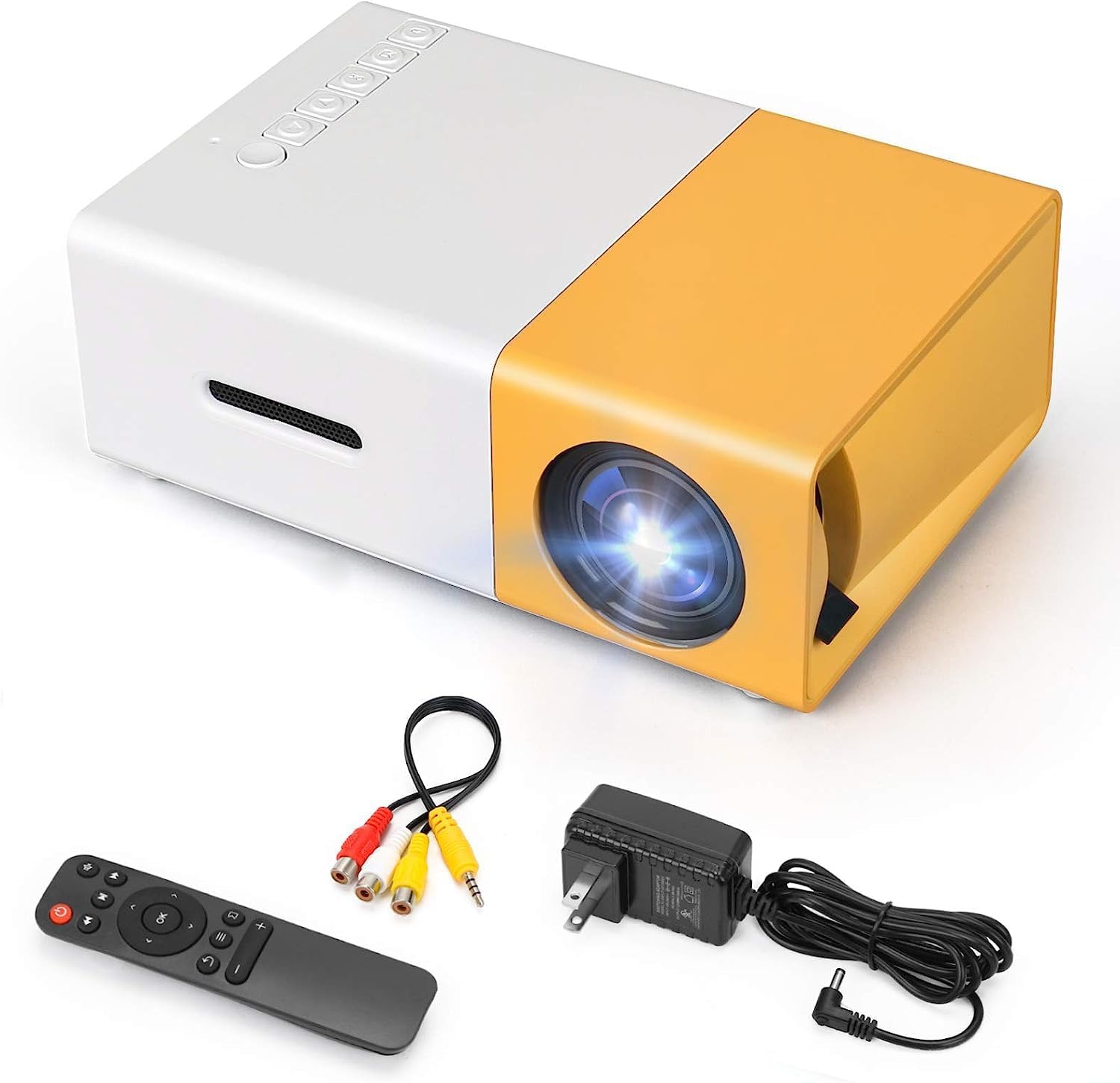
Kuva 2.1: The T300 Mini Projector and its included accessories.
3. Tuote ohiview
Familiarize yourself with the various ports and controls on your T300 Mini Projector:

Kuva 3.1: Edessä ja takana views of the T300 Mini Projector, detailing its input/output ports and control buttons.
3.1. Portit ja liitännät
- HDMI -tulo: Connect to laptops, TV boxes, gaming consoles, and other HDMI-enabled devices.
- USB-tulo: Median toistamiseen suoraan USB-asemilta.
- Micro SD -korttipaikka: For playing media directly from Micro SD cards.
- AV-tulo: Yhdistä vanhempiin laitteisiin mukana toimitetulla AV-kaapelilla.
- Micro USB (5V/2A): Power input option, compatible with power banks or car chargers.
- Earphone Slot: Ulkoisten kuulokkeiden tai kaiuttimien kytkemiseen.
- DC-virransyöttö: Main power input using the provided power adapter.
3.2. Säätimet
- Virtakytkin: To turn the projector on or off.
- Navigation Buttons (Left, Right, OK): Valikon navigointia ja valintaa varten.
- Syöttöpainike: Tulolähteen valitseminen.
- Paluupainike: Palataksesi valikoissa.
4. Asennus
4.1. Virtaliitäntä
- Connect the provided power adapter to the DC Power Input port on the projector.
- Liitä verkkolaite pistorasiaan.
- Alternatively, for portable use, connect a 5V/2A power bank or car charger to the Micro USB (5V/2A) port.
4.2. Laiteliitäntä
The T300 projector supports various input sources:
- HDMI: Connect your laptop, TV box, gaming console (PS4/PS3), or other HDMI devices using an HDMI cable (not included).
- USB: Aseta USB-muistitikku USB-porttiin toistaaksesi mediaa files suoraan.
- Micro SD -kortti: Insert a Micro SD card into the Micro SD card slot to play media files.
- AV: Use the included AV cable to connect to devices with AV output (e.g., DVD players).

Kuva 4.1: Multimedia connectivity options for the T300 Mini Projector.
4.3. Placement and Focus
- Aseta projektori vakaalle ja tasaiselle alustalle.
- Position the projector at a distance between 2 to 5 meters from the projection surface to achieve an optimal image size of 60 to 150 inches.
- Adjust the focus ring on the projector lens until the image appears clear and sharp. The short-focus optical lens allows focusing at a distance of 50cm.
5. Käyttöohjeet
5.1. Virta päälle / pois
Press the Power Switch on the projector or the power button on the remote control to turn the projector on or off.
5.2. Tulolähteen valitseminen
After powering on, use the 'Input' button on the projector or the remote control to cycle through available input sources (HDMI, USB, TF Card, AV) until your desired source is displayed.
5.3. Multimedian toisto
The projector supports multi-format video, audio, picture, and e-book playback. Navigate through your media files using the navigation buttons on the projector or remote control and press 'OK' to select.
5.4. Äänilähtö
The projector has a built-in miniature speaker. For enhanced audio, connect external speakers or headphones to the Earphone Slot.

Kuva 5.1: Versatile applications of the T300 Mini Projector for entertainment.
6. Huolto
6.1. Linssin puhdistaminen
Use a soft, lint-free cloth or lens cleaning paper to gently wipe the projector lens. Avoid using abrasive materials or harsh chemicals that could scratch the lens.
6.2. Tuuletus
Ensure the projector's ventilation openings are not blocked during operation to prevent overheating. Keep the projector in a well-ventilated area.
6.3. Varastointi
When not in use, store the projector in a cool, dry place, away from direct sunlight and excessive dust. It is recommended to use the original packaging or a protective case.
6.4. Lamp Elämä
LED lamp in your T300 projector has an estimated life of 20,000 hours, providing long-term use without frequent lamp vaihto.
7. Vianmääritys
Jos projektorin kanssa ilmenee ongelmia, katso seuraavat yleiset ongelmat ja ratkaisut:
- Kuvaa ei näy:
- Varmista, että projektori on päällä ja virtalähde on kytketty kunnolla.
- Verify the input source is correctly selected (HDMI, USB, AV, etc.).
- Check the connection cable between the projector and the source device.
- Kuva on epätarkka:
- Säädä projektorin linssin tarkennusrengasta, kunnes kuva on selkeä.
- Varmista, että heijastusetäisyys on suositellun alueen sisällä (2–5 metriä).
- Ei ääntä:
- Tarkista sekä projektorin että lähdelaitteen äänenvoimakkuusasetukset.
- If using external speakers/headphones, ensure they are properly connected to the Earphone Slot.
- Tarkista lähdelaitteesi äänilähtöasetukset.
- Kaukosäädin ei toimi:
- Varmista, ettei kaukosäätimen ja projektorin infrapunavastaanottimen välissä ole esteitä.
- Vaihda kaukosäätimen paristot tarvittaessa.
8. Tekniset tiedot
| Ominaisuus | Erittely |
|---|---|
| Malli | T300 |
| Tuen resoluutio | 1920 x 1080 (Full HD) |
| Alkuperäinen resoluutio | 1920 x 1080 |
| Näytön tyyppi | LCD-näyttö, DLP-näyttö |
| Liitännät | HDMI, USB, TF Card Slot, AV, Micro USB (5V-2A) |
| Sisäänrakennettu kaiutin | Kyllä |
| Lamp Elämä | 20,000 tuntia |
| Tuotteen koko | 114 x 87 x 50 mm |
| Suositellut käyttötavat | Kotiteatteri |
| Erikoisominaisuus | Kannettava |
| Kuvan enimmäiskoko | 150 tuumaa |
| Kuvan vähimmäiskoko | 60 tuumaa |
| Suurin heittoetäisyys | 5 metriä |
| Minimiheittoetäisyys | 2 metriä |
| Virransyöttö | 5V/2A |
9. Takuu ja tuki
9.1. Takuutiedot
Tämän tuotteen mukana tulee yleensä a 10-day replacement policy from the date of purchase. Please refer to your retailer's specific warranty terms and conditions for detailed information. The LED lamp is designed for a long life of 20,000 hours, which is not typically covered by short-term replacement policies.
9.2. Asiakastuki
For technical assistance, troubleshooting beyond this manual, or warranty claims, please contact your original retailer or the manufacturer, SHUBH LABH ENTERPRISES. Keep your purchase receipt or proof of purchase handy when contacting support.
Ask a question about this manual
Ask about setup, troubleshooting, compatibility, parts, safety, or missing instructions. Manuals+ will review the question and use this page’s manual context to help answer it.