1. Tuote ohiview
This replacement remote control is designed for use with various Pioneer Smart 4K LCD LED HDTV models. It is pre-programmed and requires no additional setup or coding. Simply insert batteries, and it is ready for immediate use.
Paketin sisältö:
- 1 x Vaihtokaukosäädin
Note: Batteries and a separate instruction manual are not included in the package.
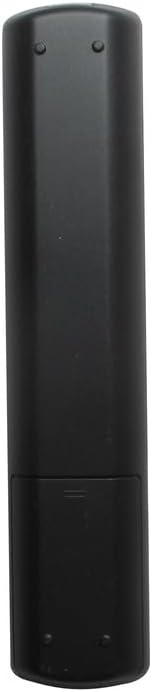
Kuva 1.1: Edessä view of the Generic replacement remote control. This image displays the full layout of the remote's buttons, including power, channel, volume, navigation, and smart TV function buttons.
2. Asennus ja akun asennus
This remote control is designed for immediate use without any programming. The only setup required is the installation of batteries.
- Obtain Batteries: Purchase two (2) new AAA batteries from a local retailer. These are not included with the remote control.
- Avaa paristolokero: Locate the battery compartment cover on the back of the remote control. Gently slide the cover downwards or press the latch (if present) to open it.
- Aseta paristot: Insert the two AAA batteries into the compartment, ensuring that the positive (+) and negative (-) terminals align correctly with the markings inside the compartment. Incorrect insertion can prevent the remote from functioning.
- Sulje paristolokero: Liu'uta paristolokeron kansi takaisin paikalleen, kunnes se napsahtaa tukevasti.
- Testaa kaukosäädintä: Point the remote control towards your Pioneer TV and press the Power button. The TV should respond. If not, recheck battery orientation or replace with new batteries.
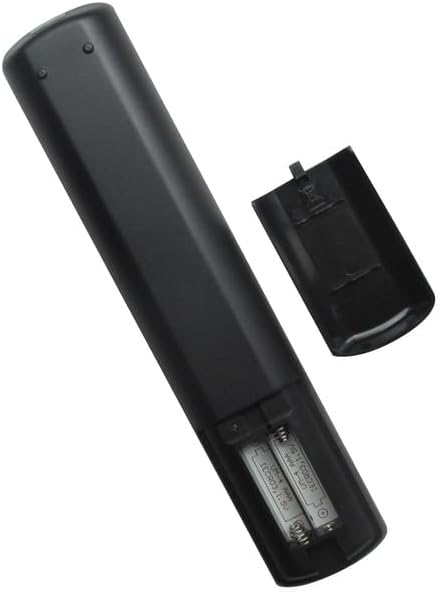
Kuva 2.1: Takaosa view of the remote control with the battery compartment open. This image illustrates the correct placement of AAA batteries within the remote's battery compartment.
3. Käyttöohjeet
Once batteries are installed, the remote control is ready to operate your compatible Pioneer TV. Point the remote directly at the TV's infrared receiver for optimal performance.
Perustoiminnot:
- Virtapainike: Kytkee television päälle tai pois päältä.
- Kanavapainikkeet (CH+/CH-): Vaihtaa TV-kanavaa ylös tai alas.
- Äänenvoimakkuuspainikkeet (VOL+/VOL-): Lisää tai vähentää television äänenvoimakkuutta.
- Mykistyspainike: Mykistää television äänen tai poistaa mykistyksen.
- Tulo-/lähdepainike: Selaa käytettävissä olevien tulolähteiden (HDMI, AV jne.) läpi.
- Navigointipainikkeet (ylös, alas, vasemmalle, oikealle, OK/Enter): Used to navigate menus and select options on the TV screen.
- Valikkopainike: Avaa television päävalikon.
- Poistumis-/Takaisin-painike: Sulkee valikot tai palaa edelliseen näyttöön.
- Numeropainikkeet (0-9): Syöttää kanavanumerot suoraan.
For specific advanced functions or smart TV features, refer to your Pioneer TV's original user manual, as button labels and functions may vary slightly depending on the TV model.
4. Huolto
Akun vaihto:
- Vaihda paristot, kun kaukosäätimen vaste hidastuu tai se lakkaa toimimasta.
- Always replace both batteries at the same time with new AAA batteries.
- Älä sekoita vanhoja ja uusia paristoja tai erityyppisiä paristoja.
- Poista paristot vuotojen estämiseksi, jos kaukosäädintä ei käytetä pitkään aikaan.
Puhdistus:
- Pyyhi kaukosäädin pehmeällä, kuivalla liinalla.
- Älä käytä nestemäisiä puhdistusaineita, suihkeita tai hankaavia materiaaleja, sillä ne voivat vahingoittaa kaukosäätimen pintaa tai sisäisiä osia.
5. Vianmääritys
-
Kaukosäädin ei toimi:
- Varmista, että paristot on asetettu oikein päin ja oikea napaisuus (+/-).
- Vaihda vanhat paristot uusiin AAA-paristoihin.
- Check for any obstructions between the remote and the TV's infrared receiver.
- Ensure you are within a reasonable range and pointing the remote directly at the TV.
-
Certain buttons not responding:
- This remote is a generic replacement. While it supports primary functions, some highly specific or advanced smart TV features might require the original TV remote.
- Puhdista kaukosäätimen pinta, erityisesti reagoimattomien painikkeiden ympäriltä, liasta ja roskista.
6. Tekniset tiedot
| Merkki | Yleinen |
| Valmistaja | Yleinen |
| Yhteensopivat laitteet | Pioneer Television models: PLE-43S05FHD, PLE-55S05FHD, PLE-43S07FHD, PLE-2405HD, PLE-55S06UHD |
| Tuettujen laitteiden enimmäismäärä | 1 (One Television) |
| Erikoisominaisuus | Ohjelmointia ei vaadita |
| Virtalähde | 2 x AAA paristot (eivät sisälly) |
7. Takuu ja tuki
No specific warranty information is provided for this generic replacement remote control. For any issues or inquiries, please refer to the retailer from whom the product was purchased.
As this is a generic replacement, direct manufacturer support may not be available. Please consult your TV's original manual for detailed information regarding your television's functions.


