
1. Johdanto
This manual provides detailed instructions for the installation, operation, and maintenance of your ZSUS X99 P4 Motherboard Kit. This kit includes the ZSUS X99 P4 motherboard, an Intel Xeon E5-2650 V4 CPU, and 16GB of DDR4 RAM. Please read this manual thoroughly before beginning the installation process to ensure proper setup and optimal performance.
2. Pakkauksen sisältö
Carefully unpack the contents of your ZSUS X99 P4 Motherboard Kit. Verify that all items listed below are present and undamaged. If any items are missing or damaged, please contact your retailer.
- ZSUS X99 P4 Motherboard
- Intel Xeon E5-2650 V4 CPU (pre-installed or separate)
- 1 x 16GB DDR4 RAM Module
- I / O-suojus
- SATA-kaapeli(t)

Image: Contents of the ZSUS X99 P4 Motherboard Kit, including the motherboard, CPU, RAM, and accessories.

Image: The ZSUS X99 P4 Motherboard and its I/O shield, securely packaged in anti-static bags.
3. Tuote ohiview
The ZSUS X99 P4 motherboard is designed to support Intel LGA2011-3 processors, offering robust performance for various computing needs. Below is an overview of the key components and ports on the motherboard.

Kuva: Yksityiskohtainen view of the ZSUS X99 P4 Motherboard with labels indicating various ports and connectors, including PS/2, USB 2.0, USB 3.0, Gigabit Ethernet, Audio, PCIe x16, PCIe x1, SATA, 4-pin CPU fan, 8-pin DC, 24-pin DC, DDR4 slots, and M.2 port.
Tärkeimmät komponentit:
- CPU-kanta: LGA2011-3, compatible with Intel Xeon E5 V3/V4 series processors.
- Piirisarja: X99 or B85 (versions may vary).
- Muistipaikkaa: 4 x DDR4 DIMM slots, supporting dual-channel memory up to 128GB at 2133MHz/2400MHz.
- PCIe-paikat: Two PCIe x16 slots for graphics cards and one PCIe x1 slot for expansion cards.
- Varastointi: One M.2 port (supports PCIe M.2 or SATA M.2) and multiple SATA ports (one SATA 3.0, two SATA 2.0).
- USB-portit: Four USB 2.0 interfaces and two USB 3.0 interfaces on the rear I/O, plus internal headers for additional USB 2.0 ports.
- Verkostoituminen: Integrated Realtek Gigabit Ethernet.
- Audio: Integrated audio interface with LINE OUT and LINE IN.

Image: The ZSUS X99 P4 Motherboard with the Intel Xeon E5 2650 V4 CPU installed in the LGA2011-3 socket and DDR4 RAM modules in the memory slots.
4. Tekniset tiedot
Detailed technical specifications for the ZSUS X99 P4 Motherboard Kit:
| Komponentti | Erittely |
|---|---|
| Emolevyn malli | ZSUS X99 P4 |
| CPU-liitäntä | Intel LGA2011-3 |
| Yhteensopivat suorittimet | Intel Xeon E5 V3/V4 -sarja |
| Piirisarja | X99 or B85 (randomly shipped) |
| Muistin tyyppi | DDR4 (Dual Channel) |
| Muistipaikkoja | 4 x DDR4 DIMM -muistia |
| Maksimimuistikapasiteetti | 128GB |
| Muistin kellonopeus | 2133 MHz (up to 2400 MHz) |
| PCIe-paikat | 2 x PCIe x16, 1 x PCIe x1 |
| M.2 Port | 1 (supports PCIe M.2 or SATA M.2) |
| SATA-portit | 1 x SATA 3.0, 2 x SATA 2.0 |
| USB-portit (takaosan I/O) | 4 x USB 2.0, 2 x USB 3.0 |
| Ethernet | Realtek Gigabit Ethernet |
| Audio | Integrated Audio (LINE OUT, LINE IN) |
| Virtaliittimet | 1 x 8-pin ATX, 1 x 24-pin ATX |
| Mitat | 216 x 190 mm |
| Mukana oleva suoritin | Intel Xeon E5-2650 V4 (12 Cores/24 Threads) |
| CPU Base Frequency | 2.2 GHz (up to 2.9 GHz Turbo) |
| CPU-välimuisti | 30 Mt L3-välimuistia |
| CPU Lithography | 14 nm |
| Mukana tuleva RAM-muisti | 1 x 16GB DDR4 2133 MHz |

Image: The ZSUS X99 P4 Motherboard displaying its physical dimensions: 215mm width and 190mm length.
5. Asennusopas
Follow these steps to properly install the components and set up your motherboard kit.
5.1. Suorittimen asennus
- Ensure the CPU socket lever is open.
- Carefully align the CPU (Intel Xeon E5-2650 V4) with the socket, matching the golden triangle on the CPU to the triangle on the socket. Do not force the CPU into place.
- Laske suoritin varovasti kantaan.
- Sulje liittimen vipu kiinnittääksesi suorittimen.
- Levitä ohut, tasainen kerros lämpötahnaa suorittimen päälle.
- Asenna CPU-jäähdytin valmistajan ohjeiden mukaisesti.

Image: The Intel Xeon E5-2650 V4 CPU, which is part of the kit.

Kuva: Lähikuva ylhäältä view of the Intel Xeon E5-2650 V4 CPU, showing its integrated heat spreader.
5.2. RAM-muistin asennus
- Paikanna emolevyn DDR4-muistipaikat.
- Avaa muistipaikan molemmissa päissä olevat pidikkeet.
- Kohdista DDR4 RAM -moduulin lovi muistipaikan kiilaan.
- Paina RAM-moduulin molempia päitä lujasti alas, kunnes klipsit napsahtavat paikoilleen ja kiinnittävät moduulin.
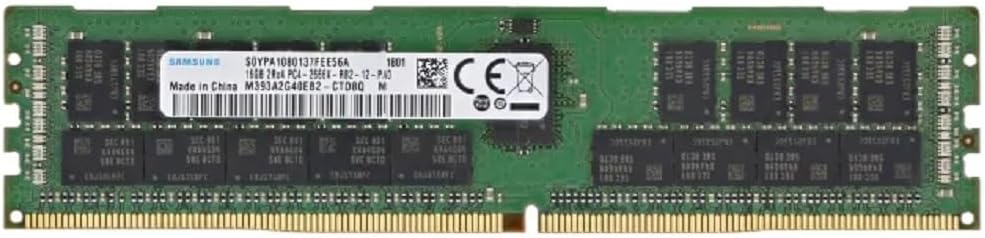
Image: A 16GB DDR4 RAM module, included in the kit, ready for installation.
5.3. Storage Device Installation (M.2 / SATA)
- M.2 SSD-levylle: Locate the M.2 slot. Insert the M.2 SSD at an angle into the slot, then gently push it down and secure it with the provided screw.
- For SATA Drives: Connect one end of the SATA data cable to a SATA port on the motherboard and the other end to your SATA hard drive or SSD. Connect a SATA power cable from your power supply to the drive.
5.4. Virtaliitännät
- Kytke virtalähteen 24-nastainen ATX-virtaliitin emolevyn 24-nastaiseen virtapistokkeeseen.
- Kytke virtalähteen 8-nastainen ATX 12V -virtaliitin suorittimen lähellä olevaan 8-nastaiseen virtapistokkeeseen.
5.5. Oheislaitteet
- Näytönohjain: Insert your graphics card into one of the PCIe x16 slots and secure it. Connect any necessary PCIe power cables from your power supply to the graphics card.
- Etupaneelin liittimet: Kytke virtapainike, nollauspainike, kiintolevyn merkkivalo, virran merkkivalo ja etupaneelin USB/ääniliitännät emolevyn vastaaviin nastoihin. Katso emolevyn kaaviosta oikeat nastojen järjestykset.
- USB-laitteet: Liitä näppäimistö, hiiri ja muut USB-laitteet takaosan I/O-paneelin USB-portteihin.
- Ethernet: Connect an Ethernet cable to the Gigabit Ethernet port for network access.
- Audio: Connect your speakers or headphones to the audio output port.
6. Käyttöohjeet
6.1. Initial Boot
- Kun kaikki komponentit on asennettu ja kytketty, varmista, että virtalähde on päällä.
- Paina tietokoneen kotelon virtapainiketta.
- Järjestelmän pitäisi käynnistyä ja näyttää BIOS/UEFI-aloitusnäyttö.
6.2. BIOS/UEFI-asetukset
Upon initial boot, you may need to enter the BIOS/UEFI setup to configure settings such as boot order, date/time, and enable specific features (e.g., NVMe support). Typically, you can enter the BIOS by pressing the DEL or F2 key during the boot process.
- Navigate through the menus using arrow keys.
- Tee tarvittavat säädöt.
- Save changes and exit the BIOS. The system will then restart.
6.3. Käyttöjärjestelmän asennus
Once the BIOS is configured, you can proceed with installing your preferred operating system (e.g., Windows, Linux) from a bootable USB drive or DVD.
7. Huolto
Säännöllinen huolto auttaa varmistamaan emolevysi pitkän käyttöiän ja vakaan toiminnan.
- Pölynpoisto: Puhdista emolevy ja komponentit säännöllisesti pölystä paineilmalla. Varmista, että järjestelmä on sammutettu ja irrotettu pistorasiasta ennen puhdistamista.
- Kaapelin hallinta: Varmista, että kaikki kaapelit on vedetty siististi eivätkä estä ilmankiertoa.
- BIOS-päivitykset: Tarkista valmistajalta website for BIOS updates. Only update the BIOS if necessary and follow the instructions carefully.
- Ohjaimen päivitykset: Keep your operating system and component drivers (chipset, graphics, audio, network) updated for optimal performance and stability.
8. Vianmääritys
If you encounter issues with your ZSUS X99 P4 Motherboard Kit, refer to the following common troubleshooting steps:
- Ei virtaa:
- Tarkista kaikki virtaliitännät (24-nastainen ATX, 8-nastainen CPU, GPU).
- Varmista, että virtakytkin on päällä.
- Testaa virtalähde toisella järjestelmällä tai virtalähdetesterillä.
- Ei näyttöä:
- Ensure the monitor is connected to the graphics card (not the motherboard, as this CPU/motherboard combo does not have integrated graphics).
- Aseta näytönohjain ja RAM-moduulit uudelleen paikoilleen.
- Kokeile käynnistää kone vain yhdellä RAM-muistitikulla.
- Järjestelmän epävakaus/kaatumiset:
- Tarkista suorittimen ja näytönohjaimen lämpötilat. Varmista riittävä jäähdytys.
- Suorita muistidiagnostiikkatyökalut RAM-virheiden tarkistamiseksi.
- Varmista, että kaikki ajurit ovat ajan tasalla.
- Käynnistyslaitetta ei löydy:
- Check SATA/M.2 cable connections.
- Verify boot order in BIOS/UEFI.
- Varmista, että käyttöjärjestelmä on asennettu oikein asemaan.
For more complex issues, consider consulting online forums or professional technical support.
9. Takuu ja tuki
Information regarding specific warranty terms and conditions for the ZSUS X99 P4 Motherboard Kit is not available in this manual. Please refer to the product packaging or contact your retailer for warranty details.
For technical support, please contact the vendor or retailer from whom you purchased this product. Keep your proof of purchase for any warranty claims or support inquiries.