
TOPTECH AL-212-BK
AL-212 Wireless Bluetooth Speaker User Manual
Model: AL-212-BK | Brand: TOPTECH
1. Johdanto
The TOPTECH AL-212 is a powerful and versatile wireless Bluetooth speaker designed to deliver high-fidelity sound with dynamic LED lighting. Featuring dual 12-inch woofers, it provides robust audio for various occasions, from home entertainment to outdoor parties. This manual provides detailed instructions for setting up, operating, and maintaining your speaker to ensure optimal performance.

Kuva: Edessä view of the AL-212 speaker, showcasing its dual 12-inch woofers and vibrant LED lighting.
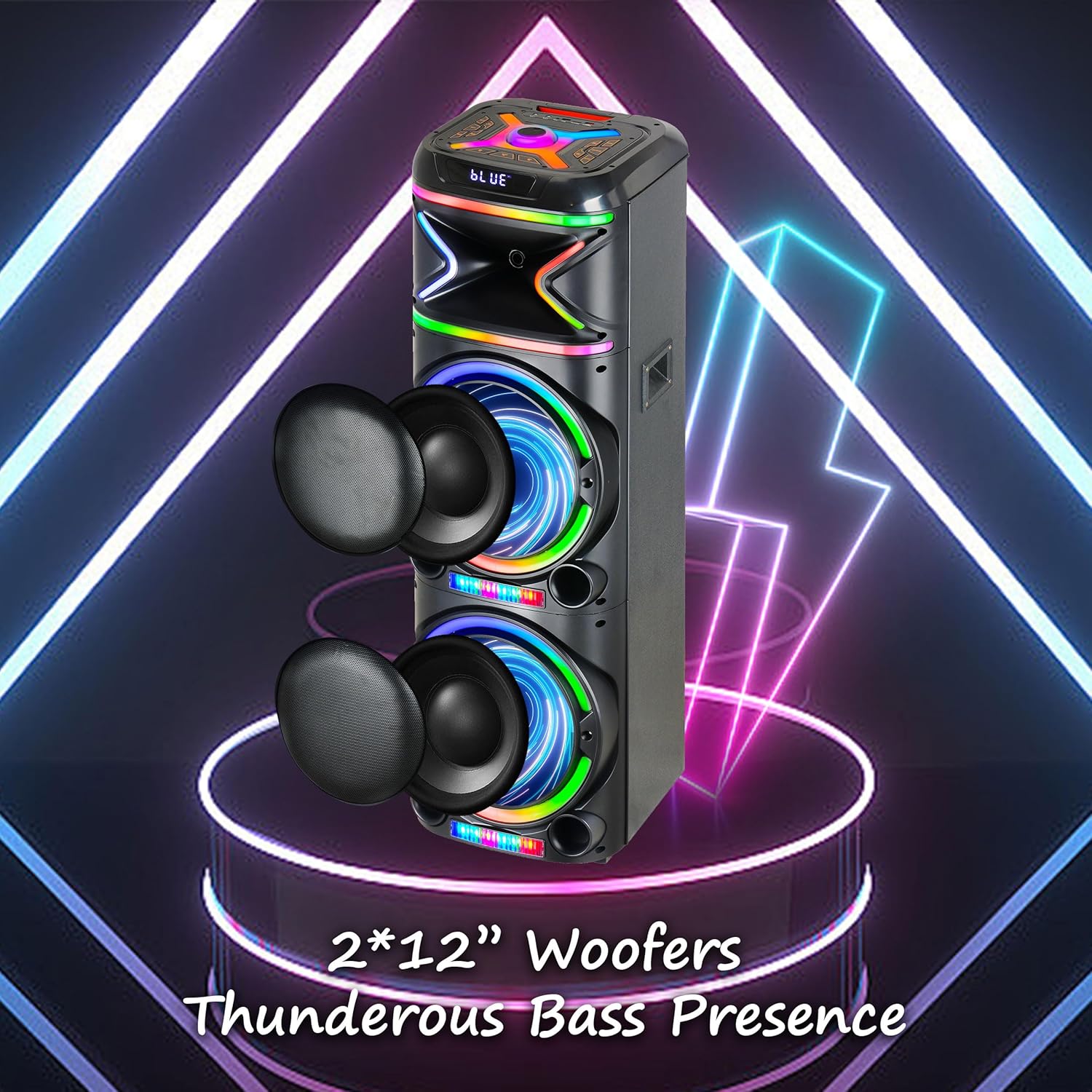
Kuva: Lähikuva view emphasizing the two 12-inch woofers, responsible for the speaker's powerful bass and clear audio output.
2. Sisältö
Tarkista pakkauksen sisältö varmistaaksesi, että kaikki osat ovat mukana:
- AL-212 Wireless Bluetooth Speaker
- Kaukosäädin
- Kiinteä mikrofoni
- Virtalähde
- Käyttöopas (tämä asiakirja)
- Takuukortti

Image: Visual representation of the speaker's dimensions and the accessories included in the package: wireless microphone, remote control, and portable wheels.
3. Ohjaimet ja portit
Familiarize yourself with the control panel and various input/output ports located on the top and rear of the speaker.
Pääpaneelin säätimet:

Kuva: Yksityiskohtainen view of the speaker's top control panel, showing buttons for various functions and input ports.

Image: A simplified diagram highlighting the key control buttons and their functions on the speaker's interface.
- Virtapainike: Kytkee kaiuttimen päälle tai pois päältä.
- Tilapainike: Switches between Bluetooth, FM Radio, AUX, USB, and TF Card modes.
- Äänenvoimakkuuden säädin: Säätää päääänenvoimakkuutta.
- Mikrofonin äänenvoimakkuuden säätönuppi: Säätää mikrofonin äänenvoimakkuutta.
- Kaiunuppi: Säätää mikrofonin kaikuefektiä.
- LED-tilapainike: Muuttaa LED-valokuvioita.
- Toisto/tauko-painike: Toistaa tai keskeyttää äänen toiston.
- Edellinen/seuraava kappale -painikkeet: Hyppää edelliseen tai seuraavaan kappaleeseen.
- Tallennuspainike: Records microphone input to USB/TF card.
- TWS-painike: Käynnistää aidosti langattoman stereoparituksen.
Tulo/lähtöportit:
- USB-portti: USB-muistitikun toistoon ja ulkoisten laitteiden lataamiseen.
- TF-korttipaikka: TF (MicroSD) -kortin toistoon.
- AUX-tulo (3.5 mm): Connect external audio devices via an audio cable.
- Mikrofonitulo (6.35 mm): Liitä langallinen mikrofoni.
- Guitar Input (6.35mm): Liitä kitara tai muu instrumentti.

Image: The AL-212 speaker displayed with icons representing its versatile connectivity options, including Bluetooth, USB, TF card, AUX, microphone, and remote control.
4. Asennus
4.1 Kaiuttimen lataaminen
The AL-212 speaker is battery-powered. Before first use, fully charge the speaker using the provided power adapter. The charging indicator light will show the charging status and turn off when fully charged.
4.2 Ensimmäinen käynnistys
Press and hold the Power button on the top panel to turn on the speaker. You will hear a power-on prompt, and the LED lights will illuminate.
5. Käyttöohjeet
5.1 Bluetooth -pariliitos
- Turn on the speaker. It will automatically enter Bluetooth pairing mode, indicated by a flashing 'BLUE' on the display and an audible prompt.
- Ota Bluetooth käyttöön älypuhelimellasi, tabletillasi tai muulla Bluetooth-yhteensopivalla laitteella.
- Etsi "AL-212" in the list of available devices and select it to connect.
- Once connected, you will hear a confirmation sound, and the 'BLUE' indicator will stop flashing.

Image: A smartphone screen showing the Bluetooth pairing menu, with the AL-212 speaker and a Bluetooth icon, illustrating the connection process.
5.2 Langattoman stereon (TWS) pariliitos
To achieve a stereo sound experience, you can pair two AL-212 speakers together using the TWS function.
- Ensure both AL-212 speakers are powered on and not connected to any Bluetooth device.
- Press the 'TWS' button on one of the speakers. It will emit a sound indicating it's searching for another speaker.
- Kaiuttimet yhdistyvät automaattisesti toisiinsa. Kun yhteys on muodostettu, kuulet vahvistusäänen.
- Now, connect your Bluetooth device to one of the paired speakers (the master speaker) as described in Section 5.1. Audio will play in stereo through both speakers.

Image: Two AL-212 speakers positioned outdoors, demonstrating the True Wireless Stereo (TWS) feature with a dotted line indicating the wireless connection between them.

Image: A simplified diagram showing two AL-212 speakers with a dotted line and 'TWS' label, illustrating the True Wireless Stereo connection.
5.3 USB/TF-kortin toisto
Insert a USB flash drive or TF (MicroSD) card into the respective port. The speaker will automatically switch to USB/TF mode and begin playing audio files. Ohjaa toistoa Toista/Tauko- ja Edellinen/Seuraava kappale -painikkeilla.
5.4 AUX-tulo
Connect an external audio device (e.g., MP3 player, laptop) to the AUX input port using a 3.5mm audio cable. The speaker will automatically switch to AUX mode. Control playback from your connected device.
5.5 Mikrofonin käyttö
Connect the provided wired microphone to the Microphone Input port. Adjust the microphone volume using the 'Mic Vol' knob and add echo effects with the 'Echo' knob. You can sing along with music playing from any source.
5.6 FM -radio
Press the 'Mode' button until you hear the FM radio prompt. Press the 'Play/Pause' button to auto-scan and save available FM stations. Use the Previous/Next Track buttons to switch between saved stations.
5.7 LED-valotilaa
Press the 'LED Mode' button to cycle through different LED light patterns and effects. Press it repeatedly to find your preferred lighting display.

Image: The AL-212 speaker illuminated with its vibrant, multi-color LED lights, showcasing the dynamic light show feature.
5.8 Kaukosäätimen toiminnot
The included remote control provides convenient access to all speaker functions from a distance. Refer to the remote control diagram in the package for specific button layouts and functions.
6. Huolto
- Puhdistus: Puhdista kaiuttimen ulkopinta pehmeällä, kuivalla liinalla. Älä käytä hankaavia puhdistusaineita, vahoja tai liuottimia.
- Varastointi: Kun kaiutinta ei käytetä pitkään aikaan, säilytä sitä viileässä, kuivassa paikassa, poissa suorasta auringonvalosta ja äärimmäisistä lämpötiloista.
- Akun hoito: Akun käyttöiän pidentämiseksi vältä kaiuttimen jatkuvaa tyhjentämistä kokonaan. Lataa se säännöllisesti, vaikka sitä ei käytettäisikään.
- Veden altistuminen: Tämä kaiutin ei ole vedenpitävä. Vältä sen altistamista vedelle tai liialliselle kosteudelle.
7. Vianmääritys
If you encounter issues with your AL-212 speaker, please refer to the following common problems and solutions:
| Ongelma | Mahdollinen syy | Ratkaisu |
|---|---|---|
| Kaiutin ei käynnisty. | Akku on vähissä tai tyhjä. | Connect the speaker to the power adapter and charge it fully. |
| Ei äänilähtöä. | Äänenvoimakkuus on liian alhainen; Väärä tila valittu; Laite ei ole kytketty oikein. | Increase the speaker volume. Ensure the correct input mode (Bluetooth, AUX, USB/TF) is selected. Reconnect your device. |
| Bluetooth-yhteys epäonnistuu. | Kaiutin ei ole pariliitostilassa; Laite on liian kaukana; Häiriöitä. | Ensure the speaker is in Bluetooth pairing mode. Move your device closer to the speaker. Avoid obstacles and other wireless devices. |
| Mikrofoni ei toimi. | Microphone not plugged in correctly; Mic volume is low. | Ensure the microphone is securely plugged into the correct input. Increase the 'Mic Vol' knob. |
| TWS-pariliitos epäonnistuu. | Kaiuttimet on jo yhdistetty toiseen laitteeseen; Kaiuttimet ovat liian kaukana toisistaan. | Disconnect both speakers from any Bluetooth devices. Ensure they are within close proximity (within 10 meters) during pairing. |
8. Tekniset tiedot
| Ominaisuus | Yksityiskohta |
|---|---|
| Mallin nimi | AL-212-BK |
| Kaiuttimen tyyppi | Bassokaiutin |
| Kaiuttimen koko | Kaksi 12 tuumaa |
| Yhteystekniikka | Bluetooth, lisälaite, USB |
| Langaton viestintätekniikka | Bluetooth |
| Bluetooth-alue | 33 jalkaa (10 metriä) |
| Äänilähtötila | Stereo (2.0 Surround-äänikanavakokoonpano) |
| Erikoisominaisuudet | LED Light, Built-In Microphone, USB Port, Display, FM Radio, Remote Control |
| Virtalähde | Paristokäyttöinen |
| Tuotteen mitat | 14.96" S x 7.48" L x 14.96" K |
| Väri | Musta |
| Asennustyyppi | Vapaasti seisova, pistokekiinnitys |
| Valmistaja | Top Tech Audio |
| UPC | 755824425927 |
9. Takuu ja tuki
The TOPTECH AL-212 speaker comes with a Limited Warranty. Please refer to the included Warranty Card for detailed terms and conditions, including coverage period and claim procedures.
For technical support, troubleshooting assistance beyond this manual, or warranty inquiries, please contact TOPTECH customer service. Contact information can typically be found on the warranty card or the official TOPTECH websivusto.
Note: No official product videos from the seller were found to be embedded based on the provided criteria.
Ask a question about this manual
Ask about setup, troubleshooting, compatibility, parts, safety, or missing instructions. Manuals+ will review the question and use this page’s manual context to help answer it.