
FREDEES BL-97022-25/29
FREDEES Farmhouse Dresser Instruction Manual
Model: BL-97022-25/29
Brand: FREDEES
1. Tärkeitä turvallisuustietoja
Lue ja ymmärrä kaikki ohjeet ennen kokoamista ja käyttöä. Säilytä tämä käyttöohje myöhempää tarvetta varten.
- Kaatumisenestolaite: Always install the anti-tip device provided to prevent serious or fatal crushing injuries.
- Painorajoitukset: Do not exceed the maximum weight capacity for the top surface or drawers. Refer to the specifications section for details.
- Kokoonpano: Assemble the dresser on a soft, clean surface to prevent scratches. Ensure all parts are securely fastened before use.
- Lasten turvallisuus: Keep small parts and packaging materials away from children. Do not allow children to climb on or play with the dresser.
- Sähköturvallisuus: When using the charging station, ensure cables are not pinched or damaged. Do not overload the electrical outlets.
2. Pakkauksen sisältö
Varmista, että kaikki osat ovat mukana ennen kokoamisen aloittamista. Jos osia puuttuu tai on vaurioitunut, ota yhteyttä asiakastukeen.

Kuva 2.1: Räjähtänyt view of dresser components.
This diagram illustrates the various parts of the dresser, including the frame, 8 wooden drawers, tempered glass tabletop, built-in charging station, retro metal handles, and solid sliding rails. All necessary hardware is included for assembly.
3. Kokoamisohjeet
Assembly is required for this product. Follow the step-by-step instructions provided in the included assembly guide. All parts and screws are labeled for easy identification.
- Valmistele alue: Clear a spacious, clean, and soft area for assembly to prevent damage to the dresser components.
- Tunnista osat: Unpack all components and hardware. Match each part to the corresponding label in the assembly guide.
- Kokoa kehys: Begin by assembling the main frame of the dresser according to the diagrams. Ensure all connections are secure.
- Asenna laatikon kiskot: Attach the drawer slides to the dresser frame and to the drawer boxes as indicated.
- Kokoa laatikot: Construct each of the 8 drawers, ensuring the bottoms are properly seated and the handles are attached.
- Asenna karkaistusta lasista valmistettu yläosa: Carefully place the tempered glass top onto the dresser frame.
- Kytke sähkökomponentit: Follow instructions to connect the LED lighting and charging station. Ensure proper power connection.
- Lisää laatikot: Slide the assembled drawers into their respective slots.
- Asenna kaatumisestepakkaus: Secure the dresser to the wall using the provided anti-tip kit to prevent tipping.
- Lopputarkastus: Verify that all screws are tightened and the dresser is stable before placing items inside.
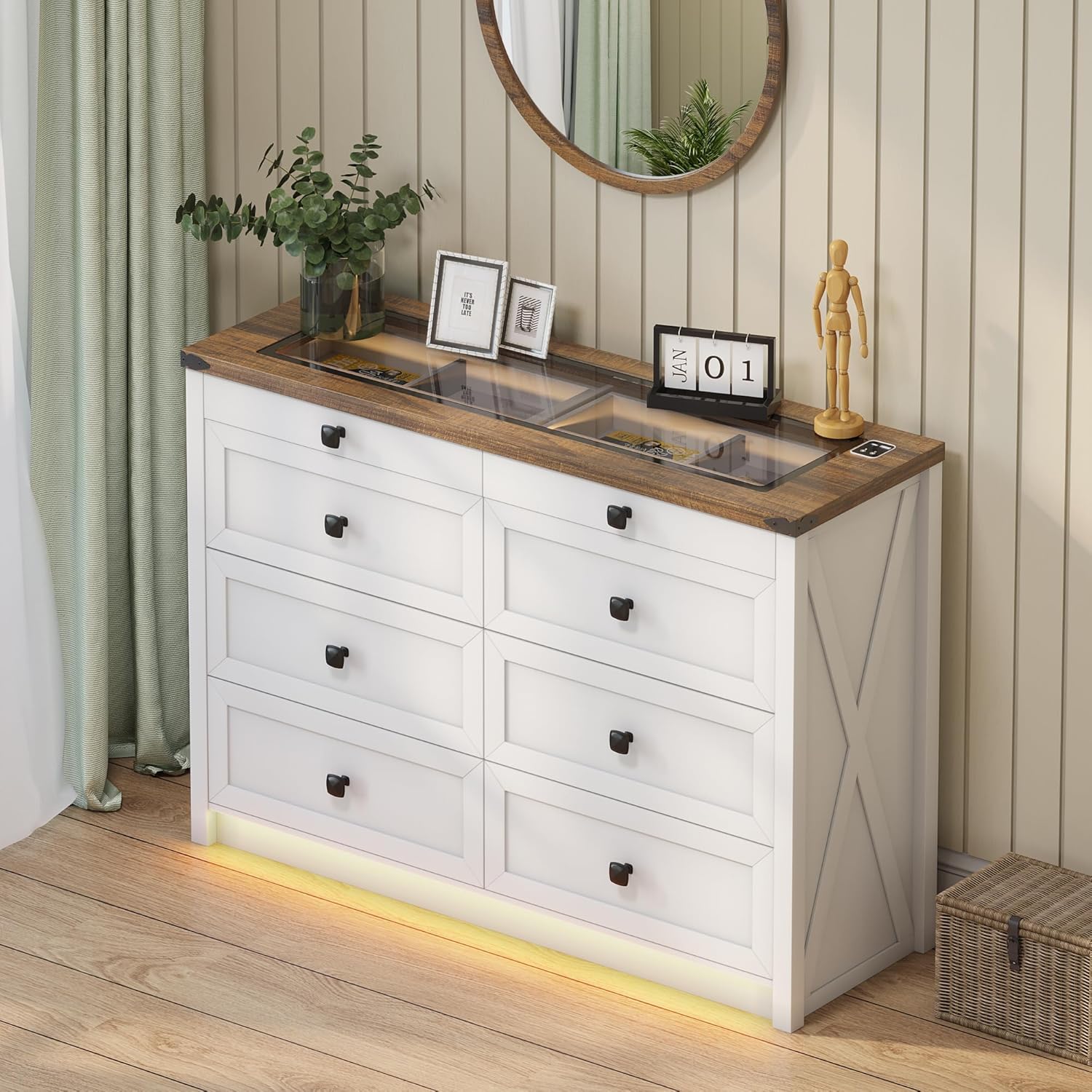
Figure 3.1: Fully assembled dresser.
This image shows the dresser fully assembled and placed in a room, ready for use. Note the integrated LED lighting at the base and the clear glass top.
4. Käyttöohjeet
4.1. LED-valaistusjärjestelmä
The dresser features integrated LED lighting with customizable color and brightness settings, along with a human sensor for automatic activation.
- Virta päälle/pois: Locate the touch button on the top surface near the charging station. A short press will turn the lights on or off.
- Vaihda väritilaa: With the lights on, short press the touch button repeatedly to cycle through the three available color modes: Warm Light, Natural Light, and White Light.
- Säädä kirkkautta: To adjust brightness, long press the touch button. The brightness will gradually increase or decrease. Release the button when the desired brightness is reached.
- Human Sensor: The dresser is equipped with a human sensor. When activated, the lights will automatically turn on when motion is detected nearby and turn off after a period of inactivity. Refer to the specific controls on the dresser for sensor activation/deactivation.

Figure 4.1: LED lighting color options.
This image demonstrates the visual difference between the Natural, White, and Warm light settings of the integrated LED strip, along with a brightness control slider.

Figure 4.2: Tempered glass top with and without illumination.
This visual shows how the transparent black tea-tinted glass top allows visibility of stored items when the internal light is on, and provides privacy when the light is off.
4.2. Latausasema
The dresser is equipped with a convenient 2-in-1 charging station on its surface, featuring both USB and Type-C ports.
- Liitä virta: Ensure the dresser's power cord is securely plugged into a functional wall outlet.
- Latauslaitteet: Connect your smartphone, tablet, or other electronic devices to the available USB (5V/2A) or Type-C ports using their respective charging cables.
- Käyttö: The charging station is designed for convenient access to power for your devices while keeping them organized on the dresser top.

Kuva 4.3: Integroitu latausasema.
A close-up of the dresser's surface, showing the integrated USB and Type-C charging ports, ready for device connection.
5. Hoito ja huolto
Asianmukainen hoito pidentää lipastosi käyttöikää ja ulkonäköä.
- Puhdistus: Pyyhi lipaston pinnat kuivalla, pehmeällä liinalla. Pinttyneisiin tahroihin voi käyttää hieman kuivaa liinalla.amp liinaa voidaan käyttää ja pyyhi sen jälkeen välittömästi kuivalla liinalla. Vältä voimakkaita kemikaaleja tai hankaavia puhdistusaineita.
- Lasikansi: Clean the tempered glass top with a glass cleaner and a soft, lint-free cloth.
- Pölyäminen: Pyyhi pöly säännöllisesti kaikilta pinnoilta estääksesi pölyn kertymisen.
- Vältä kosteutta: Do not place hot or wet items directly on the wood or glass surfaces without protection.
- Auringonvalolle altistuminen: Vältä pitkäaikaista altistumista suoralle auringonvalolle estääksesi puun pinnan haalistumisen tai värin muuttumisen.
- Laatikon huolto: Periodically check drawer slides for smooth operation. If needed, a silicone-based lubricant can be applied sparingly.
6. Vianmääritys
| Ongelma | Mahdollinen syy | Ratkaisu |
|---|---|---|
| LED-valot eivät syty. | Power cord not connected; loose connection; faulty LED strip. | Ensure power cord is securely plugged in. Check all electrical connections. If problem persists, contact customer support. |
| Latausasema ei toimi. | Power cord not connected; device cable faulty; device not compatible. | Verify dresser is plugged in. Try a different charging cable or device. Ensure device is compatible with USB/Type-C charging. |
| Laatikot ovat vaikeita avata/sulkea. | Overloaded drawer; misaligned slides; loose hardware. | Reduce contents in the drawer. Check if drawer slides are properly aligned. Tighten any loose screws on the drawer or slides. |
| Lipasto tuntuu heiluvalta. | Epätasainen lattia; löysät asennustarvikkeet; kaatumisestesarjaa ei ole asennettu. | Adjust furniture levelers if present, or place shims under the base. Retighten all assembly screws. Ensure the anti-tip kit is correctly installed and secured to the wall. |
7. Tuotteen tekniset tiedot
- Merkki: VAPAUTTAJAT
- Mallin nimi: BL-97022-25/29
- Tuotteen mitat: 15.75" S x 47.24" L x 33.46" K
- Väri: Valkoinen
- Asennustyyppi: Lattiakiinnike
- Laatikoiden määrä: 8
- Erikoisominaisuudet: Ample Storage Space, Convenient 2-in-1 Charging Solution (USB & Type-C), Customizable 3-Color Lighting, Tempered Glass Top Design, Human Sensor
- Huonekalujen viimeistely: Brown (top) / White (body)
- Tuotteen paino: 110.2 puntaa
- Asennus vaaditaan: Kyllä
- Tuotteen hoito: Pyyhi kuivalla liinalla
- UPC: 756940843978
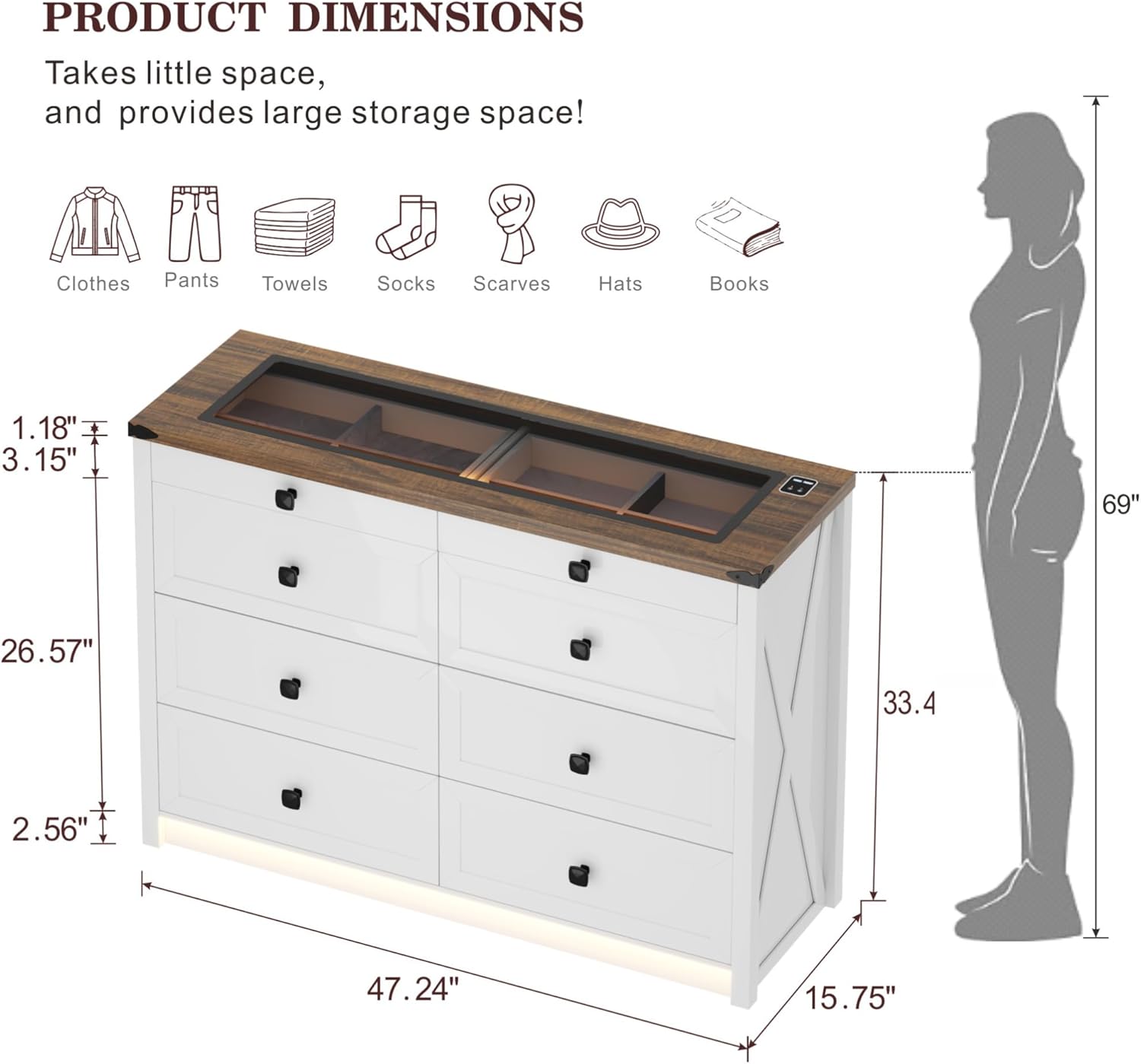
Kuva 7.1: Tuotteen yksityiskohtaiset mitat.
Tämä kaavio tarjoaa kattavan yleiskuvanview of the dresser's dimensions, including overall height, width, depth, and specific measurements for drawer height and top surface thickness.

Figure 7.2: Storage capacity illustration.
An illustrative image demonstrating the ample storage capacity of each large drawer, capable of holding approximately 20-25 t-shirts or 15-20 pairs of jeans.
8. Takuu ja tuki
For warranty information, technical support, or to order replacement parts, please contact FREDEES customer service directly. Refer to the product packaging or the original purchase documentation for contact details.
Please have your model number (BL-97022-25/29) and purchase date available when contacting support.
Ask a question about this manual
Ask about setup, troubleshooting, compatibility, parts, safety, or missing instructions. Manuals+ will review the question and use this page’s manual context to help answer it.