
1. Johdanto
This manual provides detailed instructions for the safe and effective operation of your Andoer Mini WiFi Action Camera L11. This compact digital video camera is designed for capturing high-quality 1080P video at 30 frames per second, featuring a 0.96-inch LCD screen, built-in rechargeable battery, motion detection, and versatile mounting options. Please read this manual thoroughly before using the device.
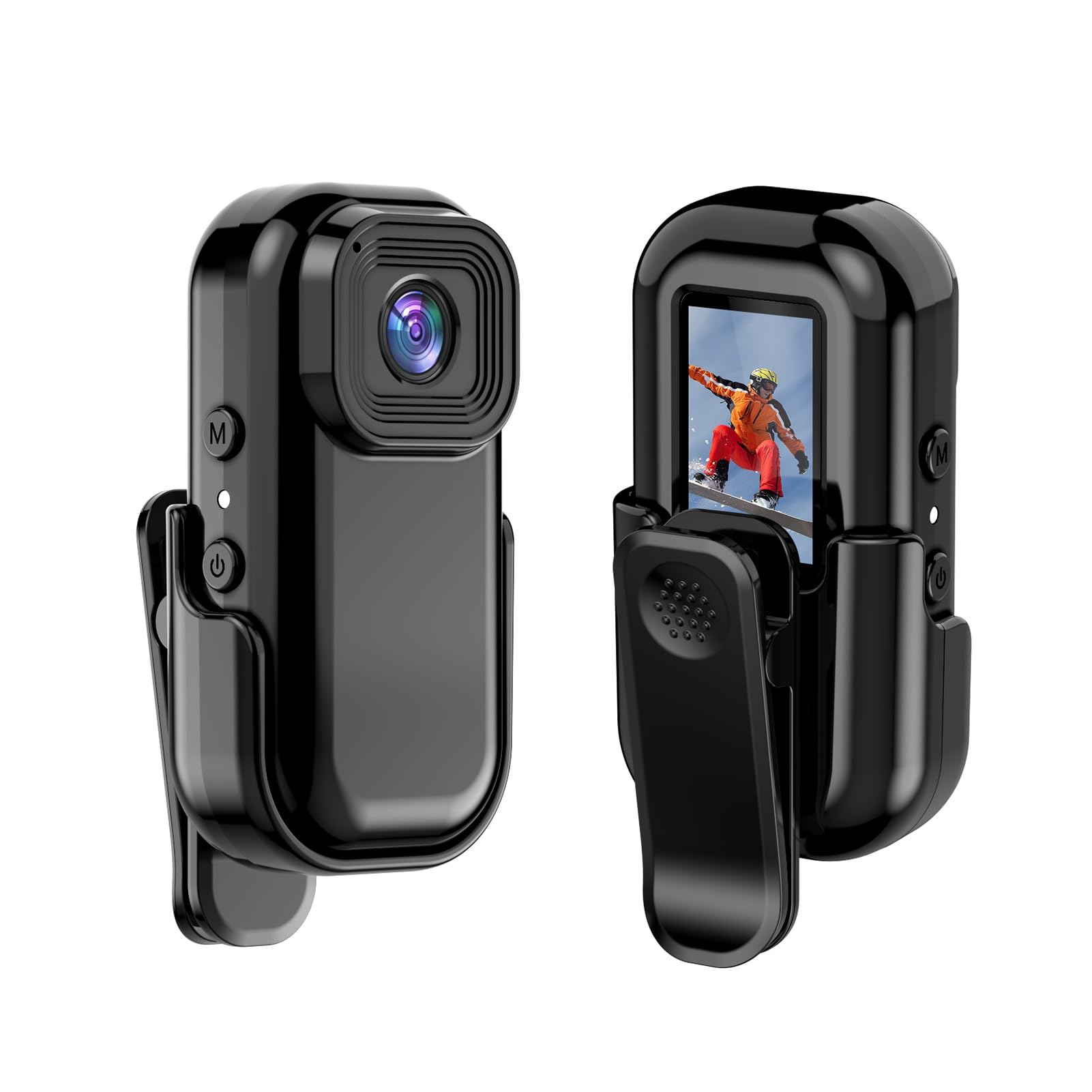
Kuva: Edestä ja takaa view of the Andoer Mini WiFi Action Camera L11, showing the lens and the 0.96-inch LCD screen.
2. Pakkauksen sisältö
Varmista, että pakkauksessasi on kaikki alla luetellut tuotteet. Jos jokin tuote puuttuu tai on vaurioitunut, ota yhteyttä asiakastukeen.
- 1 x Andoer Mini WiFi Action Camera L11
- 1 x suojakuori
- 1 x 1/4in Adapter Mount
- 1 x Back Clip Mount
- 1 x kortinlukija
- 1 x Type-C kaapeli
- 1 x Käyttöohje (tämä asiakirja)
3. Tuotteen ominaisuudet
- Laadukas video: Records in 1080P at 30 frames per second, suitable for various applications including live broadcasting and video conferencing.
- Kompakti ja kannettava: Super mini size allows for easy portability and discreet placement.
- Magneettinen runko: Features a magnetic base for secure attachment to smooth metal surfaces.
- Seamless WiFi Connectivity: Connects wirelessly to a dedicated app for live view ja ohjata.
- Monipuolinen asennus: Includes a 1/4-inch adapter mount and a back clip mount for diverse installation options.

Kuva: esimamples of application scenarios for the camera, including parachute jumping, cycling, parent-child activities, and skiing.

Image: The camera being used as a portable video recorder in various outdoor activities like camping, cycling, climbing, and sports.
4. Asennus
4.1 Akun lataaminen
Before first use, fully charge the camera's built-in 400mAh battery. Connect the provided Type-C cable to the camera's USB port and the other end to a standard USB power adapter (5V, ≥1A). The charging indicator light will typically show the charging status and turn off or change color when fully charged.
4.2 Muistikortin asettaminen
The camera supports TF (Micro SD) cards up to 128GB. Ensure the card is formatted to FAT32 for optimal performance. Gently insert the TF card into the designated slot until it clicks into place. To remove, press the card in slightly until it springs out.
Note: A memory card is required for recording video and taking photos.
4.3 Virran kytkeminen päälle/pois
- Virran kytkeminen: Press and hold the Power button (usually marked with a power symbol) for a few seconds until the screen illuminates.
- Virran sammuttaminen: Press and hold the Power button again for a few seconds until the screen turns off.
5. Käyttöohjeet
5.1 Peruskäyttö
The 0.96-inch color display provides visual feedback for modes and settings. Use the navigation buttons (if present, typically 'M' for Mode and another for selection/shutter) to cycle through options and confirm selections.
5.2 Videon tallennus
In video mode, press the Shutter/Record button to start recording. Press it again to stop. Videos are saved in AVI format at 1920x1080P resolution. The camera supports loop recording with 3-minute segments.

Image: The camera's screen displaying a family scene, indicating video recording at 1920x1080P resolution.
5.3 Valokuvien ottaminen
Switch to photo mode using the Mode button. Press the Shutter button to capture a still image. Photos are saved in JPG format.

Image: Icons representing photo, video, and audio recording modes, illustrating the camera's ability to capture various moments.
5.4 Liiketunnistus
The camera features motion detection capabilities. Refer to the on-screen menu or the dedicated app for instructions on how to activate and configure this feature. When enabled, the camera will automatically begin recording when motion is detected within its field of view.
6. WiFi-yhteys
The Andoer L11 camera supports wireless WiFi connectivity for remote control and live viewing via a smartphone application. Follow these general steps:
- Download the official Andoer camera app from your device's app store (iOS or Android).
- Power on the camera and activate its WiFi mode (refer to the camera's on-screen menu).
- On your smartphone, go to WiFi settings and connect to the camera's WiFi network (SSID and password will be displayed on the camera screen or in the app).
- Open the Andoer app. You should now see a live view from the camera and be able to control recording and settings remotely.

Image: A smartphone displaying a live view from the camera, demonstrating the WiFi connectivity feature.
7. Asennusvaihtoehdot
The Andoer L11 offers flexible mounting solutions:
- Magneettinen kiinnitys: The camera body has a magnetic feature, allowing it to be securely attached to smooth metal surfaces like refrigerator doors or metal poles.
- 1/4-inch Adapter Mount: Use the included 1/4-inch adapter mount to attach the camera to standard tripods, monopods, or other accessories with a 1/4-inch screw.
- Back Clip Mount: The back clip mount allows you to attach the camera to clothing, backpacks, or other thin objects for hands-free recording.
8. Huolto
- Puhdistus: Puhdista kameran runko pehmeällä, kuivalla liinalla. Käytä linssin puhdistukseen erityistä linssinpuhdistusliinaa ja -liuosta. Vältä voimakkaita kemikaaleja.
- Varastointi: Säilytä kameraa viileässä, kuivassa paikassa, poissa suorasta auringonvalosta ja äärimmäisistä lämpötiloista.
- Akun hoito: Pitkäaikaisvarastointia varten lataa akku noin 50 %:iin muutaman kuukauden välein sen kunnon ylläpitämiseksi.
- Laiteohjelmistopäivitykset: Check the official Andoer websivustolta säännöllisesti saatavilla olevia laiteohjelmistopäivityksiä optimaalisen suorituskyvyn ja uusien ominaisuuksien varmistamiseksi.
9. Vianmääritys
| Ongelma | Mahdollinen ratkaisu |
|---|---|
| Kamera ei käynnisty. | Varmista, että akku on täyteen ladattu. Liitä laite virtalähteeseen ja yritä uudelleen. |
| Videon tallennus/valokuvien ottaminen ei onnistu. | Check if a TF card is inserted and properly formatted. Ensure there is sufficient storage space. |
| WiFi-yhteysongelmat. | Ensure WiFi is enabled on the camera and your smartphone. Restart both devices. Verify the correct app is installed. |
| Huono videon/kuvan laatu. | Ensure the lens is clean. Check lighting conditions. Verify camera settings are correct (e.g., resolution). |
| Kamera jumiutuu tai lakkaa reagoimasta. | Perform a soft reset by holding the power button until it turns off, then restart. If persistent, remove and reinsert the memory card. |
10. Tekniset tiedot
| Ominaisuus | Yksityiskohta |
|---|---|
| Koneen tyyppi | L11 |
| Linssin kulma | 140 astetta |
| TFT-näyttö | 0.96 tuuman värinäyttö |
| Videon resoluutio | 1920 * 1080P |
| Akku | 400 mAh |
| Video File Muoto | AVI |
| Valokuvan muoto | JPG |
| Loop Video | 3 minuuttia |
| Tallennus File Muoto | WAV (Audio) |
| Toimiva kosteus | 30 % |
| Käyttölämpötila | -25 ... + 75 ° C (-13 ... + 167 ° F) |
| Virtalähde | USB voltage 5V, virta ≥1A |
| Muistikortti | TF-kortti, tukee jopa 128G |
| Yhteystekniikka | Wi-Fi |
| Muototekijä | Kompakti |
| Tuotteen paino | 4.2 unssia (noin 119 g) |
| Pakkauksen mitat | 3.94 x 2.36 x 1.97 tuumaa |
11. Turvallisuustiedot
- Do not expose the camera to extreme temperatures outside the specified operating range (-25°C to +75°C).
- Avoid operating the camera in humidity levels exceeding 30%.
- Keep the device away from water and other liquids unless explicitly stated as waterproof.
- Älä yritä purkaa tai muokata kameraa, sillä se mitätöi takuun ja voi aiheuttaa vahinkoa.
- Use only the specified power supply (USB 5V, ≥1A) for charging.
- Pidä poissa lasten ulottuvilta.