
Johdanto
Thank you for choosing the AOC 27B3HA2 27-inch Full HD LED Monitor. This manual provides essential information for the safe and efficient use of your new monitor. Please read it thoroughly before installation and operation, and keep it for future reference.
The AOC 27B3HA2 features a 27-inch Full HD (1920 x 1080) IPS panel, offering wide viewing angles and vibrant colors. It includes a 100Hz refresh rate and 1ms MPRT response time for smooth visuals, Adaptive Sync technology, and eye-care features like Flicker-Free and Low Blue Light modes to enhance user comfort during extended use.

Kuva 1: Etuosa view of the AOC 27B3HA2 monitor highlighting its 27-inch size, 100Hz refresh rate, Full HD resolution, Adaptive Sync, IPS panel, and 1ms MPRT response time.
Turvallisuustiedot
- Virtalähde: Käytä ainoastaan näytön mukana toimitettua virtalähdettä. Varmista, että pistorasia on maadoitettu asianmukaisesti.
- Sijoitus: Place the monitor on a stable, flat surface. Avoid direct sunlight, heat sources, or excessive dust. Ensure adequate ventilation around the monitor.
- Kosteus: Do not expose the monitor to rain or moisture. Do not place objects filled with liquids on the monitor.
- Puhdistus: Irrota virtajohto pistorasiasta ennen puhdistamista. Käytä pehmeää, kuivaa liinaa. Älä käytä nestemäisiä puhdistusaineita tai aerosolipuhdistusaineita.
- Ilmanvaihto: Älä tuki tuuletusaukkoja.
- Huolto: Älä yritä huoltaa näyttöä itse. Jätä kaikki huoltotyöt pätevän huoltohenkilöstön tehtäväksi.
Pakkauksen sisältö
Varmista, että pakkauksessa on kaikki tarvittavat osat. Jos jokin puuttuu tai on vaurioitunut, ota yhteyttä jälleenmyyjään.
- AOC 27B3HA2 Monitor
- Näytön jalusta (jalusta ja kaula)
- Virtakaapeli
- HDMI kaapeli
- Pika-asennusopas
- Takuukortti
Asennus
1. Näytön jalustan kokoaminen
- Aseta näyttö varovasti kuvaruutu alaspäin pehmeälle ja puhtaalle alustalle naarmujen välttämiseksi.
- Kiinnitä jalustan kaula monitorin taakse kohdistamalla kielekkeet ja painamalla, kunnes se napsahtaa paikalleen.
- Kiinnitä jalustan pohja jalustan kaulaan. Kiinnitä se jalustan alapuolella olevalla ruuvilla.

Kuva 2: Takaosa view of the monitor showing the stand attachment point.
2. Liitäntäkaapelit
Ensure the monitor and your computer are turned off before making any connections.
- Virtaliitäntä: Kytke virtajohto näytön virransyöttöön ja sitten maadoitettuun pistorasiaan.
- Videoliitäntä (HDMI): Liitä HDMI-kaapelin toinen pää tietokoneen näytönohjaimen HDMI-porttiin ja toinen pää näytön HDMI 1.4 -porttiin.
- Videoliitäntä (VGA): Alternatively, connect one end of the VGA cable to the VGA port on your computer and the other end to the VGA port on the monitor.
- Äänitulo: If using VGA for video and you want audio through the monitor's speakers, connect an audio cable from your computer's audio output to the Audio In port on the monitor.
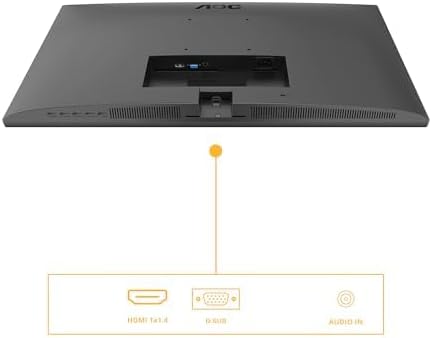
Figure 3: Diagram illustrating the available input ports on the monitor: HDMI 1.4, VGA (D-SUB), and Audio In.
3. Virran kytkeminen
- Käynnistä tietokone.
- Paina näytön virtapainiketta. Virran merkkivalon pitäisi syttyä.
- The monitor should automatically detect the active input signal. If not, you may need to manually select the input source using the OSD menu.
Näytön käyttö
On-Screen Display (OSD) -valikko
The OSD menu allows you to adjust various monitor settings. The control buttons are typically located on the bottom or back of the monitor.
- Paina Valikko -painiketta avataksesi OSD-valikon.
- Käytä navigointipainikkeita (Ylös/alas or Vasen/Oikea) to browse through menu options.
- Paina Valitse / OK button to enter a sub-menu or confirm a setting.
- Paina Poistu button to go back to the previous menu or exit the OSD.
Tärkeimmät näyttövalikkoasetukset
- Luminanssi: Adjust brightness, contrast, and gamma settings.
- Kuvan asetukset: Fine-tune image position, clock, and phase (primarily for VGA input).
- Väriasetus: Select color temperature, user color, or preset modes.
- OSD-asetukset: Säädä näyttövalikon kieltä, sijaintia ja läpinäkyvyyttä.
- Lisätiedot: Select input source (HDMI, VGA), reset settings, or view tiedot.
- Peliasetukset: Enable or disable Adaptive Sync, adjust response time (Overdrive), and other gaming-related features.
- Matala sininen valo: Activate this mode to reduce blue light emission for eye comfort.
- Välkkymätön: This technology is always active to minimize screen flickering and reduce eye strain.
Huolto
Näytön puhdistaminen
- Irrota aina näyttö pistorasiasta ennen puhdistamista.
- Käytä pehmeää, nukkaamatonta liinaa hieman dampvedellä tai miedolla, hankaamattomalla näytönpuhdistusaineella.
- Älä suihkuta puhdistusainetta suoraan näytölle. Levitä sitä ensin liinaan.
- Pyyhi näyttö varovasti pölyn ja tahrojen poistamiseksi.
- Näytölle casing, use a soft, dry cloth. Avoid harsh chemicals.
Varastointi
If you need to store the monitor for an extended period, disconnect all cables, disassemble the stand if necessary, and pack it in its original packaging or a suitable protective box. Store in a cool, dry place.
Vianetsintä
| Ongelma | Mahdollinen ratkaisu |
|---|---|
| Ei kuvaa näytöllä |
|
| Ei signaalia -viesti |
|
| Kuva on epäselvä tai vääristynyt |
|
| Kaiuttimista ei kuulu ääntä |
|
Tekniset tiedot
| Ominaisuus | Kuvaus |
|---|---|
| Mallinumero | 27B3HA2 |
| Näytön koko | 27 tuumaa (68.6 cm) |
| Paneelin tyyppi | IPS |
| Resoluutio | 1920 x 1080 (Full HD) |
| Kuvasuhde | 16:9 |
| Päivitystaajuus | 100 Hz |
| Vastausaika | 1 ms MPRT |
| Kirkkaus | 250 cd/m² |
| Videotulot | 1x HDMI 1.4, 1x VGA (D-SUB) |
| Äänitulo | Kyllä |
| Erikoisominaisuudet | Adaptive Sync, Flicker-Free, Low Blue Light |
| Tuotteen mitat (jalustan kanssa) | 9.06 x 24.41 x 18.11 tuumaa |
| Tuotteen paino (jalustan kanssa) | 11.66 kiloa |
| Valmistaja | AOC |
| EPREL -rekisteröintinumero | 1859411 |
For detailed product information and energy labeling, please refer to the official EPREL database:
 View EPREL-tuotetiedote
Figure 4: EPREL QR code and link for detailed product information.
Takuu ja tuki
AOC monitors are manufactured to the highest quality standards. For information regarding your product's warranty, please refer to the warranty card included in your package or visit the official AOC websivusto.
For technical support or customer service, please contact AOC directly:
- Toimittaja: AOC International (Europe) BV
- Osoite: Prins Bernhardplein 200 1097 JB Amsterdam, Netherlands
- Asiakaspalvelun sähköposti: kevin.yang@tpv-tech.com
- Asiakaspalvelun puhelin: +31 (0)20 504 6962
- Virallinen Websivusto: https://eu.aoc.com
Please have your monitor's model number (27B3HA2) and serial number ready when contacting support.