
1. Johdanto
Thank you for choosing the RIGOL DS1102Z-E Digital Oscilloscope. This manual provides essential information for the safe and efficient use of your device. Please read it thoroughly before operation and keep it for future reference.
The DS1102Z-E is a high-performance digital oscilloscope designed for various applications including research and development, education, maintenance, and industrial testing. It features a 100 MHz bandwidth, 1 GSa/s sample rate, and a 24 Mpts memory depth, enabling precise analysis of complex waveforms.
2. Tuote ohiview
The RIGOL DS1102Z-E is a versatile measurement instrument integrating a frequency counter and supporting protocol decoding for RS232/UART, I2C, and SPI. It also includes FFT analysis and automatic measurement functions to enhance testing efficiency.
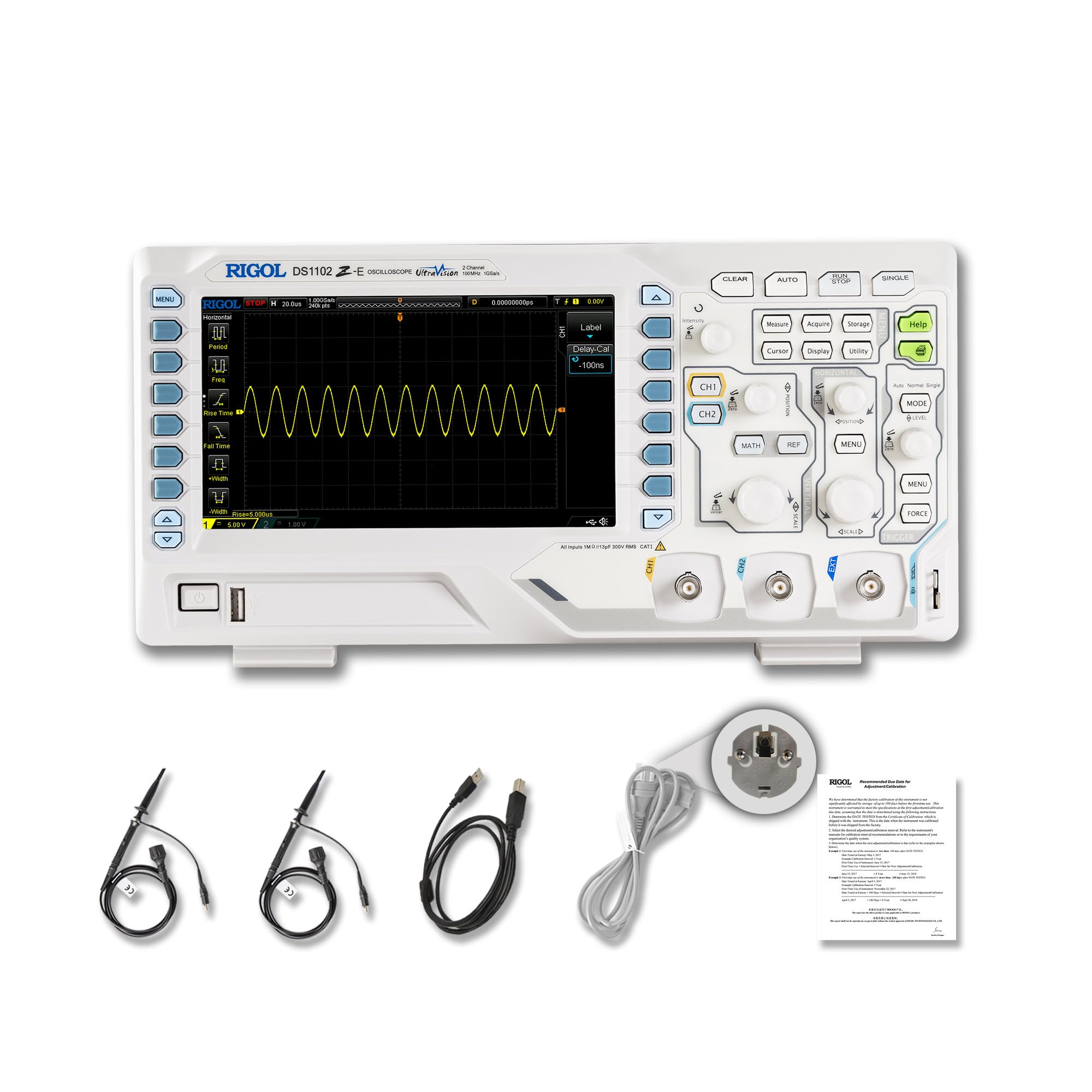
Kuva 2.1: Etuosa view of the RIGOL DS1102Z-E Digital Oscilloscope.
2.1 Tärkeimmät ominaisuudet
- 100 MHz Bandwidth, 1 GSa/s Sample Hinta: Captures signals with high precision.
- 24 Mpts Memory Depth: Allows for extended signal capture and detailed waveform analysis.
- Multi-function Measurement Device: Includes frequency counter, protocol decoding (RS232/UART, I2C, SPI), FFT analysis, and automatic measurement functions.
- Waveform Recording and Playback: Records signal variations and replays them for fault identification.
- Teräväpiirtonäyttö: 7-inch TFT screen with 256-level grayscale, offering a phosphor-like display effect for clear waveform details.
- Remote Control & Secondary Development Support: Equipped with USB and LAN ports for PC remote control, compatible with SCPI commands, LabVIEW, Visual Basic, and Visual C++.
2.2 Pakkauksen sisältö

Figure 2.2: Contents included with the DS1102Z-E Oscilloscope.
- 1x Main Unit (DS1102Z-E Digital Oscilloscope)
- 2x Passive Probes (150MHz)
- 1x Virtajohto (EU-pistoke)
- 1x USB A-B Cable
- 1x Takuukortti
- 1x Calibration Certificate
- 1x Vaatimustenmukaisuusvakuutus
3. Asennus
Follow these steps to set up your RIGOL DS1102Z-E oscilloscope:
- Purkaminen: Carefully remove all components from the packaging. Inspect the device for any signs of damage.
- Virtaliitäntä: Connect the provided power cable to the oscilloscope's power input and then to a suitable AC power outlet.
- Anturin liitäntä: Connect the passive probes to the BNC input connectors (CH1, CH2) on the front panel. Ensure a secure connection.
- Maadoitus: Always ensure the oscilloscope is properly grounded through the power cable.
- USB/LAN Connection (Optional): If you plan to use remote control or secondary development, connect the USB cable to a PC or the LAN cable to your network.

Kuva 3.1: Päättynytview of the oscilloscope's physical dimensions and ports.
4. Käyttöohjeet
This section covers the basic operation of your oscilloscope.
4.1 Virran kytkeminen päälle/pois
- Virta päälle: Press the power button located on the front panel. The device will perform a self-test and display the main interface.
- Virta pois: Pidä virtapainiketta painettuna, kunnes laite sammuu.
4.2 Aaltomuodon perusnäyttö
After powering on, connect a signal to one of the input channels (e.g., CH1). Adjust the vertical scale (Volts/Div) and horizontal scale (Time/Div) knobs to display the waveform clearly. Use the AUTO button for automatic setup of the waveform display.

Kuva 4.1: Esimample of a waveform displayed on the oscilloscope screen.
4.3 Lisätoiminnot
- Mittaustoiminnot: Paina MITATA button to access automatic measurements like frequency, period, peak-to-peak voltage jne.
- Laukaisujärjestelmä: Use the trigger controls to stabilize repetitive waveforms. Adjust the trigger level and mode (Edge, Pulse, Video, Slope, etc.) as needed.
- Aaltomuodon tallennus: The oscilloscope allows recording and replaying waveforms. Access this feature through the menu to capture transient events.
- Protocol Decoding: For serial bus analysis (RS232/UART, I2C, SPI), configure the decoding settings via the menu.
- FFT-analyysi: Perform Fast Fourier Transform (FFT) to analyze the frequency components of your signal.

Figure 4.2: Complex waveform analysis with measurement data.

Figure 4.3: Multiple waveforms displayed simultaneously for comparison.
5. Huolto
Asianmukainen huolto varmistaa oskilloskoopin pitkän käyttöiän ja tarkkuuden.
- Puhdistus: Puhdista oskilloskoopin ulkopinta pehmeällä, kuivalla liinalla. Pinttyneeseen likaan käytä hieman kuivaa liinaa.amp voidaan käyttää miedolla pesuaineella kostutettua liinaa. Vältä hankaavia puhdistusaineita tai liuottimia.
- Näytön hoito: Clean the display screen with a soft, lint-free cloth. Do not use excessive force or harsh chemicals.
- Varastointi: When not in use, store the oscilloscope in a clean, dry environment, away from direct sunlight, extreme temperatures, and excessive dust.
- Anturin hoito: Handle probes carefully. Avoid bending or stressing the probe tips. Store them properly to prevent damage.
- Kalibrointi: For optimal performance, periodic calibration by qualified personnel is recommended. Refer to the official RIGOL website for calibration services.
6. Vianmääritys
Tässä osiossa on ratkaisuja yleisiin ongelmiin, joita saatat kohdata.
| Ongelma | Mahdollinen syy | Ratkaisu |
|---|---|---|
| Ei virtaa, kun laite on päällä. | Power cable not connected, power outlet faulty, or power button issue. | Check power cable connection. Test the power outlet. Ensure the power button is fully pressed. |
| Ei aaltomuotoa näytössä. | No signal input, probe not connected correctly, vertical/horizontal scale incorrect, or trigger not set. | Verify signal source. Check probe connections. Adjust Volts/Div and Time/Div. Press AUTO or adjust trigger settings. |
| Aaltomuoto on epävakaa. | Incorrect trigger settings. | Adjust trigger level, mode, and source to stabilize the waveform. |
| Kaukosäädin ei toimi. | USB/LAN cable issue, incorrect network settings, or software driver not installed. | Check cable connections. Verify network configuration. Install necessary drivers and software (e.g., UltraScope). |
If the problem persists, please contact RIGOL technical support.
7. Tekniset tiedot
Detailed technical specifications for the RIGOL DS1102Z-E Digital Oscilloscope.

Figure 7.1: Visual representation of key technical specifications.
| Ominaisuus | Erittely |
|---|---|
| Merkki | Rigol |
| Malli | DS1102Z-E |
| Kaistanleveys | 100 MHz |
| Kanavat | 2 Channels + EXT |
| Sample Korko | 1 GSa/s |
| Muistin syvyys | 24 Mpts |
| Aaltomuodon sieppausnopeus | 30,000 XNUMX wfms/s |
| Pystysuora resoluutio | 8-bittinen |
| Minimiherkkyys | 1 mV/jako |
| Minimum Time Base | 2 ns/div |
| Dekoodauksen tuki | RS232/UART, I2C, SPI |
| FFT-analyysi | Vakio |
| Näyttö | 7 tuuman TFT-näyttö (800x480) |
| Yhteydet | USB-isäntä, USB-laite, lähiverkko |
| Virtalähde | AC-sovitin |
| Väri | Harmaa / valkoinen |
| Tuotteen paino | 2.9 kiloa |
| Mitat (P x L x K) | 31.31 x 16.08 x 12.24 cm |
| Yhteensopivia standardeja | CE, RoHS |
| Valmistajan osanumero | DS1102Z-E |
| Alkuperämaa | Kiina |
8. Takuu ja tuki
RIGOL is committed to providing high-quality products and excellent customer service.
- Takuu: The RIGOL DS1102Z-E Digital Oscilloscope comes with a 3 vuoden takuu ostopäivästä alkaen. Tämä takuu kattaa materiaali- ja valmistusvirheet normaalikäytössä.
- Tekninen tuki: RIGOL offers 24/7 tekninen tuki to assist you with any questions or issues you may encounter. Please refer to the official RIGOL websivusto yhteystietojen ja tukiresurssien osalta.
- Verkkoresurssit: Visit the official RIGOL website for product documentation, software updates (e.g., UltraScope), and additional support materials.

Figure 8.1: RIGOL oscilloscopes support multiple languages for user convenience.