
1. Johdanto
Thank you for choosing the OLTEANP 2500W Pure Sine Wave Power Inverter. This device is engineered to convert 12V DC power from your vehicle's battery into stable 230V AC power, making it ideal for powering a wide range of electronic devices and home appliances on the go. With a continuous output of 2500W and a peak power of 5000W, it provides reliable electricity for RVs, road trips, van life, and various off-grid applications. Please read this manual thoroughly before installation and operation to ensure safe and efficient use.
2. Turvallisuusohjeet
Noudata aina seuraavia turvaohjeita invertterin ja siihen liitettyjen laitteiden loukkaantumisen tai vaurioiden välttämiseksi:
- Oikea ilmanvaihto: Ensure the inverter is installed in a well-ventilated area. Do not block the cooling fans or vents.
- Kuiva ympäristö: Keep the inverter away from water, moisture, and any liquids.
- Vältä syttyviä materiaaleja: Do not operate the inverter near flammable gases, liquids, or materials.
- Oikeat liitännät: Always connect the inverter to the battery with the correct polarity (positive to positive, negative to negative). Incorrect connections can cause severe damage.
- Kantavuus: Do not exceed the inverter's rated continuous power output (2500W) or peak power (5000W). Overloading can damage the inverter and connected appliances.
- Kipinäsuojaus: This inverter is equipped with a professional spark protection circuit. Ensure proper connection to prevent sparks during initial hook-up.
- Lapset ja lemmikit: Pidä invertteri poissa lasten ja lemmikkien ulottuvilta.
- Pätevä henkilöstö: Vain pätevä henkilöstö saa suorittaa huoltoa tai korjauksia.
3. Tuotteen ominaisuudet ja komponentit
Familiarize yourself with the various parts and features of your OLTEANP Power Inverter.
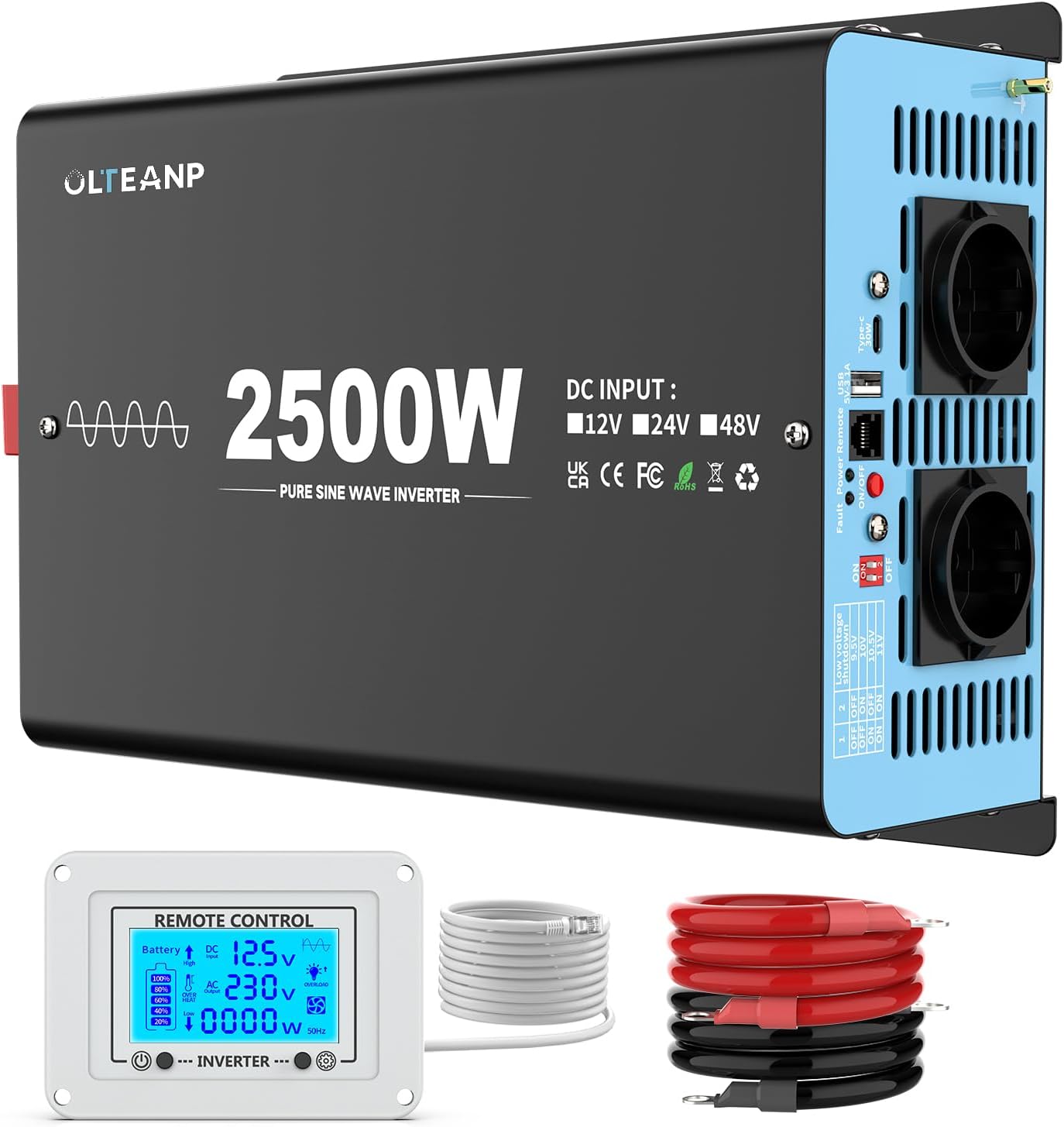
Kuva 3.1: Yliview of the OLTEANP 2500W Pure Sine Wave Power Inverter, showing the main unit, remote control with LCD display, and included battery cables.
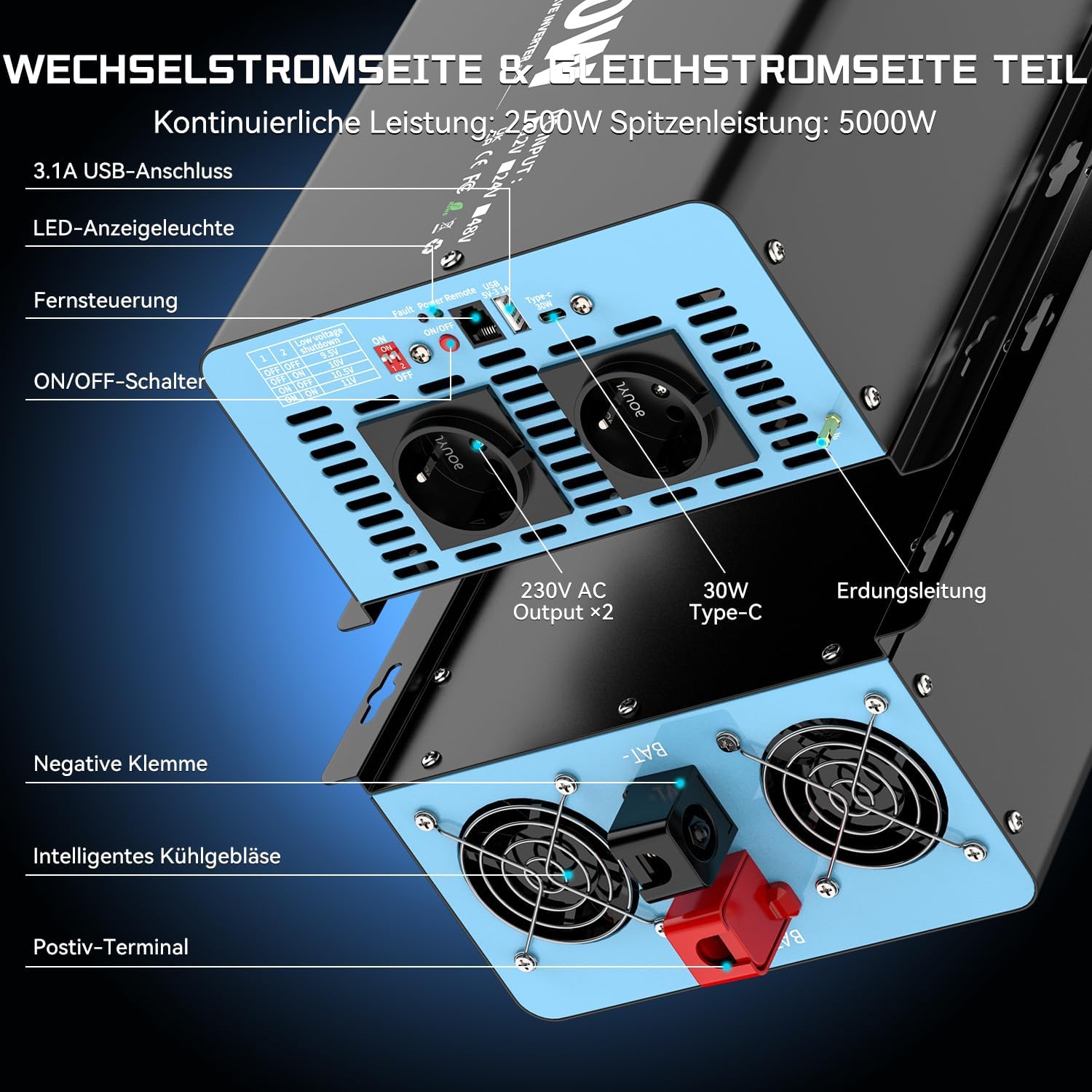
Kuva 3.2: Yksityiskohtainen view of the inverter's input and output terminals. The AC side features two 230V AC outlets, a 3.1A USB port, and a 30W Type-C port. It also includes an ON/OFF switch, remote control port, LED indicator light, and fault/power indicator lights. The DC side shows the positive and negative terminals for battery connection, intelligent cooling fans, and an earthing terminal.

Kuva 3.3: The remote control with its LCD screen. This display provides real-time information on battery status, DC input voltage, AC-lähtö voltage, current power consumption (in Watts), and indicators for overheat or overload conditions. Flashing icons on the LCD directly communicate any issues, aiding in troubleshooting and parameter adjustment.

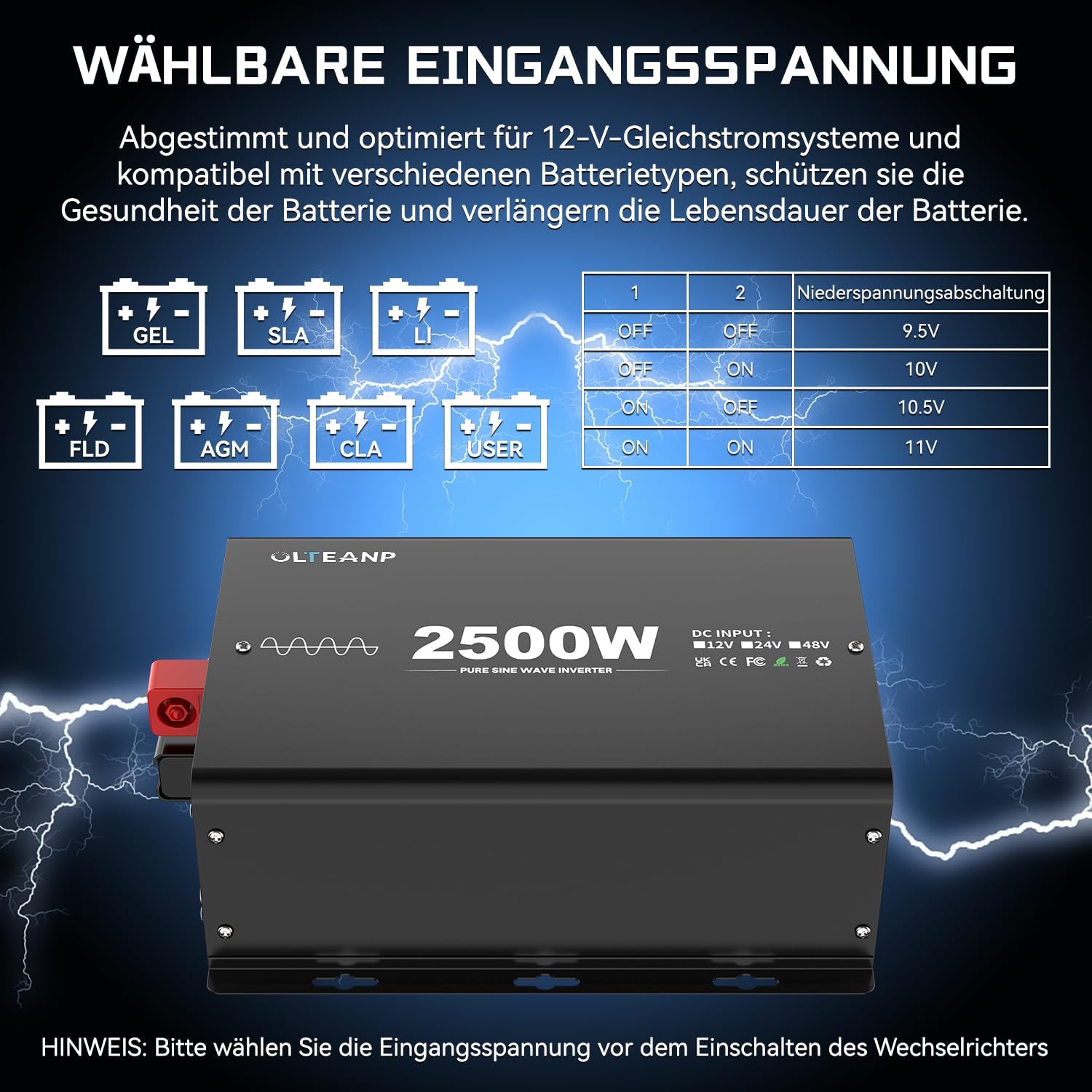
Kuva 3.4: The adjustable input voltage function, compatible with various battery types including GEL, SLA, LI (Lithium), FLD, AGM, CLA, and USER-defined settings. The table illustrates how to set the low voltage shutdown threshold using DIP switches (1 and 2) to protect battery health and extend its lifespan. Tärkeää: Säädä voltage only when the inverter is turned OFF.

Kuva 3.5: Examples of typical applications for the 2500W Pure Sine Wave Inverter. It can power a wide range of devices such as electric ovens, cameras, laptops, coffee machines, hair dryers, LED lights, TVs, and electric drills, provided their combined power consumption does not exceed 2500 Watts.
Kuva 3.6: Dimensions of the OLTEANP 2500W Inverter (approximately 11.88 inches / 302mm in length, 7.91 inches / 201mm in width, and 4.4 inches / 113mm in height). The image also shows the included accessories: the remote control and 80cm battery cables (red for positive, black for negative).
4. Asennus ja asetukset
Noudata näitä ohjeita oikean asennuksen varmistamiseksi:
- Valitse sijainti: Select a cool, dry, and well-ventilated area for the inverter. Ensure there is sufficient space around the unit for airflow.
- Kytke akun kaapelit:
- Connect the red (positive) battery cable to the positive (+) terminal of the inverter.
- Connect the black (negative) battery cable to the negative (-) terminal of the inverter.
- Connect the other end of the red cable to the positive (+) terminal of your 12V battery.
- Connect the other end of the black cable to the negative (-) terminal of your 12V battery.
- Connect Remote Control (Optional): Plug the remote control cable into the designated port on the inverter.
- Adjust Input Voltage (if necessary): If you are using a lithium battery or wish to customize the low voltage shutdown, refer to Section 3.4 and adjust the DIP switches on the inverter while it is OFF.
- Maadoitus: Connect the grounding terminal on the inverter to a proper earth ground.
5. Käyttö
Asennuksen jälkeen invertterin käyttö on yksinkertaista:
- Virta päälle: Press the ON/OFF switch on the inverter or the remote control. The LED indicator light will illuminate, and the LCD screen on the remote control will activate.
- Monitorin tila: The LCD display on the remote control provides real-time information:
- Akun kuvake: Shows approximate battery charge level.
- DC -tulo Voltage: Näyttää nykyisen voltage from your 12V battery.
- AC -lähtö Voltage: Shows the 230V AC output.
- Virrankulutus (W): Indicates the real-time power draw of connected appliances.
- Overheat/Overload Icons: These icons will flash if the inverter detects an overheat or overload condition, indicating a potential issue.
- Yhdistä laitteet: Plug your 230V AC appliances into the AC outlets. For charging mobile devices, use the 5V/3.1A USB port or the 30W Type-C port.
- Virta pois: When finished, disconnect appliances and press the ON/OFF switch on the inverter or remote control to turn off the unit.
6. Huolto
Säännöllinen huolto auttaa varmistamaan invertterisi pitkän käyttöiän ja optimaalisen suorituskyvyn:
- Pidä puhtaana: Periodically wipe the exterior of the inverter with a dry, soft cloth. Do not use liquid cleaners.
- Tarkista liitännät: Regularly inspect battery cable connections to ensure they are tight and free from corrosion.
- Varmista ilmanvaihto: Make sure the cooling fans and vents are free from dust and obstructions. Clean them gently if necessary.
- Varastointi: Jos invertteriä säilytetään pitkään, irrota se akusta ja säilytä sitä viileässä ja kuivassa paikassa.
7. Vianmääritys
Jos invertterisi kanssa ilmenee ongelmia, katso seuraavat yleiset ongelmat ja ratkaisut:
| Ongelma | Mahdollinen syy | Ratkaisu |
|---|---|---|
| Ei tehoa / Invertteri ei käynnisty | Löysät akun liitännät Alhainen akun tilavuustage Invertterikytkin on OFF-asennossa Palanut sulake (sisäinen) | Tarkista ja kiristä akun kaapelit Lataa tai vaihda akku Turn ON the inverter switch Contact support (do not attempt to replace internal fuses) |
| Overload warning (LCD icon flashing) | Connected appliance(s) exceed 2500W continuous power | Reduce the total load by unplugging some appliances. Restart the inverter. |
| Overheat warning (LCD icon flashing) | Huono ilmanvaihto Korkea ympäristön lämpötila Continuous high load | Varmista esteetön ilmavirtaus invertterin ympärillä. Siirrä laite viileämpään ympäristöön. Vähennä kuormitusta. Anna invertterin jäähtyä. |
| Alhainen tilavuustage sammutus | Akun tilavuustage dropped below set threshold | Recharge the battery. Check battery health. Adjust low voltage shutdown setting if using lithium batteries (refer to Section 3.4). |
| No AC output, but inverter is ON | Short circuit in connected appliance Sisäinen vika | Disconnect all appliances and restart. If issue persists, contact support. |
For any issues not covered here, or if troubleshooting steps do not resolve the problem, please contact OLTEANP customer support.
8. Tekniset tiedot
| Ominaisuus | Erittely |
|---|---|
| Jatkuva teho | 2500 wattia |
| Huipputeho | 5000 wattia |
| DC -tulo Voltage | 12V DC (Adjustable range: 9.5V - 16V) |
| AC -lähtö Voltage | 230V AC |
| Lähtöaaltomuoto | Puhdas siniaalto |
| Pistorasiat | 2 |
| USB-portti | 5V / 3.1A |
| Type-C -portti | 30W |
| Suojausominaisuudet | Spark protection, Overload, Overheat, Low/High Voltage, Oikosulku |
| Jäähdytys | Älykäs jäähdytystuuletin |
| Kaukosäädin | Yes, with LCD Display |
9. Takuu ja tuki
For warranty information, technical support, or service inquiries, please refer to the product packaging or contact OLTEANP customer service directly through the retailer where the product was purchased. Please have your product model and purchase details ready when contacting support.