
1. Johdanto
This manual provides detailed instructions for the installation, operation, and maintenance of the QOLTEC 50900 Three Phase Electronic Energy Consumption Meter. This device is designed for measuring active energy consumption in three-phase, four-wire AC circuits. Please read this manual thoroughly before installation and use to ensure proper function and safety.
2. Turvallisuustiedot
VAROITUS: Installation and maintenance of this device must be performed by qualified personnel only. Failure to follow these instructions can result in electric shock, fire, or serious injury.
- Katkaise aina virta ennen mittarin asentamista tai huoltoa.
- Varmista, että kaikki johdotusliitännät ovat tukevasti ja oikein kytkentäkaavion mukaisesti.
- Do not operate the meter in environments exceeding its specified operating conditions.
- Do not open or modify the meter casing. Sisällä ei ole käyttäjän huollettavia osia.
- Protect the meter from moisture, dust, and direct sunlight.
3. Tuote ohiview
The QOLTEC 50900 is a compact, DIN rail mountable electronic energy meter designed for accurate measurement of three-phase energy consumption. It features an LCD display for clear readings and a pulse output for remote monitoring.

Figure 3.1: QOLTEC 50900 Energy Meter showing dimensions (75mm x 92mm x 76mm) and key features like Three Phase Type, 230V Rated Voltage, 1.0 Precision Class, and LCD Display.
Tärkeimmät ominaisuudet:
- Three-phase, four-wire measurement
- LCD digital display for energy consumption (kWh)
- DIN rail mounting (4P width)
- High accuracy (Class 1.0)
- Pulse output (400imp/kWh)
- Käyttö voltage: 3x230/400V
4. Tekniset tiedot
| Parametri | Arvo |
|---|---|
| Malli | 50900 |
| Rated Voltage | 3 x 230/400 V AC |
| Nimellisvirta | 3x10(100)A |
| Taajuus | 50 Hz |
| Tarkkuusluokka | 1.0 |
| Näyttö | LCD |
| Pulssilähtö | 400imp / kWh |
| Asennus | DIN Rail (4P) |
| Mitat (L x K x S) | 75 x 92 x 76 mm |
| Paino | 100 g |
| Materiaali | Akryyli |
5. Asennus ja asennus
The QOLTEC 50900 meter is designed for standard 35mm DIN rail mounting. Ensure the installation location is dry, well-ventilated, and free from excessive vibration or electromagnetic interference.
5.1 Asennus
- Locate a suitable 35mm DIN rail within your electrical panel.
- Align the meter's DIN rail clip with the rail.
- Press the meter firmly onto the rail until it clicks into place.

Figure 5.1: The QOLTEC 50900 meter securely mounted on a DIN rail, showing its compact form factor.
5.2 Johdotusliitännät
TÄRKEÄÄ: All wiring must comply with local electrical codes and regulations. Ensure power is OFF before making any connections.
- Identify the input (IN) and output (OUT) terminals on the meter.
- Connect the incoming three-phase lines (L1, L2, L3) and Neutral (N) to the corresponding IN terminals (typically 5, 6, 7, 8).
- Connect the outgoing three-phase lines (L1, L2, L3) and Neutral (N) to the corresponding OUT terminals (typically 1, 2, 3, 4).
- Varmista, että kaikki liitännät ovat tiukat ja turvalliset, jotta vältetään löysiä kontakteja ja ylikuumenemista.

Kuva 5.2: Sivu view of the meter showing the wiring diagram for input (IN) and output (OUT) connections for L1, L2, L3, and Neutral.

Kuva 5.3: Etuosa view of the meter with its LCD display and a separate view of the terminal block for wiring connections.
6. Käyttöohjeet
Once properly installed and powered, the QOLTEC 50900 meter will automatically begin measuring energy consumption.
6.1 LCD-näyttö
The LCD displays the total active energy consumption in kilowatt-hours (kWh). The display is continuous and does not require any button presses for basic reading.
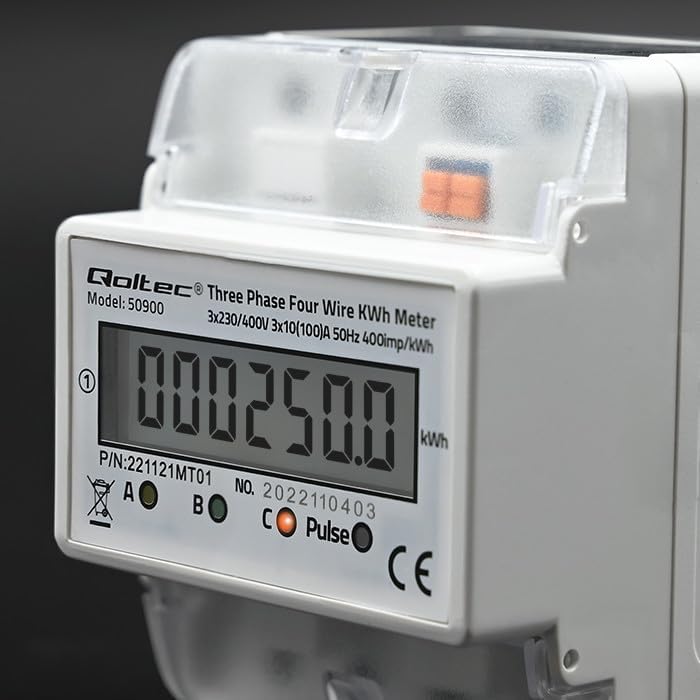
Kuva 6.1: Lähikuva view of the LCD display showing an example energy reading in kWh.
6.2 Pulssilähtö
The meter features a pulse output (400imp/kWh) which can be used to connect to external monitoring systems for remote data collection. Refer to the external system's documentation for connection details.
7. Huolto
The QOLTEC 50900 energy meter is designed for maintenance-free operation under normal conditions.
- Puhdistus: Use a soft, dry cloth to clean the meter's exterior. Do not use abrasive cleaners, solvents, or liquids that could enter the casing.
- Tarkastus: Tarkista johdotusliitännät säännöllisesti löystymisen tai vaurioiden varalta. Varmista, että mittariin ei ole kertynyt pölyä.
- Ympäristöolosuhteet: Varmista, että käyttöympäristö pysyy määritetyissä lämpötila- ja kosteusrajoissa mittarin käyttöiän pidentämiseksi.
8. Vianmääritys
If you encounter issues with your QOLTEC 50900 meter, refer to the following common problems and solutions:
| Ongelma | Mahdollinen syy | Ratkaisu |
|---|---|---|
| Ei näyttöä/Mittari ei käynnisty | No power supply; Incorrect wiring; Blown fuse in circuit | Check power supply to the meter. Verify wiring connections. Check circuit breaker/fuse. |
| Incorrect energy reading | Incorrect wiring; Faulty meter | Verify wiring connections against the diagram. If wiring is correct, contact support. |
| Pulse output not working | Incorrect connection to external system; Faulty meter | Check pulse output wiring to the external system. Consult external system's manual. If issue persists, contact support. |
If the problem persists after attempting these solutions, please contact Qoltec customer support.
9. Takuu ja tuki
Qoltec products are manufactured to high-quality standards. For warranty information and technical support, please refer to the warranty card included with your product or visit the official Qoltec websivusto. Säilytä ostokuitti ostotodistuksena.