
ANMEATE FC-IR202
ANMEATE No-Touch Forehead Thermometer User Manual
Brand: ANMEATE | Model: FC-IR202
Johdanto
The ANMEATE No-Touch Forehead Thermometer is designed for swift, accurate, and reliable temperature measurements for individuals of all ages, including adults, kids, and babies. Its non-contact design ensures hygienic use, making it ideal for monitoring body temperature without physical contact. This manual provides comprehensive instructions for setup, operation, maintenance, and troubleshooting to ensure optimal performance and longevity of your device.
Key features include 1-second rapid readings, rigorous clinical testing for accuracy, and a user-friendly design. The device also incorporates a large display with 3 backlight indicators (Green, Yellow, Red) to visually communicate temperature levels, a one-touch mute mode for quiet operation, and a memory recall function to store up to 35 previous readings. A fever warning alarm is also integrated for immediate alerts.
Tärkeimmät ominaisuudet
- Swift 1-Second Readings: Obtain accurate temperature readings rapidly.
- Reliable and Accurate Measurements: Clinically tested for precision with a tiny error margin.
- 3 Backlight Indicators: Green (normal), Yellow (slightly elevated), Red (fever/abnormal) for easy interpretation.
- 35 Sets of Memory Storage: Track temperature trends over time.
- One-Touch Mute Mode: For quiet operation, especially useful for sleeping individuals.
- Fahrenheit/Celsius vaihdettavissa: Vaihda helposti lämpötilayksiköiden välillä.
- Fever Warning Alarm: Audible alert for abnormal temperatures.
- Käyttäjäystävällinen muotoilu: Ergonomic and suitable for all ages (adults, kids, and babies).
- Täydellinen paketti: Includes thermometer, 2 AAA batteries, and user manual.
Asennus
Akun asennus
Your ANMEATE thermometer comes with 2 AAA batteries included. To install or replace batteries:
- Etsi lämpömittarin takaa paristolokeron kansi.
- Avaa lokero liu'uttamalla kantta alaspäin.
- Aseta 2 AAA-paristoa lokeroon varmistaen oikean napaisuuden (+ ja -) lokeron sisällä olevien merkkien mukaisesti.
- Liu'uta paristolokeron kansi takaisin paikalleen, kunnes se napsahtaa tukevasti.

Image: Battery compartment with AAA batteries.
Video: Demonstrates how to install batteries and use the thermometer.
Käyttöohjeet
Taking Temperature (Forehead Mode)
Kehon lämpötilan mittaamiseksi:
- Ensure the thermometer is in Forehead Mode (indicated by a human head icon on the display). If not, refer to "Switching Temperature Modes" below.
- Hold the thermometer 0.3-1.5 inches (1-3 cm) away from the center of the forehead.
- Press the measurement button (large button with thermometer icon).
- The temperature reading will appear on the display within 1 second, accompanied by a corresponding backlight color.

Image: Non-contact forehead temperature measurement.
Video: Demonstrates how to use the thermometer for forehead temperature readings.
Taking Temperature (Object/Room Mode)
To measure the temperature of objects or a room:
- Ensure the thermometer is in Object/Room Mode (indicated by a house icon on the display). If not, refer to "Switching Temperature Modes" below.
- Point the thermometer at the object or area you wish to measure.
- Paina mittauspainiketta.
- Lämpötilalukema tulee näkyviin.

Image: Multiple uses including object and room temperature measurement.
Video: Demonstrates switching between forehead and object/room temperature modes.
Switching Temperature Modes (Forehead/Object)
To switch between Forehead Mode and Object/Room Mode, ensure the device is OFF. Press and hold the 'Mem' button for approximately 3 seconds until the mode icon changes on the display (human head for forehead, house for object/room).
Switching Temperature Units (Fahrenheit/Celsius)
To switch between Fahrenheit (℉) and Celsius (℃) units, ensure the device is ON. Press and hold the 'Mute' button (speaker icon) for approximately 3 seconds until the unit changes on the display.
Video: Demonstrates how to switch between Fahrenheit and Celsius units.
Mykistystila
The thermometer features a one-touch mute mode for silent operation. This is particularly useful when taking temperatures of sleeping infants or children to avoid disturbance. Press the 'Mute' button (speaker icon) briefly to toggle the sound on or off.

Image: Silent mode for undisturbed temperature checks.
Video: Highlights the mute mode and memory recall features.
Muistin palauttaminen
The thermometer can store up to 35 sets of previous temperature readings. To access memory recall, press the 'Mem' button briefly. Each press will cycle through the stored readings. This feature is useful for tracking temperature changes over time.
Backlight Indicators
The display features a color-coded backlight to indicate temperature status:
- Vihreä: Normal temperature range.
- Keltainen: Slightly elevated temperature, indicating caution.
- Punainen: High temperature, indicating a fever or abnormal reading, often accompanied by an alarm.
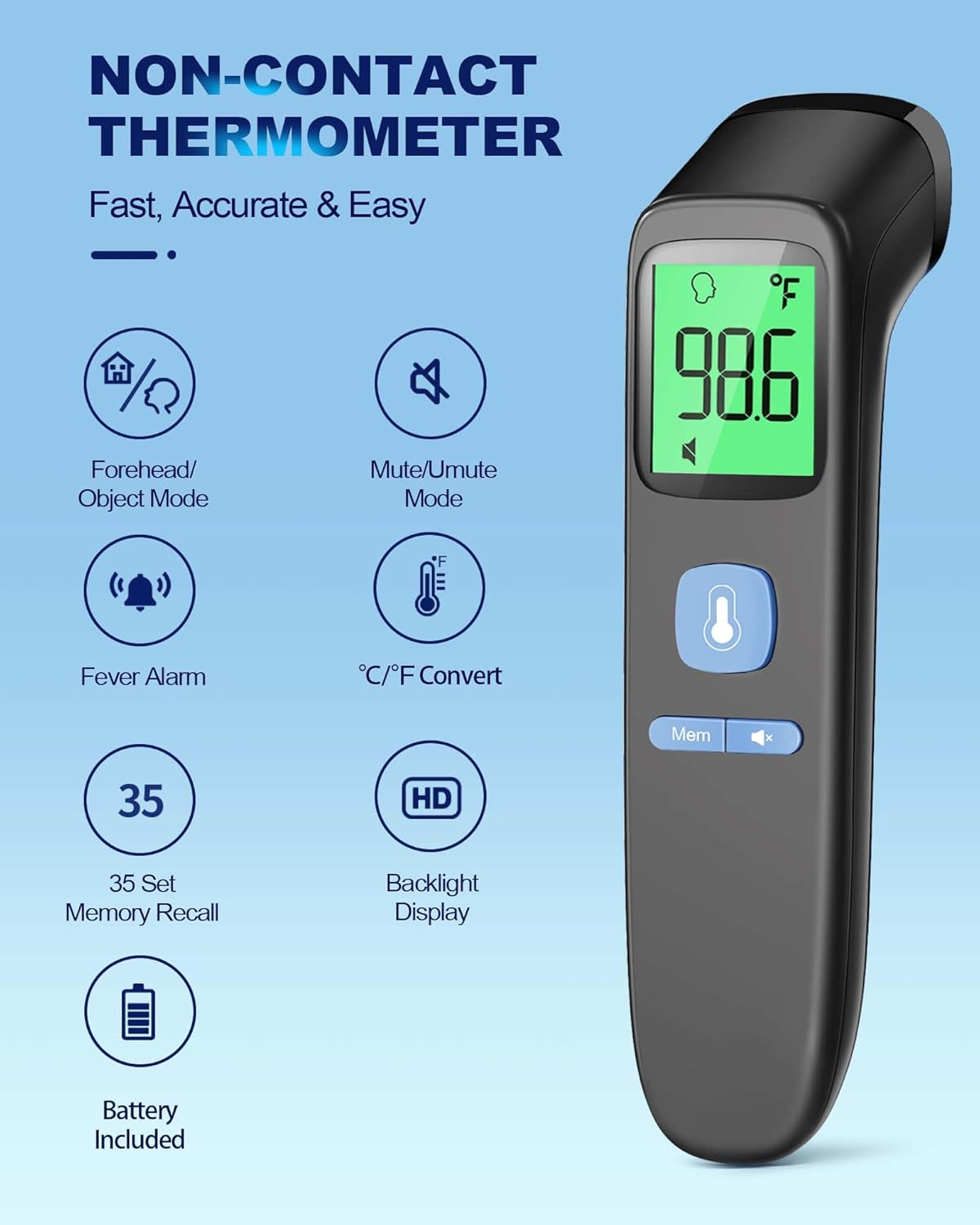
Image: Visual representation of backlight indicators.
Huolto
Puhdistus
To ensure hygienic use and accurate readings, clean the thermometer regularly. Wipe the device with a soft, dry cloth. For disinfection, use an alcohol swab (70% isopropyl alcohol) to gently wipe the sensor and the body of the thermometer. Do not immerse the thermometer in water or any cleaning solutions.
Varastointi
Store the thermometer in a cool, dry place away from direct sunlight, extreme temperatures, and humidity. Keep it out of reach of children. The included pouch can be used for convenient and protective storage.
Video: Demonstrates the thermometer's features, including its compact size for storage.
Vianetsintä
| Ongelma | Mahdollinen syy | Ratkaisu |
|---|---|---|
| Näytössä näkyy "Lo" tai "Hi" | Lämpötila on mittausalueen ulkopuolella. | Ensure proper distance from the forehead (0.3-1.5 inches). Ensure the environment temperature is within operating limits. |
| Epätarkkoja lukemia | Improper measurement distance, dirty sensor, or unstable environment. | Verify correct distance. Clean the sensor. Avoid measuring in drafts or extreme temperature changes. Allow the thermometer to acclimate to room temperature for 30 minutes before use if moved from a different environment. |
| Näyttö ei käynnisty | Tyhjät tai väärin asennetut paristot. | Tarkista paristojen napaisuus. Vaihda paristot tarvittaessa. |
| No sound in mute mode | Mykistystila on käytössä. | Press the 'Mute' button to toggle sound on. |
Tekniset tiedot
| Ominaisuus | Yksityiskohta |
|---|---|
| Tuotteen mitat | 6.43 x 1.54 x 1.56 tuumaa; 3 unssia |
| Tuotteen mallinumero | FC-IR202 |
| Paristot | Vaatii 2 AAA-paristoa (mukana) |
| Valmistaja | ANMEATE |
| Erikoisominaisuus | Non-Contact, Low Battery Indicator, Ultra Clear Screen With Backlit, Fast Reading System, High Accuracy |
| Väri | Musta |
| Ikäryhmä (kuvaus) | Adult, Kid & Baby |
| Mukana olevat komponentit | 1*Thermometer, 2*AAA Batteries, 1*User Manual, 1*Quick User Guide |
| Ulkomateriaali | Muovi |
| Erittely Met | FDA, CE, ISO 13485 |
| Näytön tyyppi | Digitaalinen |
| Tuotteen hoito-ohjeet | Pyyhkiä puhtaaksi |
| Yksikkömäärä | 1.0 Count |
Takuu ja tuki
Your ANMEATE No-Touch Forehead Thermometer comes with lifetime support. For any questions, concerns, or technical assistance, please refer to the contact information provided in your Quick User Guide or visit the official ANMEATE websivusto.
Ask a question about this manual
Ask about setup, troubleshooting, compatibility, parts, safety, or missing instructions. Manuals+ will review the question and use this page’s manual context to help answer it.