
1. Johdanto
This manual provides detailed instructions for the operation and maintenance of your SWOFY M4 MP3 Player. Please read this manual thoroughly before using the device to ensure proper functionality and to maximize your user experience.
2. Tuote ohiview
The SWOFY M4 is a versatile digital audio player featuring Bluetooth 5.3 connectivity, a 2.4-inch touch screen, and a range of functions including FM radio, e-book reader, video playback, and voice recording. It comes with 64GB of built-in storage, expandable up to 128GB with a Micro SD card.
2.1 Pakkauksen sisältö
- 1x SWOFY 64GB Bluetooth MP3 Player
- 1x Wired Earbuds
- 1 x USB Type-C -kaapeli
- 1x Silicone Protective Case
- 1x käyttöopas
2.2 Laitteen asettelu
Familiarize yourself with the physical components of your SWOFY M4 MP3 Player.
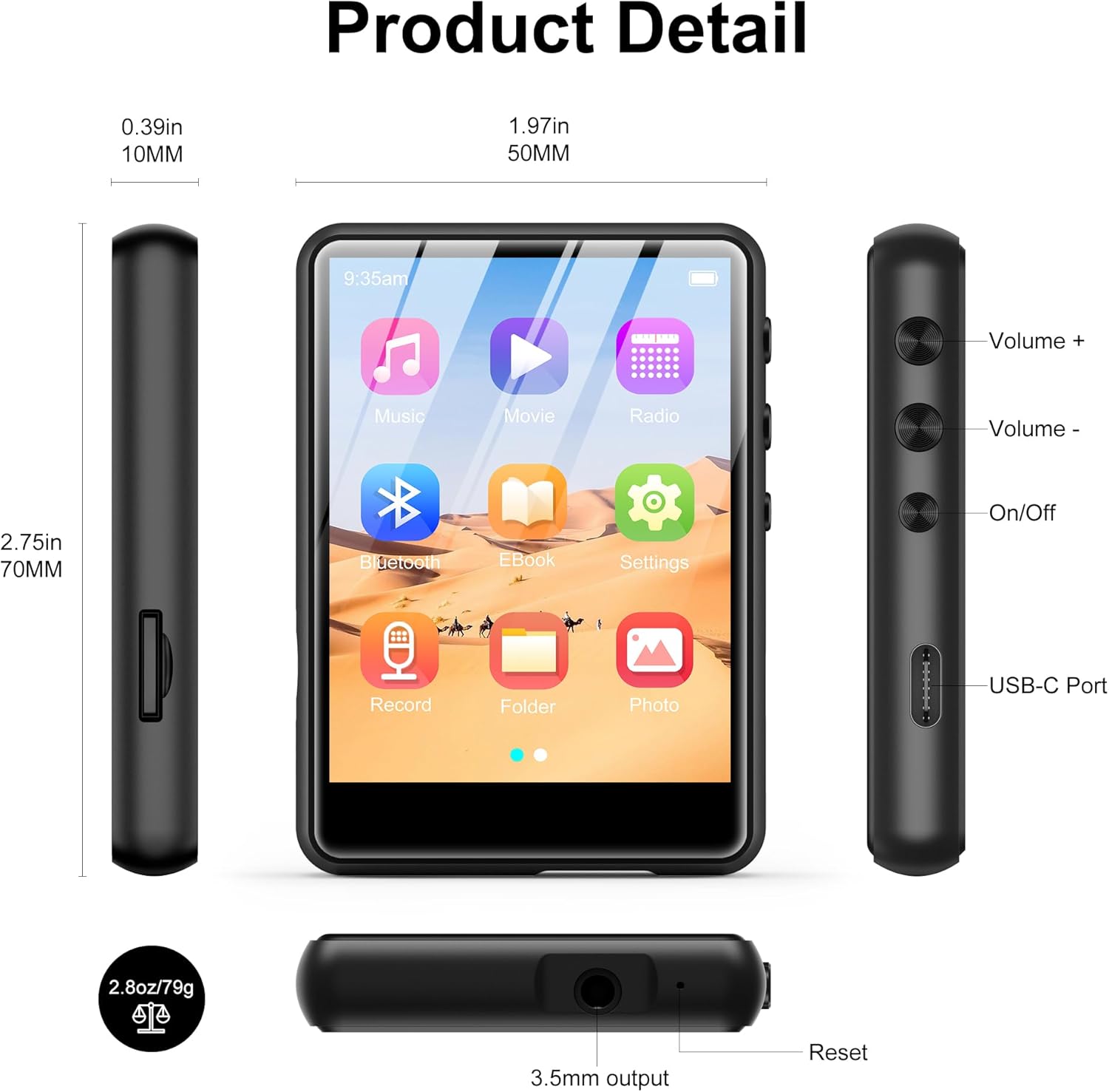
Kuva 2.2.1: Edessä, sivulla ja päällä views of the SWOFY M4 MP3 Player, highlighting the 2.4-inch screen, Volume +/-, On/Off buttons, USB-C Port, 3.5mm output, Reset button, and Micro SD card slot.
- 2.4 tuuman IPS-kosketusnäyttö: For navigation and display.
- Äänenvoimakkuuden +/- painikkeet: Säädä äänen lähtötasoa.
- Päälle/pois-painike: Laitteen virta päälle tai pois päältä.
- USB-C-portti: Lataamiseen ja tiedonsiirtoon.
- 3.5 mm stereoliitäntä: Liitä langalliset kuulokkeet tai ulkoiset kaiuttimet.
- Micro SD -korttipaikka: For storage expansion up to 128GB.
- Reset-painike: To restart the device if it becomes unresponsive.
- HD -kaiutin: Integroitu kaiutin äänentoistoon.
3. Asennus
3.1 Laitteen lataaminen
Before first use, fully charge the MP3 player. Connect the provided USB Type-C cable to the device's USB-C port and the other end to a USB power adapter (not included) or a computer's USB port. The battery indicator on the screen will show charging status.

Kuva 3.1.1: The SWOFY M4 MP3 Player connected via USB Type-C cable, illustrating its 300mAh battery capacity for long playback.
3.2 Virran kytkeminen päälle/pois
- Virran kytkeminen: Press and hold the On/Off button located on the side of the device until the screen illuminates.
- Virran sammuttaminen: Press and hold the On/Off button until a power-off prompt appears on the screen. Select "Power Off" or continue holding until the screen turns off.
3.3 Loading Music and Files
Siirtämään files MP3-soittimeesi:
- Liitä MP3-soitin tietokoneeseen mukana toimitetulla USB Type-C -kaapelilla.
- Laite näkyy tietokoneellasi siirrettävänä levynä.
- Drag and drop your music, video, image, or e-book files MP3-soittimen oikeisiin kansioihin.
- Irrota laite turvallisesti tietokoneesta ennen kaapelin irrottamista.

Kuva 3.3.1: Musiikin siirtäminen files (MP3, WMA, APE, FLAC, WAV, OGG, DRM, ACELP) from a computer to the SWOFY M4 MP3 Player via USB-C.
The device supports various audio formats including MP3, WMA, APE, FLAC, WAV, OGG, DRM, and ACELP. For video and image files, ensure they are in compatible formats to avoid "unsupported format" errors.
3.4 Tallennustilan laajentaminen
The SWOFY M4 has 64GB of internal storage. You can expand this by inserting a Micro SD card (up to 128GB) into the dedicated slot on the side of the device.
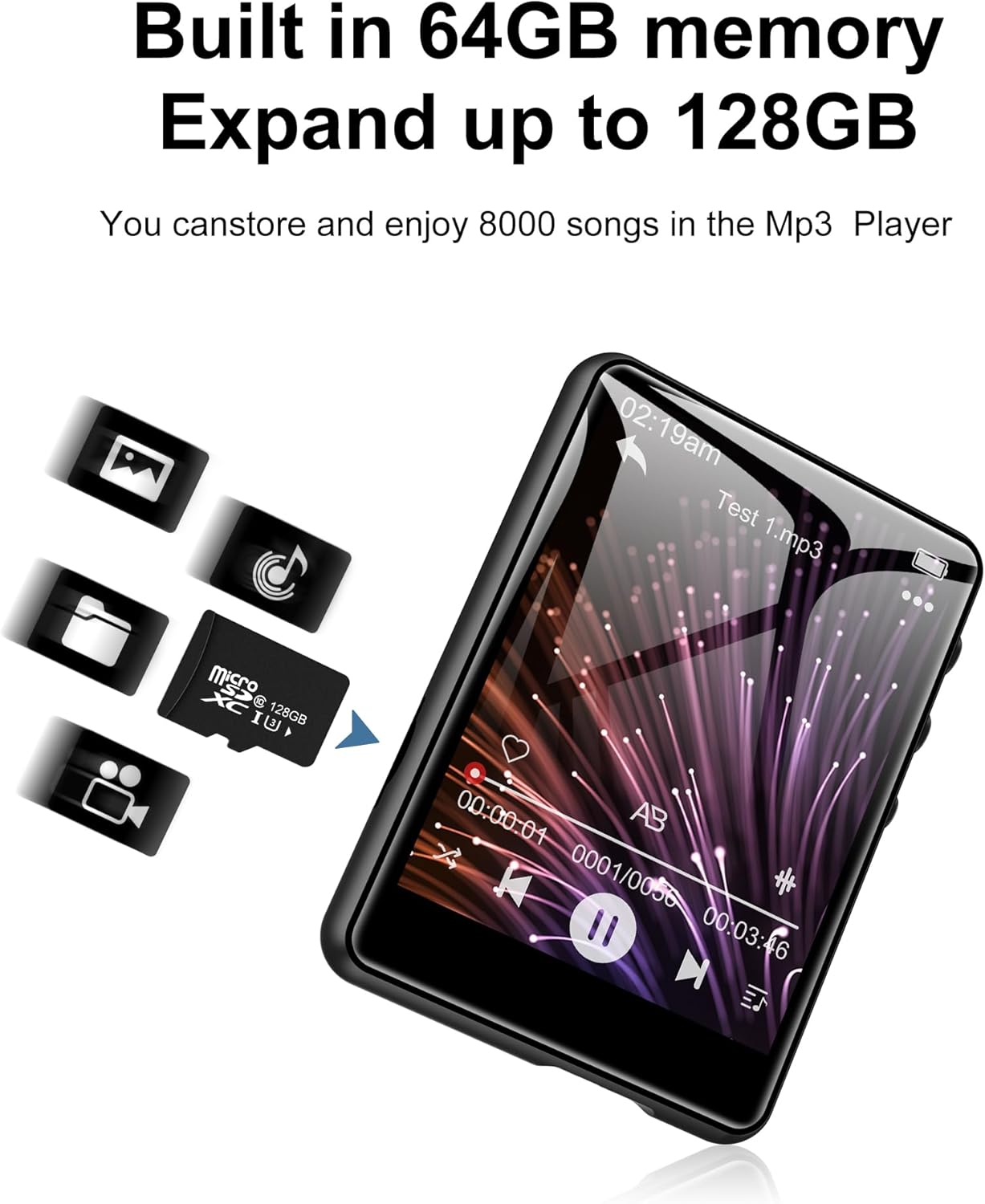
Kuva 3.4.1: The SWOFY M4 MP3 Player with a Micro SD card, illustrating the expandable storage capability up to 128GB.
4. Käyttöohjeet
4.1 Kosketusnäytön käyttö
The 2.4-inch touch screen allows for intuitive navigation. Tap icons to open applications, swipe to scroll, and use the back arrow icon to return to the previous screen.

Kuva 4.1.1: A finger interacting with the 2.4-inch IPS touch screen of the SWOFY M4 MP3 Player, demonstrating its convenient operation.
4.2 Musiikin toisto
- Napauta päävalikosta "Musiikki"-kuvaketta.
- Selaa musiikkikirjastoasi artistin, albumin, genren tai kansion mukaan.
- Aloita toisto napauttamalla kappaletta.
- Use the on-screen controls (play/pause, skip, volume) or physical volume buttons to manage playback.
- Access equalizer settings and playback modes (repeat, shuffle) from the music playback screen.

Kuva 4.2.1: The music playback interface of the SWOFY M4, showing options for AB Repeat, 8-speed playback, two playback modes, and equalizer settings.
4.3 Bluetooth-yhteys
The SWOFY M4 features Bluetooth 5.3 for wireless audio streaming.
- From the main menu, tap the "Bluetooth" icon or go to "Settings" and select "Bluetooth".
- Turn Bluetooth on. The device will scan for available Bluetooth devices.
- Varmista, että Bluetooth-kuulokkeet tai -kaiutin ovat pariliitostilassa.
- Select your device from the list to pair. Once paired, audio will stream wirelessly.

Kuva 4.3.1: The SWOFY M4 MP3 Player demonstrating Bluetooth 5.3 connectivity with both Bluetooth earbuds and a Bluetooth speaker for wireless audio.
4.4 FM -radio
FM-radiotoiminnon käyttäminen:
- Connect wired headphones to the 3.5mm jack; they act as the antenna.
- From the main menu, tap the "Radio" icon.
- Perform an auto-scan to find available stations or manually tune to a frequency.

Kuva 4.4.1: The SWOFY M4 MP3 Player showing the FM radio interface with wired headphones connected, which are necessary for antenna reception.
4.5 E-kirjanlukija
To read e-books:
- Siirrä yhteensopiva e-kirja files to the device (e.g., TXT format).
- Tap the "E-Book" icon from the main menu.
- Select an e-book to open it. Use the touch screen to turn pages.

Kuva 4.5.1: The SWOFY M4 MP3 Player displaying an e-book, with a hand demonstrating page-turning via the touch screen.
4.6 Videon toisto
Laite tukee videoiden toistoa. Varmista, että video files are in a compatible format for optimal performance.
- Siirrä yhteensopivaa videota files laitteeseen.
- Tap the "Movie" icon from the main menu.
- Valitse toistettava video.

Kuva 4.6.1: The SWOFY M4 MP3 Player displaying a video in full-screen mode, demonstrating its video playback capability.
4.7 Ääninauhuri
Äänen tallentaminen:
- Napauta päävalikosta "Tallenna"-kuvaketta.
- Aloita tallennus napauttamalla tallennuspainiketta.
- Tap again to pause/resume, and tap the stop button to end and save the recording.

Kuva 4.7.1: The SWOFY M4 MP3 Player showing the voice recorder interface, indicating active recording with sound wave visualization.
4.8 valokuva Viewer
Vastaanottaja view kuvat:
- Transfer compatible image files (e.g., JPEG) to the device.
- Tap the "Photo" icon from the main menu.
- Valitse kuva view. Swipe left or right to navigate through photos.

Kuva 4.8.1: The SWOFY M4 MP3 Player displaying images, with a hand demonstrating swiping gestures to browse through photos.
5. Huolto
- Puhdistus: Puhdista laite pehmeällä, kuivalla liinalla. Vältä nestemäisiä puhdistusaineita tai hankaavia aineita.
- Varastointi: Säilytä MP3-soitinta viileässä, kuivassa paikassa, poissa suorasta auringonvalosta ja äärimmäisistä lämpötiloista.
- Akun hoito: Akun käyttöiän pidentämiseksi vältä akun usein tapahtuvaa täydellistä tyhjentymistä. Lataa laite säännöllisesti, vaikka sitä ei käytettäisi pitkään aikaan.
- Suojaus: Use the provided silicone protective case to guard against scratches and minor impacts.
6. Vianmääritys
- Laite ei käynnisty:
- Ensure the device is fully charged. If the issue persists, try pressing the reset button with a thin object (like a paperclip) and then attempt to power on again.
- "Unsupported format" error for files:
- Varmista, että sinun files (music, video, image) are in compatible formats. For music, MP3, WMA, APE, FLAC, WAV, OGG, DRM, ACELP are supported. For videos and images, specific formats may be required; refer to the product specifications or try converting files to common formats like JPEG for images or MP4 for videos.
- Ei voi muodostaa yhteyttä tietokoneeseen:
- Ensure the USB Type-C cable is securely connected to both the device and the computer. Try a different USB port or cable. Restart both the MP3 player and the computer. Ensure the device is powered on when connecting.
- Bluetooth-laite ei pariliitu:
- Ensure Bluetooth is enabled on both the MP3 player and the target device (headphones/speaker). Make sure the target device is in pairing mode and within range. Try turning Bluetooth off and on again on both devices.
- Huono äänenlaatu:
- Tarkista ääni file quality. Ensure headphones or speakers are properly connected and functioning. Adjust equalizer settings on the device. For wired connections, ensure the 3.5mm jack is fully inserted.
7. Tekniset tiedot
| Ominaisuus | Yksityiskohta |
|---|---|
| Mallinumero | M4 |
| Mitat | 2.75 x 1.97 x 0.4 tuumaa |
| Tuotteen paino | 7.4 unssia |
| Näytön koko | 2.4 tuumaa |
| Sisäinen tallennustila | 64 Gt |
| Laajennettava tallennustila | Up to 128GB (Micro SD card) |
| Bluetooth-versio | 5.3 |
| Yhteydet | Bluetooth, USB Type-C |
| Akku | 300mAh litiumpolymeeriakku (sisältyy pakkaukseen) |
| Playback Time (wired earbuds) | Jopa 50 tuntia |
| FM Radio Recording Time | Noin 7.5 tuntia |
| Tuetut äänimuodot | MP3, WMA, FLAC, APE, OGG, DRM, ACELP, WAV |
| Erikoisominaisuudet | Equalizer, FM Radio, Touch Screen, Video Playback, Voice Recorder |
8. Virallinen tuotevideo
Video 8.1.1: An official product video from SWOFY Direct showcasing the features and design of the SWOFY M4 MP3 Player. This video demonstrates the device's multi-colored options, package contents, 2.4-inch touch screen, various ports, Bluetooth 5.3, and overall functionality.
9. Takuu ja tuki
For warranty information and technical support, please refer to the contact details provided on the product packaging or visit the official SWOFY websivusto. Säilytä ostokuitti takuuvaatimuksia varten.