
1. Johdanto
Thank you for choosing the WORKPRO 7.2V Cordless Rotary Tool. This manual provides essential information for the safe and effective operation, maintenance, and troubleshooting of your tool. Please read it thoroughly before use and retain it for future reference.
The WORKPRO 7.2V Cordless Rotary Tool is a versatile and compact device designed for various DIY and craft projects. Its lightweight design and variable speed settings make it suitable for tasks such as sanding, engraving, cutting, drilling, grinding, and polishing.

Figure 1: WORKPRO 7.2V Cordless Rotary Tool with included accessories and storage bag.
2. Turvallisuustiedot
Noudata aina sähkötyökaluja käyttäessäsi perusturvallisuusohjeita tulipalon, sähköiskun ja henkilövahinkojen vähentämiseksi.
- Lue kaikki ohjeet: Tutustu työkalun toimintaan ja turvallisuusohjeisiin.
- Käytä silmäsuojaimia: Käytä aina suojalaseja tai sivusuojilla varustettuja suojalaseja.
- Työkappaleen kiinnitys: Aina clamp tai kiinnitä työkappale muulla tavoin estääksesi sen liikkumisen käytön aikana.
- Pidä työalue puhtaana: Sotkuiset alueet aiheuttavat onnettomuuksia.
- Vältä vaarallisia ympäristöjä: Älä käytä sähkötyökaluja kohdassa damp tai märkiä paikkoja tai altista ne sateelle. Pidä työalue hyvin valaistuna.
- Pidä lapset loitolla: Kaikki vierailijat tulee pitää turvallisen välimatkan päässä työalueelta.
- Pukeudu oikein: Do not wear loose clothing or jewelry. They can be caught in moving parts. Non-skid footwear is recommended. Wear protective hair covering to contain long hair.
- Käytä oikeaa työkalua: Älä pakota työkalua tai lisälaitetta tekemään työtä, jota varten sitä ei ole suunniteltu.
- Katkaise virta: Disconnect the tool from its power source before making adjustments, changing accessories, or storing it.
- Älä ylitä: Pysy koko ajan oikeassa asennossa ja tasapainossa.
- Huolla työkaluja huolellisesti: Pidä työkalut terävinä ja puhtaina parantaaksesi ja turvallisempaa suorituskykyä. Noudata voitelu- ja lisävarusteiden vaihto-ohjeita.
- Tarkista vaurioituneiden osien varalta: Ennen kuin käytät työkalua jatkossa, suojus tai muu vahingoittunut osa on tarkastettava huolellisesti, jotta voidaan varmistaa, että se toimii kunnolla ja suorittaa aiottua tehtävää.
- Älä käytä latauksen aikana: For safety reasons, do not use the tool while it is being charged.
3. Tuote ohiview
The WORKPRO 7.2V Cordless Rotary Tool is designed for precision work. Understanding its components is key to effective operation.
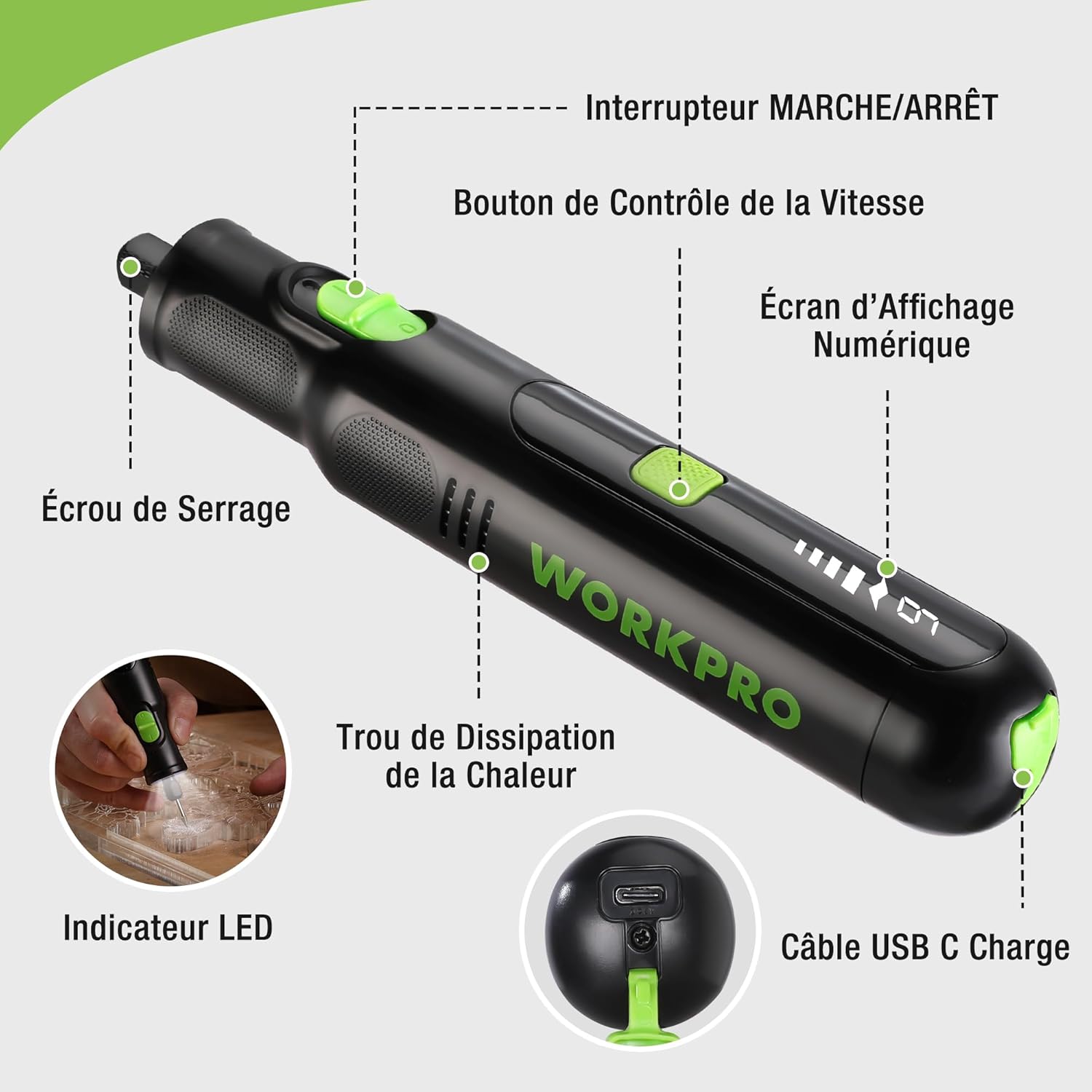
Figure 2: Key components of the rotary tool.
Komponentit:
- On / off kytkin: Aktivoi ja deaktivoi työkalun.
- Nopeudensäätöpainike: Adjusts the rotational speed of the tool.
- Digitaalinen näyttö: Näyttää nykyisen nopeusasetuksen.
- Holkkimutteri: Secures the accessory bits in place.
- Lämmönpoistoaukko: Ensures proper cooling of the motor during operation.
- LED-ilmaisin: Tarjoaa valaistuksen työalueelle.
- USB-C-latausportti: Sisäisen akun lataamiseen.
Mukana tulevat tarvikkeet:
Your WORKPRO rotary tool comes with 117 diverse accessories, enabling a wide range of applications. These include:

Kuva 3: Päättynytview 117 mukana toimitetusta lisävarusteesta.
- Hionta/Teroitus: Grinding stones and wheels for material shaping and sharpening.
- Veistos: Diamond bits for detailed carving and engraving.
- Kiillotus: Wool felt wheels, felt wheels, screw mandrels, and metal brushes for achieving smooth, shiny finishes.
- Jyrsintä: Milling bits for precise material removal.
- Leikkaus: Cutting discs and saw blades for various cutting tasks, along with a cutting disc holder.
- hiominen: Sandpaper, rubber sanding drums, and sanding bands for surface preparation and finishing.
- Holkit: 2.35mm and 3.2mm collets to accommodate different shank sizes.
- Poraus: 2.35mm and 3.2mm drill bits for small-scale drilling.
- Jakoavain: For securing and loosening collet nuts.
4. Asennus
4.1 Työkalun lataaminen
The tool is equipped with a 7.2V 1100mAh Lithium-ion rechargeable battery. Before first use, fully charge the tool.
- Connect the provided USB-C charging cable to the tool's USB-C charging port.
- Liitä USB-kaapelin toinen pää yhteensopivaan USB-virtalähteeseen (esim. tietokoneeseen tai USB-seinäsovittimeen).
- The digital display will indicate charging status. A full charge typically takes approximately 2 hours.
- Kun lataus on täynnä, irrota latauskaapeli.
Note: For optimal battery life, it is recommended to store the tool with the battery charged between 50% and 75%. Recharge the tool at least once every 3 to 6 months if not used regularly.

Figure 4: Charging the rotary tool via USB-C.
4.2 Lisävarusteiden asentaminen
The WORKPRO rotary tool features an automatic spindle lock design for easy and secure accessory changes.
- Ensure the tool is turned OFF.
- Unscrew the collet nut at the front of the tool.
- Select the appropriate collet size for your desired accessory (2.35mm or 3.2mm). Insert the collet into the tool if not already present.
- Insert the shank of the accessory bit into the center of the collet nut. Ensure the bit is fully seated.
- Hand-tighten the collet nut. For a secure fit, use the included wrench to tighten the collet nut firmly. Do not overtighten.

Figure 5: Two-step accessory replacement process.

Figure 6: Detailed installation steps for various accessories.
Note: The automatic spindle lock engages when the tool is off, allowing for accessory changes without needing to press a separate button. A slight clicking sound when the tool stops is normal due to this mechanism.
5. Käyttöohjeet
5.1 Virran kytkeminen päälle/pois
To turn the tool ON, slide the ON/OFF switch to the 'ON' position. To turn it OFF, slide the switch to the 'OFF' position.
5.2 Nopeuden säätäminen
The tool features 6 variable speed settings, ranging from 5000 RPM to 30000 RPM. Press the Speed Control Button to cycle through the speeds. The current speed setting will be displayed on the digital screen.
- Speed I: 5000 RPM
- Speed II: 10000 RPM
- Speed III: 15000 RPM
- Speed IV: 20000 RPM
- Speed V: 25000 RPM
- Speed VI: 30000 RPM
Choose the appropriate speed for your task and material. Lower speeds are generally suitable for polishing, delicate work, and softer materials, while higher speeds are for cutting, grinding, and harder materials.

Figure 7: Variable speed settings and powerful motor.
5.3 Integroitu LED-valo
The tool includes an integrated LED light that illuminates the work area, improving visibility in dimly lit spaces and for detailed tasks.

Figure 8: Using the LED light for precision engraving.
5.4 Sovellukset
The WORKPRO rotary tool is highly versatile and can be used for:
- Leikkaus: Use appropriate cutting discs for various materials.
- Veistos/kaiverrus: Utilize diamond bits for intricate designs on wood, plastic, or soft metals.
- Kiillotus: Apply felt wheels and polishing compounds to restore shine to surfaces.
- hiominen: Use sanding bands and drums for smoothing rough edges or preparing surfaces.
- Poraus: Employ small drill bits for precision holes.

Kuva 9: Esimamples of versatile applications.
6. Huolto
6.1 Puhdistus
- Irrota työkalu aina kaikista virtalähteistä ennen puhdistamista.
- Käytä pehmeää, damp liinalla työkalun ulkopinnan pyyhkimiseen. Älä käytä voimakkaita kemikaaleja tai hankaavia puhdistusaineita.
- Use a small brush or compressed air to clear dust and debris from the heat dissipation holes and around the collet area.
6.2 Akun hoito ja säilytys
- To prolong battery life, avoid completely discharging the battery regularly.
- For long-term storage, ensure the battery is charged to approximately 50-75%. Recharge the tool every 3 to 6 months to prevent deep discharge and maintain battery health.
- Säilytä työkalua viileässä, kuivassa paikassa, poissa suorasta auringonvalosta ja äärimmäisistä lämpötiloista.
6.3 Lisävarustesäilytys
Keep all accessories organized in the provided storage bag or a suitable container to prevent loss and damage.
7. Vianmääritys
This section addresses common issues you might encounter with your WORKPRO rotary tool.
| Ongelma | Mahdollinen syy | Ratkaisu |
|---|---|---|
| Työkalu ei käynnisty. | Akku on tyhjä. | Charge the tool fully using the USB-C cable. |
| Tool stops unexpectedly during use. | Akun varaus on heikko tai työkalu on ylikuormitettu. | Recharge the battery. Reduce pressure on the tool or use a lower speed setting for the task. |
| Clicking sound when turning off. | Normal operation of the automatic spindle lock. | This is a normal function and does not indicate a fault. |
| Accessory bit is loose or wobbles. | Kiristysholkin mutteria ei ole kiristetty riittävästi tai kiristysholkin koko on väärä. | Ensure the correct collet size is used for the accessory. Tighten the collet nut firmly with the included wrench. |
| Reduced performance or short runtime. | Battery degradation or improper charging/storage. | Ensure proper charging and storage practices are followed (refer to Section 6.2). If the issue persists, the battery may need replacement. |
8. Tekniset tiedot
Below are the technical specifications for the WORKPRO 7.2V Cordless Rotary Tool (Model W123024A).
| Ominaisuus | Erittely |
|---|---|
| Merkki | WORKPRO |
| Mallinumero | W123024A |
| Voitage | 7.2 volttia |
| Akun tyyppi | Litiumioni (1 mukana) |
| Akun kapasiteetti | 1100 mAh |
| Suurin pyörimisnopeus | 30000 RPM |
| Muuttuvat nopeudet | 6 (5 000–25 000 kierrosta minuutissa) |
| Latausaika | Noin 2 tuntia |
| Suoritusaika (maksiminopeus) | Noin 45 minuuttia |
| Paino | 227 grammaa |
| Mitat (P x L x K) | 25.2 x 16.8 x 5.5 cm |
| Erikoisominaisuus | Cordless, Integrated LED Light, Automatic Spindle Lock |
| Mukana olevat komponentit | 117 Lisävarusteet |
| Valmistaja | Hang Zhou Great Star Industrial Co., LTD |
9. Takuu ja tuki
For warranty information, please refer to the documentation provided at the time of purchase or contact your retailer. WORKPRO is committed to providing quality products and customer satisfaction.
If you encounter any issues or have questions regarding your WORKPRO 7.2V Cordless Rotary Tool, please contact the seller or WORKPRO customer support through their official website or contact channels. Please have your model number (W123024A) and purchase details ready when seeking support.