
Johdanto
This manual provides detailed instructions for the installation, operation, and maintenance of your XTRONS IQ72DLRP Car Stereo GPS unit. Please read this manual thoroughly before using the product to ensure proper functionality and to prevent damage. Keep this manual for future reference.
Turvallisuustiedot
- Do not attempt to operate the unit while driving. Distracted driving can lead to accidents.
- Ensure all wiring is correctly connected before powering on the unit to avoid short circuits or damage.
- Consult a professional for installation if you are unsure about any steps. Incorrect installation can void your warranty.
- Vältä laitteen altistamista äärimmäisille lämpötiloille, pitkäaikaiselle suoralle auringonvalolle tai liialliselle kosteudelle.
- Do not disassemble the unit. This may cause damage and will void the warranty.
Pakkauksen sisältö
Varmista, että kaikki osat ovat pakkauksessa ennen asennuksen jatkamista.
- XTRONS IQ72DLRP Head Unit
- GPS antenni
- Virtajohtosarja
- USB-kaapelit
- RCA-kaapelit
- Ulkoinen mikrofoni
- Käyttöopas (tämä asiakirja)
- Other accessories as pictured below.

Kuva 1: Mukana tulevat lisävarusteet
Asennus
1. Asennus ohiview
The XTRONS IQ72DLRP is designed for specific integration with the Land Rover Freelander 2. Professional installation is recommended. Ensure the vehicle's battery is disconnected before starting any electrical work.
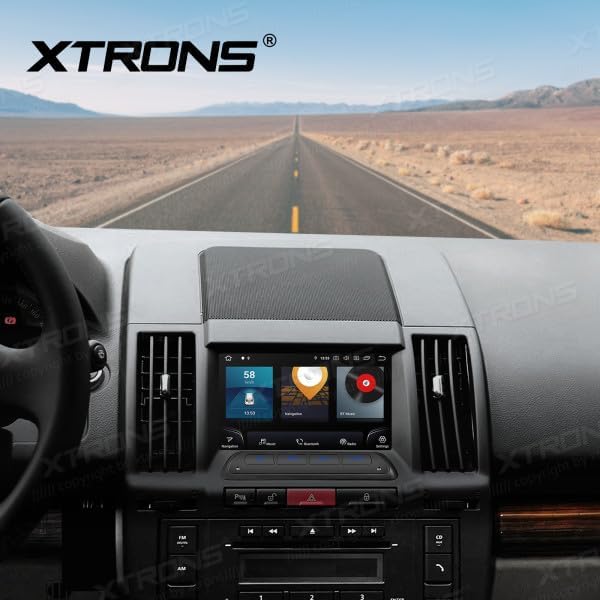
Figure 2: Unit installed in Land Rover Freelander 2 dashboard
2. Johdotusliitännät
Connect the main power harness, speaker wires, and other auxiliary cables according to your vehicle's wiring diagram and the provided XTRONS harness. Pay close attention to the following connections:
- Teho: Kytke keltainen johto (jatkuva 12 V), punainen johto (lisävaruste 12 V) ja musta johto (maadoitus).
- Kaiuttimet: Connect the speaker wires to the corresponding vehicle speaker wires (e.g., Front Left +, Front Left -).
- GPS-antenni: Asenna GPS-antenni paikkaan, jossa on esteetön view taivaalla, tyypillisesti kojelaudalla tai tuulilasin alla.
- USB: Connect the USB cables for external storage or smartphone connectivity.
- Ulkoinen mikrofoni: Liitä ulkoinen mikrofoni parantaaksesi puhelun laatua.
3. Ensimmäinen käynnistys
After all connections are secure, reconnect the vehicle's battery. Turn on the ignition. The unit should power on automatically. Follow any on-screen prompts for initial setup, such as language selection and time zone.
Käyttöohjeet
1. Perustoiminnot
- Virta päälle/pois: Paina virtapainiketta (jos sellainen on) ja pidä sitä painettuna tai kytke ajoneuvon sytytysvirta päälle/pois.
- Äänenvoimakkuuden säätö: Säädä äänenvoimakkuutta äänenvoimakkuuden säätimellä tai näytön säätimillä.
- Aloitusnäyttö: Napauta kotikuvaketta palataksesi Androidin pääkäyttöliittymään.

Figure 3: Main Android Home Screen
2. Android-käyttöjärjestelmän navigointi
The unit runs on Android 12. Navigate through menus and applications by tapping, swiping, and dragging on the touchscreen, similar to a smartphone or tablet.

Figure 4: Application Drawer
3. Radiotoiminta
Access the "Radio" application from the home screen. You can scan for stations, save presets, and switch between AM/FM bands.
4. Bluetooth-yhteys
Puhelimen parittaminen:
- Siirry osoitteeseen Asetukset > Bluetooth.
- Enable Bluetooth on both the head unit and your mobile device.
- Etsi available devices on your mobile phone and select "XTRONS IQ72DLRP" (or similar name).
- Vahvista pariliitoskoodi molemmissa laitteissa.
Kun pariliitos on muodostettu, voit soittaa handsfree-puheluita ja suoratoistaa ääntä.
5. CarPlay / Android Auto
Connect your compatible smartphone via USB to use Apple CarPlay or Android Auto. The system will automatically detect and launch the respective interface, allowing access to navigation, music, messages, and more directly from your phone.
6. GPS-navigointi
The unit comes with a built-in GPS module and antenna. You can use pre-installed navigation apps or download others from the Google Play Store. Ensure the GPS antenna is properly installed for optimal signal reception.
7. USB / Media Playback
Insert a USB drive into one of the provided USB ports. Use the "Music" or "Video" applications to browse and play media files. The unit supports various audio and video formats.
8. DSP-asetukset
The Digital Sound Processor (DSP) allows for advanced audio customization. Access the "DSP" application to adjust equalizer settings, balance, fader, and other sound effects to optimize your listening experience.

Kuva 5: DSP-asetusten käyttöliittymä
9. Wi-Fi- ja 4G-yhteydet
Connect to a Wi-Fi network via Asetukset > Verkko ja Internet > Wi-Fi. For 4G connectivity, insert a compatible SIM card (if the unit supports it and a slot is available) or use a USB 4G dongle (sold separately) and configure network settings.
Huolto
1. Laitteen puhdistaminen
Puhdista näyttö ja laitteen ulkopinta pehmeällä, kuivalla liinalla. Pinttyneisiin tahroihin käytä hieman kuivaa liinaa.amp cloth with a mild, non-abrasive cleaner can be used. Avoid spraying liquids directly onto the unit.
2. Ohjelmistopäivitykset
Periodically check for software updates to ensure optimal performance and access to new features. Updates can usually be found in the system settings or on the official XTRONS website. Follow the instructions provided with the update package carefully.
Vianetsintä
| Ongelma | Mahdollinen syy | Ratkaisu |
|---|---|---|
| Yksikkö ei käynnisty. | Väärä johdotus; Palanut sulake; Ajoneuvon akku irti. | Tarkista virtaliitännät (keltainen, punainen, musta johto). Tarkista ajoneuvon sulakkeet. Varmista, että akku on kytketty. |
| Ei ääntä kaiuttimista. | Kaiutinjohdot väärin kytketty; äänenvoimakkuus liian alhainen; mykistystoiminto aktiivinen. | Verify speaker wiring. Increase volume. Check if the unit is muted. |
| GPS-signaali on heikko tai sitä ei ole saatavilla. | GPS-antenni on asennettu väärin tai sen takana on peite. | Varmista, että GPS-antennilla on esteetön yhteys view taivaasta. Tarkista antennin liitäntä. |
| Bluetooth-pariliitos epäonnistuu. | Bluetooth not enabled; Incorrect pairing code; Device out of range. | Enable Bluetooth on both devices. Re-enter pairing code. Ensure devices are close. |
| Kosketusnäyttö ei reagoi. | Tilapäinen ohjelmistohäiriö; Laite jumiutunut. | Restart the unit (turn vehicle ignition off and on). If issue persists, perform a factory reset (refer to settings). |
Tekniset tiedot
- Mallinumero: IQ72DLRP
- Merkki: XTRONS
- Käyttöjärjestelmä: Android 12
- Näytön koko: 7 tuumaa
- Liitettävyys: Bluetooth, Wi-Fi, 4G (optional), Apple CarPlay, Android Auto, USB
- Yhteensopivat laitteet: Matkapuhelin
- Väri: Musta
- Prosessori: Kahdeksanytiminen
- RAM: 8GB LPDDR4
- ROM: 256GB SSD
- Näyttötekniikka: QLED
- Äänilähtö: Optical Coaxial, RCA Audio Out
Note: Specifications are subject to change without prior notice. Some product images may show Android 13, but the product title specifies Android 12.
Takuu ja tuki
1. Takuutiedot
XTRONS products typically come with a limited warranty covering manufacturing defects. Please refer to the warranty card included with your product or visit the official XTRONS websivustolta tarkemmat takuuehdot omalle alueellesi.
2. Asiakastuki
If you encounter any issues not covered in the troubleshooting section or require further assistance, please contact XTRONS customer support. You can usually find contact information (email, phone, or support portal) on the official XTRONS websivusto:
When contacting support, please have your product model number (IQ72DLRP) and purchase details ready.