
SINGMOOD S100
SINGMOOD S100 -karaokelaitteen käyttöohje
Professional Karaoke System with Lyrics Display, Bluetooth Speaker, and Wireless Microphones
1. Johdanto
Welcome to the SINGMOOD S100 Karaoke Machine user manual. This professional, all-in-one karaoke system is designed to provide an immersive and enjoyable singing experience for adults, families, and friends. Featuring a smart portable design, a large lyrics display, powerful Bluetooth speaker, and two wireless microphones, the S100 is engineered for superior audio quality and ease of use. Please read this manual thoroughly to ensure proper setup, operation, and maintenance of your new karaoke machine.
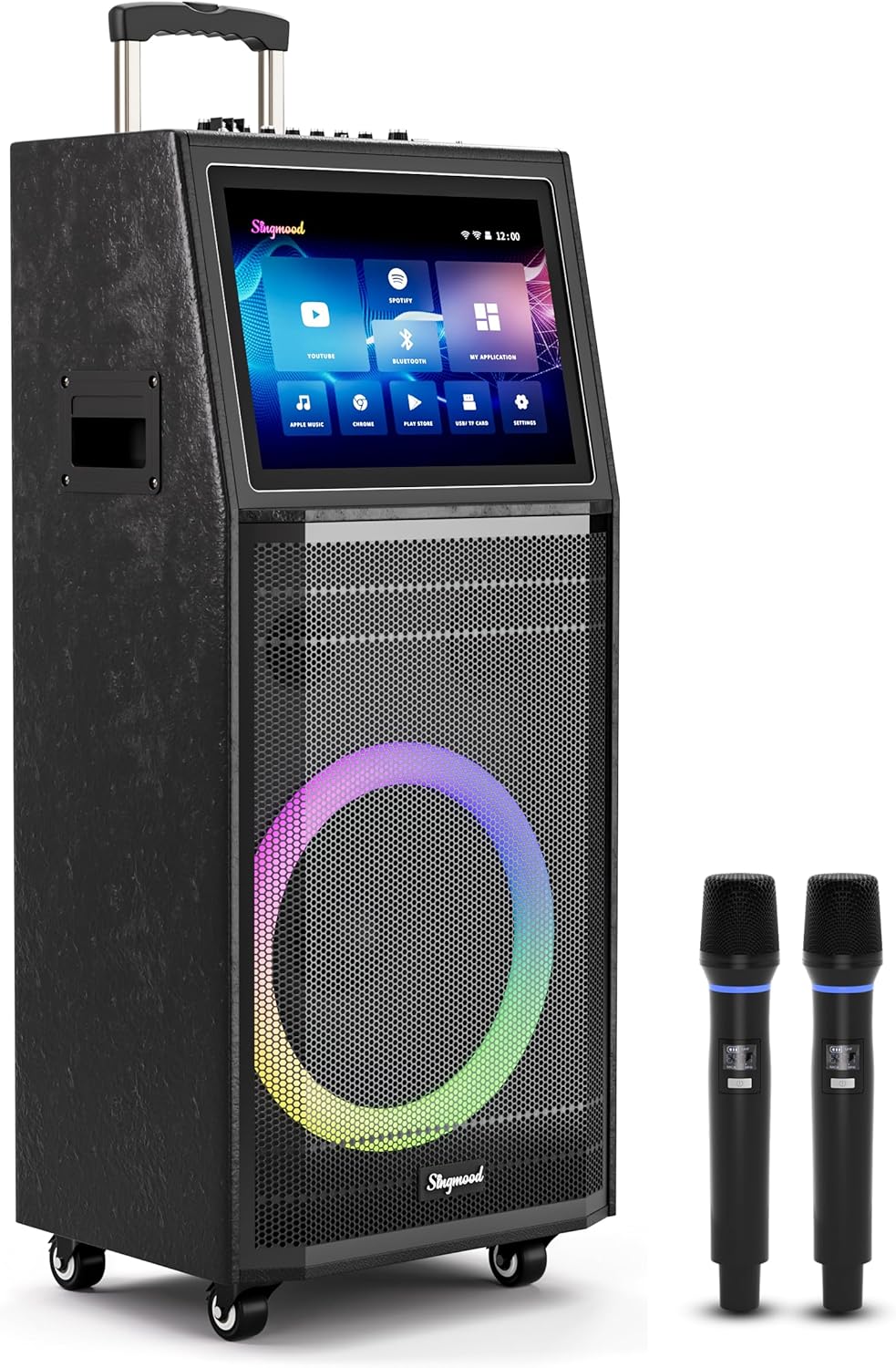
Figure 1: The SINGMOOD S100 Karaoke Machine with its integrated display and two wireless microphones.
2. Sisältö
Tarkista pakkauksen sisältö huolellisesti. Jos jokin puuttuu tai on vaurioitunut, ota välittömästi yhteyttä asiakaspalveluun.
- 1 x SINGMOOD S100 Karaoke Machine
- 2 x UHF-langatonta mikrofonia
- 2 x Microphone Batteries (9V)
- 1 x virtalähde
- 1 x Käyttöohje
3. Tärkeimmät ominaisuudet
- All-in-One Design: Integrates a 10.1-inch tablet, two wireless microphones, and a powerful Bluetooth party speaker (1000W peak power) for a compact and convenient setup.
- Powerful Configuration: Equipped with a high-performance RK3566 chip, 4GB RAM, and 64GB ROM, ensuring smooth performance for singing and video streaming.

Figure 2: High-performance RK3566 chip and memory configuration for seamless operation.
- Immersive Large Touch Screen: A vibrant 10.1-inch full-touch display allows for effortless song browsing, playback control, and settings adjustment.

Figure 3: The 10.1-inch touch screen provides access to various applications for endless entertainment.
- True UHF Microphones: Two UHF microphones deliver crystal-clear sound with stable and faster connection due to UHF communication technology. Microphones are rechargeable via Type-C ports.

Figure 4: The included UHF wireless microphones offer high-fidelity sound and enhanced stability.
- Korkealaatuinen äänentoisto: Features a 32-bit digital audio decoder chip for unparalleled clarity, depth, and full-bodied sound.

Figure 5: Advanced audio processing ensures superior sound quality.
- Monipuoliset liitännät: Supports HDMI, AUX, USB, and Wi-Fi connections for various audio and video sources.
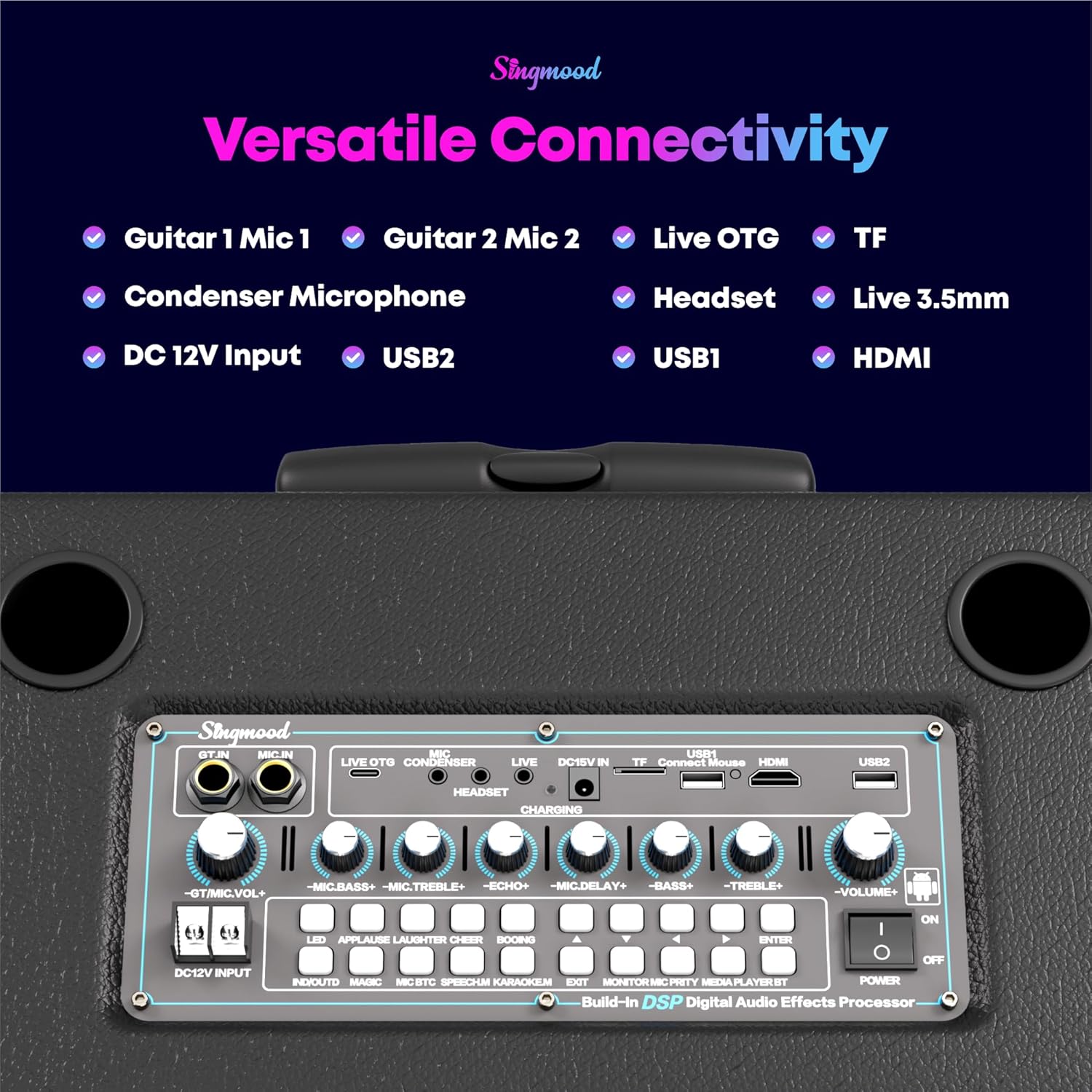
Figure 6: The control panel offers multiple connectivity options for diverse media sources.
- Kannettava muotoilu: Equipped with a hand-carry handle and 4 transport wheels, making it easy to move and set up anywhere.
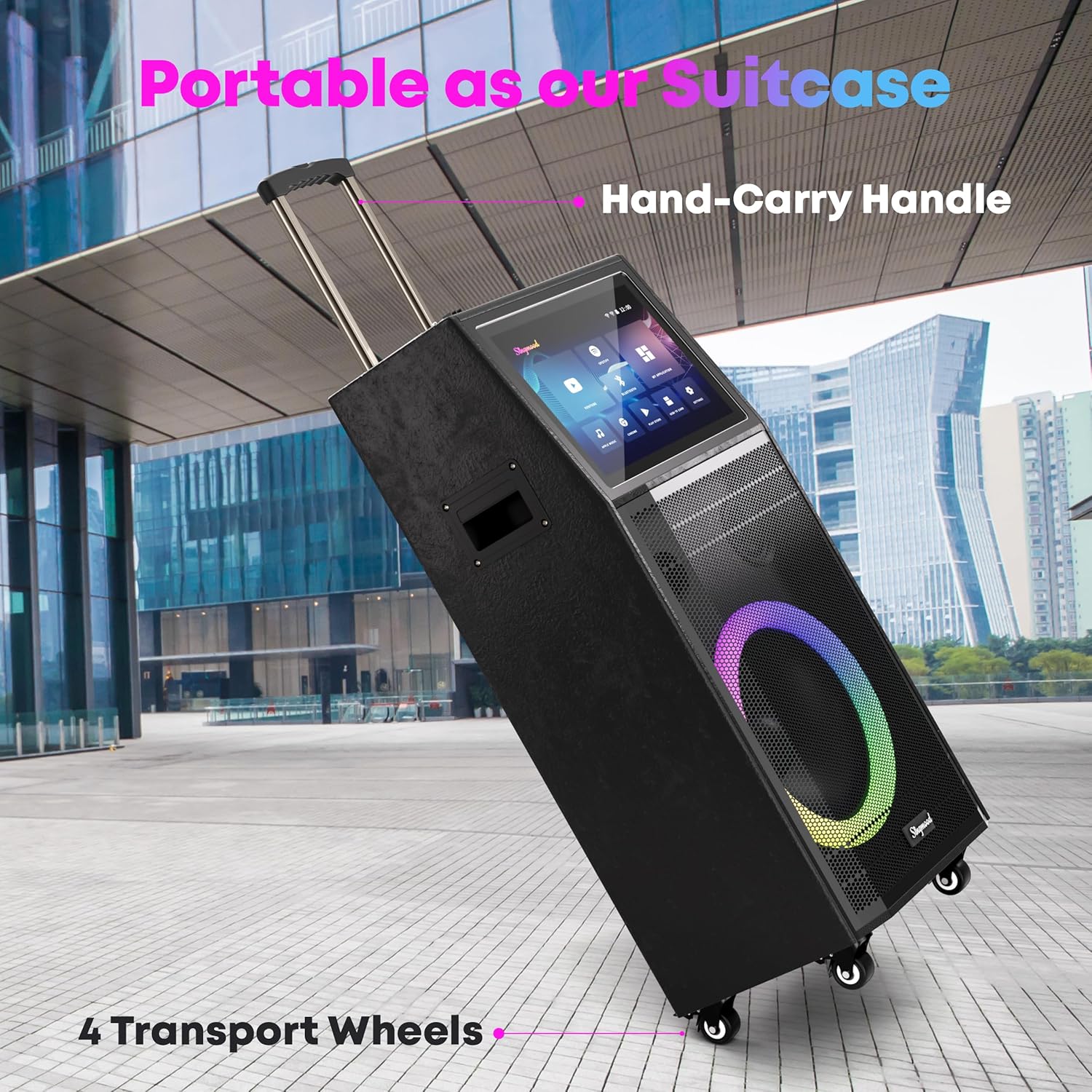
Figure 7: The S100's portable design with a retractable handle and wheels for easy transport.
- RGB Lighting Show: Dynamic RGB lighting on the speaker creates a vibrant party atmosphere.
4. Asennusopas
- Purkaminen: Poista kaikki osat varovasti pakkauksesta. Säilytä pakkaus myöhempää säilytystä tai kuljetusta varten.
- Virtaliitäntä: Connect the provided power adapter to the DC 12V input port on the karaoke machine and plug it into a standard electrical outlet.
- Alkuperäinen lataus: For optimal performance, fully charge the karaoke machine and microphones before first use. The microphones have Type-C charging ports.
- Virta päälle: Locate the POWER ON/OFF switch on the control panel and switch it to the "ON" position. The display screen will light up.
- Mikrofonin pariliitos: The UHF wireless microphones are typically pre-paired. If not, refer to the microphone's specific instructions for pairing with the main unit. Ensure microphone batteries are inserted correctly.
- Wi-Fi-yhteys: On the 10.1-inch touch screen, navigate to "Settings" and connect to your local Wi-Fi network to access online content and apps.
5. Käyttöohjeet
5.1. Kosketusnäytön käyttö
The S100 features an intuitive 10.1-inch touch screen. The main interface provides quick access to various applications and settings:
- YouTube: Tap the YouTube icon to access a vast library of karaoke songs with lyrics.
- Spotify/Apple Music: Download and log in to your preferred music streaming apps from the Play Store to play music.
- Bluetooth: Connect your smartphone or other Bluetooth devices to stream audio wirelessly.
- Kromi: Browse the internet directly from the device.
- Play Kauppa: Download additional applications to expand the machine's functionality.
- Asetukset: Adjust system settings, Wi-Fi, display, and audio preferences.
Video 1: A demonstration of the SINGMOOD S100 karaoke machine's features and operation, including the touch screen interface, sound effects, and microphone usage.
5.2. Karaoke Mode and Vocal Lowering
To activate karaoke mode and lower the original vocals of a song, press the dedicated "KARAOKEM" button on the control panel. This feature allows you to sing along to almost any song as if it were an instrumental track.

Figure 8: The "KARAOKEM" button for vocal reduction in songs.
5.3. Microphone Adjustments and Sound Effects
The control panel provides knobs and buttons for fine-tuning your audio experience:
- Mikrofonin äänenvoimakkuus: Adjust the volume of the wireless microphones using the dedicated knobs.
- Basso/diskantti: Fine-tune the bass and treble levels for both music and microphone output.
- Kaiku/Viive: Add echo and delay effects to your vocals for a professional sound.
- Äänitehosteet: Utilize built-in sound effects such as applause, laughter, and cheer to enhance the party atmosphere. Press the corresponding buttons on the control panel.
Note: If you experience feedback noise, lower the microphone treble, echo, and delay settings on the control panel.
5.4. Screen Projection
You can sync the S100's screen to a larger TV or display via HDMI for a more expansive viewing experience. Connect an HDMI cable from the S100's HDMI output port to your TV's HDMI input port. Alternatively, some applications may support screen mirroring via Wi-Fi.
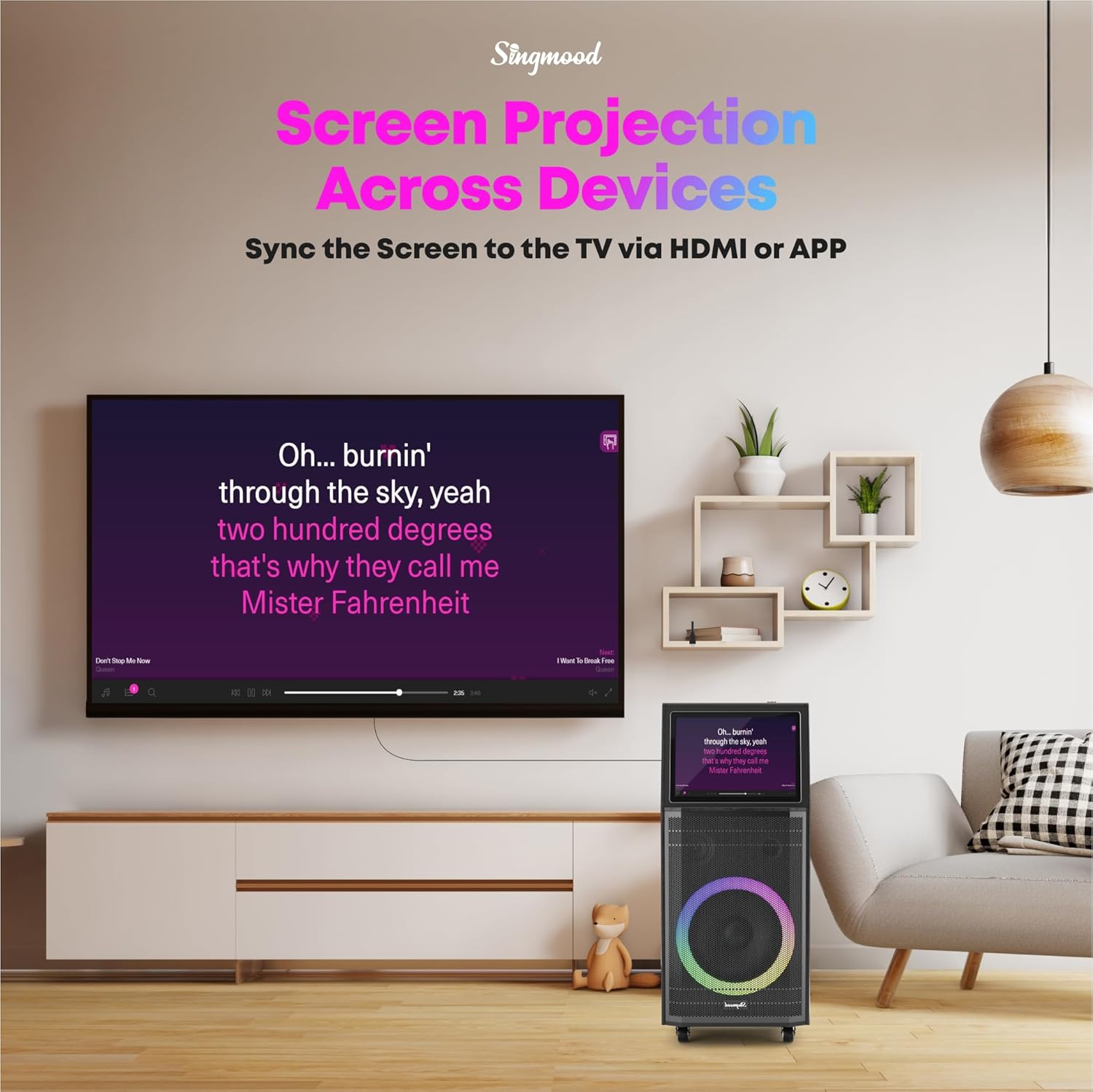
Figure 9: Project the S100's display to an external screen for a larger view.
6. Huolto
- Puhdistus: Use a soft, dry cloth to clean the exterior of the machine and microphones. For the screen, use a microfiber cloth specifically designed for electronics. Avoid using abrasive cleaners or solvents.
- Varastointi: When not in use, store the karaoke machine in a cool, dry place away from direct sunlight and extreme temperatures.
- Akun hoito: To prolong battery life, avoid fully discharging the unit and microphones frequently. Recharge them regularly, even if not in constant use.
- Ilmanvaihto: Varmista, että laitteen tuuletusaukot eivät ole tukossa ylikuumenemisen estämiseksi.
7. Vianmääritys
| Ongelma | Mahdollinen syy | Ratkaisu |
|---|---|---|
| No power/Unit won't turn on. | Power adapter not connected or unit not charged. | Ensure power adapter is securely connected and plugged in. Allow unit to charge for a few hours. |
| Mikrofonit eivät toimi. | Microphone batteries low/dead, not paired, or out of range. | Charge microphone batteries. Re-pair microphones if necessary (refer to microphone manual). Ensure microphones are within operating range. |
| Kaiuttimesta ei kuulu ääntä. | Volume too low, incorrect input selected, or external device issue. | Increase master volume. Check if the correct input source (Bluetooth, AUX, HDMI) is selected on the screen. Verify external device's volume and connection. |
| Feedback/Squealing sound. | Microphone too close to speaker, or microphone gain/treble/echo too high. | Move microphone further from the speaker. Reduce microphone volume, treble, or echo settings on the control panel. |
| Wi-Fi-yhteysongelmat. | Väärä salasana, heikko signaali tai reitittimen ongelma. | Double-check Wi-Fi password. Move unit closer to the router. Restart your Wi-Fi router. |
8. Tekniset tiedot
| Ominaisuus | Yksityiskohta |
|---|---|
| Mallinumero | S100 |
| Merkki | SINGMOOD |
| Näytön koko | 10.1 inches (Full-Touch) |
| Prosessori | RK3566 Chip |
| RAM | 4GB |
| ROM | 64GB |
| Huipputeho | 1000W |
| Mikrofonin tyyppi | UHF Wireless (2 included) |
| Audio dekooderi | 32-bit Digital Audio Decoder Chip |
| Yhteydet | Bluetooth, HDMI, AUX, USB, Wi-Fi |
| Tuotteen mitat (P x L x K) | 8 x 10 x 13 tuumaa |
| Tuotteen paino | 50.9 kiloa |
| Virtalähde | Paristokäyttöinen |
9. Takuu ja tuki
The SINGMOOD S100 Karaoke Machine comes with a 10 vuoden takuu, demonstrating our commitment to quality and durability. Additionally, a 180 päivän ilmainen kokeilu period is offered for your peace of mind.
For any questions, technical assistance, or warranty claims, please contact SINGMOOD Customer Support. Contact information can typically be found on the product packaging or the official SINGMOOD websivusto.
We are dedicated to providing excellent customer service and ensuring your satisfaction with the SINGMOOD S100 Karaoke Machine.
Ask a question about this manual
Ask about setup, troubleshooting, compatibility, parts, safety, or missing instructions. Manuals+ will review the question and use this page’s manual context to help answer it.