
Johdanto
Thank you for choosing the Vieta Pro Karaoke Party Microphone. This device combines a high-quality microphone with an integrated speaker, designed for an engaging karaoke experience. It features True Wireless technology, allowing two microphones to connect to a single device, and offers various sound modes and connectivity options.
Pakkauksen sisältö
- Vieta Pro Karaoke Party Microphone with Integrated Speaker
- Latauskaapeli (USB-C)
- Käyttöopas

Image: The retail box of the Vieta Pro Karaoke Party Microphone, showing the product and its features.
Tuote loppuview
Familiarize yourself with the main components and controls of your Vieta Pro Karaoke Party Microphone.

Kuva: Edessä view of the Vieta Pro Karaoke Party Microphone, highlighting the control buttons for power, volume, mode, and Bluetooth.
Ohjaimet ja portit:
- Virtapainike: Paina ja pidä pohjassa kytkeäksesi päälle/pois. Lyhyt painallus vaihtaaksesi tilaa.
- Äänenvoimakkuuspainikkeet (+/-): Säädä kaiuttimien äänenvoimakkuutta.
- Tilapainike (M): Cycle through sound effects or modes.
- Bluetooth-painike: Aloita Bluetooth-pariliitos.
- USB-C-portti: Laitteen lataamiseen.
- 3.5mm Audio Jack (Input): Liitä ulkoiset äänilähteet.
- 3.5mm Audio Jack (Output): Liitä kuulokkeet tai ulkoiset kaiuttimet.
- Valotilan painike: Change or turn off LED lighting effects.
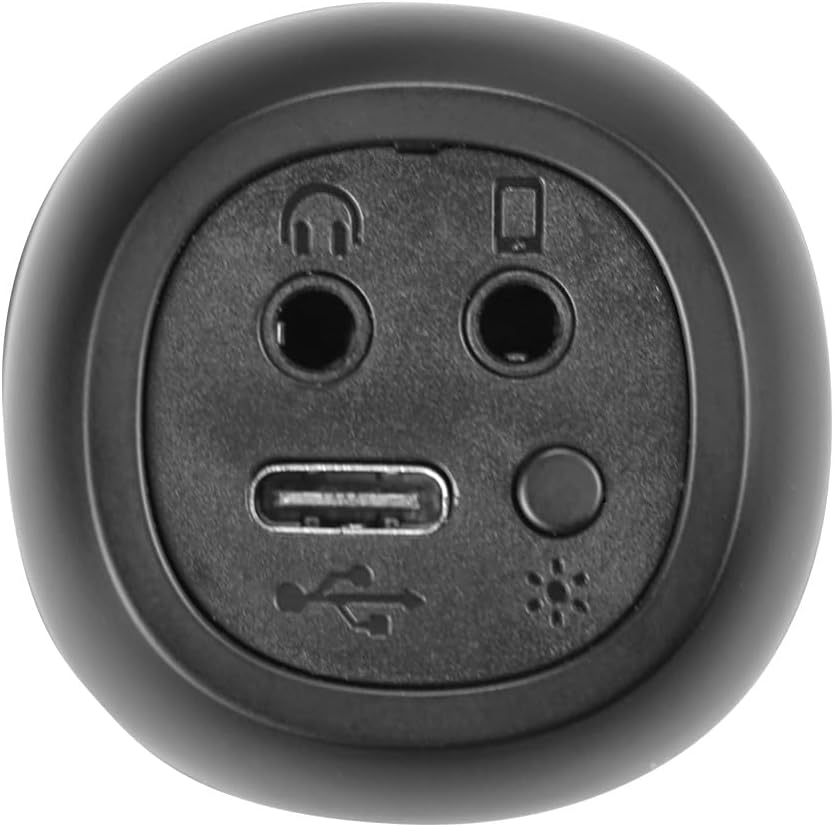
Kuva: Lähikuva view of the bottom of the microphone, showing the USB-C charging port, 3.5mm audio input/output jacks, and the light mode button.
Asennus ja yhteys
1. Mikrofonin lataaminen
Before first use, fully charge the microphone. Connect the provided USB-C cable to the microphone's USB-C port and the other end to a USB power adapter (not included) or a computer's USB port. The battery indicator light will show charging status.
2. Virta päälle / pois
Paina ja pidä painettuna Virtapainike for approximately 3 seconds to turn the microphone on or off. A sound prompt will indicate the power status.
3. Bluetooth-pariliitos
- Turn on the microphone. It will automatically enter Bluetooth pairing mode, indicated by a flashing Bluetooth light.
- Ota Bluetooth käyttöön älypuhelimessa, tabletissa tai tietokoneessa ja hae käytettävissä olevia laitteita.
- Select "Vieta Pro Karaoke Party" from the list of devices.
- Once connected, a sound prompt will confirm successful pairing, and the Bluetooth light will stop flashing.
4. True Wireless Connection (Connecting Two Microphones)
To use two Vieta Pro Karaoke Party microphones simultaneously with one device:
- Varmista, että molemmat mikrofonit ovat päällä eivätkä ole yhteydessä mihinkään toiseen Bluetooth-laitteeseen.
- On one microphone (this will be the primary), double-press the Bluetooth-painike. It will enter True Wireless pairing mode.
- The primary microphone will search for the second microphone. Once connected, a sound prompt will confirm the True Wireless connection.
- Now, connect the primary microphone to your device via Bluetooth as described in step 3. Both microphones will now output audio from your device.

Image: Two individuals holding and using Vieta Pro Karaoke Party Microphones, demonstrating the True Wireless feature.
5. Langallinen yhteys (AUX)
Connect an external audio source (e.g., MP3 player) to the microphone using a 3.5mm audio cable (not included) plugged into the 3.5mm audio input jack.
Käyttöohjeet
1. Äänenvoimakkuuden säätäminen
Käytä Äänenvoimakkuus + ja Äänenvoimakkuus - buttons on the microphone to adjust the speaker output volume. You can also control the volume from your connected device.
2. Changing Sound Modes/Effects
Paina Tilapainike (M) repeatedly to cycle through the four available sound configuration modes or voice effects. Experiment to find your preferred sound.
3. Voice Reduction Feature
This feature allows you to reduce the vocal track of a song, making it easier to sing along. To activate or deactivate this feature, refer to the specific instructions in the full manual or experiment with the Tilapainike (M) or a dedicated button if present (not explicitly detailed in provided data, but mentioned as a feature).
4. Äänitys
The microphone supports one-touch recording. Connect the microphone to a compatible recording device (e.g., smartphone with a recording app) via Bluetooth or the 3.5mm output jack. Press the dedicated Tallennuspainike (if available, or refer to the full manual for specific button assignment) to start and stop recording.
5. LED-valaistustehosteet
Paina Valotilan painike (located near the ports at the bottom) to change the LED lighting patterns or turn them off.

Image: Close-up of the Vieta Pro Karaoke Party Microphone's speaker grille, showing the integrated LED lighting effects.
Huolto
- Puhdistus: Puhdista mikrofonin pinta pehmeällä, kuivalla liinalla. Älä käytä hankaavia puhdistusaineita tai liuottimia.
- Varastointi: Säilytä mikrofonia viileässä, kuivassa paikassa, poissa suorasta auringonvalosta ja äärimmäisistä lämpötiloista.
- Akun hoito: Akun käyttöiän pidentämiseksi vältä akun usein tapahtuvaa täydellistä tyhjentymistä. Lataa laite säännöllisesti, vaikka sitä ei käytettäisi pitkään aikaan.
- Veden altistuminen: Tämä laite ei ole vedenpitävä. Vältä altistumista vedelle tai korkealle kosteudelle.
Vianetsintä
| Ongelma | Mahdollinen syy | Ratkaisu |
|---|---|---|
| Ei virtaa | Akku on tyhjä. | Lataa mikrofoni USB-C-kaapelilla. |
| Ei voi muodostaa yhteyttä Bluetoothin kautta | Bluetooth is off on the device; microphone is already connected to another device; microphone is out of range. | Ensure Bluetooth is enabled on your device. Disconnect from other devices. Move microphone closer to your device (within 10 meters). Restart both devices. |
| Ei äänilähtöä | Volume is too low; microphone is muted; incorrect input source. | Increase volume on both the microphone and your connected device. Check if the microphone is in the correct operating mode. |
| True Wireless connection fails | One or both microphones are already paired; microphones are too far apart. | Ensure both microphones are unpaired from other devices. Place them close to each other during True Wireless pairing. Follow True Wireless pairing steps carefully. |
Tekniset tiedot
| Ominaisuus | Yksityiskohta |
|---|---|
| Mallin nimi | Karaoke Party |
| Merkki | Vieta Pro |
| Yhteystekniikka | Aidosti langaton, Bluetooth |
| Liittimen tyyppi | USB-C, 3.5 mm:n liitin |
| Teholähtö | 18 W |
| Akun kesto | Jopa 10 tuntia |
| Akun tyyppi | 1 litiumioniakku (sisältyy toimitukseen) |
| Taajuusalue | 50 - 15,000 XNUMX Hz |
| Impedanssi | 600 ohmia |
| Napainen kuvio | Yksisuuntainen |
| Yhteensopivat laitteet | Henkilökohtainen tietokone, älypuhelin |
| Erikoisominaisuudet | Volume Control, 1-Touch Recording, Lighting Modes, Battery Indicator, Radio |
| Paino | 337 grammaa |
| Materiaali | Muovi |
Takuu ja tuki
For warranty information and technical support, please contact the manufacturer, FRAMASON AUDIO SA, or your local retailer. Keep your proof of purchase for any warranty claims.
Manufacturer: FRAMASON AUDIO SA