
1. Johdanto
This manual provides essential information for the safe and efficient operation of your Gre HPGIC75 Full Inverter Pool Heat Pump. Please read these instructions carefully before installation, operation, or maintenance to ensure proper use and to prevent damage to the unit or injury.
2. Tuote ohiview ja Ominaisuudet
The Gre HPGIC75 is a Full Inverter heat pump designed for heating swimming pools up to 75 cubic meters. Its advanced technology optimizes energy consumption and reduces noise levels by adjusting the operating speed based on the pool water temperature.

Kuva 1: Edessä view of the Gre HPGIC75 Full Inverter Pool Heat Pump, showcasing its compact design and central fan.
Tärkeimmät ominaisuudet:
- Full Inverter Technology: Continuously adjusts compressor and fan speed for optimal energy efficiency and reduced noise.
- Wi-Fi-yhteys: Integrated Wi-Fi allows remote monitoring and control via the iAqualink+ application.
- iAqualink+ App: Provides real-time data on water and air temperature, operating mode, and performance reports.
- Kolme toimintatilaa: Selectable modes to suit various heating needs.
- Mukana tulevat tarvikkeet: Condensation kit, winter cover, and anti-vibration pads for installation.
3. Asennus ja asennus
The Gre HPGIC75 heat pump is designed for straightforward installation. While assembly is not required for the main unit, proper placement and connection to your pool's filtration system are crucial. It is recommended to have a qualified professional perform the installation to ensure compliance with local regulations and optimal performance.
Asennusvaiheet:
- Sijoitus: Position the heat pump on a stable, level surface, ensuring adequate airflow around the unit. Use the provided anti-vibration pads to minimize noise and vibration.
- Vesiliitännät: Connect the heat pump to your pool's filtration system. Ensure the water inlet (IN) and outlet (OUT) connections are correctly plumbed.
- Sähköliitäntä: Connect the heat pump to a dedicated electrical circuit as per local electrical codes. Refer to the product specifications for power requirements.
- Kondenssiveden poisto: Install the condensation kit to manage water runoff from the unit.
- Ensimmäinen käynnistys: After all connections are secure, turn on the pool pump to ensure water flow through the heat pump before powering on the unit.

Image 2: Close-up of the water inlet ('IN') and outlet ('OUT') connections on the side of the heat pump, with warning labels visible.

Image 3: Detail of the pressure gauge and power supply connection points on the heat pump's rear panel.
4. Toimintatilat
The Gre HPGIC75 offers three distinct operating modes, allowing you to optimize performance based on your specific needs. These modes can be selected via the integrated control panel or the iAqualink+ application.

Image 4: Close-up of the digital control panel with protective cover, used for setting operating parameters.

Image 5: A smartphone screen showing the iAqualink+ application interface, demonstrating remote control and monitoring capabilities for the heat pump.
- Eco-Silence Mode: This mode prioritizes energy savings and quiet operation. The heat pump runs at reduced power, making it ideal for maintaining the desired water temperature with minimal noise and energy consumption.
- Älykäs tila: In Smart mode, the heat pump automatically adjusts its power output based on the current water temperature and the set target temperature. This provides a balance between heating speed and energy efficiency.
- Tehostustila: For rapid heating, Boost mode operates the heat pump at maximum power. This is suitable when you need to quickly reach the desired pool temperature, especially after initial fill or significant temperature drops.
5. Huolto
Regular maintenance ensures the longevity and efficient operation of your Gre HPGIC75 heat pump.
- Kausittaista puhdistusta: Keep the area around the heat pump clear of debris, leaves, and other obstructions to ensure proper airflow. Periodically clean the fan blades and evaporator coils.
- Talvistaminen: Before the cold season, drain all water from the heat pump and plumbing to prevent freezing damage. Use the provided winter cover to protect the unit from harsh weather conditions.
- Tarkastus: Regularly check all connections for leaks and ensure electrical wiring is secure and undamaged.
6. Vianmääritys
If you encounter issues with your heat pump, consider the following basic troubleshooting steps:
- Ei virtaa: Tarkista sulake ja varmista, että laite on kytketty oikein pistorasiaan.
- Riittämätön lämmitys: Verify that the desired temperature is set correctly. Ensure the pool pump is running and there is adequate water flow through the heat pump. Check for any blockages in the water circulation system.
- Epätavallinen melu: Inspect the fan for any obstructions. Ensure the unit is placed on a stable surface and the anti-vibration pads are correctly installed.
- Sovellusten yhteysongelmat: Ensure your home Wi-Fi network is active and the heat pump is within range. Restart the heat pump and your mobile device.
For persistent issues, consult a qualified technician or contact Gre customer support.
7. Tekniset tiedot
Technical details for the Gre HPGIC75 Full Inverter Pool Heat Pump:
| Erittely | Yksityiskohta |
|---|---|
| Mallinumero | HPGIC75 |
| Merkki | Gre |
| Tuotteen mitat (P x L x K) | 1 x 1 x 1 cm (approx. 10L x 10l x 10H millimeters) |
| Paino | 56 kiloa |
| Materiaali | Metalli |
| Kapasiteetti | Up to 75 cubic meters (for pools) |
| Väri | Musta |
| Muoto | Suorakulmainen |
| Mukana olevat komponentit | Condensation kit, winter cover, anti-vibration pads |
| Asennus vaaditaan | Ei (pääyksikölle) |
| Erikoisominaisuus | Full Inverter Technology, Wi-Fi connectivity, iAqualink+ app for remote monitoring |
| Alkuperämaa | Portugali |
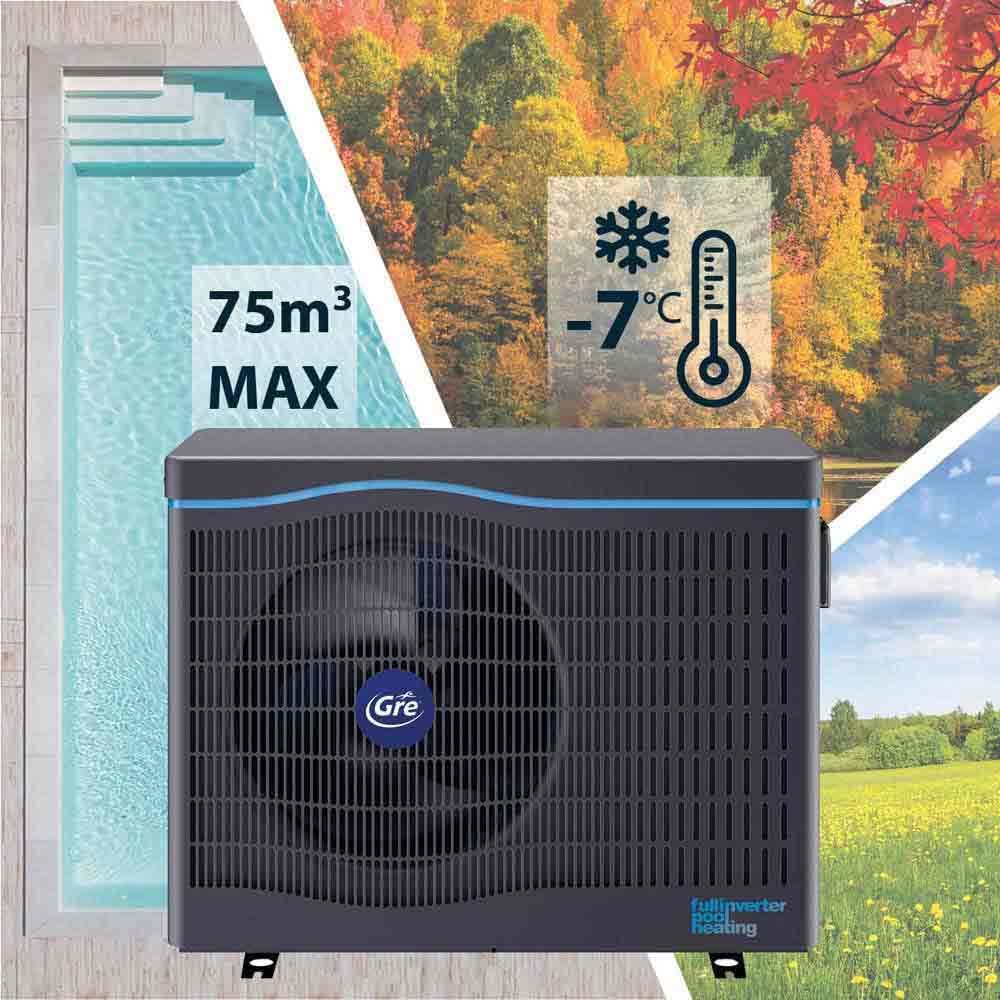
Image 6: Visual representation of the heat pump's capacity (75m³) and operational temperature range (down to -7°C).
8. Takuu ja tuki
For detailed warranty information, please refer to the documentation provided with your purchase or contact the seller directly. Gre typically offers a manufacturer's warranty covering defects in materials and workmanship under normal use.
For technical support, spare parts, or service inquiries, please contact your authorized Gre dealer or visit the official Gre websivustolta asiakaspalvelun yhteystiedot.