
1. Tuote ohiview
The DollaTek DC Buck Boost Converter is a versatile power module designed for precise voltage and current regulation. It features a digital LCD for real-time monitoring and offers a wide range of adjustable output parameters. This module is equipped with advanced protection mechanisms to ensure safe and reliable operation.
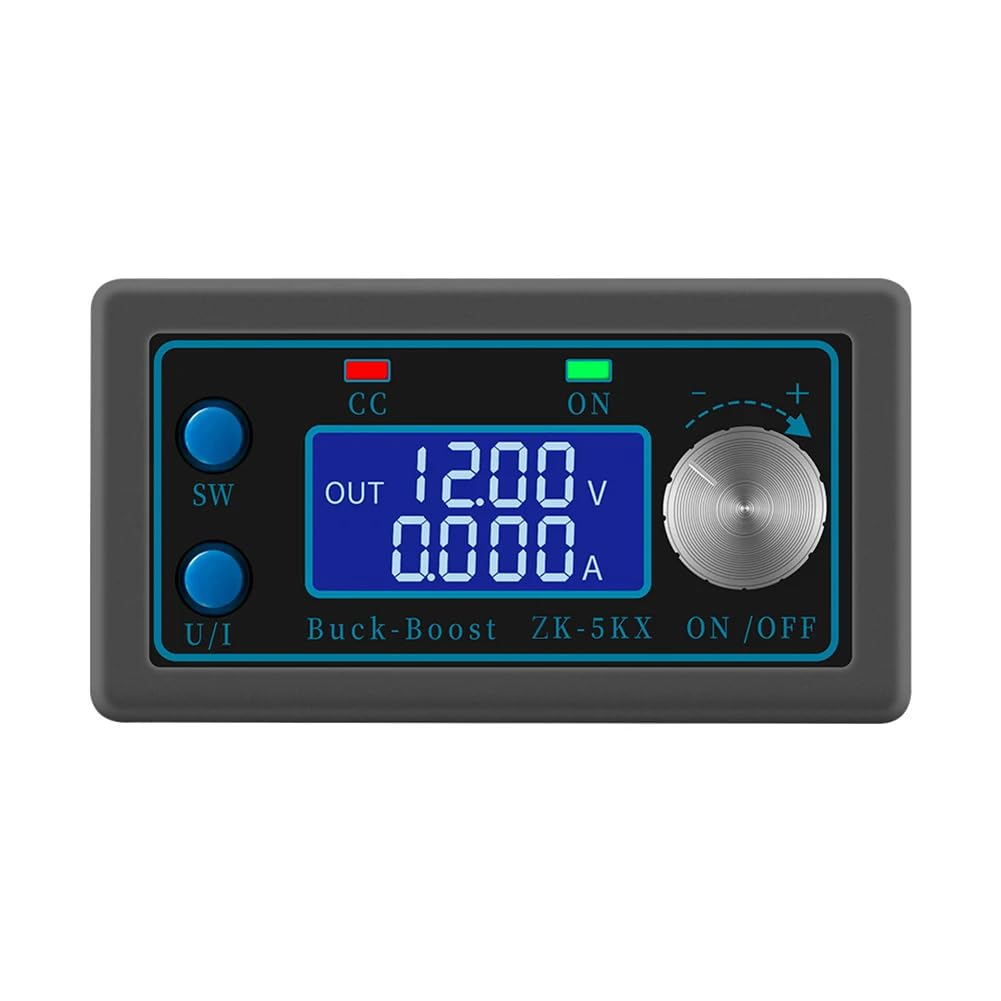
Kuva 1.1: The DollaTek DC Buck Boost Converter with its clear liquid crystal display showing output voltage and current. The display provides precise and fast readings for monitoring.
2. Tärkeimmät ominaisuudet
- LCD-näyttö: Näyttää tulo-/lähtöäänenvoimakkuudentage, output current/power, output capacity, and output time.
- Digitaalinen ohjaus: Precise and fast adjustment of output voltage (0.6-36V) and current limit (0-5A).
- Tulon käänteisen napaisuuden suojaus: Prevents damage from incorrect input wiring.
- Comprehensive Software Protections: Adjustable thresholds for undervoltage, ylivirtatage, overcurrent, overpower, overtemperature, timed output, and overcapacity. Output automatically disables if thresholds are exceeded.
- Intelligent Temperature-Controlled Fan: Automatically starts when temperature exceeds 50°C or current exceeds 1A, ensuring efficient heat dissipation.
- Alhainen lähtöaaltoilu: Features T-type filtration for stable output.
- Enhanced Heat Sink: Thicker heat sink with bidirectional ventilation for improved cooling performance.

Kuva 2.1: Useita views of the converter, highlighting its compact design and various components including the display, control buttons, and connection terminals.
3. Tekniset tiedot
| Parametri | Arvo |
|---|---|
| Tulo Voltage | 6.0 V - 36 V |
| Lähtö Voltage | 0.6V - 36V (Säädettävä) |
| Lähtövirta | Max 5A |
| Lähtöteho | Max 80W |
| Voitage Näytön tarkkuus | 0.01V |
| Current Indicator Resolution | 0.001A |
| Muunnostehokkuus | Noin 88% |
| Pehmeä käynnistys | Yes (May fail with high power load) |
| Mallinumero | CP028911 |
| Mitat (P x L x K) | 8 cm x 4.2 cm x 2.5 cm (noin) |
| Valmistaja | DollaTek |
| Alkuperämaa | Kiina |

Kuva 3.1: Physical dimensions of the converter module.
4. Komponenttien tunnistaminen

Kuva 4.1: Front panel controls and indicators. The 'SW' key switches display modes, 'U/I' key selects voltage/current adjustment, 'CC' indicates constant current mode, 'ON' indicates output enabled, and the rotary encoder adjusts values.

Kuva 4.2: Internal components and connection points. The input terminals are labeled IN+ and IN-, while the output terminals are OUT+ and OUT-. The fan and heat sink are visible for thermal management.
5. Asennusohjeet
- Virta pois: Varmista, että kaikki virtalähteet on irrotettu ennen liitäntöjen tekemistä.
- Tuloliitäntä: Connect your DC power source (6.0V-36V) to the IN+ ja IN- terminals. Observe polarity: IN+ for positive, IN- for negative. The module has reverse polarity protection, but correct wiring is always recommended.
- Lähtöliitäntä: Kytke kuorma OUT+ ja OUT- terminals. Observe polarity: OUT+ for positive, OUT- for negative.
- Suojatut yhteydet: Ensure all wire connections are tight and secure to prevent loose contacts and potential damage.
- Ensimmäinen käynnistys: After verifying all connections, apply power to the input. The LCD display should illuminate.
6. Käyttöohjeet
6.1. Näyttötilat
- Paina SW key to cycle through different display modes: input voltage, lähtö voltage, output current, output power, output capacity (Ah), and output time (h).
- The display will show 'IN' for input parameters and 'OUT' for output parameters.
6.2. Lähdön äänenvoimakkuuden säätäminentage ja nykyinen
- Voitage Säätö: Paina U/I key until the voltage value on the display starts blinking. Rotate the rotary encoder clockwise to increase the voltage and counter-clockwise to decrease it. Press U/I again to confirm the setting or wait a few seconds for it to auto-confirm.
- Current Limit Adjustment: Paina U/I key until the current value on the display starts blinking. Rotate the rotary encoder to set the desired current limit. Press U/I again to confirm. The 'CC' indicator will light up when the module operates in constant current mode.
6.3. Lähdön käyttöönotto/pois käytöstä
- Paina ON/OFF button (often integrated with the rotary encoder or a separate button) to enable or disable the output. The 'ON' indicator light will show the output status.
7. Suojamekanismit
The module incorporates several software protection features with adjustable thresholds. If any operating parameter exceeds its set threshold, the output will automatically be disabled to protect the module and the connected load.
- Tulosignaalin peruutussuoja: Estää väärän tulonapaisuuden aiheuttamat vauriot.
- Output Anti-Reverse Protection: Protects the module if a reverse voltage is applied to the output.
- Tulo Undervoltage-suojaus (UVP): Adjustable from 5.8V to 36V (default 5.8V).
- Output Overvoltage-suojaus (OVP): Adjustable from 0.6V to 36V (default 36V).
- Lähtövirtasuoja (OCP): Adjustable from 0A to 5A (default 5A).
- Output Overpower Protection (OPP): Adjustable from 0W to 80W (default 80W).
- Overtemperature Protection (OTP): Adjustable from 80°C to 110°C (default 110°C).
- Timed Protection (OHP): Adjustable from 0 to 100 hours (default off).
- Overcapacity Protection (OAP): Adjustable from 0 to 60Ah (default off).
To adjust protection thresholds, refer to the detailed instructions provided with the product packaging or manufacturer's website, as the exact button sequence may vary slightly.
8. Huolto
- Puhdistus: Keep the module clean and free from dust. Use a soft, dry cloth for cleaning. Do not use liquids or abrasive cleaners.
- Ilmanvaihto: Ensure the fan and ventilation openings are not obstructed to maintain proper airflow and cooling. Periodically check for dust buildup on the fan blades and heat sink.
- Varastointi: Säilytä moduulia kuivassa, viileässä paikassa, poissa suorasta auringonvalosta ja äärimmäisistä lämpötiloista.
- Liitännät: Tarkista säännöllisesti kaikkien sähköliitäntöjen kireys ja kulumisen tai korroosion merkit.
9. Vianmääritys
- Ei näyttöä/ei virtaa:
- Tarkista syöttövirtalähde ja liitännät. Varmista, että syöttöjännite ontage on 6.0–36 V:n välillä.
- Verify correct input polarity.
- Ei lähtöä:
- Ensure the output is enabled (check 'ON' indicator).
- Check for active protection (e.g., OVP, OCP, OTP indicators). If a protection is triggered, the output will be disabled. Address the cause (e.g., reduce load, check temperature) and re-enable output.
- Verify output connections and load.
- Lähtö Voltage/Current Not Stable:
- Ensure input power is stable and sufficient for the desired output.
- Tarkista löysät liitännät.
- If operating near maximum power (80W) or current (5A), ensure adequate cooling. The intelligent fan should activate.
- Tuuletin ei pyöri:
- The fan is temperature-controlled. It will only activate if the internal temperature exceeds 50°C or the output current exceeds 1A. This is normal operation.
- If the module is hot and current is high, but the fan is not running, check for obstructions or fan malfunction.
10. Takuu ja tuki
Information regarding product warranty and customer support for the DollaTek DC Buck Boost Converter (Model CP028911) is not available in this manual. Please refer to the product packaging, the retailer's website, or contact DollaTek customer service directly for details on warranty coverage and technical assistance.
For further inquiries or support, please visit the official DollaTek websivustolta tai ota yhteyttä ostopaikkaan.