
1. Johdanto
The Sygonix SY-5044422 Digital Timer Switch is designed for easy programming and operation, helping to manage power consumption for various appliances. This device features 20 ON/OFF programs, 3 random settings, and a countdown function, with switching intervals as short as 1 minute. Programs can be set for specific days, combinations of days, or daily. Its IP44 splash-proof rating allows for outdoor use, and an integrated battery retains settings during power outages. The timer supports a maximum switching capacity of 1800 W and includes enhanced touch protection.
2. Turvallisuusohjeet
- Lue kaikki ohjeet huolellisesti ennen käyttöä.
- This device is rated IP44, making it splash-proof for outdoor use. However, do not immerse it in water or expose it to direct jets of water.
- Ensure the total load of connected appliances does not exceed 1800 W.
- Do not open the device housing. Repairs should only be performed by qualified personnel.
- Keep out of reach of children. The device features enhanced touch protection.
- Irrota ajastin aina pistorasiasta ennen puhdistamista.
3. Pakkauksen sisältö
- Sygonix SY-5044422 Digital Timer Switch
- Käyttöohje
- Takuutiedot
4. Tuote ohiview
Familiarize yourself with the components and controls of your digital timer switch.
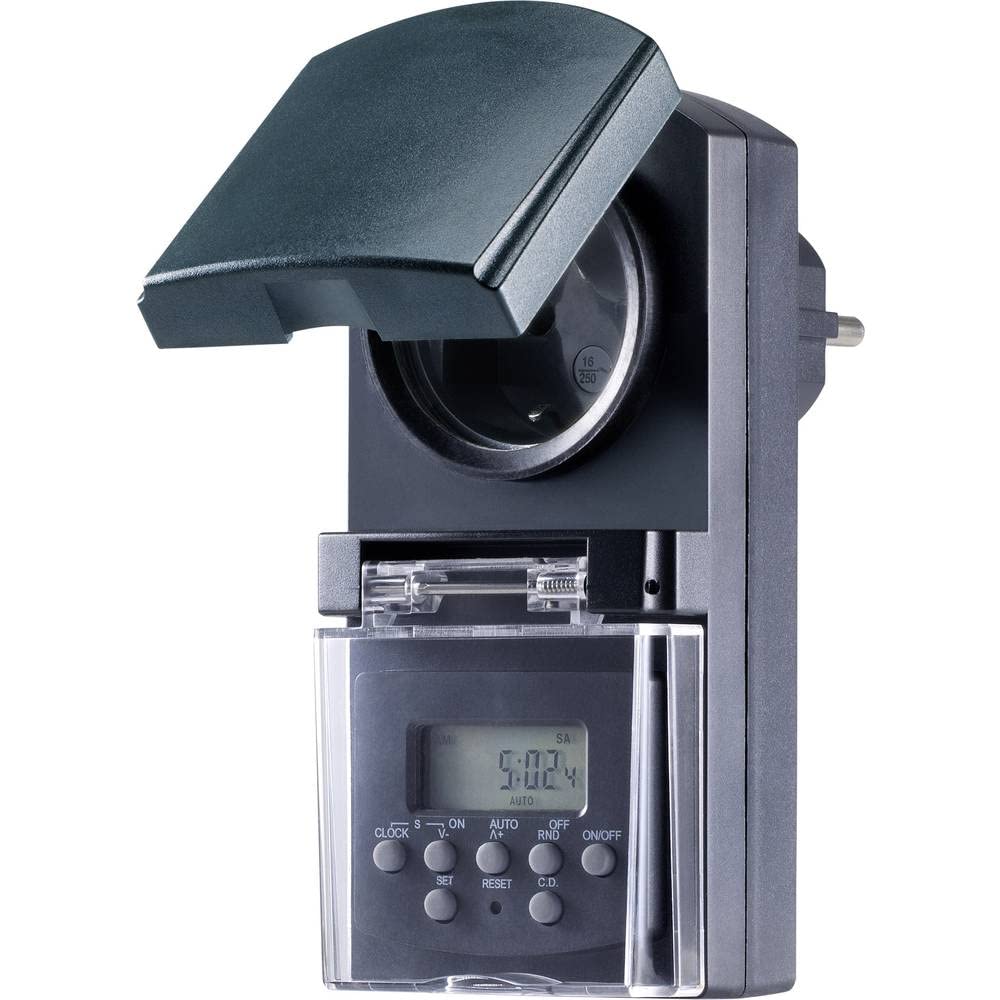
Kuva 1: Edessä view of the Sygonix SY-5044422 Digital Timer Switch. This image displays the LCD screen, which shows the current time and day, along with various control buttons including CLOCK, ON/OFF, SET, RESET, AUTO/A+, OFF/RND, and C.D. (Countdown).

Kuva 2: Edessä view of the timer with the protective cover opened, showing the integrated power socket. The display and control buttons are visible below the socket.
Ohjauspainikkeet:
- KELLO: Käytetään nykyisen kellonajan ja viikonpäivän asettamiseen.
- ON/OFF: Manually switches the timer output ON or OFF.
- ASETA: Siirtyy ohjelmointitilaan ja vahvistaa asetukset.
- PALAUTA: Clears all settings and resets the timer to factory defaults.
- AUTO/A+: Cycles through automatic mode, program settings, and adjusts values.
- OFF/RND: Activates or deactivates the Random function.
- C.D. (Countdown): Activates or deactivates the Countdown function.
5. Asennus
5.1 Ensimmäinen lataus
Before first use, plug the timer into a power outlet for approximately 30 minutes to charge the internal battery. This ensures the display is active and settings are retained during power outagtai kun se on irrotettu pistorasiasta.
5.2 Nykyisen kellonajan ja päivämäärän asettaminen
- Paina ja pidä painettuna KELLO -painiketta.
- Pitämällä KELLO, paina AUTO/A+ repeatedly to set the current day (MO, TU, WE, TH, FR, SA, SU).
- Pitämällä KELLO, paina SARJA repeatedly to set the current hour.
- Pitämällä KELLO, paina OFF/RND toistuvasti asettaaksesi nykyisen minuutin.
- Vapauta KELLO -näppäintä tallentaaksesi asetukset.
5.3 Summer Time Adjustment
The timer supports a summer time function. To activate or deactivate:
- Paina ja pidä painettuna KELLO -painiketta ja ON/OFF button simultaneously for 3 seconds. The display will show "SUMMER" or "WINTER" to indicate the mode.
6. Käyttöohjeet
6.1 Programming ON/OFF Times (Weekly Program)
The timer allows for up to 20 ON/OFF programs. Each program can be set for specific days or combinations of days.
- Paina SARJA button once to enter program mode. The display will show "1 ON".
- Paina AUTO/A+ to select the desired day(s) for the program (e.g., MO, TU, WE, TH, FR, SA, SU, MO-FR, SA-SU, MO-SA, etc.).
- Paina SARJA vahvistaaksesi päivän valinnan.
- Paina AUTO/A+ asettaaksesi halutun PÄÄLLE-ajan.
- Paina OFF/RND asettaaksesi halutun käynnistysminuutin.
- Paina SARJA again. The display will now show "1 OFF".
- Toista vaiheet 2–5 asettaaksesi saman ohjelman sammutusajan.
- Jatka painamista SARJA to cycle through all 20 ON/OFF programs. To exit program mode at any time, press the KELLO -painiketta.
Huomautus: After programming, ensure the timer is in AUTO mode for the programs to execute. Press ON/OFF repeatedly until "AUTO" is displayed.
6.2 Lähtölaskentatoiminto
The countdown function allows you to switch the connected appliance ON or OFF after a set duration.
- Paina CD button once. The display will show "CD ON" or "CD OFF".
- Paina AUTO/A+ to set the desired countdown hour.
- Paina OFF/RND to set the desired countdown minute.
- Paina CD uudelleen aloittaaksesi lähtölaskennan. Näytössä näkyy jäljellä oleva aika.
- Voit peruuttaa lähtölaskennan painamalla CD vielä kerran.
6.3 Random Function (Presence Simulation)
The random function simulates presence by randomly switching the connected appliance ON and OFF within a set time window, deterring potential intruders.
- Varmista, että ajastin on päällä AUTO tila.
- Paina OFF/RND button. The display will show "RND" to indicate the random function is active.
- The timer will now randomly switch the output ON and OFF for short periods within the programmed ON/OFF times.
- To deactivate the random function, press OFF/RND again. "RND" will disappear from the display.
6.4 Manual ON/OFF Override
You can manually override the programmed settings at any time.
- Paina ON/OFF button repeatedly to cycle through "ON", "OFF", and "AUTO" modes.
- "ON" means the output is continuously ON.
- "OFF" means the output is continuously OFF.
- "AUTO" means the timer will follow the programmed settings.
7. Huolto
- Before cleaning, always unplug the timer from the power outlet.
- Pyyhi laite pehmeällä, kuivalla liinalla. Älä käytä hankaavia puhdistusaineita tai liuottimia.
- Varmista, ettei laitteen sisään pääse nesteitä.
8. Vianmääritys
| Ongelma | Mahdollinen syy | Ratkaisu |
|---|---|---|
| Näyttö on tyhjä tai himmeä. | Sisäinen akku on tyhjä. | Plug the timer into a live power outlet for at least 30 minutes to charge the battery. |
| Ohjelmat eivät suoritu. | Ajastin ei ole AUTOMAATTINEN-tilassa. | Paina ON/OFF button repeatedly until "AUTO" is displayed. |
| Näytetään väärä aika tai päivä. | Time/day was not set correctly or reset. | Refer to Section 5.2 "Setting Current Time and Day" to re-set. |
| All settings lost after power outage. | Internal battery not charged or faulty. | Ensure the timer is regularly plugged in to keep the internal battery charged. If the issue persists, contact support. |
9. Tekniset tiedot
| Mallinumero: | SY-5044422 |
| Max. Switching Capacity: | 1800 W |
| Suojausluokka: | IP44 (roisketiivis) |
| Näyttötyyppi: | Digitaalinen |
| Ohjelmat: | 20 ON/OFF-ohjelmaa |
| Minimum Switching Interval: | 1 minuutti |
| Erikoisominaisuudet: | Countdown function, Random function (presence simulation), Summer time, Integrated battery for settings retention, Enhanced touch protection. |
| Tuotteen mitat: | 14 x 10 x 6 cm |
| Valmistaja: | Sygonix |
| Alkuperämaa: | Kiina |
10. Takuu ja tuki
This product comes with a minimum 2-year warranty from the date of purchase. In case of any issues or defects, please contact your retailer or Sygonix customer support for assistance. Keep your proof of purchase for warranty claims.